


Efficient E-commerce Order Management Automation
Why Automate Your E-commerce Orders in n8n?
If you run an online store, you already know how many tiny steps live inside a single order. A customer hits “buy”, and suddenly you are juggling payment checks, inventory, shipping, and status updates. Miss one step and you risk delays, angry emails, or manual cleanup.
This is exactly where an automated n8n workflow template shines. It takes that entire order journey – from the moment an order comes in to the point where tracking details are confirmed – and handles it for you in a clean, reliable flow.
Instead of manually checking payments or updating systems, this template keeps everything in sync behind the scenes so you can focus on growing your store, not babysitting orders.
What This n8n Order Management Template Actually Does
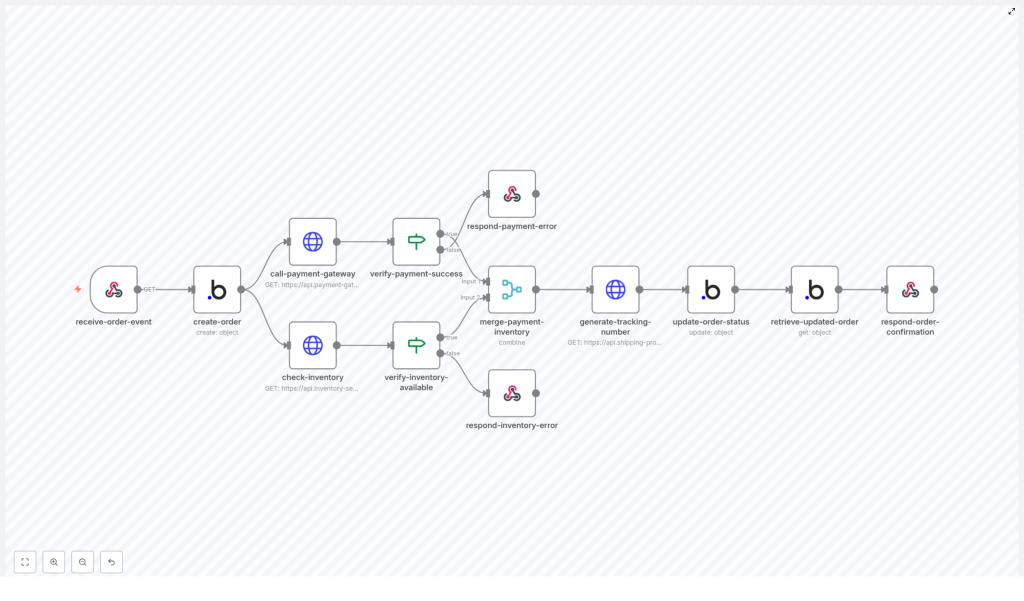
In simple terms, this workflow listens for new orders, creates an order record in your backend (like Bubble.io), checks payment and inventory in parallel, and if everything looks good, triggers shipment and updates the order with tracking details.
Here is the high-level flow:
- Receive a new order event through a webhook
- Create a persistent order record in your backend
- Run payment processing and inventory checks at the same time
- Validate both results with IF nodes
- Generate a shipment tracking number when all checks pass
- Update the order with payment status, fulfillment status, and tracking info
- Send a final confirmation response back to the caller
Everything is handled by n8n, using a series of connected nodes that you can customize to your own tools and APIs.
When Should You Use This Template?
This order automation workflow is perfect if you:
- Sell through a website or app and want orders processed automatically
- Use services like Bubble.io or a similar backend to store order data
- Rely on a payment gateway API and a separate inventory system
- Want to avoid manually verifying payments or stock before shipping
- Need a scalable order management process that can handle more volume without extra staff
If any of that sounds familiar, this n8n template will save you time, reduce mistakes, and give your customers faster, clearer updates.
Step-by-Step: How the Workflow Runs in n8n
1. Webhook: Catching the New Order Event
Everything starts with a webhook node. This node listens for new order events from your website or app. Whenever a customer places an order, that system sends the order data to this webhook URL.
The webhook captures all the essentials, such as:
- Order ID
- Customer name
- Items ordered
- Total amount
- Payment status (usually set to pending at this point)
Once the webhook receives this payload, the workflow kicks off automatically. No manual clicks, no extra steps.
2. Creating the Order Record in Your Backend
Next, the workflow takes that incoming order data and sends it to your backend system. In this template, it is designed to work with a Bubble.io application, but the same idea works with similar backends too.
n8n uses an HTTP or app-specific node to:
- Create a new order record in your database
- Store all relevant details for future tracking and reporting
This gives you a persistent, central record of the order that everything else can reference, instead of relying only on the initial request.
3. Running Payment and Inventory Checks in Parallel
Once the order record exists, the workflow branches into two paths that run at the same time. This is one of the big efficiency wins of this template.
- Payment gateway API call
The workflow sends the payment details to your external payment gateway. This could be any payment provider that exposes an API.
The goal here is to process the transaction and get a clear success or failure response.
- Inventory availability check
At the same time, another node calls your inventory service to confirm that all ordered items are in stock.
This step helps you avoid processing payments for items you cannot actually ship.
By running these checks concurrently instead of one after another, you cut down on total processing time and make your order flow feel much snappier.
4. Validating Payment and Stock With IF Nodes
Once both APIs respond, the workflow uses two IF nodes to validate what came back.
- Payment success check
This IF node looks at the payment gateway response and checks whether the payment was successful. If the status indicates failure or an error, the workflow:
- Stops further processing
- Returns a payment error message to the original caller
- Inventory availability check
The second IF node verifies that all ordered items are in stock. If the inventory service reports insufficient stock, the workflow:
- Halts the process
- Sends back an inventory error response
Only when both checks pass does the order move on to shipping. This double validation is what keeps your system accurate and your customers happy.
5. Merging Results and Requesting Shipment
When everything looks good, the workflow merges the successful payment and inventory results. With both pieces of information confirmed, it is safe to proceed to fulfillment.
At this point, n8n calls your shipping provider to generate a tracking number. That might be via a shipping API or a logistics platform you already use.
The response usually includes:
- A tracking number
- Any additional shipment details provided by the carrier
This tracking info becomes part of your order record so you and your customer can follow the shipment.
6. Updating the Order and Sending Final Confirmation
With payment confirmed, stock verified, and tracking created, the workflow updates the original order record in your backend.
Typical updates include:
- Setting the payment status to paid
- Marking the fulfillment status as processing
- Saving the tracking number from the shipping provider
After this update, the workflow retrieves the fresh version of the order data and sends a final success response back to the original caller. That can then be used to:
- Show an order confirmation screen
- Trigger a confirmation email or notification
- Update your internal dashboards
The whole journey from “order placed” to “order confirmed with tracking” is handled automatically by n8n.
Why This n8n Automation Makes Your Life Easier
Faster Processing With Parallel Calls
Because payment and inventory checks run at the same time, you are not waiting on one to finish before starting the other. That parallel processing cuts down on overall order handling time and makes your e-commerce flow feel more responsive.
Fewer Mistakes, More Reliable Orders
The workflow uses multiple validation steps so orders only move forward when payment is successful and stock is available. This reduces:
- Accidental shipments without payment
- Orders confirmed for items that are out of stock
- Manual corrections and follow-up messages
Happier Customers With Clear Status and Tracking
Customers love quick confirmations and tracking links. Since this template updates payment status, fulfillment status, and tracking automatically, you can send accurate information right away, which builds trust and reduces support tickets.
Scales Easily As Your Store Grows
Whether you are handling a handful of orders or hundreds per day, the same automated flow works. Because the process is handled by n8n with minimal manual intervention, you can scale up without immediately needing extra staff to manage orders.
Ready To Try This n8n Order Management Template?
Automating your e-commerce order management flow is one of those upgrades that quickly pays off. You get fewer errors, faster responses, and a smoother experience for both you and your customers.
If you are using n8n or thinking about it, this template gives you a solid, production-ready starting point that you can tweak for your own stack, APIs, and business rules.
Want to see the actual workflow and start using it?
