


Etsy Review to Slack – n8n RAG Workflow For Focused, Automated Growth
Imagine opening Slack each morning and already knowing which Etsy reviews need your attention, which customers are delighted, and which issues are quietly hurting your business. No more manual checking, no more missed feedback, just clear, organized insight flowing straight into your workspace.
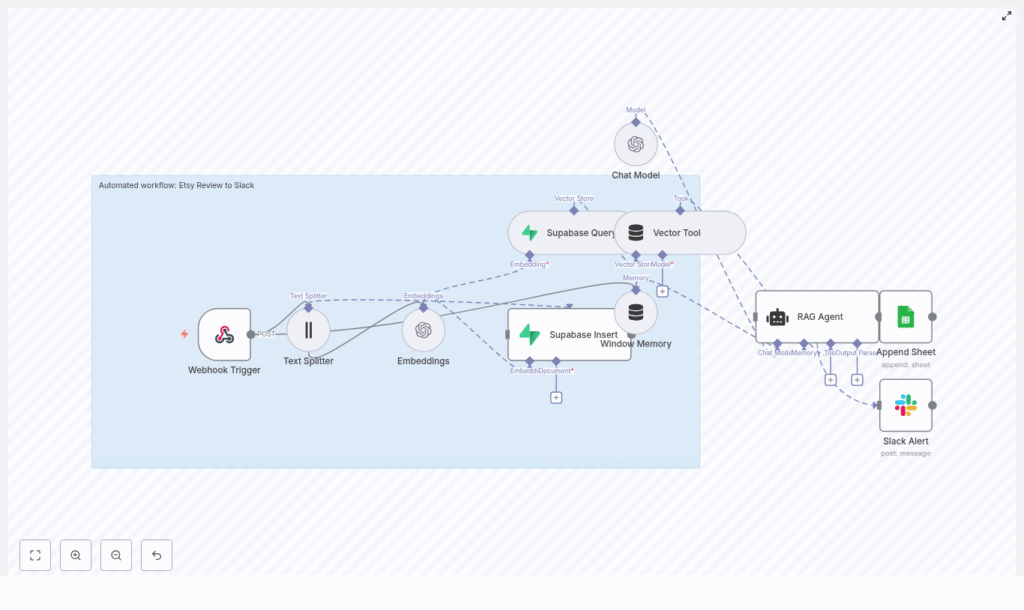
This is exactly what the Etsy Review to Slack n8n workflow template makes possible. It captures incoming Etsy reviews, converts them into embeddings, stores and queries context in Supabase, enriches everything with a RAG agent, logs outcomes to Google Sheets, and raises Slack alerts on errors or urgent feedback. In other words, it turns scattered customer reviews into a reliable, automated signal for growth.
From Reactive To Proactive – The Problem This Workflow Solves
Most teams treat customer reviews as something to “check when we have time.” That often means:
- Manually logging into Etsy to skim recent reviews
- Missing critical negative feedback until it is too late
- Copying and pasting reviews into spreadsheets for tracking
- Relying on memory to see patterns or recurring issues
Yet customer reviews are a goldmine for product improvement, customer success, and marketing. When they are buried in dashboards or scattered across tools, you lose opportunities to respond quickly, learn faster, and build stronger relationships.
Automation changes that. By connecting Etsy reviews directly into Slack, enriched with context and logged for analysis, you move from reactive firefighting to proactive, data-driven decision making. And you do it without adding more manual work to your day.
Shifting Your Mindset – Automation As A Growth Lever
This template is more than a technical setup. It is a mindset shift. Instead of thinking, “I have to remember to check reviews,” you design a system where reviews come to you, already summarized, scored, and ready for action.
With n8n, you are not just automating a single task, you are building a reusable automation habit:
- Start small with one workflow
- Save time and reduce manual effort
- Use that time to improve and extend your automations
- Slowly build a more focused, scalable operations stack
Think of this Etsy Review to Slack workflow as a stepping stone. Once you see how much time and mental energy it saves, it becomes natural to ask, “What else can I automate?”
The Workflow At A Glance – How The Pieces Fit Together
Under the hood, this n8n template connects a powerful set of tools, all working together to deliver intelligent review insights to Slack:
- Webhook Trigger – Receives Etsy review payloads at
POST /etsy-review-to-slack - Text Splitter – Breaks long reviews into smaller chunks for embeddings
- Embeddings (OpenAI) – Creates vector representations using
text-embedding-3-small - Supabase Insert & Query – Stores vectors in a Supabase vector table, then queries them for context
- Window Memory + Vector Tool – Gives the RAG agent access to relevant past reviews and short-term context
- RAG Agent – Summarizes, scores sentiment, and recommends actions
- Append Sheet (Google Sheets) – Logs results for auditability and future analytics
- Slack Alert – Posts error messages or high-priority notifications in Slack
Each node plays a specific role. Together, they form a workflow that quietly runs in the background, turning raw reviews into actionable insight.
Step 1 – Capturing Reviews Automatically With The Webhook Trigger
Your journey starts with a simple but powerful step: receiving Etsy reviews in real time.
Webhook Trigger
In n8n, configure a public webhook route with the path /etsy-review-to-slack. Then point your Etsy webhooks or integration script to that URL.
Whenever a review is created or updated, Etsy sends the review JSON payload to this endpoint. That payload becomes the starting input for your workflow, no manual check-ins required.
Step 2 – Preparing Text For AI With The Text Splitter & Embeddings
To make your reviews searchable and context-aware, the workflow converts them into embeddings. Before that happens, the text is prepared for optimal performance and cost.
Text Splitter
Long reviews or combined metadata can exceed safe input sizes for embeddings. The Text Splitter node breaks the content into manageable chunks so your AI tools can process it safely and effectively.
Recommended settings from the template:
chunkSize: 400chunkOverlap: 40
This balance keeps semantic coherence while minimizing truncation and unnecessary cost.
Embeddings (OpenAI)
Next, each chunk is converted into a dense vector using an embeddings provider. The template uses OpenAI with the model text-embedding-3-small, which is a practical balance between cost and quality for short review text.
Each vector represents the meaning of that chunk. Those vectors are what make it possible for the workflow to later retrieve similar reviews, detect patterns, and provide context to the RAG agent.
Step 3 – Building Your Knowledge Base In Supabase
Instead of letting reviews disappear into the past, this workflow turns them into a growing knowledge base that your agent can draw from over time.
Supabase Insert & Supabase Query
Every embedding chunk is inserted into a Supabase vector table with a consistent index name. In this template, the index/table is named etsy_review_to_slack.
Alongside the vectors, you can store metadata like:
- Review ID
- Order ID
- Rating
- Date
- Source
This metadata lets you filter, de-duplicate, and manage retention over time. When a new review comes in, the Supabase Query node retrieves the most relevant vectors. That context is then passed to the RAG agent so it can interpret the new review in light of similar past feedback.
Step 4 – Giving The Agent Context With Vector Tool & Memory
To move beyond simple keyword alerts, your workflow needs context. That is where the Vector Tool and Window Memory come in.
Vector Tool
The Vector Tool acts like a LangChain-style tool that lets the agent query the vector store. It can pull in related prior reviews, notes, or any other stored context so the agent is not working in isolation.
Window Memory
Window Memory preserves short-term conversational context. If multiple related events are processed close together, the agent can produce more coherent outputs. This is especially helpful if you are processing a burst of reviews related to a specific product or incident.
Step 5 – Turning Raw Reviews Into Action With The RAG Agent
This is where the workflow starts to feel truly intelligent. The RAG agent receives the review content, the retrieved vector context, and the memory, then generates an enriched response.
RAG Agent Configuration
The agent is configured with a system message such as:
“You are an assistant for Etsy Review to Slack”
Based on your prompt, it can:
- Summarize the review
- Score sentiment
- Label the review as OK or needing escalation
- Recommend follow-up actions (for example, escalate to support or respond with a specific tone)
The output is plain text that can be logged, analyzed, and used to decide how to route the review in Slack or other tools.
Step 6 – Logging Everything In Google Sheets For Clarity
Automation should not feel like a black box. To keep everything transparent and auditable, the workflow logs each processed review in a Google Sheet.
Append Sheet
Using the Append Sheet node, every processed review is added to a sheet named Log. The agent output is mapped to columns, such as a Status column for “OK” or “Escalate,” plus fields for summary, sentiment, or suggested action.
This gives you:
- A simple audit trail
- Data for dashboards and trend analysis
- A quick way to review how the agent is performing over time
Step 7 – Staying In Control With Slack Alerts
Finally, the workflow brings everything to the place where your team already lives: Slack.
Slack Alert
The Slack node posts messages to an alerts channel, for example #alerts. You can configure it to:
- Notify on workflow errors
- Highlight reviews that require urgent attention
- Share summaries of high-impact feedback
The template includes a failure path that posts messages like:
“Etsy Review to Slack error: {$json.error.message}”
This keeps you informed if something breaks so you can fix it fast and keep your automation reliable.
Deployment Checklist – Get Your Workflow Live
To turn this into a production-ready system, walk through this checklist:
- An n8n instance reachable from Etsy (public or via a tunnel such as ngrok).
- An OpenAI API key configured in n8n credentials if you use OpenAI embeddings and chat models.
- A Supabase project with vector store enabled and an index/table named
etsy_review_to_slack. - Google Sheets OAuth2 credentials with permission to append to your
Logsheet. - A Slack app token with permission to post messages in your chosen channel.
- A test Etsy webhook so you can confirm the payload format matches what your workflow expects.
Once these are in place, you are ready to run test reviews and watch the automation come to life.
Configuration Tips To Make The Workflow Truly Yours
Chunk Size And Overlap
Adjust chunkSize based on your typical review length. Larger chunks mean fewer embeddings and lower cost, but less granularity. As a guideline, 200-500 tokens with 10-20 percent overlap is a safe default for most setups.
Choosing The Right Embedding Model
For short Etsy reviews, compact models often give you the best cost-to-quality ratio. The template uses text-embedding-3-small, which is well suited for this use case. You can experiment with other models if you need more nuance or have longer content.
Supabase Schema And Retention Strategy
To keep your vector store efficient over time:
- Store metadata such as review ID, rating, date, and source
- Use that metadata to filter or de-duplicate entries
- Implement a retention policy, for example archiving old vectors or rotating indexes monthly
This keeps your queries fast and costs predictable while still preserving the context that matters.
Error Handling And Observability
Use a combination of Slack alerts and Google Sheets logs to monitor workflow health. Consider adding retry logic for transient issues such as network hiccups or rate limits. The more visible your automation is, the more confidently you can rely on it.
Sample Prompt For The RAG Agent
You can fully customize the agent prompt to match your brand voice and escalation rules. Here is a sample prompt you can start with, then refine as you learn:
System: You are an assistant for Etsy Review to Slack. Summarize the review and mark if it should be escalated.
User: {{review_text}}
Context: {{vector_context}}
Output: Provide a one-line status (OK / Escalate), short summary (1-2 sentences), and suggested action.
Run a few reviews through this prompt, see how it behaves, then fine-tune the wording to better match your internal workflows.
Troubleshooting Common Issues
If something does not work on the first try, you are not failing, you are iterating. Here are common issues and what to check:
- Missing or malformed webhook payload – Verify your Etsy webhook settings and test with a known payload.
- Embeddings failing – Confirm your OpenAI credentials, chosen model, and check for rate limits.
- Supabase insert errors – Ensure the vector table exists and your Supabase API key has insert privileges.
- Slack post failures – Check token scopes and confirm that the app is a member of the target Slack channel.
Each fix makes your automation more robust and sets you up for future workflows.
Ideas To Extend And Evolve This Workflow
Once the core Etsy Review to Slack pipeline is running smoothly, you can build on it to support more advanced use cases:
- Automatic reply drafts – Let the agent draft responses that a customer support rep can review and send.
- Sentiment dashboards – Feed Google Sheets data into a BI tool or dashboard to track sentiment trends over time.
- Tagging and routing – Route reviews to different Slack channels based on product, category, or issue type.
- Multi-lingual handling – Add a translation step for international reviews before generating embeddings.
Each extension is another step toward a fully automated, insight-driven customer feedback loop.
Security And Privacy – Automate Responsibly
Customer reviews often contain personal information. As you automate, keep security and privacy front of mind:
- Avoid logging sensitive fields in public sheets or channels
- Use limited-scope API keys and rotate credentials regularly
- Configure Supabase row-level policies or encryption where needed
Thoughtful design here ensures you gain the benefits of automation without compromising your customers’ trust.
Bringing It All Together – Your Next Step
This n8n Etsy Review to Slack workflow gives you a scalable way to capture customer feedback, enrich it with historical context, and route actionable insights to your team in real time. It is a practical, production-ready example of how automation and AI can free you from repetitive checks and help you focus on what matters most: improving your products and serving your customers.
You do not have to build everything at once. Start with the template, deploy it in your n8n instance, and:
- Run a few test reviews through the workflow
- Tune the RAG agent prompt to match your tone and escalation rules
- Adjust chunk sizes, retention policies, and Slack routing as you learn
Each small improvement compounds. Over time, you will not just have an automated review pipeline, you will have a smarter, calmer way of running your business.
Call to action: Deploy the workflow, experiment with it, and treat it as your starting point for a more automated, focused operation. If you need help refining prompts, designing retention policies, or expanding Slack routing, connect with your automation engineer or a consultant who knows n8n and vector stores. You are only a few iterations away from a powerful, always-on feedback engine.
