


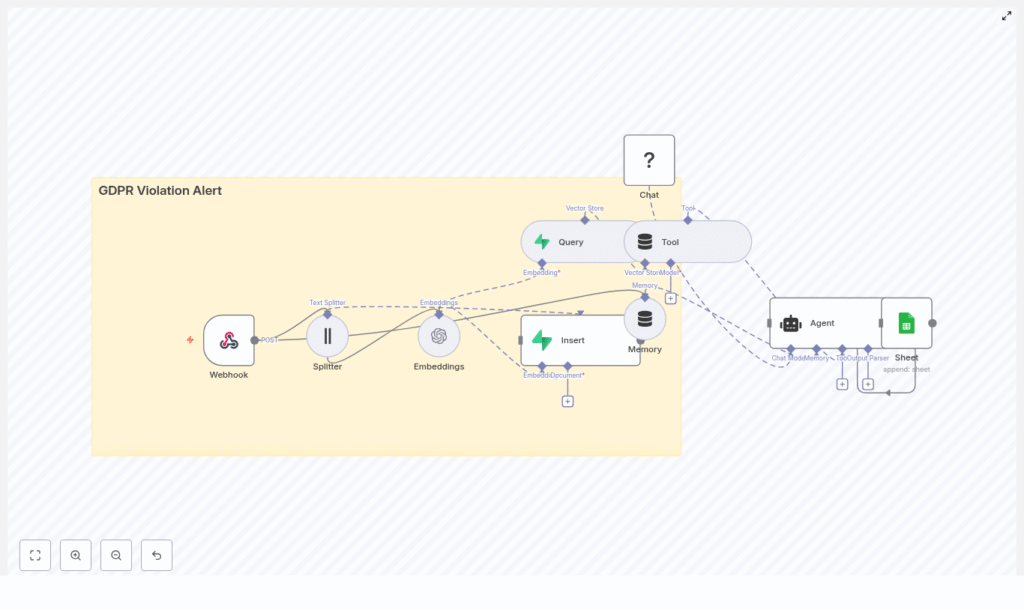
GDPR Violation Alert: n8n + Vector DB Workflow
This documentation-style guide describes a reusable, production-ready n8n workflow template that detects, enriches, and logs potential GDPR violations using vector embeddings, a Supabase vector store, and an LLM-based agent. It explains the architecture, node configuration, data flow, and operational considerations so you can confidently deploy and customize the automation in a real environment.
1. Workflow Overview
The workflow implements an automated GDPR violation alert pipeline that:
- Accepts incoming incident reports or logs through an HTTP webhook
- Splits long text into chunks suitable for embedding and retrieval
- Generates embeddings with OpenAI and stores them in a Supabase vector database
- Queries the vector store for similar historical incidents
- Uses a HuggingFace-powered chat model and agent to classify and score potential GDPR violations
- Logs structured results into Google Sheets for auditing and downstream processing
This template is designed for teams that already understand GDPR basics, NLP-based semantic search, and n8n concepts such as nodes, credentials, and workflow triggers.
2. Use Case & Compliance Context
2.1 Why automate GDPR violation detection
Organizations that process personal data must detect, assess, and document potential GDPR violations quickly. Manual review of logs, support tickets, and incident reports does not scale and can introduce delays or inconsistencies.
This workflow addresses that gap by:
- Automatically flagging content that may include personal data or GDPR-relevant issues
- Providing a consistent severity classification and recommended next steps
- Maintaining an audit-ready log of processed incidents
- Leveraging semantic search to detect nuanced violations, not just keyword matches
Natural language processing and vector search allow the system to recognize similar patterns across different phrasings, making it more robust than simple rule-based or regex-based detection.
3. High-Level Architecture
At a high level, the n8n workflow consists of the following components, ordered by execution flow:
- Webhook – Entry point that accepts POST requests with incident content.
- Text Splitter – Splits long input text into overlapping chunks.
- Embeddings (OpenAI) – Transforms text chunks into vectors.
- Insert (Supabase Vector Store) – Persists embeddings and metadata.
- Query + Tool – Performs similarity search and exposes it as an agent tool.
- Memory – Maintains recent context for multi-step reasoning.
- Chat (HuggingFace) – LLM that performs reasoning and classification.
- Agent – Orchestrates tools and model outputs into a structured decision.
- Google Sheets – Appends a log row for each processed incident.
The combination of webhook ingestion, vector storage, and an LLM-based agent makes this workflow suitable as a central component in a broader security or privacy incident management pipeline.
4. Node-by-Node Breakdown
4.1 Webhook Node – Entry Point
Purpose: Accepts incoming GDPR-related reports, alerts, or logs via HTTP POST.
- HTTP Method: POST
- Path:
/webhook/gdpr_violation_alert
Typical payload sources:
- Support tickets describing data exposure or access issues
- Security Information and Event Management (SIEM) alerts that may contain user identifiers
- Automated privacy scanners or third-party monitoring tools
Configuration notes:
- Enable authentication or IP allowlists to restrict who can call the endpoint.
- Validate JSON structure early to avoid downstream errors in text processing nodes.
- Normalize incoming fields (for example, map
description,message, orlogfields into a single text field used by the Splitter).
4.2 Text Splitter Node – Chunking Input Text
Purpose: Breaks long incident descriptions or logs into smaller segments that fit embedding and context constraints.
- Chunk size: 400 characters (or tokens, depending on implementation)
- Chunk overlap: 40 characters
Behavior:
- Ensures that each chunk retains enough local context for meaningful embeddings.
- Overlap avoids losing critical context at chunk boundaries, improving search quality.
- Protects against exceeding embedding model token limits on very long inputs.
Edge considerations:
- Short texts may result in a single chunk, which is expected and supported.
- Very large logs will produce many chunks, which may impact embedding cost and query time.
4.3 Embeddings Node (OpenAI) – Vectorization
Purpose: Converts each chunk into a high-dimensional vector representation for semantic search.
- Provider: OpenAI Embeddings
- Model: A semantic search capable embedding model (workflow uses the default embedding model configured in n8n)
Data stored per chunk:
- Text chunk content
- Vector embedding
- Metadata such as:
- Source or incident ID
- Timestamp of the report
- Chunk index or position
- Optional severity hints or category tags
Configuration considerations:
- Use a model optimized for semantic similarity tasks, not for completion.
- Propagate metadata fields from the webhook payload so that search results remain explainable.
- Handle API errors or rate limits by configuring retries or backoff at the n8n workflow level.
4.4 Insert Node – Supabase Vector Store
Purpose: Writes embeddings and associated metadata into a Supabase-backed vector index.
- Index name:
gdpr_violation_alert - Operation mode:
insert(adds new documents and vectors)
Functionality:
- Persists each chunk embedding into the configured index.
- Enables efficient nearest-neighbor queries across historical incidents.
- Supports use cases such as:
- Identifying repeated PII exposure patterns
- Finding similar previously investigated incidents
- Detecting known risky phrases or behaviors
Configuration notes:
- Ensure Supabase credentials are correctly set up in n8n.
- Map metadata fields consistently so that future queries can filter or explain results.
- Plan for index growth and retention policies as the volume of stored incidents increases.
4.5 Query Node + Tool Node – Vector Search as an Agent Tool
Purpose: Retrieve similar incidents from the vector store and expose that capability to the agent.
Query Node:
- Executes a similarity search against
gdpr_violation_alertusing the current input embedding or text. - Returns the most similar stored chunks, along with their metadata.
Tool Node:
- Wraps the Query node as a tool that the agent can call on demand.
- Enables the agent to perform hybrid reasoning, for example:
- “Find previous incidents mentioning ’email dump’ similar to this report.”
- Provides the agent with concrete historical context to improve its classification and recommendations.
Edge considerations:
- If the index is empty or few matches exist, the query may return no or low-quality results. The agent should be prompted to handle this gracefully.
- Similarity thresholds can be tuned within the node configuration or in downstream logic to reduce noisy matches.
4.6 Memory Node & Chat Node (HuggingFace) – Context and Reasoning
Memory Node:
- Type: Buffer-window memory
- Purpose: Stores recent conversation or processing context for the agent.
- Maintains a sliding window of messages so the agent can reference prior steps and tool outputs without exceeding model context limits.
Chat Node (HuggingFace):
- Provider: HuggingFace
- Role: Core language model that interprets the incident, vector search results, and prompt instructions.
- Performs:
- Summarization of incident content
- Classification of GDPR relevance
- Reasoning about severity and recommended actions
Combined behavior:
- The memory node ensures the agent can reason across multiple tool calls and intermediate steps.
- The chat model uses both the original text and vector search context to produce informed decisions.
4.7 Agent Node – Decision Logic and Orchestration
Purpose: Orchestrates the chat model and tools, then outputs a structured decision object.
Core responsibilities:
- Call the Chat node and Tool node as needed.
- Apply prompt instructions that define what constitutes a GDPR violation.
- Generate structured fields for downstream logging.
Recommended prompt behavior:
- Determine whether the text:
- Contains personal data (names, email addresses, phone numbers, identifiers)
- Indicates a possible GDPR breach or is more likely a benign report
- Assign a severity level such as:
- Low
- Medium
- High
- Recommend next actions, for example:
- Escalate to Data Protection Officer (DPO)
- Redact or anonymize specific data
- Notify affected users or internal stakeholders
- Produce structured output fields:
- Timestamp
- Severity
- Short summary
- Evidence snippets or references to chunks
Prompt example:
"Classify whether the given text contains personal data (names, email, phone, identifiers), indicate the likely GDPR article impacted, and assign a severity level with reasoning."
Error-handling considerations:
- Ensure the agent prompt instructs the model to output a consistent JSON-like structure to avoid parsing issues.
- Handle model timeouts or failures in n8n by configuring retries or fallback behavior if needed.
4.8 Google Sheets Node – Logging & Audit Trail
Purpose: Persist the agent’s decision and metadata in a human-readable, queryable format.
- Operation: Append
- Target: Sheet named
Log
Typical logged fields:
- Incident timestamp
- Severity level
- Short description or summary
- Key evidence snippets or references
- Optional link to original system or ticket ID
Usage:
- Serves as an audit trail for compliance and internal reviews.
- Can be integrated with reporting dashboards or ticketing systems.
- Allows manual overrides or annotations by privacy and security teams.
5. Implementation & Configuration Best Practices
5.1 Webhook Security
Do not expose the webhook endpoint publicly without controls. Recommended measures:
- Require an API key header or bearer token in incoming requests.
- Implement HMAC signature validation so only trusted systems can send data.
- Use IP allowlists or VPN access restrictions where possible.
- Rate limit the endpoint to mitigate abuse and accidental floods.
5.2 Metadata & Observability
Rich metadata improves search quality and incident analysis. When inserting embeddings, include fields such as:
- Origin system (for example, support desk, SIEM, scanner)
- Submitter or reporter ID (hashed or pseudonymized if sensitive)
- Original timestamp and timezone
- Chunk index and total chunks count
- Any initial severity hints or category labels from the source system
These fields help with:
- Explaining why a particular incident was flagged
- Tracing issues across systems during root-cause analysis
- Filtering historical incidents by source or timeframe
5.3 Prompt Design for the Agent
Clear, explicit prompts are critical for consistent classification. When defining the agent prompt:
- Specify what qualifies as personal data, with examples.
- Instruct the model to refer to GDPR concepts (for example, personal data, data breach, processing, consent) without making legal conclusions.
- Define severity levels and criteria for each level.
- Request a deterministic, structured output format that can be parsed by n8n.
Use the earlier example prompt as a baseline, then iterate based on false positives and negatives observed during testing.
5.4 Data Minimization & Privacy Controls
GDPR requires limiting stored personal data to what is strictly necessary. Within this workflow:
- Consider hashing or redacting highly sensitive identifiers (for example, full email addresses, phone numbers) before sending them to embedding or logging nodes.
- If raw content is required for investigations:
- Restrict access to the vector store and Google Sheets to authorized roles only.
- Define retention periods and automatic deletion processes.
- Avoid storing more context than necessary in memory or logs.
5.5 Monitoring & Alerting Integration
For high-severity events, integrate the workflow with alerting tools:
- Send notifications to Slack channels for immediate team visibility.
- Trigger PagerDuty or similar incident response tools for critical cases.
- Use n8n branches or additional nodes to:
- Throttle repeated alerts from the same source
- Implement anomaly detection and rate-based rules to reduce noise
6. Testing & Validation Strategy
Before deploying this workflow to production, perform structured testing:
- Synthetic incidents: Create artificial examples that clearly contain personal data and obvious violations.
- Historical incidents: Replay anonymized or sanitized real cases to validate behavior.
- Borderline cases: Include:
- Pseudonymized or tokenized data
- Aggregated statistics without individual identifiers
- Internal technical logs that may or may not contain user data
