


Generate Automated Timesheet Reports With n8n: A Story Of One Overwhelmed Manager
The Monday That Broke Alex’s Patience
By 8:30 a.m., Alex already knew it was going to be one of those Mondays.
As the operations manager of a growing remote team, Alex had a ritual. Every week, they opened three different tools, exported timesheets, copied them into spreadsheets, searched for missing hours, hunted for typos, and then tried to make the final report look presentable enough for leadership and clients.
It was slow, repetitive, and frustrating. People’s names were duplicated or mistyped, hours were scattered across multiple tasks, and the final report always looked bland and impersonal. No faces, no context, just raw numbers.
That morning, after catching a fourth typo in a client report, Alex finally said out loud, “There has to be a better way.”
That was the moment Alex decided to automate the entire timesheet reporting process, from fetching the data to sending a polished, avatar-rich report by email. The tool that would make it possible was n8n.
Discovering n8n And The Timesheet Report Template
Alex had heard of n8n before. A flexible, open source workflow automation tool that connects APIs, databases, and services with visual nodes. But until now, it had always felt like a “someday” project.
Searching for “automated timesheet report n8n,” Alex stumbled on a workflow template that promised exactly what was needed:
- Automatically gather and sort timesheet records
- Attach each user’s avatar to their entries
- Generate a clean, formatted report in Markdown and HTML
- Optionally send it by email as an attachment
It sounded almost too good to be true. Still, curiosity won. Alex imported the template into their n8n instance and began exploring how it worked.
Rising Pressure: The Old Way Versus Automation
Before touching anything, Alex thought about the current weekly routine:
- Export timesheet data from multiple tools
- Sort entries by user and task by hand
- Manually calculate totals per task
- Try to format everything into a decent looking table
- Attach the report to an email and send it to managers and clients
Every step was fragile. One wrong copy and paste could throw off hours. One forgotten user could mean an awkward email later. And the report never looked “designed.” It looked like what it was: a spreadsheet dumped into an attachment.
So Alex decided to walk through the n8n template node by node, not just to use it, but to understand it.
Step Inside The Workflow: How Alex’s Automation Came Together
The Trigger: When Alex Chooses To Run The Report
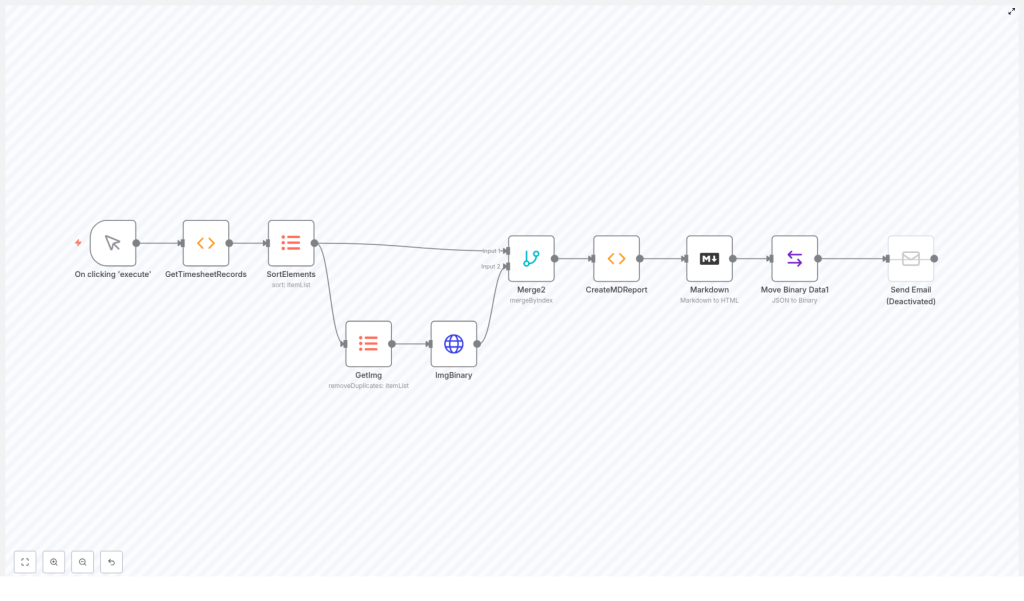
The first node Alex saw was a Manual Trigger labeled On clicking ‘execute’. It was simple but powerful. Instead of waiting for a schedule, Alex could run the workflow whenever a report was needed.
“Perfect for testing,” Alex thought, “and later I can always swap this for a cron trigger if I want weekly automation.”
Fetching The Timesheet Records
Next was a Function node that Alex quickly recognized as the heart of the data collection step. This node was responsible for pulling in timesheet records and organizing them by:
- User name
- Task title
- Date
- Notes
- Hours spent
It also included user avatar URLs and detailed task information. In Alex’s head, this replaced all the manual exports from different tools. Instead of juggling CSV files, the workflow would gather structured timesheet data in one place.
Imposing Order: Sorting The Data
In the old world, Alex spent too much time dragging spreadsheet columns around just to make the data readable.
The Sort Elements node changed that. It sorted the timesheet items by:
UserNameTaskTitledate
Alex realized that this was not just about aesthetics. Proper sorting was crucial for building meaningful reports, grouping entries logically, and calculating totals per user and task.
“This alone saves me several minutes every week,” Alex thought, already feeling a bit of relief.
Making Faces Visible: Unique User Avatars
One of the things Alex had always wanted was a more human looking report. Numbers were fine, but faces made it easier for managers to recognize who did what.
The template handled this with a node called GetImg. It used an itemLists operation with removeDuplicates on the UserAvatar field. In practice, this meant:
- Collect all avatar URLs from the timesheet records
- Remove duplicate URLs so the same image was not fetched multiple times
Efficient, clean, and exactly what Alex needed to avoid repeated HTTP requests.
Downloading Avatars As Binary Data
The next node, ImgBinary, was an HTTP Request node. Its job was to download the unique avatar images in binary format.
Alex noticed that storing these images as binary made it much easier to embed them directly into the final report. Instead of linking to external URLs, the workflow could encode the images and place them inline.
“So the report will work even if someone opens it offline,” Alex realized. “Nice.”
Merging People With Their Work
At this point, the workflow had two streams of data:
- Sorted timesheet entries
- Downloaded avatar binaries
The Merge2 node was responsible for bringing these streams together. It merged items by index so that each user’s data matched the correct avatar.
Alex understood how fragile this could be if done by hand. A single mismatch could put the wrong face next to the wrong name. Here, n8n handled the pairing automatically and reliably.
The Turning Point: Creating The Markdown Report
Everything so far had been setup. The real magic happened in the CreateMDReport Function node.
This node dynamically built a Markdown string that would become the final report. As Alex opened the function code, the structure became clear:
- Markdown headers for each user and each task section
- Embedded user avatars as base64 images placed next to usernames
- Tables listing:
- Date
- Hours
- Task description or notes
- Totals per task, styled in italics for quick scanning
- Custom CSS styling for tables, improving readability and visual hierarchy
- A footer line indicating the report generation date
For Alex, this was the real turning point. Instead of a messy spreadsheet, the workflow would produce a structured, human friendly document where each person’s section started with their avatar and name, followed by clear task breakdowns and totals.
“This is exactly what I used to try to build by hand,” Alex thought, “but cleaner, consistent, and automatic.”
From Markdown To HTML: Ready For Email And Web
Once the Markdown was generated, the workflow passed it into the Markdown node. This node converted the Markdown content into styled HTML with support for:
- Tables
- Headings
- Custom styles
Alex immediately saw the value. HTML reports could be:
- Sent directly in emails
- Displayed in a web dashboard
- Archived for future reference
Preparing The Report As A File Attachment
To make the report easy to share, the template included a node called Move Binary Data1. This node took the HTML content and converted it into a binary file named report.html with the correct MIME type.
In other words, it prepared a clean attachment that could be sent in an email or stored somewhere else as a file.
Optional Finale: Sending The Email
The last piece of the workflow was an optional Send Email node. In the template, it was disabled by default, but clearly ready to use.
Alex realized that by configuring SMTP credentials, this node could automatically send the generated report.html as an attachment to:
- Team leads
- Clients
- Finance or HR
Once enabled, Alex would no longer have to manually attach and send anything. The entire chain, from data to inbox, would be automated.
Seeing The First Automated Report
With the workflow imported and reviewed, Alex clicked the manual trigger and watched the nodes light up one by one.
Within seconds, the run finished. Alex opened the generated HTML report.
There it was:
- Each user’s name, with their avatar image right next to it
- Task sections neatly grouped and labeled
- Tables listing dates, hours, and descriptions, all easy to scan
- Subtotals per task, clearly highlighted
- A professional layout that looked like a custom built reporting tool
It felt like a small victory. All the hours spent manually cleaning up timesheets were suddenly optional.
Why This n8n Timesheet Workflow Changed Alex’s Week
After a couple of runs, Alex realized the workflow was not just a convenience. It was a structural improvement to how the team operated.
Key Benefits Alex Experienced
- Automation – The workflow transformed raw timesheet data into polished reports automatically, eliminating repetitive manual work.
- Customization – By tweaking the Function nodes, Alex could adjust the report format, add new fields, or change styling without rebuilding everything.
- Integration – Because it ran on n8n, the workflow could be extended to pull data from databases, HTTP APIs, or other services, and to push reports into email, storage, or internal tools.
- Visual Workflow – The drag and drop interface made it easier to understand complex logic and explain it to non technical colleagues.
How The Markdown Logic Keeps Reports Flexible
Alex grew especially fond of the CreateMDReport node. Its function code was the “language” of the report and provided several advantages:
- Use of Markdown headers to structure users and tasks in a clear hierarchy
- Embedded avatars as base64 images so the report stayed self contained
- Tables for each group of entries, listing dates, hours, and descriptions
- Italic styled totals per task that stood out without being distracting
- Custom CSS for table styling, ensuring readability across devices
- A footer that always showed when the report was generated, adding transparency
Whenever Alex needed to adjust the layout or wording, it was as simple as editing the function. No more wrestling with spreadsheets to make them look “good enough.”
From One Workflow To A New Habit
Within a couple of weeks, Alex’s Monday mornings looked very different.
Instead of wrangling CSV files, Alex would:
- Open n8n
- Click “execute workflow” or let the scheduled trigger run
- Review the generated HTML report
- Let the email node send it automatically to stakeholders
That extra time went into analyzing the data instead of cleaning it. Alex could spot patterns in workload, identify overworked team members, and share insights with leadership, all using the same automated report.
Your Turn: Put This n8n Template To Work
If you recognize yourself in Alex’s story, you can follow a similar path.
Start by importing the timesheet report workflow template into your own n8n instance:
How To Get Started
- Import the template into n8n.
- Open the GetTimesheetRecords Function node and adapt it to your own data source or timesheet system.
- Run the workflow manually using the trigger to see the full process in action.
- Inspect the generated HTML report and adjust the Markdown logic in CreateMDReport if you want different headings, fields, or styling.
- Configure the Send Email node with your SMTP credentials, then enable it to automate report distribution.
Extend And Customize As Your Needs Grow
As Alex discovered, this workflow is a strong foundation, not a rigid final product. You can:
- Connect to different databases or APIs for timesheet input
- Add filters for specific clients, projects, or teams
- Store the HTML file in cloud storage alongside email delivery
- Trigger the workflow on a schedule instead of manually
If you run into questions or want to share improvements, the n8n community is a great place to compare approaches and learn new tricks.
Resolution: Professional, Personal, And Effortless Reporting
Alex’s story is not unique. Many managers, founders, and developers face the same tension between needing accurate, professional timesheet reports and not having time to build them by hand.
By using n8n and this automated timesheet report template, you can:
- Replace manual exports and formatting with a reliable workflow
- Add a personal touch through user avatars and clean layout
- Gain back hours each week to focus on analysis, not administration
Automated timesheet reporting with embedded user avatars is more than a cosmetic upgrade. It improves clarity, accountability, and communication across your team and with your clients.
Start building your own version of this workflow today, and let n8n handle the repetitive work while you focus on what matters most.
