


Hotel Review Sentiment with n8n & Pinecone
Imagine waking up, opening your laptop, and instantly seeing what guests really think about your hotel – neatly organized, scored, and ready to act on. No more copying reviews into spreadsheets or manually tagging them as positive or negative.
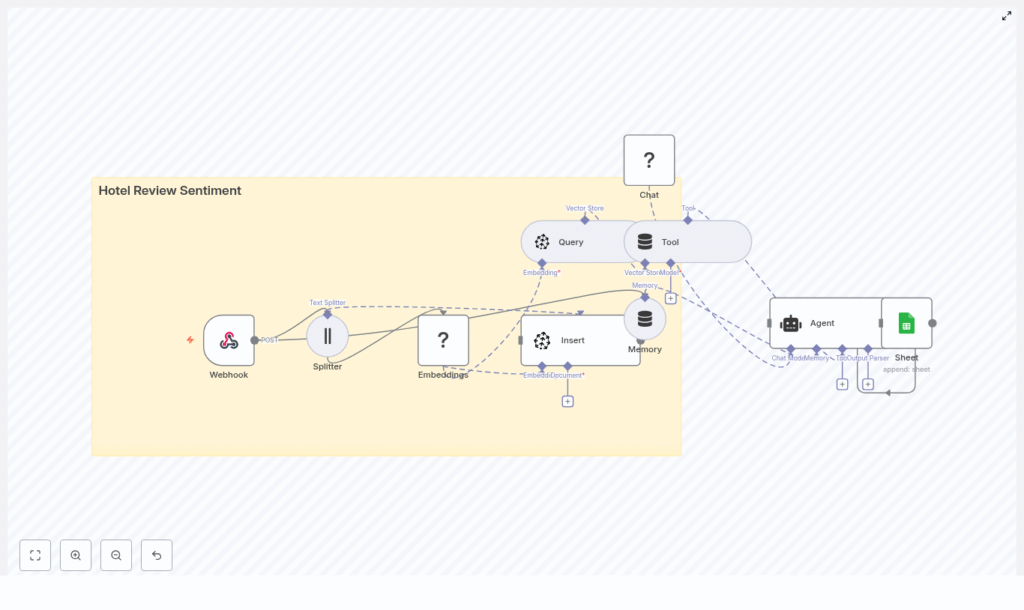
That is exactly what this n8n workflow template helps you do. It takes raw hotel reviews, turns them into vectors with Hugging Face embeddings, stores them in Pinecone, runs an AI agent to classify sentiment, then logs everything in Google Sheets for easy tracking and reporting.
In this guide, we will walk through what the template does, when you would want to use it, and how each part of the workflow fits together. Think of it as your low-code starter kit for hotel review sentiment analysis.
Why bother automating hotel review sentiment?
If you manage or support a hotel brand, you probably already know the pain: reviews are everywhere, and reading them one by one just does not scale.
Automated hotel review sentiment analysis helps you:
- Spot problems early – noisy rooms, rude staff, bad Wi-Fi, you name it.
- Track guest satisfaction trends over time, per hotel or per region.
- Prioritize responses so your team focuses on the most urgent or negative feedback first.
- Keep tagging consistent instead of relying on different people interpreting reviews differently.
This template uses a vector-based approach instead of simple keyword matching. That means you get:
- Semantic search – it understands that “air conditioner too loud” is similar to “noisy AC.”
- Context-aware classification – it can weigh mixed feedback like “great staff but terrible breakfast.”
- Fast retrieval across thousands of reviews stored in Pinecone.
If you are dealing with more than a handful of reviews a day, this kind of automation quickly goes from “nice to have” to “how did we ever live without this?”
What this n8n template actually does
Let us start with the big picture before diving into each step. The workflow is an end-to-end pipeline that:
- Receives hotel reviews through a Webhook.
- Splits long reviews into smaller chunks with a Splitter.
- Creates vector embeddings using Hugging Face.
- Stores those vectors and metadata in a Pinecone index.
- Uses Pinecone as a vector store tool that the agent can query.
- Keeps context using memory so the agent can reason better.
- Runs a Hugging Face language model to analyze sentiment.
- Lets an Agent orchestrate all this and output structured sentiment results.
- Logs everything into Google Sheets for reporting and auditing.
So from a single incoming review, you end up with:
- A sentiment label like Positive, Neutral, or Negative.
- A numeric sentiment score between 0 and 1.
- Key highlights like “noisy AC” or “amazing staff.”
All of this is done automatically through n8n, Hugging Face, and Pinecone, with minimal manual setup.
Step-by-step: how the workflow is wired together
1. Webhook – where your reviews enter the system
The workflow starts with a Webhook node. This is the public endpoint that receives reviews via HTTP POST requests, typically in JSON format. You can send data from your booking system, review scraper, or internal tools.
A simple JSON payload might look like this:
{  "review_id": "12345",  "hotel_id": "H-234",  "text": "The room was clean but the AC was noisy at night.",  "rating": 3
}
It is a good idea to:
- Use authentication like an API key or secret.
- Restrict access to your internal network or trusted services.
- Validate incoming payloads so you are not storing junk or malformed data.
2. Splitter – breaking reviews into manageable chunks
Next up is the Splitter node. Its job is to cut longer reviews into smaller pieces so the embedding model can better capture local context.
The template uses these defaults:
chunkSize = 400characterschunkOverlap = 40characters
For typical hotel reviews, chunk sizes in the 200 to 400 character range work nicely. If you are processing long survey responses or multi-paragraph feedback, you might want to increase the chunk size.
The overlap is important because it helps preserve context between chunks. Without overlap, a sentence split in half could lose meaning. With a small overlap, the model still “sees” enough surrounding text to understand what the guest is saying.
3. Embeddings – turning text into vectors with Hugging Face
Once the text is chunked, the Embeddings (Hugging Face) node generates vector representations for each chunk. These vectors are what Pinecone uses for similarity search and semantic retrieval.
In this template, you will typically use a sentence-transformers model such as:
all-MiniLMvariants or similar
They are a good balance of speed and cost, which matters in production. If you need more domain-specific understanding for hospitality, you can look into:
- Fine-tuning a model on your own review data.
- Using a larger model for more nuance, at a higher cost.
Make sure your Hugging Face API key is set correctly in n8n and that the model name is valid.
4. Pinecone index – storing vectors with useful metadata
Now that you have embeddings, the Insert (Pinecone) node saves them into a Pinecone index.
You will want to create an index, for example:
hotel_review_sentiment
Along with the vector, store relevant metadata such as:
review_idhotel_idrating- A short text snippet or the full chunk
Why store metadata? It lets you:
- Filter by specific hotels, time ranges, or ratings.
- Run segmented analysis, like “show me all negative reviews for Hotel H-234 in the last 30 days.”
Make sure the index name, API key, and region in n8n match what you created in Pinecone.
5. Query + Tool – using Pinecone as a vector store
When you want to analyze or revisit a review, the workflow uses the Query (Pinecone) node together with a Tool node. This combination lets the agent search for semantically similar chunks inside Pinecone.
The result is that your AI agent can:
- Look up related reviews that mention similar issues.
- Pull in context from past feedback when analyzing a new review.
This is the “memory” of your review history, but stored efficiently as vectors.
6. Memory – keeping conversational context
The Memory (Buffer) node helps preserve recent context for the agent. If your workflow involves multiple steps of reasoning or follow-up questions, this memory node keeps track of what has already been discussed or analyzed.
For simple one-off sentiment classification, it is mostly about consistency. For more advanced workflows, it allows richer, more contextual conversations with your review data.
7. Chat (Hugging Face LM) – the language model brain
Next, the Chat (Hugging Face LM) node is the actual language model that reads the review text, considers the rating, and helps classify sentiment.
It is guided by a prompt that tells it exactly what to do and how to format its output. A simplified example prompt might look like this:
Classify the sentiment of the following hotel review. Return JSON with keys: sentiment, score (0-1), highlights.

Review: "{{text}}"

Consider the rating if available: {{rating}}
The model then returns structured data like:
sentiment: Positive / Neutral / Negativescore: A confidence score between 0 and 1highlights: Key issues or praise points
Before you store any output, it is smart to validate and sanitize the JSON so a formatting hiccup does not break your pipeline.
8. Agent – orchestrating tools, memory, and the model
The Agent node is where everything comes together. It coordinates:
- The vector store tool that queries Pinecone.
- The memory buffer that holds context.
- The Chat LM that does the actual reasoning.
The agent uses these components to produce a final, structured sentiment analysis for each review. This is what you ultimately log and report on.
9. Google Sheets – logging results for reporting
Finally, the Sheet (Google Sheets) node appends the sentiment results to a sheet that behaves like a simple log or CSV file.
This gives you:
- An auditable record of what the system decided for each review.
- A quick way to filter and sort by sentiment, score, hotel, or date.
- A data source that can feed into BI tools or dashboards.
For more advanced analytics, you can later swap or add destinations like:
- BigQuery or another data warehouse.
- SQL databases.
- Dashboards in Looker, Metabase, or similar tools.
How inference and review lookup actually work
Let us zoom in on what happens when you want to analyze or look up a review.
- The review text is embedded and stored as vectors in Pinecone.
- When you trigger analysis or search, the Query (Pinecone) node finds similar chunks.
- The Agent uses those results plus the language model to generate a consolidated sentiment view.
This setup means you can do things like:
- Find all reviews that mention “noisy AC,” even if guests phrase it differently.
- See how often the same issue appears across locations.
- Combine historical context with new reviews for richer insights.
Ideas to customize and extend the template
Once you have the basic pipeline running, you can start tailoring it to your operations. Here are a few ideas:
- Aspect-based sentiment
Go beyond “overall sentiment” and extract categories like cleanliness, staff friendliness, breakfast quality, Wi-Fi, or noise levels. - Active learning loop
Periodically sample low-confidence reviews, have a human label them, and use that feedback to refine prompts or models. - Ticketing integration
Automatically create tasks in your ticketing tool whenever a negative review is detected for a specific hotel. - Dashboarding
Build a dashboard showing sentiment trends per hotel, top recurring complaints, and average time to resolution.
Cost, performance, and best practices
Most of your cost will come from:
- Embedding calls to Hugging Face.
- Language model calls for sentiment classification.
- Vector storage and queries in Pinecone.
To keep things efficient and affordable:
- Batch embeddings when possible and avoid re-embedding the same text repeatedly.
- Use smaller embedding models for bulk processing, and reserve larger LMs for more complex reasoning.
- Configure retention policies in Pinecone, such as time-to-live, if you do not need to keep every review forever.
On the compliance side, remember to:
- Strip or anonymize personally identifiable information (PII) before storage.
- Encrypt sensitive metadata where required.
- Review your data flows against privacy regulations in your region.
Troubleshooting common issues
If something goes wrong, it is usually one of a few predictable culprits. Here is a quick checklist.
- Embeddings failing?
Check your Hugging Face API key, ensure the model name is correct, and confirm you are not hitting token or rate limits. - Pinecone insert or query errors?
Verify the index name, API key, and region settings. Also check Pinecone dashboards for rate limits or timeouts. - Agent returns broken or inconsistent JSON?
Tighten the prompt, include explicit output format examples, and add a JSON schema validation step before writing to Sheets.
Deployment checklist for production use
Before you roll this out to your whole hotel portfolio, run through this quick deployment checklist:
- Store all API keys and secrets securely in the n8n credentials manager.
- Test the workflow with a representative dataset, then run a small real-world batch.
- Set up monitoring and alerts for node errors, API quotas, and timeouts.
- Document the agent prompt you are using and keep versioned copies for reproducibility.
When this template is a great fit
You will get the most value from this n8n template if:
- You manage one or more hotels or hospitality brands.
- You receive reviews from multiple sources and channels.
- You want consistent, scalable sentiment analysis without building everything from scratch.
- You like the idea of a low-code workflow that you can tweak and extend over time.
It is flexible enough for experimentation but solid enough to form the backbone of a production sentiment pipeline.
Wrapping up
This n8n workflow template gives you a practical, low-code way to turn unstructured hotel reviews into structured, actionable insights. By combining text splitting, Hugging Face embeddings, Pinecone vector search, and an AI agent, you get a system that:
- Understands context instead of just counting keywords.
- Scales to thousands of reviews.
- Integrates cleanly with your existing tools and operations.
Ready to see it in action? Clone the template into your n8n instance, plug in your Hugging Face, Pinecone,
