


How AI Agents Use Tools To Transform Chat Responses
The Shift From Manual Work To Smart Automation
Every growing business eventually hits the same wall: there are too many conversations, too many questions, and not enough time. You answer the same queries, look up the same information, and jump between tools to keep up. It works for a while, but it is not scalable and it keeps you away from the work that truly moves the needle.
This is where automation and AI agents become more than a technical curiosity. They become a way to reclaim your time, scale your support, and create space for deeper, more strategic work. Instead of manually searching for answers, you can design an automated system that listens, understands, and responds with context-aware, accurate information.
In this article, you will walk through how an AI agent powered by n8n and tools like Wikipedia, SerpAPI, memory buffers, and OpenAI’s GPT models can upgrade your chat experience. Think of this workflow template as a starting point in your automation journey – a practical, ready-to-use foundation you can adapt, extend, and make your own.
From Static Replies To Tool-Powered AI Agents
Traditional chatbots rely on fixed rules or predefined answers. They can be useful, but they hit their limits quickly. Modern AI agents are different. They combine:
- Powerful language models for natural conversation
- Memory to remember what was said before
- External tools to look up real-time, verified information
Instead of acting like a script, your agent behaves more like a smart assistant that can think, recall, and research on demand. With n8n, you can orchestrate all of this visually, turning complex AI behavior into a clear, maintainable workflow.
Mindset: Treat Your AI Agent As A Growing System
Before diving into the template itself, it helps to adopt the right mindset. This is not about building a perfect chatbot on day one. It is about creating a flexible system you can iterate on.
Start small, then improve:
- Launch with a simple, working AI agent that can answer questions
- Observe how users interact with it and what they ask most
- Add new tools, refine prompts, and adjust memory as you learn
Every improvement you make compounds over time. As your AI agent becomes smarter, you free up more of your energy for creative and strategic work. The n8n template you are about to explore is built exactly with this spirit of growth and experimentation in mind.
Inside The AI Agent Architecture
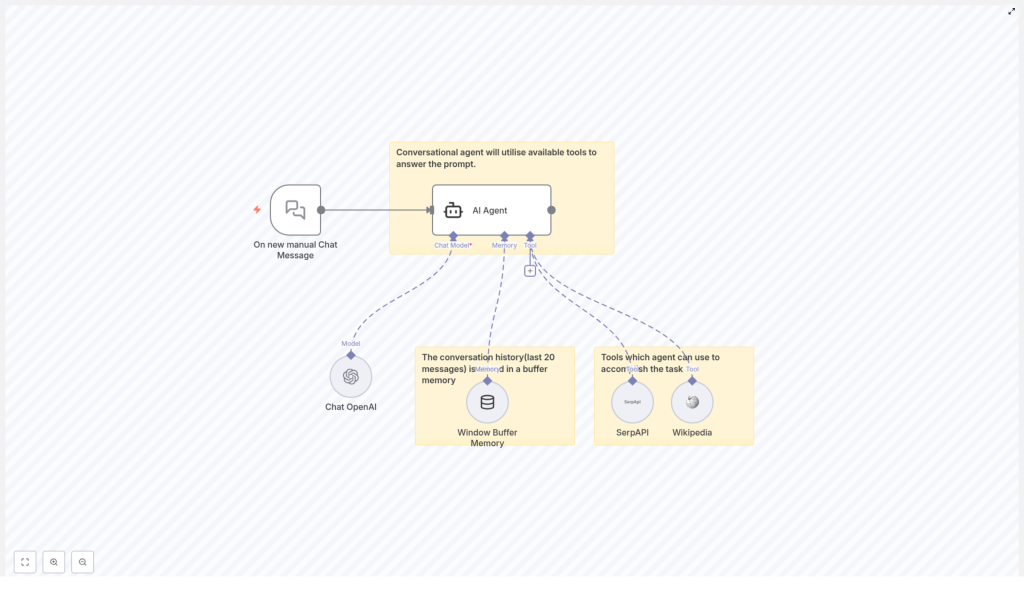
At the heart of this n8n workflow template is a simple but powerful architecture. It brings together four core components that work in harmony:
- User Input Trigger – Listens for new chat messages and kicks off the workflow.
- Language Model (Chat OpenAI) – Understands the user’s request and generates human-like responses.
- Memory Module – Keeps track of recent conversation history so replies stay consistent and contextual.
- External Tools – Connects to services like Wikipedia and SerpAPI to fetch fresh, accurate information.
Instead of treating AI as a black box, this architecture lets you see and control how each part contributes. You can tweak settings, add or remove tools, and adapt the workflow as your needs evolve.
Step 1: Triggering The AI Agent With A New Chat Message
Every great conversation starts with a message. In this workflow, that moment is captured by a dedicated trigger node.
The process begins when a user sends a manual chat message. In n8n, this is represented by the “On new manual Chat Message” node. This node detects incoming messages and passes them directly into the AI agent block.
From a business perspective, this is where your automation starts saving time. Instead of someone manually reading, interpreting, and responding, the workflow takes over instantly, 24/7, without losing quality.
Step 2: Letting The Language Model Do The Heavy Lifting
Once the message is received, the AI agent calls a language model such as the GPT-4 variant via Chat OpenAI. This is the brain of your agent.
The model:
- Understands natural language queries
- Interprets intent, not just keywords
- Generates coherent, context-aware responses
Within the node configuration, you can fine-tune parameters like temperature to balance creativity and precision. A lower temperature keeps answers focused and reliable. A slightly higher one allows more flexible, exploratory responses. This is your chance to shape the personality and tone of your AI assistant to match your brand or use case.
Step 3: Using Memory Buffers To Build Real Conversations
Real conversations flow. Users refer back to earlier questions, change their minds, or build on previous replies. Without memory, an AI agent would treat every message as if it were the first, which quickly becomes frustrating.
To solve this, the workflow uses a window buffer memory that stores the last 20 chat exchanges. This memory module:
- Preserves recent context so the AI can follow the thread
- Supports follow-up questions and clarifications
- Makes the interaction feel more human and continuous
In practice, this means your agent can answer questions like “What about the previous option?” or “Can you expand on that?” without losing track. It is a small configuration that delivers a big upgrade in user experience.
Step 4: Connecting External Tools For Real-Time Accuracy
Language models are powerful, but they are not omniscient. Their knowledge is based on what they were trained on, which means they can be out of date or uncertain about specific details.
This is where external tools come into play. In this n8n workflow template, the AI agent can call out to:
- Wikipedia – To retrieve factual information, definitions, and background knowledge.
- SerpAPI – To perform real-time web searches and access up-to-date information from the internet.
The agent does not have to guess. It can query these APIs on demand, then weave the results into its responses. The outcome is a chatbot that feels both knowledgeable and current, ideal for users who rely on you for accurate, timely information.
Why A Multi-Tool Conversational Agent Changes The Game
By combining a language model, memory, and external tools inside n8n, you are not just building a chatbot. You are building a scalable, intelligent assistant that grows with your business.
Some of the key benefits include:
- Improved Accuracy – Access to real-time and verified data sources like SerpAPI and Wikipedia reduces misinformation and guesswork.
- Context Awareness – Memory buffers help maintain natural conversation flow, so users feel heard and understood.
- Enhanced Flexibility – You can plug in different tools and APIs to handle a wide range of tasks, from research to support.
- Better User Experience – Responses feel more relevant, more helpful, and more human, which builds trust and satisfaction.
Most importantly, this kind of automation frees you and your team from repetitive support tasks. You can invest your energy in strategy, creativity, and growth, knowing that your AI agent is handling a large portion of everyday questions and lookups.
Using The n8n Template As Your Starting Point
Instead of assembling all of this from scratch, you can start from a ready-made n8n workflow template that already connects:
- The “On new manual Chat Message” trigger
- The Chat OpenAI language model
- A window buffer memory storing the last 20 exchanges
- External tools like Wikipedia and SerpAPI
From there, you can:
- Adjust prompts and temperature to match your voice
- Change how many messages the memory keeps
- Add new tools or APIs your business relies on
- Integrate the agent into your existing chat interface or internal systems
This template is not the final destination. It is a launchpad that helps you move faster, experiment safely, and learn what works for your audience.
Next Steps: Build, Experiment, And Grow Your Automation
Modern conversational AI agents are no longer just language models. They are connected systems that use memory, external tools, and smart workflows to deliver enriched, context-aware responses. By combining Chat OpenAI, memory buffers, and APIs like SerpAPI and Wikipedia inside n8n, you can create an AI assistant that feels intelligent, reliable, and genuinely helpful.
If you have been waiting for the right moment to start automating more of your work, this is it. Use this template as your first step. Launch it, watch how it behaves, then refine and expand it as you go. Every improvement you make will compound, saving you time and giving your users a better experience.
Try The Template And Start Your Automation Journey
Ready to build your own AI-powered chatbot that leverages multiple tools for enhanced responsiveness and accuracy? Explore integrations with OpenAI, Wikipedia APIs, and search APIs like SerpAPI inside n8n, and turn your conversations into a powerful, automated system.
Use the workflow template below as your foundation, then customize it to fit your unique needs, brand, and goals.
