


How to Automate Daily Email Digests with AI Summarization Using n8n
Picture this: you open your inbox in the morning and it looks like it has been busy networking all night. Newsletters, updates, long threads, “quick questions” that are never quick. You want the useful bits, not a full-time job in scrolling.
That is where this n8n workflow template comes in. With a little help from OpenAI and a simple Gmail label, you can turn that daily chaos into a clean, AI-generated email digest that lands in your inbox at a set time. No more hunting through 50 emails to find 3 important ones. Automation does the boring part, you keep your sanity.
What This n8n Email Digest Workflow Actually Does
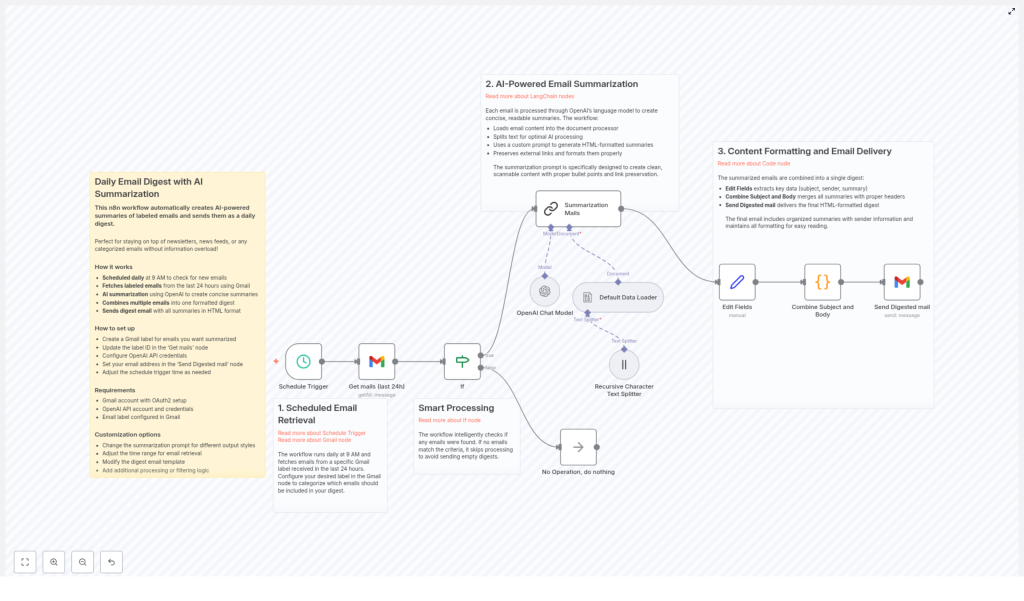
This workflow runs on autopilot to create a daily, AI-summarized email digest from Gmail. Under the hood, it:
- Runs every day at a scheduled time (for example, 9 AM)
- Grabs all Gmail messages from the last 24 hours with a specific label
- Feeds those emails into OpenAI using the LangChain Summarization node
- Generates short, HTML-formatted summaries that keep links and key info
- Combines everything into one nicely structured digest email
- Sends that digest to the email address you choose
End result: one tidy summary email instead of a scattered inbox full of half-read messages.
Why Bother With AI-Powered Email Digests?
If your inbox is your main source of news, updates, or industry info, it can also be your main source of distraction. AI summarization helps you skim the signal without drowning in the noise. With this workflow you can:
- Save Time by reading short summaries instead of full email novels
- Stay Informed with a structured digest that covers multiple conversations and topics in one place
- Reduce Overload by filtering to only labeled emails and highlighting the important bits
Instead of checking your inbox all day, you get one curated update that you can read in a few minutes.
How the Workflow Works Behind the Scenes
The n8n template breaks the whole process into three main stages. Each part tackles one annoying piece of email management so you never have to think about it again.
1. Scheduled Email Retrieval from Gmail
First, the workflow needs to know when to run and which emails to care about.
- A Schedule Trigger node kicks things off every day at a specific time, such as 9 AM.
- The workflow then uses the Gmail node to fetch messages from the last 24 hours.
- Only emails with a particular Gmail label are included, for example a label you apply to newsletters, updates, or anything you want in your digest.
This label-based approach lets you decide what gets summarized without changing your entire email setup.
2. AI Summarization with LangChain and OpenAI
Next comes the fun part: turning long emails into short, readable summaries.
Each fetched email is processed by OpenAI through the LangChain Summarization node. The workflow:
- Loads the email content into a document processor
- Splits longer text into chunks for more efficient AI processing
- Uses a custom prompt to create clean, HTML-formatted summaries with bullet points
- Keeps external links intact inside the summary so you can still click through to original content
The result is a set of AI-generated summaries that are short, scannable, and still contain all the important references.
3. Formatting the Digest and Sending the Final Email
Once everything is summarized, n8n assembles it into one polished digest email.
- An Edit Fields step pulls out useful metadata like subject, sender, and the generated summary.
- A Combine Subject and Body step merges each summary with a header that includes the original email subject and who it came from.
- Finally, the Send Digested mail step sends a single HTML-formatted digest to your chosen email address.
Instead of 10 or 30 individual emails, you get one neatly formatted message that is easy to read and quick to skim.
Quick Setup Guide: From Zero to Daily Digest
You do not need to be a developer to use this n8n template, but you will need a few pieces in place. Here is the simplified setup flow:
- Create a Gmail label Decide what you want summarized, for example “Daily Digest”, “Newsletters”, or “Industry Updates”, and create a label in Gmail. Apply it to any emails you want to include.
- Configure the Gmail node in n8n In the workflow, set the Gmail node to use that label by updating the label ID in its configuration so it only pulls those tagged messages.
- Set up OpenAI credentials In n8n, configure your OpenAI API credentials for the LangChain nodes so the workflow can call the AI model for summarization.
- Choose where the digest goes In the email sending step, set the target email address that should receive the final digest.
- Adjust the schedule If 9 AM is not your thing, tweak the Schedule Trigger node to whatever time fits your routine.
Once you save and activate the workflow, it will quietly run in the background and deliver your daily digest automatically.
Advanced Tips and Easy Customizations
After you have the basic version running, you can tune the workflow so it fits your habits perfectly.
- Customize the AI prompt Adjust the summarization prompt in the LangChain node to change the tone, level of detail, or structure of your summaries. Want more bullet points or shorter paragraphs? This is where you tweak it.
- Change the email retrieval rules Modify the time range or filters in the Gmail node if you want more than 24 hours of content or a narrower slice of your inbox.
- Personalize the digest layout Edit the combined digest template to include your own branding, a short intro, or extra sections such as “Top 3 highlights”.
- Add extra filtering logic Insert additional n8n nodes to skip certain senders, filter by subject keywords, or route specific summaries to different digests.
Think of the template as a starting point that you can gradually shape into your ideal inbox assistant.
Who Gets the Most Value From This Workflow?
This setup is especially useful if your job or interests depend on staying informed but you do not want to live in your inbox.
- Content creators who subscribe to multiple newsletters and need quick overviews for research or inspiration.
- Busy professionals who want fast industry updates without reading every single announcement or product email.
- Anyone dealing with email overload who prefers bite-sized, AI-summarized information instead of endless scrolling.
If your inbox feels like a firehose, this workflow turns it into a manageable daily summary.
Next Steps: Try the Template and Tame Your Inbox
Automating daily email digests with AI summarization is one of those small changes that quietly saves you a lot of time and attention. With n8n handling the scheduling, Gmail pulling the right messages, and OpenAI summarizing them, you get a powerful, low-maintenance system that keeps you informed without constant inbox checking.
Set up the workflow once, tweak it to match your preferences, and let it run. Your future self, sipping coffee while reading a single tidy digest instead of 40 separate emails, will be very pleased.
Need help? You are not alone in your quest for inbox sanity. Join the n8n Discord or post your questions in the n8n Community Forum to get support, ideas, and workflow tips.
