


How to Build a Crypto News & Sentiment Analysis Bot in n8n
Overview
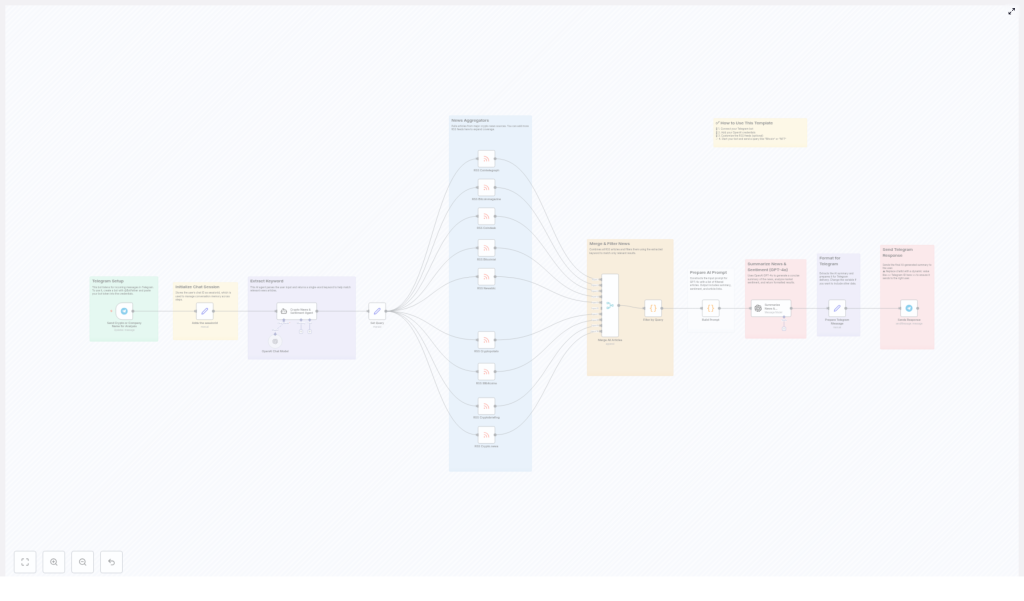
This guide explains how to implement a crypto news and sentiment analysis bot in n8n using a workflow template. The automation collects cryptocurrency news from multiple RSS feeds, uses OpenAI to extract a relevant keyword and generate a summary with sentiment, then delivers the result to users via a Telegram bot.
The documentation-style breakdown below is aimed at technical users who are already familiar with n8n concepts such as triggers, nodes, credentials, and data mapping.
Workflow Architecture
The workflow is designed as an event-driven Telegram bot that processes each user message as an independent execution, while still maintaining user context through a session identifier. At a high level, the data flow is:
- Telegram Trigger receives a user message.
- Session handling captures the user’s chat ID as a
sessionId. - OpenAI node analyzes the message and extracts a single keyword.
- Multiple RSS Feed nodes fetch the latest crypto news from several sources.
- Merge / Code node combines all articles into one list and filters by the keyword.
- Prompt construction builds a structured input for the summarization model.
- OpenAI GPT-4o node generates a news summary and sentiment analysis.
- Telegram Send node formats and returns the response to the correct user chat.
Node-by-Node Breakdown
1. Telegram Bot Setup & Trigger
Purpose: Receive crypto-related queries from Telegram users and initiate the n8n workflow.
- External prerequisite: Create a Telegram bot using
@BotFather.- Run
/newbotin Telegram with@BotFather. - Follow the prompts to define the bot name and username.
- Copy the bot token provided at the end. This token is required as n8n credentials.
- Run
- n8n node type: Telegram Trigger (or equivalent Telegram node configured as a webhook listener).
- Credentials: Configure a Telegram credential in n8n using the bot token from
@BotFather. - Core parameters:
- Update type: typically
Message, so the workflow runs when a user sends a text message. - Webhook URL: automatically set by n8n if using the Telegram Trigger node.
- Update type: typically
The trigger node exposes the incoming Telegram payload, including the chat.id and text fields. These are used in later nodes for session tracking and keyword extraction.
2. Session Initialization
Purpose: Maintain per-user context so that each response is routed back to the correct Telegram chat and can be treated as an individual session.
- Data used:
chat.idfrom the Telegram Trigger output. - Session identifier: Store the user’s
chat.idassessionId.
This can be done using a Set node or a Code node:
- Set node approach:
- Create a new field, for example
sessionId. - Map it to the expression
{{$json["message"]["chat"]["id"]}}(exact path may vary depending on the Telegram node output).
- Create a new field, for example
The sessionId is later referenced when sending the reply so that the response is always delivered to the same user who initiated the request. This pattern allows the workflow to handle multiple concurrent users safely, since each execution carries its own sessionId value.
3. Keyword Extraction with OpenAI
Purpose: Interpret the user’s natural language query and derive a single, relevant keyword that will be used to filter news articles.
- Node type: OpenAI (Chat or Completion model, depending on your n8n version).
- Model: OpenAI GPT model configured for keyword extraction (for example, a GPT-4 or GPT-3.5 variant, according to your account).
- Credentials: OpenAI API key added as an n8n credential.
Input: The user message text from Telegram, for example via an expression like {{$json["message"]["text"]}}.
Prompt design: The node should instruct the model to return exactly one keyword, such as a cryptocurrency symbol or topic, that will serve as the filter for news articles. For instance, if the user writes “What is happening with Bitcoin and ETFs today?”, the model should return a single keyword like Bitcoin.
This constraint is important, since the downstream filtering logic expects a single term, not a list. If the user sends a vague query with no obvious crypto-related term, you may want to handle that case by returning a generic keyword, but the template focuses on the core path where a meaningful crypto keyword is identified.
4. RSS Feed Aggregation
Purpose: Collect the latest news articles from multiple cryptocurrency news outlets to ensure broad and diverse coverage.
- Node type: One or more RSS Feed Read nodes (or equivalent HTTP Request nodes configured for RSS URLs).
- Sources: The template uses multiple leading crypto news sites, for example:
- Cointelegraph
- Bitcoin Magazine
- Coindesk
- Bitcoinist
- NewsBTC
- Cryptopotato
- 99Bitcoins
- Cryptobriefing
- Crypto.news
Each RSS node typically outputs fields such as title, link, and content or snippet, depending on the feed structure. The template assumes that at least the title and link are available for all sources.
5. Merging & Filtering Articles
Purpose: Combine all fetched articles into a single list, then keep only those that are relevant to the extracted keyword.
5.1 Merge Articles
- Node type: Merge node or a Code node, depending on how the template is structured.
- Operation: Join items from multiple RSS nodes into one unified collection.
After this step, the workflow has a consolidated array of articles from all configured news feeds.
5.2 Filter by Keyword
- Node type: Commonly a Code node using JavaScript, or a combination of IF nodes and expressions.
- Input:
- The merged list of articles.
- The extracted keyword from the OpenAI keyword-extraction node.
Filtering logic: For each article, check if the keyword is present in one or more of the following fields:
titlesnippetordescription(if provided by the RSS feed)contentor any full-text field if available
Only articles that contain the keyword in at least one of these fields are kept. The result is a subset of the overall news feed focused on the topic requested by the user.
If no articles match the keyword, the filtered list may be empty. The base template focuses on the main success path, but in production you may want to handle this edge case by returning a fallback message to the user indicating that no recent articles were found for that topic.
6. Prompt Construction for Summarization
Purpose: Build a structured prompt that provides the AI summarization model with all relevant articles and clear instructions on how to respond.
- Node type: Set node or Code node to assemble the prompt string.
- Input: The filtered list of articles, including at least their titles and links.
The prompt should include:
- The extracted keyword or topic.
- A list of article titles with their URLs.
- Instructions for the model to:
- Provide a concise summary of the latest news related to the keyword.
- Analyze the overall market sentiment (for example, bullish, bearish, neutral) based on the articles.
- Return or reference the links to the original articles.
The template specifically instructs the AI to output:
- A summary of the news.
- Market sentiment analysis.
- Links to reference news articles.
This structured prompt ensures that the summarization model has enough context to generate usable, actionable insights from the filtered news data.
7. Summarization & Sentiment Analysis with GPT-4o
Purpose: Convert the filtered raw news articles into a human-readable summary with sentiment analysis tailored to the user’s keyword.
- Node type: OpenAI node configured for chat completion or text completion.
- Model: GPT-4o, used to generate a concise, coherent output.
- Credentials: Same OpenAI API key used earlier, or another valid OpenAI credential.
Input: The constructed prompt string that includes article titles and links, plus the instructions for summary and sentiment.
Output: A single AI-generated text block that typically includes:
- A short overview of what is happening around the requested crypto topic.
- A sentiment assessment, for example indicating if the tone of recent news is mostly positive, negative, or mixed.
- References to the main articles, often with inline or listed URLs.
This step is where the workflow transforms scattered news items into a condensed, user-friendly report.
8. Formatting & Telegram Response
Purpose: Prepare the AI output in a Telegram-friendly format and send it back to the correct user chat.
8.1 Extract and Format the AI Response
- Node type: Set or Code node to shape the final message string.
- Input: The text output from the GPT-4o node.
Typical formatting steps include:
- Extracting the main response text from the OpenAI node output.
- Optionally adding basic formatting such as line breaks or bullet points that display well in Telegram.
8.2 Send Message to the User
- Node type: Telegram node (Send Message operation).
- Credentials: Same Telegram bot credential used in the trigger.
- Key parameters:
- Chat ID: Use the
sessionIdcaptured earlier, for example{{$json["sessionId"]}}or the equivalent path. - Text: The formatted summary and sentiment analysis from the previous node.
- Chat ID: Use the
It is important to replace any placeholder chat ID in the template with the actual sessionId value, otherwise the message will not be routed to the correct user. Once configured, the bot will send the summarized crypto news and sentiment analysis directly into the user’s Telegram chat as a standard message.
Configuration Notes
Telegram Bot Integration
- Create your bot via
@BotFatherand store the token safely. - In n8n, create a Telegram credential using that token.
- Attach this credential to both the Telegram Trigger node and the Telegram Send node.
OpenAI Credentials & Models
- Add your OpenAI API key in n8n as an OpenAI credential.
- Use this credential for:
- The keyword extraction node.
- The GPT-4o summarization node.
- Select an appropriate model for each step. The template uses GPT-4o for summarization, while the keyword extraction can also run on a lighter GPT model if desired.
RSS Feeds Customization
- The template comes with a predefined set of crypto RSS feeds, including:
- Cointelegraph
- Bitcoin Magazine
- Coindesk
- Bitcoinist
- NewsBTC
- Cryptopotato
- 99Bitcoins
- Cryptobriefing
- Crypto.news
- You can:
- Add more RSS nodes to broaden coverage.
- Remove sources that are not relevant to your audience.
- Adjust polling or fetch logic depending on how you want to handle frequency and volume.
Usage & Testing
- Deploy the workflow in n8n and ensure the Telegram webhook is active.
- Open your Telegram client and search for your bot by its username.
- Send crypto-related queries such as:
BitcoinETHNFTSolana news today
- Observe the response, which should contain:
- A concise news summary.
- A sentiment overview.
- Links to the original articles.
Advanced Customization
Prompt Tuning & Output Control
You can refine the behavior of the summarization and sentiment analysis by adjusting the prompt text used for GPT-4o:
- Change how detailed the summary should be.
- Request more granular sentiment descriptions.
- Specify a maximum length or structure for the response.
Keyword Extraction Behavior
The keyword extraction step currently focuses on returning a single keyword. Depending on your use case, you might:
- Allow multiple keywords and adjust the filtering logic accordingly.
- Introduce validation to handle queries that are not clearly crypto-related.
- Add a fallback keyword or generic “crypto market” summary when no specific coin is detected.
Filtering & Relevance Logic
The article filtering can be extended by:
- Applying case-insensitive matching or simple normalization of the keyword.
- Prioritizing newer articles or limiting the number of items sent to the summarization model.
- Adding additional conditions, such as only including articles from specific domains or categories.
