


How a Lean Support Team Built a Smart AI Helpdesk With n8n
The Night Everything Broke
At 11:47 PM on a Tuesday, Lara, a solo customer support lead at a fast-growing SaaS startup, watched her inbox explode.
A new feature had just gone live. Marketing sent a big announcement. Users loved the idea, but they were confused. The same questions kept coming in:
- “How do I enable the new feature?”
- “Is this available on my plan?”
- “Why am I seeing this error message?”
By midnight, live chat was full of nearly identical messages. Lara knew the pattern. She would copy-paste answers from an internal FAQ, tweak them a bit, and try not to miss anything important.
It was repetitive, expensive in time, and completely unsustainable.
Her founders wanted something smarter. They mentioned “AI support” and “automation” in every meeting. Lara had heard of n8n and large language models, but she was not a machine learning engineer. She needed a way to turn their existing FAQs into a smart assistant without building a full AI stack from scratch.
The Discovery: An n8n Template That Could Think
A few days later, while searching for “n8n AI customer support” templates, Lara found a workflow that sounded almost too perfect.
It promised a hybrid approach:
- Use vector embeddings of existing FAQs as the first line of defense.
- Fall back to a Large Language Model only when the FAQ could not help.
- Run everything inside n8n with Google Sheets, HuggingFace, and Google Gemini.
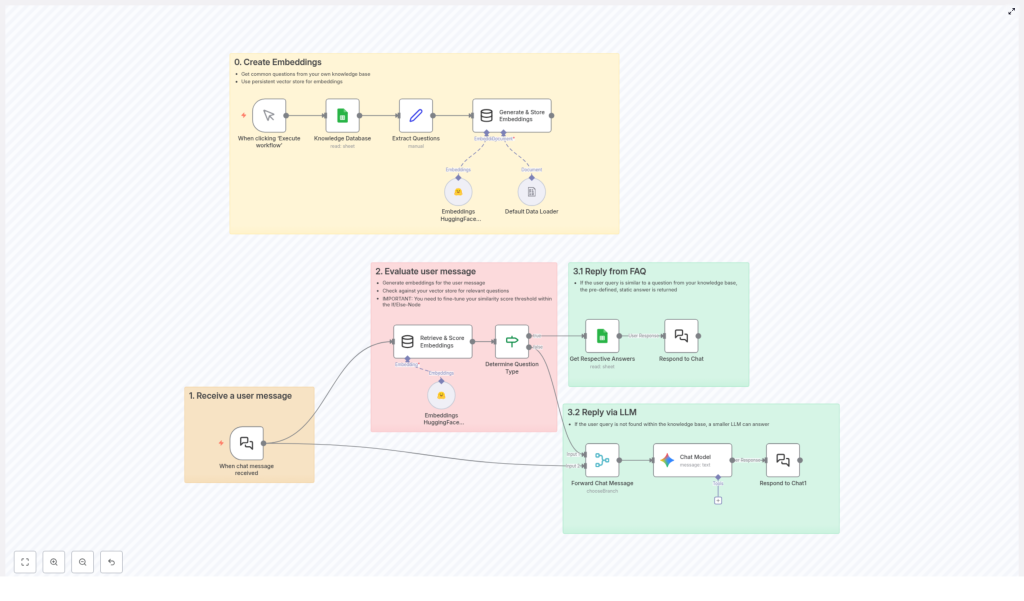
The idea was simple but powerful. Instead of sending every question to an LLM, the workflow would try to match the user message to a known question in their FAQ using embeddings. If a close match was found, it would send the exact answer they had already written. If not, the LLM would step in with a safe, generic, but helpful reply.
For Lara, this meant two things that mattered a lot:
- She could keep full control over policy and account-specific answers in the FAQ.
- She could save on LLM costs by only using it when needed.
Act 1 – Turning FAQs Into Something a Machine Can Understand
Lara started with what she already had: a long Google Sheet full of questions and answers the team had curated over months.
The n8n template described this as Step 0, but to Lara it felt like laying the foundation for a new kind of helpdesk.
Step 0: Teaching the Workflow What the FAQ Means
The template guided her to transform the plain text questions into embeddings, which are numerical representations that capture the meaning of each question. That way, when a user later typed “Why am I seeing this red banner?” the system could recognize it as similar to “What does the red error banner mean?” even if the wording was different.
Inside n8n, the workflow did three key things:
- Data Source: It connected to Google Sheets, which served as the knowledge base holding all the common questions and answers.
- Process: When Lara manually executed the workflow for the first time, it read every row, extracted the questions, and sent them to HuggingFace inference to generate embeddings.
- Storage: The embeddings were saved in an in-memory vector store, ready to be searched whenever a user message arrived.
That first manual run felt like the moment the system “learned” the knowledge base. Nothing visible changed on the website yet, but behind the scenes, the FAQ had become searchable by meaning, not just exact text.
Act 2 – The First Real User Message
With the embeddings created, Lara connected the workflow to their chat system. Now, every new message would trigger the n8n flow automatically.
Step 1: Receiving a User Message
In the template, this was the entry point. A chat trigger node captured each incoming message and handed it off to the rest of the workflow.
For Lara, the first live test came from a user asking:
“Can I use the new analytics feature on the basic plan?”
Step 2: Comparing the Question to the Knowledge Base
As soon as the message arrived, n8n converted it into an embedding using HuggingFace, just like it had done for the FAQ questions.
The workflow then compared this new embedding to all existing FAQ embeddings stored in the vector database. It calculated similarity scores for each potential match, typically using cosine similarity or an equivalent metric.
In the middle of the workflow, an If/Else node played the role of gatekeeper:
- If the highest score was above a configured threshold, for example 0.8, the system would assume it had found a relevant FAQ.
- If the score fell below that threshold, it would treat the message as something new or less clear, and route it to the LLM instead.
That threshold became a tuning knob for Lara. Higher values meant the system would only answer from the FAQ when it was very confident. Lower values meant more aggressive matching, which could occasionally pick a not-quite-right answer.
Act 3 – When the FAQ Knows the Answer
For that first analytics question, the similarity score came back high. The user message was almost a perfect semantic match to an existing FAQ entry about feature availability by plan.
Step 3.1: Responding Directly From the FAQ
Because the score passed the threshold, the workflow followed the “FAQ path”. It looked up the matched question in Google Sheets, grabbed the predefined answer, and sent it back through the chat node.
From the user’s perspective, it felt like a support agent had immediately typed a clear, correct explanation. From Lara’s perspective, she had not lifted a finger. The workflow had:
- Recognized the intent of the question.
- Mapped it to an existing FAQ entry.
- Delivered a human-written answer that the team had already vetted.
Most importantly, no LLM call was needed. That meant lower cost and no risk of the model inventing policy details.
Act 4 – When the FAQ Does Not Know Enough
A few hours later, a different kind of question came in:
“Can you give me tips to improve my dashboard performance?”
This time, the FAQ did not have a perfect match. There were entries about errors and limits, but nothing that directly answered that open-ended request. The similarity scores came back mediocre.
Step 3.2: Falling Back to a Large Language Model
The If/Else node detected that the best score was below the threshold. Instead of forcing a half-relevant FAQ answer, the workflow followed the fallback path and sent the user message to a Large Language Model, in this template configured as Google Gemini.
Lara had already set a system message when she configured the LLM node. It instructed Gemini to:
- Avoid answering policy or account-specific questions.
- Keep responses concise, friendly, and direct.
- Provide generic, safe guidance when the FAQ did not cover the topic.
The reply that came back was exactly what she hoped for: a short list of practical suggestions about reducing unnecessary widgets, optimizing filters, and checking data refresh intervals. It did not touch pricing or account details, which was crucial for compliance.
Again, n8n sent the response straight through the chat node. The user got help within seconds, and Lara saw the entire path inside the n8n execution log.
Why This Hybrid Support Flow Changed Lara’s Workday
Over the next week, as more users tried the new feature, the workflow handled a growing share of questions automatically. Some were resolved directly from the FAQ, others went to Gemini for generic guidance. The combination started to feel like a real teammate.
Key Benefits Lara Saw in Practice
- Efficiency: Repeated questions like “How do I enable X” or “What happens if I change Y” were answered instantly from the Google Sheets knowledge base. The system did not call the LLM for those, which saved API usage and reduced costs.
- Flexibility: The mix of vector search and fallback LLM meant the assistant was both accurate on known FAQs and adaptable for new or unexpected queries.
- Scalability: Any time the product team added a new feature, Lara just updated the FAQ in Google Sheets and reran the embedding creation step. The workflow always had the latest answers without a complex retraining process.
How Lara Set Everything Up With the n8n Template
If you want to follow the same path, the steps Lara took are straightforward, even if you are not a machine learning expert.
1. Prepare the Knowledge Base
- Create or clean up your FAQ list in Google Sheets. Use one column for questions and another for answers.
2. Configure the n8n Workflow
- Import the n8n template that combines embeddings, knowledge base search, and an LLM fallback.
- Connect your Google Sheets credentials so the workflow can read your FAQ.
- Add your HuggingFace API details so the workflow can generate embeddings.
- Connect your Google Gemini (or other LLM) credentials for the fallback responses.
3. Run the Embedding Initialization
- Execute the workflow manually once to generate embeddings for all FAQ questions.
- Confirm that the embeddings are stored in the in-memory vector store and that the workflow finishes without errors.
4. Go Live With Real User Messages
- Enable the chat trigger or webhook that feeds user messages into n8n.
- Test with a few known FAQ questions to see the “Reply from FAQ” path in action.
- Try some new or vague questions to verify the “Reply via LLM” fallback.
- Adjust the similarity threshold if needed to balance precision and coverage.
The Resolution: A Support System That Grows With the Product
A month later, Lara’s late nights became rare. The workflow handled a large share of routine questions. When new topics surfaced, she simply added them to the Google Sheet and reran the embedding step. The assistant grew smarter without becoming more complicated.
In the end, this n8n workflow was not just a clever automation trick. It became the backbone of a smart, AI-driven customer support system that:
- Combined embeddings and knowledge bases for precise FAQ handling.
- Used a Large Language Model like Google Gemini only when needed.
- Stayed transparent, configurable, and cost-effective.
If you are facing the same flood of repeated questions, you do not need to rebuild your stack from scratch. You can start where Lara did, with a simple spreadsheet and an n8n template that ties everything together.
Ready To Build Your Own AI-Powered Support Flow?
Explore the tools that made Lara’s workflow possible:
Get started with n8n | Explore HuggingFace | Discover Google Gemini
