


How to Build a URL Shortener with n8n and Airtable
Introduction
URL shortening is a common requirement in modern applications, particularly for marketing, analytics, and user experience optimization. In this guide, we walk through how to implement a production-ready URL shortener using n8n as the orchestration layer and Airtable as the backing datastore.
The n8n workflow template described here provides a complete solution. It generates shortened URLs, persists and retrieves records from Airtable, tracks click counts, and exposes a simple analytics dashboard. The design follows automation best practices such as clear separation of concerns, idempotent operations where possible, and the use of deterministic IDs for predictable behavior.
Architecture Overview
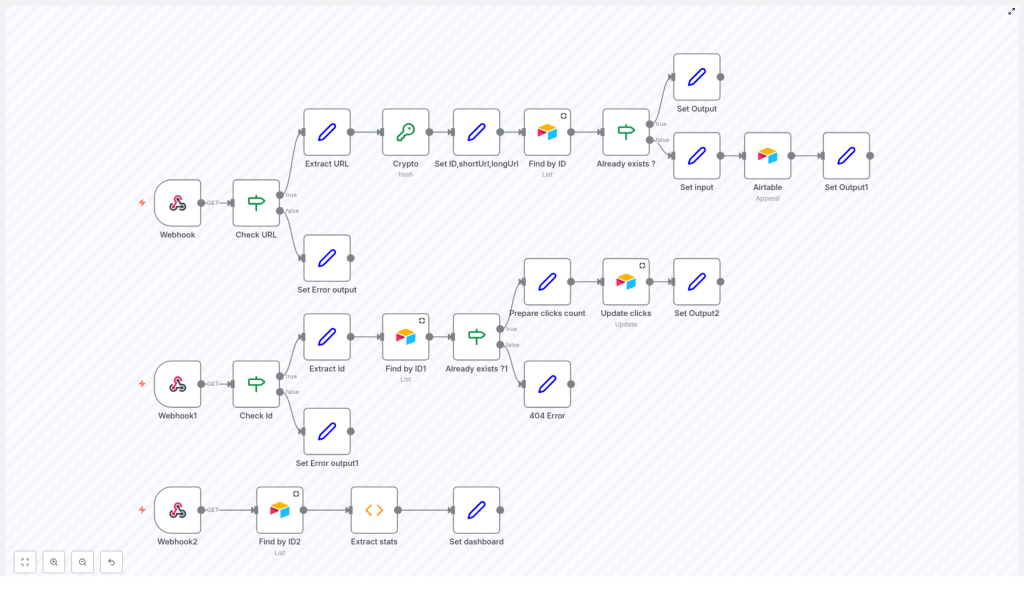
The workflow is divided into three independent HTTP-facing components, each implemented as a dedicated Webhook in n8n:
- Shortening API endpoint – Receives a long URL, creates a short identifier, validates uniqueness, and stores the mapping in Airtable.
- Redirect endpoint – Accepts a short ID, resolves it to the original URL, increments a click counter, and returns an HTML-based redirect response.
- Dashboard endpoint – Aggregates data from Airtable and renders an HTML dashboard with key metrics such as total links, total clicks, and unique hosts.
This separation allows you to scale, secure, and evolve each capability independently, while keeping the underlying data model consistent in Airtable.
Core Components and Integrations
Key n8n Nodes
- Webhook nodes to expose HTTP endpoints for shortening, redirect, and dashboard views.
- Crypto node configured with SHA256 hashing to derive deterministic short IDs from long URLs.
- Set nodes to construct structured payloads, including IDs, short URLs, and HTML responses.
- If / Conditional nodes to implement validation logic, existence checks, and error handling.
- Airtable nodes for querying, inserting, and updating URL records.
Airtable as the Data Layer
Airtable is used as the central database for the URL shortener. Each record typically contains:
- Short ID
- Original long URL
- Shortened URL
- Host (domain extracted from the long URL)
- Click count
Using Airtable provides a flexible schema, straightforward CRUD operations, and powerful filtering that integrates cleanly with n8n’s native Airtable node.
Implementing the URL Shortening Endpoint
The first part of the workflow exposes an API-style endpoint that accepts a long URL and returns a shortened URL. The logic is deterministic: the same input URL always generates the same short ID, and the workflow checks Airtable to avoid duplicate records.
Request Handling and Validation
- Webhook Node
Configured to listen for HTTPGETrequests. It expects a query parameter namedurlthat contains the long URL to shorten. - Check URL Node
A conditional node that validates the presence of theurlparameter. If the parameter is missing, the workflow immediately returns an error response, preventing unnecessary processing and database calls. - Extract URL Node
Extracts the value of theurlquery parameter and normalizes it for further processing. This ensures that downstream nodes operate on a clean, predictable field.
Generating and Managing Short IDs
- Crypto Node (SHA256)
The Crypto node computes a SHA256 hash of the long URL. Using a hash function ensures that identical URLs consistently produce the same hash, which keeps the shortener idempotent for repeated requests with the same URL. - Set ID, shortUrl, longUrl Node
From the generated hash, the workflow takes the first 6 characters to form the short ID. It then constructs the full short URL by combining the base domain of your shortener service with this ID. The node also standardizes the long URL field for insertion into Airtable.
Persistence and De-duplication in Airtable
- Find by ID Node
Queries Airtable to determine whether a record with the generated short ID already exists. This step is critical to avoid collisions and to reuse the existing short URL for the same long URL when applicable. - Conditional Node – Already exists?
If the short ID is found, the workflow returns the existing record’s short URL, avoiding duplicate entries. If it does not exist, the workflow proceeds to create a new Airtable record. - Airtable Append Operation
Inserts a new record into the Airtable table with:- The generated short ID
- The original long URL
- The full short URL
- The host extracted from the long URL
- An initial click count, typically set to zero
This structure supports both efficient lookups and downstream analytics.
- Set Output Node
Builds the HTTP response that returns the short URL to the caller. This can be a simple JSON payload or any format appropriate for your integration.
Implementing Redirects and Click Tracking
The second part of the workflow is responsible for resolving a short URL to its original long URL and tracking usage. It is exposed as a separate Webhook endpoint that users hit when they access a short link.
Short ID Resolution
- Webhook1 Node
Listens forGETrequests that include a query parameterid, which represents the short URL identifier. - Check Id Node
Validates that theidparameter is present. If it is missing, the workflow responds with an appropriate error, such as a 400 Bad Request. - Extract Id Node
Extracts the short ID from the request for use in the lookup step. - Find by ID1 Node
Queries Airtable for a record that matches the provided short ID. This is the core resolution step that maps the short URL back to the original long URL.
Error Handling and Click Increment
- Already exists?1 Node
A conditional node that checks whether the Airtable query returned a record. If no record is found, the workflow returns a 404-style response, indicating that the short URL is invalid or no longer available. If the record exists, the workflow continues to click tracking. - Prepare clicks count Node
Reads the current click count from the record, increments it by one, and prepares the updated value for persistence. This node ensures that the click counter is always advanced atomically within the workflow execution. - Update clicks Node
Updates the Airtable record with the new click count. This step closes the loop on tracking and enables accurate reporting in the dashboard.
Redirect Response
- Set Output2 Node
Constructs an HTML response that automatically redirects the user to the original long URL. This is typically implemented with a simple HTML page that contains a meta refresh tag or JavaScript-based redirect. Using an HTML intermediary allows you to customize the user experience, for example by adding branding or a brief message.
Building the Analytics Dashboard
The third part of the workflow provides an at-a-glance dashboard that aggregates statistics from Airtable. It is designed as another Webhook endpoint that returns a styled HTML page.
Data Retrieval and Aggregation
- Webhook2 Node
Exposes an endpoint that, when accessed, triggers the generation of the analytics dashboard. This can be secured or left open depending on your use case and authentication strategy. - Find by ID2 Node
Fetches all URL records from Airtable. The complete dataset is required to compute aggregate metrics such as total links and total clicks. - Extract stats Node
Processes the retrieved data to derive:- Total shortened links – The number of records in the table.
- Total clicks – The sum of the click count field across all records.
- Total unique hosts – The count of distinct host values, giving a sense of domain diversity.
This node can also be extended with additional calculations as your reporting needs evolve.
Dashboard Rendering
- Set dashboard Node
Generates an HTML page that presents the calculated metrics in a readable, styled format. This can include basic styling or be integrated into a more sophisticated front-end. The result is returned directly as the HTTP response from the Webhook, providing a lightweight analytics interface without additional infrastructure.
Why Combine n8n and Airtable for URL Shortening?
n8n provides a flexible, visual automation platform that is particularly well suited to building API-centric workflows. It supports real-time Webhook triggers, conditional routing, data transformation, and native integrations with a broad range of services. For automation professionals, this means rapid prototyping and production deployment without extensive custom code.
Airtable functions as an accessible yet powerful backend database. Its spreadsheet-like interface simplifies schema management and manual inspection of data, while the API and n8n integration enable robust automation. Features such as filtering and sorting are leveraged by the workflow to perform efficient lookups and updates for URL records.
Together, n8n and Airtable provide a low-friction stack that is ideal for building and maintaining a URL shortener, particularly in environments where agility and visibility are priorities.
Extending and Hardening the Workflow
The described implementation forms a solid baseline that can be evolved into a more advanced link management system. Potential enhancements include:
- Custom aliases – Allow users to specify their own short IDs instead of always relying on hashed values.
- Advanced analytics – Integrate additional data sources or services to capture geolocation, device type, or referrer information for each click.
- Expiration and lifecycle management – Add fields and logic for expiration dates, soft deletion, or archival of inactive links.
- Authentication and access control – Protect the shortening and dashboard endpoints with authentication, and restrict access to creation, modification, or viewing of statistics.
Because the workflow is built on n8n, these extensions can typically be implemented by adding or adjusting nodes rather than rewriting large portions of code.
Next Steps
Implement this URL shortener workflow in your own n8n instance and connect it to your Airtable base to see it in action. Once the core functionality is working, iterate on it to align with your organization’s branding, security requirements, and analytics needs.
For additional automation patterns, best practices, and workflow templates, continue exploring our tutorials and resources.
