


How to Convert YouTube Videos into SEO Blog Posts with n8n
Systematically transforming YouTube videos into long-form, search-optimized articles is one of the most efficient ways to scale content production. With a well-structured n8n workflow, you can automate transcript extraction, AI-assisted writing, image generation, and delivery of web-ready HTML, all while maintaining editorial control and SEO quality.
This guide explains how to implement and optimize an n8n workflow template that converts YouTube videos into SEO blog posts. It is written for automation professionals and content teams who want a repeatable, production-grade process rather than a one-off experiment.
Strategic Value of Converting YouTube Videos to Articles
Repurposing video into written content is not only a time saver, it is also a strategic SEO and distribution play. By operationalizing this workflow in n8n, you can:
- Expand search visibility by turning spoken content into indexable text that ranks for long-tail and question-based queries.
- Improve accessibility for readers who prefer text or rely on transcripts, including hearing-impaired users.
- Increase content ROI by deriving multiple assets from a single recording, such as blog posts, social snippets, and gated resources.
- Reach new audiences that rarely consume video but actively search and read blog content.
Automating this pipeline with n8n allows you to standardize quality, reduce manual effort, and integrate seamlessly with your existing content stack.
Architecture of the n8n Workflow
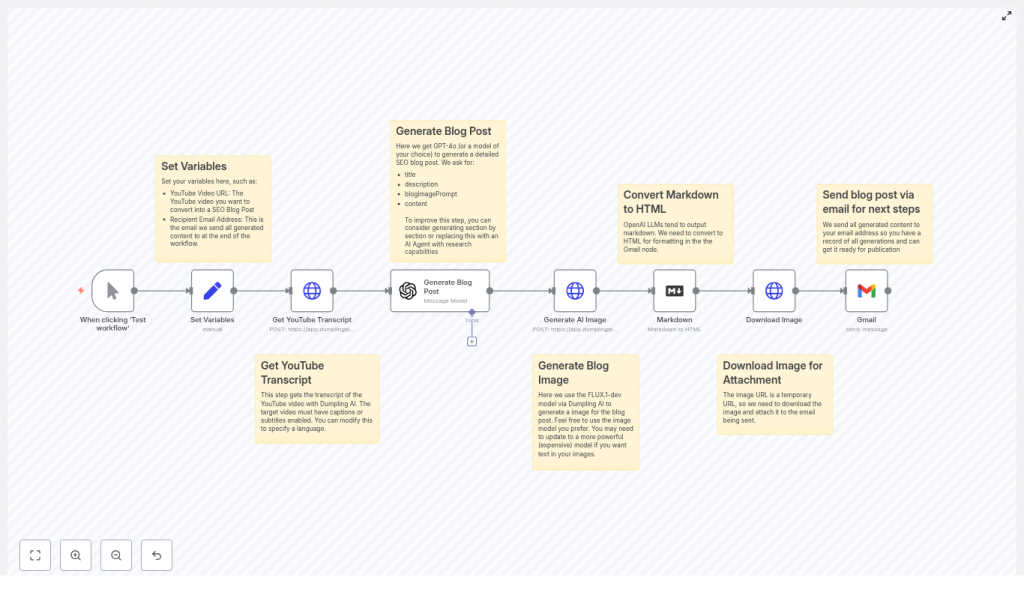
The n8n template implements a linear but configurable pipeline that starts from a YouTube URL and ends with an SEO-ready article and featured image delivered by email. At a high level, the workflow consists of:
- Variable initialization for input parameters.
- Transcript retrieval from YouTube via an external API.
- LLM-based content generation for the blog post.
- AI image generation for the featured visual.
- Markdown-to-HTML conversion for publishing readiness.
- Image download and email dispatch of the final assets.
Each stage can be adapted to your own APIs, models, and editorial standards, while the overall orchestration remains the same.
Key Nodes and Integrations in the Template
Input & Configuration: Set Variables
The workflow begins with a variable configuration step. This makes the automation reusable and easy to trigger from different sources, such as forms, webhooks, or scheduled jobs. Typical variables include:
- YouTube Video URL – the canonical link to the source video that will be transcribed and converted.
- Recipient Email Address – the destination mailbox for the generated HTML article and image assets.
By centralizing these values in a single node, you can parameterize the workflow for different teams, channels, or campaigns without modifying downstream logic.
Transcript Extraction: Get YouTube Transcript
The next phase is transcript acquisition. The template uses a transcript API such as Dumpling AI to fetch captions from the YouTube video. When configuring this node, consider the following:
- Verify that captions or subtitles are available on the video. Auto-generated captions can be used but may require additional cleaning.
- Specify the language if your channel publishes in multiple locales.
- Optionally request timestamps if you plan to generate time-coded sections, show notes, or reference markers.
Ensuring transcript quality at this step significantly affects the accuracy and reliability of the generated article.
Content Generation: LLM-Powered Blog Post Creation
Once the transcript is retrieved and optionally pre-processed, the workflow passes it to a large language model. The template references GPT-4o, but any compatible LLM can be integrated through n8n’s HTTP or dedicated AI nodes.
The LLM node should be instructed to:
- Analyze the transcript to identify the primary topics, narrative flow, and key arguments.
- Structure the content into a coherent long-form article with clear H2 and H3 headings.
- Generate an SEO-focused title and meta description, along with suggested keywords.
- Produce output in Markdown for easy downstream conversion, or directly in HTML if your stack prefers it.
A concise example prompt used in the workflow is:
“Create a long-form, SEO-optimized blog post based on this transcript. Include a title, meta description, headings, introduction, body, conclusion, and suggested keywords. Keep tone informative and action-oriented.”
For production deployments, you should version and maintain prompt templates, enforce constraints such as word count, and explicitly instruct the model to remain faithful to the transcript to limit hallucinations.
Visual Asset Creation: Generate AI Image
To complete the blog package, the workflow generates a featured image using an AI image API. In the template, the FLUX.1-dev model is used, but you can substitute any compatible provider.
Best practices for this node include:
- Use prompts that reflect the article’s theme and your brand’s visual language.
- Favor relatively simple, abstract, or conceptual imagery that works across devices and layouts.
- Standardize image dimensions and aspect ratios to match your CMS requirements.
The resulting image URL is then passed to subsequent nodes for download and attachment.
Formatting: Convert Markdown to HTML
Most content teams prefer to work with HTML for publishing, email review, or CMS ingestion. If the LLM output is in Markdown, the workflow uses a conversion node to transform it into HTML while preserving headings, lists, links, and emphasis.
This step ensures that the final article renders predictably across platforms and can be directly copied into your CMS or used as-is in automated publishing pipelines.
Delivery: Download Image & Send Email
AI-generated image URLs are frequently short-lived or tied to a specific session. To avoid broken assets, the workflow downloads the image and either attaches it to the outgoing email or stores it in your media library before sending a reference.
The email node then sends the compiled HTML article and the associated image to the configured recipient address. Typical recipients include:
- Content editors for review and refinement.
- A publishing mailbox or ticketing system for further processing.
- Automation endpoints that trigger downstream workflows, such as CMS imports.
SEO Optimization Guidelines for Generated Articles
Automating content generation does not remove the need for SEO strategy. To ensure the resulting blog posts perform well in search, apply the following practices to your prompts and editorial review:
- Define a primary keyword such as convert YouTube videos to blog posts and ensure it appears in the title, opening paragraph, at least one H2, and the meta description.
- Leverage long-tail phrases that emerge naturally in the transcript, especially question-style queries that viewers might search for later.
- Enforce scannable structure using clear H2/H3 headings, short paragraphs, and bullet lists to improve readability and on-page engagement.
- Integrate internal and external links to related resources, documentation, or authoritative references.
- Implement technical SEO such as Article schema, descriptive alt text for the generated image, and consistent URL and heading conventions.
Editorial Quality Control Checklist
Even with a robust automation pipeline, human oversight remains essential. Before publishing any AI-assisted article, validate it against a quality checklist:
- Verify factual accuracy for names, dates, statistics, and product references mentioned in the transcript.
- Refine the title and meta description to maximize click-through rate and alignment with your content strategy.
- Ensure the tone, style, and terminology match your brand guidelines and target audience.
- Check that any code snippets, quotes, or citations are correctly attributed and formatted.
- Run a basic SEO and readability audit, including keyword placement, internal links, alt text, and heading hierarchy.
Position the n8n workflow as a high-quality first draft generator, with editorial review as a mandatory final step.
Troubleshooting and Reliability Considerations
Improving Transcript Quality
Transcription quality directly affects the coherence and accuracy of the generated article. If you observe issues such as misheard terms or fragmented sentences, consider:
- Using a manually prepared caption file when available, rather than relying solely on auto-generated captions.
- Adding a pre-processing step in n8n to normalize recurring mishearings using find-and-replace or simple text-cleaning logic.
Mitigating LLM Hallucinations
Large language models may introduce information that does not appear in the source transcript. To reduce this behavior within the workflow:
- Explicitly instruct the model to only use facts contained in the transcript and avoid external assumptions.
- Ask the model to flag statements it cannot verify and, where relevant, include timestamps from the transcript for easier human validation.
Aligning Generated Images with Brand Standards
If the AI-generated images do not align with your visual identity, iterate on your prompt templates or introduce brand constraints:
- Specify color palettes, composition preferences, and subject matter in the prompt.
- Use a brand-guided template that references logo placement, typography style, or recurring motifs.
Practical Applications of the Workflow
This n8n template is flexible enough to support a variety of content types and operational contexts. Common use cases include:
- Product demos converted into detailed how-to guides, onboarding documentation, or help center articles.
- Educational videos transformed into evergreen blog posts, course notes, or downloadable study materials.
- Interviews and podcasts repurposed into long-form show notes, highlight summaries, or Q&A articles with timestamps.
- Marketing webinars distilled into actionable recap posts, landing page copy, and CTA-driven content blocks.
By standardizing this workflow, teams can maintain consistent quality across a large volume of repurposed assets.
Example LLM Prompt Used in the Workflow
<!-- Example prompt sent to GPT-4o -->
"You are an experienced content writer. Use the transcript below to write a 1,000-1,500 word SEO-optimized blog post. Provide:
- a compelling title
- a meta description (max 160 chars)
- H2/H3 structured article
- target keywords
- short conclusion and CTA
Only use facts and content from the transcript. Indicate any statements you cannot verify with timestamps."
This prompt can serve as a baseline. In production, you may maintain multiple prompt variants for different content types, industries, or tones and select them dynamically in n8n based on metadata about the video.
Operational Takeaways
Automating the conversion of YouTube videos into SEO blog posts with n8n enables content teams to scale output without losing control over quality. The template discussed here implements a robust pipeline: capture the transcript, generate a structured article with an LLM, create a supporting image, convert to HTML, and deliver everything to your editorial inbox.
When combined with strong prompts, SEO-aware guidelines, and a disciplined review process, this workflow can become a core component of your content operations, driving more value from every video you publish.
Next Steps
If you are ready to operationalize video-to-article conversion, deploy this n8n workflow and connect it to your preferred transcript and LLM providers. Iterate on prompts, image styles, and editorial checks until the outputs match your standards.
For teams that need deeper customization, such as integration with specific CMS platforms or advanced prompt orchestration, consider extending the template or collaborating with automation specialists. You can also subscribe to ongoing tutorials and prompt libraries to keep improving performance over time.
