


How to Push Files to GitHub with n8n Automation (So You Can Stop Doing It Manually)
Imagine Never Typing git push Again…
You just updated a tiny line in your README.md. Again. You open the terminal, again. You type git add, git commit, git push, again. At this point you are less a developer and more a professional button pusher.
Good news: n8n can do that part for you.
In this guide, you will see how to use an n8n workflow template to push changes to GitHub automatically. The workflow covers two flavors of automation:
- Quickly updating a single file in a GitHub repo using the GitHub node
- Pushing full Git commits using Git commands from a local repository
Same Git results, far fewer repetitive keystrokes, and way less chance of accidentally committing debug-final-FINAL-v3.js.
What This n8n GitHub Workflow Actually Does
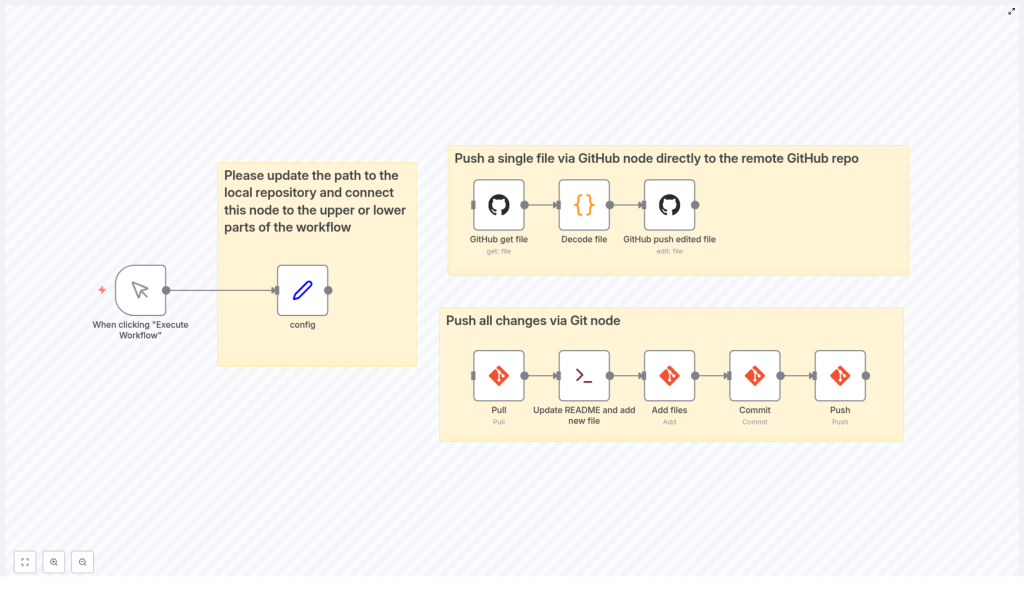
The template gives you two automation paths inside n8n:
- Single file push with the GitHub node
Perfect when you just want to tweak one file, likeREADME.md, directly in the remote repository using the GitHub API. - Full repo push using Git nodes
Ideal when you have a local Git repository and want to automate the whole flow: pull, modify files, add, commit, and push.
You can use either approach on its own or combine them as part of a larger n8n automation. For example, you might update documentation after a form submission, or generate timestamped files as part of a nightly job.
Before You Start: What You Need
To keep everything running smoothly, make sure you have these basics in place:
- Git and GitHub knowledge You should already know what a repository, commit, and push are. No need to be a Git wizard, just the usual everyday Git survival skills.
- n8n installed The workflow runs inside the n8n automation platform, so have your n8n instance up and running.
- GitHub OAuth2 authentication Set up OAuth2 credentials in n8n so it can talk to your GitHub account securely.
- A local Git repository For the Git-command-based part, you need a repo cloned locally on the machine where n8n is running.
Option 1 – Push a Single File Using the GitHub Node
If you are mostly updating one file repeatedly, this is your new best friend. No local repo required, no Git commands, just straight API magic via n8n.
How the Single File Flow Works
The workflow uses three main steps to update a specific file in your GitHub repository, like README.md:
- GitHub – get file The workflow first retrieves the existing file from your repository. GitHub sends the file content back as base64, because of course it does.
- Decode file The next node decodes the base64 content into plain text so it is actually readable and editable inside the workflow.
- GitHub – push edited file After you modify the content (for example, appending text or replacing sections), this node sends the updated version back to GitHub with a commit message. The file in the remote repository is updated directly.
This method is ideal for:
- Auto-updating documentation files
- Injecting timestamps or status updates into a single file
- Quick edits without touching a local clone at all
Think of it as a surgical update to one file, instead of wheeling in the entire Git toolbox.
Option 2 – Push All Changes Using Git Nodes
Sometimes you need more power. Maybe you are changing multiple files, generating new ones, or keeping a local repo in sync. In that case, let the Git nodes do the heavy lifting right from your n8n workflow.
What the Full Git Workflow Does
This part of the template automates the classic Git flow:
- Pull The workflow starts by pulling the latest changes from the remote repository into your local clone. That way you are not committing on top of an outdated state.
- Update README and add new file Using shell commands, n8n appends fresh information to
README.mdand creates a new file with a timestamp in its name. This is handy for logs, snapshots, or daily generated content. - Add files A Git node stages all modified and newly created files using
git add. No more forgetting that one tiny file and wondering why your change is missing. - Commit Another Git node commits the staged changes with a clear, informative message. You can customize the message so future-you actually understands what happened.
- Push Finally, the workflow pushes the commit back to the remote GitHub repository. Your changes are now live, and you did not manually type a single Git command during the process.
This approach gives you full control over repository changes from within n8n, while still following a standard Git workflow behind the scenes.
Key Configuration: Point n8n at the Right Repo
There is one critical detail that makes everything work correctly.
Important: In the workflow there is a config node that holds the path to your local Git repository. Update that path so it matches the actual location of your repo on the machine where n8n is running.
Once you set the correct path and connect this node to the relevant Git and shell nodes, your pulls, adds, commits, and pushes will run in the right directory instead of some mysterious default folder.
Step-by-Step: Getting the Template Running
Here is a simplified setup guide to get you from “interesting idea” to “fully automated Git pushes”:
- Open your n8n instance and import the GitHub push workflow template from the link below.
- Configure your GitHub OAuth2 credentials in n8n and select them in the GitHub nodes.
- Update the local repository path in the
confignode so it matches your cloned repo. - Review the nodes:
- Single file flow: GitHub get file, decode file, GitHub push edited file
- Full Git flow: pull, shell commands to edit files, Git add, commit, push
- Run the workflow once manually and check:
- Did the target file update correctly?
- Did the new timestamped file appear in your repo?
- Did the commit show up in GitHub with the expected message?
- Once it behaves as expected, schedule it or trigger it from other workflows or events.
Why Bother Automating GitHub With n8n?
Aside from reducing your daily quota of “did I already push that?” moments, there are some solid benefits:
- Save time on routine updates Let n8n handle repetitive file edits and commits so you can focus on actual development instead of ritual Git ceremonies.
- Reduce human error Automated workflows are less likely to forget a file, mistype a command, or push to the wrong branch.
- Integrate with other systems n8n connects GitHub with APIs, databases, CRMs, and more, so your repository can react automatically to events across your stack.
- Easy to extend Start with this template, then add conditions, notifications, or extra steps as your automation needs grow.
Next Steps: Make Git Push Itself
Using n8n to automate pushing files to GitHub is a simple upgrade that can make your workflow smoother and more reliable. Whether you are just tweaking a single file through the GitHub node or running full Git pull-add-commit-push cycles, this template gives you a solid starting point.
Import the workflow into your n8n instance, plug in your GitHub credentials, adjust the local repo path, and let automation take over the boring parts.
Got questions, ideas, or clever use cases? Drop a comment or visit the n8n community forum to get help and share what you build.
