


How to Send a Private Message on Zulip with n8n
Overview
This guide describes a minimal but production-ready n8n workflow template that sends a private Zulip message using a manual trigger. It is intended for users who are already familiar with n8n concepts such as nodes, credentials, and executions, and who use Zulip as a team chat platform.
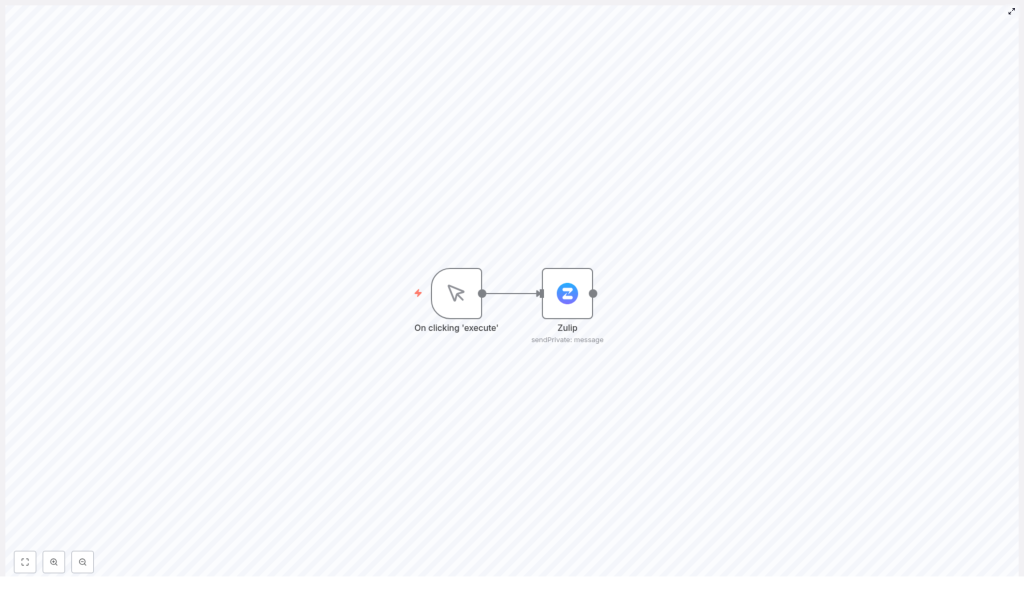
The workflow is composed of two nodes:
- A Manual Trigger node that starts the workflow on demand.
- A Zulip node that calls the Zulip API to send one or more private messages to specified recipients.
This template is useful for testing Zulip integration, sending ad hoc private notifications, or wiring it into more complex workflows as a reusable sub-flow.
Background: n8n and Zulip
n8n
n8n is an open-source workflow automation platform that connects multiple services and APIs through a node-based interface. Each node performs a specific task, such as triggering a workflow, transforming data, or calling an external API. Workflows can be executed manually, on a schedule, or in response to external events.
Zulip
Zulip is an open-source team chat application that structures conversations by topics. It supports:
- Private messages (direct messages) between one or more users.
- Group chats via multiple recipients in a single private message.
- Public streams and topics for team-wide discussions.
The workflow described here focuses specifically on the private messaging capability using the Zulip API.
Workflow Architecture
At a high level, the workflow has a straightforward architecture:
- Manual Trigger node
- Execution is initiated when the user clicks
Execute Workflowin the n8n editor. - No external input is required, which makes it ideal for testing or controlled, on-demand messaging.
- Execution is initiated when the user clicks
- Zulip node
- Consumes the trigger event and uses configured Zulip API credentials to authenticate.
- Sends a private message to one or more recipients specified by email address.
- Allows customization of the message body within the node configuration.
Data flow is linear and predictable. The Manual Trigger simply passes a single item into the Zulip node, and the Zulip node uses static configuration values (for example, hardcoded recipient emails and message content) unless you extend it to use dynamic data from previous nodes.
Node-by-Node Breakdown
1. Manual Trigger Node
Purpose
The Manual Trigger node is used to initiate the workflow only when explicitly requested from the n8n UI. It is suitable for:
- Testing the Zulip integration and credentials.
- Sending one-off private messages on demand.
- Using the workflow as a controlled utility instead of an always-on automation.
Behavior
- The node emits a single item each time you click Execute Workflow.
- It does not require any parameters or configuration for this template.
- It does not modify data, it only acts as a starting signal for downstream nodes.
2. Zulip Node
Role in the Workflow
The Zulip node is configured to send a private message via the Zulip API. It uses the credentials you configure in n8n to authenticate and then sends a message to the specified recipients.
Key Configuration Parameters
When you configure the Zulip node for this template, pay attention to the following fields:
- Operation / Message Type
Ensure that the node is set to send a private message. In the node configuration, this typically corresponds to choosing the appropriate operation or message type that targets one or more users directly rather than a stream. - To
In thetofield, specify the recipients by their Zulip email addresses. This field usually accepts:- A single email address for a one-to-one private message.
- Multiple email addresses for a group private message.
Make sure the email addresses match existing Zulip users on your Zulip server. If an email does not correspond to a valid user, the Zulip API request will fail.
- Credentials
Select thezulipApicredentials you have configured in n8n. These credentials handle:- Authentication against your Zulip instance.
- Authorization to send messages as the associated Zulip user.
- Message Content
Define the text of the private message in the node configuration. For this simple template, the content is static, but you can later parameterize it using expressions or data from previous nodes.
Execution Flow and Output
- On execution, the node sends a single Zulip API request using the configured
zulipApicredentials. - If the request is successful, the node returns the Zulip API response, which you can inspect in the n8n execution view.
- If the request fails, n8n will surface the error message from the Zulip API in the node execution details.
Configuring Zulip API Credentials in n8n
Before the Zulip node can send messages, you must configure the zulipApi credentials in n8n.
Steps to Add Zulip Credentials
- Open the Credentials section in your n8n instance.
- Create a new credential of type Zulip API (or select the relevant Zulip credential type provided by your n8n version).
- Provide the required details, typically including:
- Base URL of your Zulip instance, for example
https://your-zulip-domain.example.com. - API key obtained from your Zulip user settings.
- Any additional fields requested by the Zulip credential type in n8n, such as the associated email or username, if applicable.
- Base URL of your Zulip instance, for example
- Save the credential and optionally test it in the n8n UI if a test function is available.
- Back in the workflow, open the Zulip node and select the newly created
zulipApicredential from the credentials dropdown.
Once credentials are configured and selected, n8n will use them to authenticate every time the Zulip node executes.
Typical Use Cases
Although the template is minimal, it can be applied in several real-world automation scenarios:
- Targeted reminders Manually trigger the workflow to send reminders to specific team members, for example about deadlines, meeting follow-ups, or approvals.
- On-demand alerts Use the manual trigger during testing or incident response to send private alerts to a small group of stakeholders.
- Integration with other workflows While this template uses a Manual Trigger, the Zulip node configuration can be reused in more complex workflows that react to events from other tools, then send private notifications to individuals in Zulip.
Configuration Notes and Edge Considerations
Recipient Handling
- All recipients in the
tofield must be valid users on the configured Zulip server. - If one or more email addresses are invalid, the Zulip API may reject the entire request, depending on the server configuration.
- For testing, start with a single known-valid email address to confirm connectivity and permissions.
Authentication and Permissions
- The message is sent as the Zulip user associated with the API key configured in the
zulipApicredentials. - Ensure this user has permission to send private messages to the intended recipients according to your Zulip organization settings.
Error Handling
The template itself is intentionally simple and does not include explicit error-handling branches. However, n8n will still:
- Mark the workflow execution as failed if the Zulip API returns an error status.
- Display the error details in the Zulip node execution panel, which can include HTTP status codes and messages from Zulip.
You can later extend the workflow with additional nodes to:
- Catch errors and send alternative notifications.
- Log failures to another system, such as a database or logging tool.
Advanced Customization Ideas
Once the basic template is working, you can evolve it into a more flexible automation by:
- Using dynamic message content Replace static text in the Zulip node with n8n expressions that reference data from previous nodes or user input.
- Replacing the Manual Trigger Swap the Manual Trigger node with:
- A webhook trigger to send Zulip messages in response to external HTTP calls.
- A schedule trigger to send recurring reminders.
- Other app-specific triggers to react to events in your existing tooling.
- Branching by recipient Add logic nodes to route messages to different recipient lists based on conditions, such as severity level or event type.
All of these enhancements build on the same core pattern described in this template: a trigger node feeding into a properly configured Zulip node with valid credentials and recipients.
Summary
This n8n workflow template demonstrates a clear and minimal pattern for sending private messages on Zulip:
- A Manual Trigger node executes the workflow on demand.
- A Zulip node, using configured
zulipApicredentials, sends a private message to specified email addresses.
By integrating Zulip with n8n in this way, you can automate targeted, private communication for reminders, alerts, and notifications, while keeping full control over when and how messages are sent.
Call to Action: Import this template into your n8n instance, configure your Zulip API credentials, and start sending private messages programmatically to streamline your team communication.
