


From Manual Busywork to Confident Automation
If you are building on Bubble.io, you already know how quickly small tasks can pile up. Creating records, updating fields, checking that everything is in sync – it all adds up. Every manual step steals a bit of focus from what really matters: growing your product, serving your users, and shipping features that move the needle.
Automation with n8n gives you a different path. Instead of reacting to tasks one by one, you can design a system that does the work for you. The workflow template in this article is a simple example, yet it represents something bigger: a repeatable way to sync Bubble objects automatically, so you can reclaim time, reduce errors, and build a more scalable foundation for your app.
We will walk through how to sync Bubble objects with n8n, not just as a technical tutorial, but as a small but powerful step toward a more automated, focused way of working.
Imagining a Better Workflow with n8n and Bubble
Imagine this: a new request comes into your system. Instead of logging into Bubble, manually creating an object, updating it, then checking if everything is correct, an automated workflow quietly handles it all in the background. Your Bubble app stays in sync, your data stays consistent, and you stay focused on the bigger picture.
That is exactly what this n8n workflow template helps you do. It connects Bubble.io with n8n using webhooks and Bubble’s API so that objects are created, updated, and retrieved automatically. You can start simple, then expand and customize it as your needs grow.
This is not just a one-off trick. It is a reusable pattern you can copy, adapt, and build on to automate more and more of your Bubble operations.
What This n8n – Bubble Workflow Does
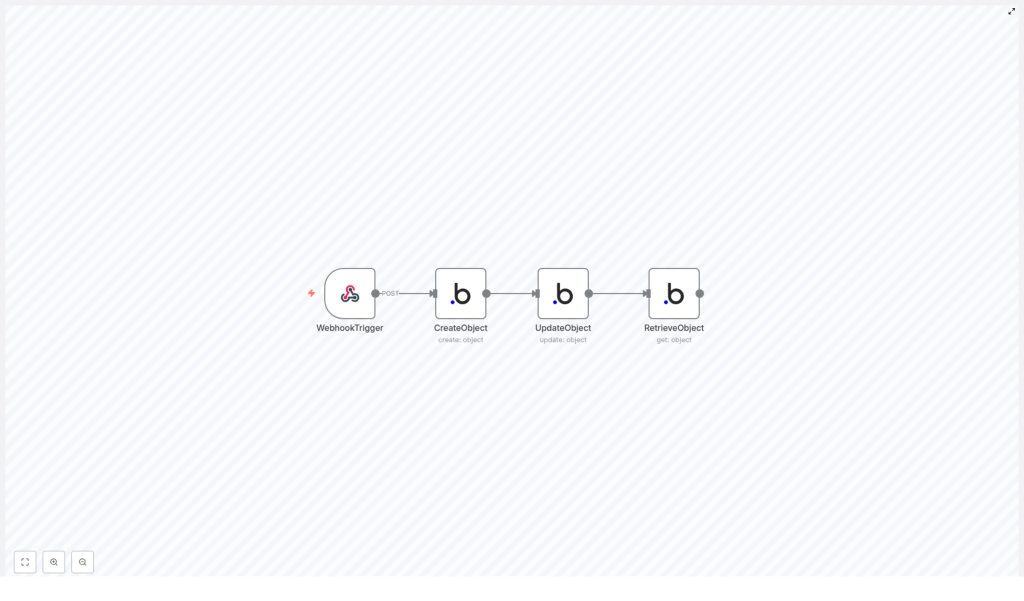
The template is built around a clear and practical flow for synchronizing Bubble objects of type Doc. It consists of four core nodes that work together to handle the full lifecycle of a single object:
- Webhook Trigger – Listens for an incoming HTTP POST request and starts the workflow.
- Create Object – Creates a new Bubble object of type Doc with an initial property.
- Update Object – Updates the
Namefield of the object that was just created. - Retrieve Object – Fetches the updated object from Bubble so you can verify and use the final data.
On the surface, it is a simple create-update-retrieve sequence. In practice, it is a template you can extend to handle more complex logic, additional fields, and other object types as your automation skills grow.
The Journey: From Trigger to Synced Bubble Object
1. Starting the Flow with a Webhook Trigger
Every great automation needs a clear starting point. In this template, that starting point is an n8n Webhook node. It is configured to listen for a POST request at the path /bubble-webhook.
Whenever your system, another app, or even a testing tool sends data to this URL, n8n wakes up and runs the workflow. That means you can connect this trigger to forms, external services, internal tools, or any part of your stack that can send an HTTP request.
This is the moment where you move from manual action to automated response. Instead of you reacting, your workflow reacts for you.
2. Creating a Bubble Object of Type Doc
Once the webhook fires, the next step is to create a Bubble object. The workflow uses the Bubble node in n8n to send a request to Bubble’s API and create a new record in the Doc data type.
In this template, the Name property is initially set to "Bubble". This is just a starting value, but it shows how you can pass structured data into Bubble automatically, without opening the Bubble editor or clicking through the UI.
As soon as this node runs, Bubble returns an object ID. That ID is critical, because it becomes the link between the object you just created and the updates you will apply next.
3. Updating the Newly Created Bubble Object
Automation really starts to shine when steps build on each other. Immediately after the object is created, the workflow uses the returned object ID to update the same record.
The Update Object step modifies the Name property from "Bubble" to "Bubble node". This demonstrates a powerful pattern you can reuse:
- Create a Bubble object.
- Capture the ID in n8n.
- Use that ID to apply further changes or logic.
You can extend this idea to update multiple fields, apply conditional logic, or sync data from other services, all driven by the same object ID.
4. Retrieving the Updated Object for Verification and Use
The final step in this journey is to make sure everything worked as expected. The workflow uses another Bubble node to retrieve the updated object using the same ID.
This retrieval confirms that the Name field was successfully updated and gives you access to the final version of the data. From here, you can:
- Log the result for debugging or analytics.
- Send the data to another app or database.
- Trigger additional workflows based on the updated object.
With this final step, you close the loop. A single POST request leads to a fully automated create-update-retrieve cycle in Bubble, all handled by n8n.
Why This Integration Matters for Your Growth
At first glance, this workflow might look small. Yet, it represents a powerful shift in how you build and operate your Bubble app. By automating object sync with n8n, you unlock several key benefits:
- Automation – Bubble and n8n work together to handle object creation, updates, and retrieval without manual intervention. Your app becomes more responsive and more reliable.
- Efficiency – Chaining actions in a single workflow reduces repetitive tasks and minimizes human error. You save time and mental energy that can be invested in strategy and innovation.
- Scalability – The same pattern can be adapted to different Bubble data types, more properties, and more complex logic as your app grows. You are building a foundation that can scale with your business.
Every automated workflow like this frees up a little more space for creative work, better user experiences, and faster iteration.
Using the Template: A Practical Starting Point
This n8n workflow template is designed to be easy to adopt, even if you are just beginning your automation journey. Here is how to start using it in your own environment:
- Import the JSON workflow into your n8n instance. This gives you the complete sequence of nodes that handle the webhook, object creation, update, and retrieval.
- Configure your Bubble API credentials in n8n so that the Bubble nodes can connect to your Bubble application securely. Make sure your API keys and app URL are correct.
- Deploy the webhook and send a test POST request to
/bubble-webhook. You can use tools like Postman, curl, or another app to trigger the workflow. - Monitor the execution inside n8n to verify each step. Confirm that the object is created in Bubble, the
Nameproperty is updated from"Bubble"to"Bubble node", and the final retrieval returns the updated object.
Once everything runs smoothly, you have a working automation that you can trust. From there, you can start iterating and improving.
Taking It Further: Experiment, Adapt, and Grow
This template is not the finish line, it is the starting point. Here are a few ideas for how you can expand on it:
- Add more fields to the Doc object and map them from your webhook payload.
- Apply conditional logic in n8n to decide when to create, update, or skip an object.
- Connect additional services so that Bubble objects sync with CRMs, email tools, or analytics platforms.
- Reuse the same pattern for other Bubble data types, turning this into a standard way you sync data across your stack.
Each small improvement compounds over time. As you experiment with templates like this, you build confidence, speed, and a more automated business or product.
Start Your Next Automation Step Today
If you are ready to move beyond manual Bubble operations, this workflow template is a simple, practical step forward. It shows how n8n and Bubble can work together to keep your objects in sync, reduce repetitive tasks, and give you more time to focus on what matters most.
Import the template, connect your Bubble app, and watch your first fully automated object sync come to life. Then, keep going. Use this as a foundation to design more workflows, automate more processes, and build a more powerful, scalable system around your Bubble application.
