


HR Onboarding Automation with n8n: Give Every New Hire a Smooth First Day
Think about the last time you onboarded someone. How many tools did you touch? Email, calendar, HR system, chat, task manager, IT tickets… it adds up fast. Now imagine most of that happening automatically while you sip your coffee.
That is exactly what this HR onboarding automation with n8n is built to do. Using a single workflow, you can:
- Receive new hire data from a form or HR system
- Create and update a person in Copper CRM
- Announce the new hire in Slack
- Spin up onboarding tasks in Asana
- Add them to the right Google Workspace group
- Schedule orientation in Google Calendar
- Return a clean JSON response so the calling app knows everything worked
Let’s walk through what this template does, when you should use it, and how each piece fits together in a way that makes your life a lot easier.
Why bother automating HR onboarding?
Onboarding is one of those processes that looks simple on paper but quickly turns into a checklist jungle. Every new hire needs the same basic setup, yet someone still has to type, click, and copy-paste across tools.
With an automated n8n workflow, you can:
- Get new hires productive faster – accounts, groups, meetings, and tasks are ready before day one.
- Cut down on mistakes – no more typos in email addresses or missed calendar invites.
- Keep onboarding consistent – every new person goes through the same steps and gets the same information.
- Make audits and reporting easier – track onboarding status right in Copper or your HR tools.
- Help HR, IT, and hiring managers stay aligned – everyone sees the same data, at the same time.
If you find yourself repeating the same setup tasks for every new hire, this template is made for you.
What this n8n onboarding workflow actually does
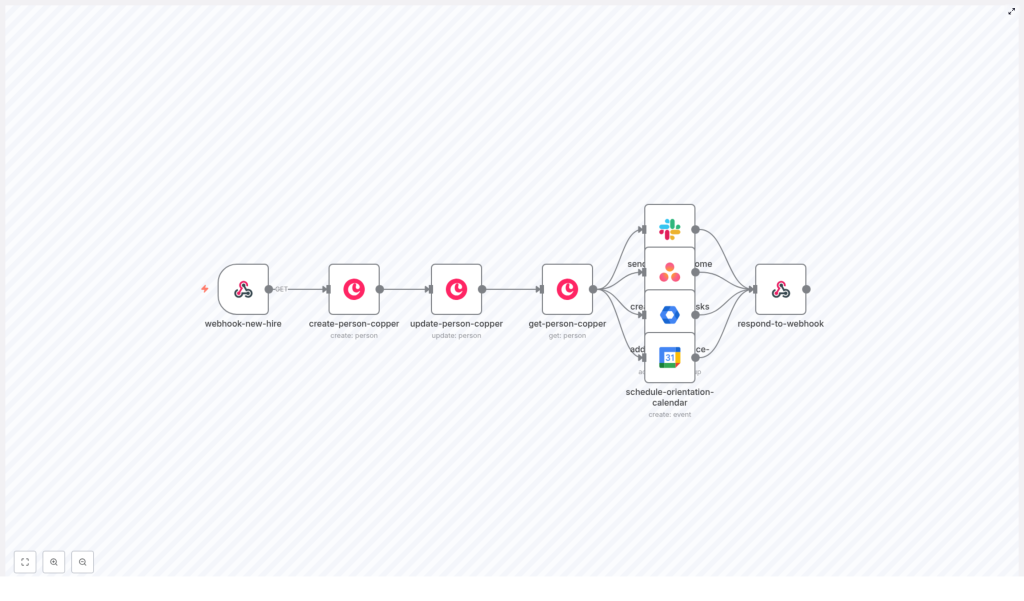
This workflow template connects your HR or form submission to a full onboarding sequence. Here is the high-level flow in plain language:
- A Webhook receives new hire details from your HRIS, ATS, or a form.
- A Copper CRM person is created for the new hire.
- The Copper record is updated with extra fields like phone, title, department, and onboarding status.
- The workflow retrieves the person from Copper to make sure everything is saved correctly.
- A Slack message announces the new hire to your HR or team channel.
- An Asana task is created to manage the onboarding checklist.
- The new hire is added to a Google Workspace group for new employees.
- A Google Calendar event is scheduled for orientation.
- The workflow responds to the webhook with a JSON success payload.
Key tools this template connects
- Copper CRM – stores the central person record and onboarding-related custom fields.
- Slack – posts welcome and announcement messages.
- Asana – tracks onboarding tasks and checklists.
- Google Workspace Admin – adds the new hire to email groups.
- Google Calendar – creates orientation events.
- n8n Webhook – acts as the entry point for HR apps or forms.
Now let’s unpack each part of the workflow so you know exactly what is happening and where you can customize it.
Step-by-step: Inside the n8n onboarding template
1. Webhook: webhook-new-hire
Everything starts with an n8n Webhook node. It listens for a POST request containing the new hire’s information. Typical fields you will send include:
firstNamelastNameemailphoneroledepartmentmanagerIdstartDate
You will want to secure this endpoint. Use a signed webhook, a secret token in the headers, or an IP allowlist so random callers cannot trigger your onboarding flow.
2. Create a Copper person: create-person-copper
Next, the workflow creates a person record in Copper CRM using the data from the webhook. At a minimum, you map:
- First and last name
- Work email
This becomes the canonical record for the new hire, which is handy if you want to use Copper as a lightweight HR tracking hub or tie onboarding to other processes later.
3. Update Copper with onboarding details: update-person-copper
Right after creating the person, the template updates that same Copper record. It fills in details like:
- Phone number
- Job title or role
- Manager ID
- Department
- A custom field such as
onboarding_status = "In Progress"
Storing onboarding metadata directly in Copper lets you build HR dashboards, run reports, or quickly see where each new hire is in the process.
4. Confirm the Copper record: get-person-copper
Once the record is updated, the workflow retrieves the full person from Copper. This step:
- Makes sure all fields exist and were saved correctly.
- Provides a clean, consistent data structure for downstream nodes.
The returned object usually includes the emails array, custom_fields, id, and name, which other nodes can rely on without having to guess formats.
5. Announce the new hire in Slack: send-slack-welcome
Now for the fun part. The workflow sends a formatted Slack welcome message to your HR channel or a general team channel. The message typically includes:
- The new hire’s name and role
- Email address
- Start date
- Department
You can customize the text, add channel mentions, and use emojis to make it feel more personal and visible. That way, everyone knows who is joining and when.
6. Create onboarding tasks in Asana: create-asana-tasks
To keep the operational side under control, the workflow creates an Asana task in your HR or onboarding project. This task can include:
- A checklist of onboarding items like:
- Workstation setup
- Account creation
- 1:1 with manager
- Training modules
- Paperwork and compliance
- A due date set to the new hire’s
startDate
From there, your HR or People team can track progress and make sure nothing slips through the cracks.
7. Add the new hire to a Google Workspace group: add-to-workspace-group
Using the Google Workspace Admin node, the workflow adds the new hire’s email address to a group such as:
new-employees@company.com
This is perfect for:
- Onboarding email sequences
- Shared resources and docs
- Company-wide announcements
It also keeps your distribution lists automatically in sync with new arrivals.
8. Schedule orientation in Google Calendar: schedule-orientation-calendar
The next step is to create a Google Calendar event for the new hire’s orientation. The node typically:
- Sets the event date to the
startDate - Invites the new hire and HR team members
- Adds a detailed agenda
- Specifies the meeting location or video link
- Enables reminders and notifications
This saves you from manually sending invites and helps ensure orientation is scheduled consistently for every hire.
9. Return a JSON response: respond-to-webhook
Finally, the workflow sends a JSON response back to the original caller. This response confirms that the onboarding steps ran successfully and can include values like:
- The Copper person ID
- The canonical name
- Any other IDs or status flags you want to return
Your HR system, applicant tracking system, or form can then show a confirmation to the user or log the result for future reference.
Example: Sample webhook payload
To trigger the workflow, you send a POST request to your n8n webhook with JSON similar to this:
{  "firstName": "Alex",  "lastName": "Taylor",  "email": "alex.taylor@company.com",  "phone": "+1-555-234-5678",  "role": "Product Manager",  "department": "Product",  "managerId": "mgr_12345",  "startDate": "2025-11-03"
}
Make sure your dates are formatted in ISO style YYYY-MM-DD if your downstream tools or nodes expect that format. It keeps parsing simple and avoids weird date issues later.
Keeping things safe: Security, access, and testing
Secure your webhook and credentials
Since this workflow touches multiple systems, you want to treat it like any other production integration. A few best practices:
- Protect the webhook with a secret token, signed requests, or an IP allowlist.
- Use scoped service accounts for Copper, Slack, Asana, and Google, with only the permissions you actually need.
- Store and rotate API keys using n8n’s credential storage instead of hard-coding them.
Handle errors gracefully
Things will fail occasionally, so it is good to plan for that. You can use n8n’s error handling features to:
- Retry Copper create or update calls if you get 429 or other transient errors.
- Send a Slack alert to a dedicated HR or admin channel if any node fails.
- Log failed payloads to S3, Google Drive, or a database so you can reprocess them later.
Test before you go live
Before you plug this into your real HR process, run it through some test scenarios:
- Use n8n’s active test mode with staging credentials where possible.
- Send realistic sample payloads and verify that records appear correctly in Copper, Asana, Slack, and Google Workspace.
- If you have CI in place, consider adding a simple job that hits the webhook with test data to catch regressions early.
Customization ideas to match your HR process
The template works out of the box, but you will probably want to tweak it to match how your company does onboarding. Here are a few ideas:
- Extend Copper custom fields to track:
- Equipment requests and approvals
- Asset tags for laptops or phones
- Training completion or progress
- Branch onboarding tasks in Asana based on:
- Department (Engineering vs. Sales)
- Role type (manager vs. individual contributor)
- Add conditions so contractors skip steps like:
- Google Workspace group addition
- Certain internal trainings
- Set up probation milestones at 30, 60, and 90 days that automatically:
- Send checklists to managers
- Trigger surveys for new hires
- Connect your HRIS (such as BambooHR or Workday) so onboarding and other lifecycle events all use a single source of truth.
The nice thing about n8n is that you can keep iterating. Start simple, then add branches and conditions as your process matures.
Troubleshooting: What to check when things go wrong
If something does not behave as you expect, here are a few quick checks:
- Slack messages not posting? Double-check the Slack app token, channel permissions, and that the bot is actually a member of the target channel.
- Copper updates failing? Verify that your
custom_field_definition_idvalues match the fields configured in your Copper instance. - Asana or Google nodes complaining? Look at OAuth scopes and consent. Make sure the app has permission to create tasks, manage groups, or create calendar events.
Use n8n’s execution logs and the node output preview to inspect the input and output JSON at each step. It is one of the fastest ways to see where a field is missing or mis-mapped.
When should you use this n8n onboarding template?
This template is a great fit if:
- You already use Copper, Slack, Asana, and Google Workspace.
- You receive new hire data from a form, ATS, or HRIS and want everything else to happen automatically.
- Your team is tired of repeating the same onboarding steps for every single employee.
Even if you only start with a few steps, you can gradually expand the workflow into a full employee lifecycle automation.
Ready to try it? Next steps
If this sounds like the kind of time saver your team needs, getting started is pretty simple:
- Import the provided n8n workflow template into your n8n instance.
- Connect your credentials for Copper, Slack, Asana, and Google Workspace.
- Send a test payload from a staging HR app or a simple REST client.
- Review the results in each connected tool and adjust mappings or messages as needed.
If you want to go a bit further, you can:
- Customize the workflow for contractors, interns, or international hires.
- Add payroll or identity verification integrations.
- Enhance error handling, logging, and audit trails for compliance.
Call to action: Import the n8n template, connect your APIs, and run a test hire today, or get in touch to plan a tailored onboarding automation that matches your exact HR process.
