


In‑Game Event Reminder with n8n & Vector Search
In this guide, you will learn how to implement a robust in‑game event reminder system using n8n, text embeddings, a Supabase vector store, and an Anthropic chat agent. The article breaks down the reference workflow template from the initial webhook trigger through vector storage and retrieval, all the way to automated logging and auditability.
Use Case: Why Automate In‑Game Event Reminders?
Live games increasingly rely on scheduled events, tournaments, and limited‑time activities to maintain player engagement. Managing these events manually or with simple time‑based triggers often leads to missed opportunities, inconsistent messaging, and limited insight into how players interact with event information.
By combining n8n with vector search and conversational AI, you can:
- Automatically ingest and index event data as it is created.
- Answer player questions about upcoming events using semantic search, not just keyword matching.
- Trigger contextual reminders based on event metadata and player queries.
- Maintain a persistent log of decisions and responses for analytics and compliance.
The template described here provides a production‑oriented pattern for building such an in‑game event reminder engine on top of n8n.
High‑Level Architecture of the n8n Workflow
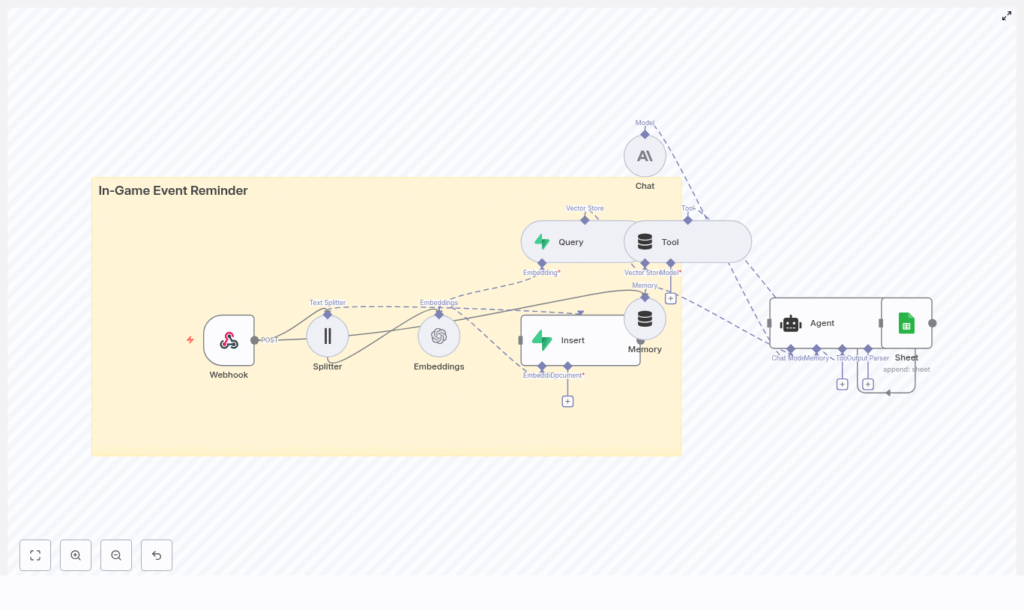
The workflow template connects several components into a single automated pipeline:
- Webhook intake to receive event payloads from your game backend.
- Text processing with a splitter to convert long descriptions into manageable chunks.
- Embeddings generation to transform text chunks into vectors.
- Supabase vector store for persistent storage and semantic retrieval.
- Retriever tool and memory to provide contextual knowledge to the agent.
- Anthropic chat model to drive decision logic and generate responses.
- Google Sheets logging to capture an auditable trail of events and agent outputs.
This architecture enables a loop where event data is ingested once, indexed semantically, and then reused across multiple player interactions and reminder flows.
End‑to‑End Flow: From Event Payload to Logged Response
At runtime, the workflow behaves as follows:
- The game backend or scheduler sends a POST request to the n8n webhook endpoint for new or updated events.
- The incoming text (for example, event title and description) is split into overlapping chunks to preserve semantic continuity.
- Each chunk is converted into a vector embedding using the Embeddings node.
- These vectors are stored in a Supabase index named
in‑game_event_reminderwith relevant metadata. - When a player or system query arrives, the workflow queries the vector store for semantically similar items.
- The retrieved context is exposed as a tool to the Anthropic‑powered agent, together with short‑term memory.
- The agent decides how to respond (for example, send a reminder, summarize upcoming events, or escalate) and returns a message.
- The final decision and response are appended to a Google Sheet for monitoring and audit purposes.
Key n8n Nodes and Their Configuration
Webhook: Entry Point for Event Data
The Webhook node serves as the public interface for your game services.
- Path:
in‑game_event_reminder - Method: POST (recommended)
Use this endpoint as the target for your game backend or job scheduler when a new in‑game event is created, updated, or canceled. For production use, do not expose the webhook without protection. Place it behind an API gateway or authentication layer and validate requests using HMAC signatures or API keys before allowing them into the workflow.
Text Splitter: Preparing Content for Embeddings
Long descriptions and lore documents need to be split into smaller segments so that embeddings and vector search remain efficient and semantically meaningful. The template uses the Text Splitter node with the following configuration:
chunkSize = 400chunkOverlap = 40
This configuration provides a balance between context preservation and storage efficiency. For shorter event descriptions, you can reduce chunkSize. For long, narrative‑style content, maintaining a small chunkOverlap helps keep references and context consistent across chunks.
Embeddings Node: Converting Text to Vectors
The Embeddings node transforms each text chunk into a numeric vector suitable for similarity search. The template uses the default embeddings model in n8n, but in a production environment you should choose a model aligned with your provider, latency requirements, and cost constraints.
Key considerations:
- Use a single, consistent embeddings model for all stored documents to ensure comparable similarity scores.
- Document any custom parameters (such as dimensions or normalization) so that downstream services remain compatible.
Supabase Vector Store: Insert Operation
Once embeddings are generated, they must be persisted in a vector database. The template uses Supabase with pgvector enabled.
- Node mode:
insert - Index name:
in‑game_event_reminder
Before using this node, ensure that:
- Your Supabase project has pgvector configured.
- The table backing the
in‑game_event_reminderindex contains fields for:- Vector embeddings.
- Event identifiers.
- Timestamps.
- Any additional metadata such as event type, region, or platform.
Storing rich metadata enables more refined filters and advanced analytics later on.
Vector Query and Tool: Retrieving Relevant Context
When the agent needs contextual knowledge, the workflow uses a Query node to search the Supabase index for nearest neighbors to the current query.
The Query node:
- Accepts embeddings derived from the user or system query.
- Returns the top‑k most similar vectors along with their associated metadata.
The Tool node then wraps this vector search as a retriever that the agent can call as needed. This pattern is particularly useful when you want the agent to decide when to consult the knowledge base rather than always injecting context manually.
Memory: Short‑Term Conversational Context
The Memory node is configured as a buffer window that maintains a short history of the interaction. This helps the agent:
- Track the flow of a conversation across multiple turns.
- Reference previous questions or clarifications from the player.
- Avoid repeating information unnecessarily.
By combining memory with vector retrieval, the agent can respond in a way that feels both context‑aware and grounded in the latest event data.
Anthropic Chat Model and Agent: Decision Logic
The Anthropic chat node powers the language understanding and generation capabilities of the agent. The Agent in n8n orchestrates:
- The Anthropic chat model for reasoning and response generation.
- The vector store tool for on‑demand knowledge retrieval.
- The memory buffer for conversational continuity.
Typical responsibilities of the agent in this template include:
- Determining whether a reminder should be sent for a given event.
- Choosing the appropriate level of detail or tone for the response.
- Identifying when an issue should be escalated or logged for manual review.
Google Sheets: Logging and Audit Trail
To maintain observability and traceability, the workflow appends every relevant interaction to a Google Sheet.
- Operation:
append - Document ID:
SHEET_ID - Sheet name:
Log
This provides a human‑readable record of:
- Incoming events and queries.
- Agent decisions and generated messages.
- Timestamps and other metadata.
While Google Sheets is convenient for prototypes and low‑volume deployments, you should consider a dedicated logging database or data warehouse for production workloads.
Example Scenario: Handling a Tournament Reminder
To illustrate how the template operates, consider a weekend tournament in your game:
- Your backend posts a payload to the webhook with fields such as event title, start time, and description.
- The workflow splits the description into chunks, generates embeddings, and inserts them into the Supabase index.
- Later, a player asks, “What events are happening this weekend?” through an in‑game interface or chat channel.
- The agent converts this question into an embedding and uses the Query node and tool to fetch the most relevant stored events.
- Using the retrieved context and memory, the Anthropic chat model composes a concise, player‑friendly summary of upcoming events.
- The response and associated metadata are appended to the Google Sheet for later analysis.
This pattern generalizes to daily quests, seasonal content, live events, or any in‑game activity that benefits from timely, contextual reminders.
Security, Privacy, and Operational Best Practices
When deploying an automation workflow that touches live game data and player interactions, security and governance are critical.
- Secure the webhook: Validate all incoming requests with signatures or API keys. Reject unauthenticated or malformed payloads.
- Control sensitive data: Avoid storing personally identifiable information (PII) in embeddings or vector metadata unless there is a clear policy, encryption in place, and a valid legal basis.
- Rotate credentials: Regularly rotate API keys for Anthropic, OpenAI (if used), Supabase, and Google Sheets.
- Manage vector growth: Monitor vector index size and embedding costs. Implement retention rules to remove outdated or low‑value vectors periodically.
- Audit agent behavior: Keep logs of agent decisions and responses. Use Google Sheets or a logging backend to support debugging, compliance, and model evaluation.
Scalability and Performance Considerations
As your player base and event volume grow, the performance characteristics of your workflow become increasingly important.
- Batch embeddings: When ingesting large numbers of events, batch embedding requests where possible to reduce API overhead and latency.
- Use upserts: For frequently updated events, use incremental inserts or upserts in Supabase to prevent duplicate vectors and maintain a clean index.
- Optimize vector search: If query latency increases, consider sharding your vectors, tuning Supabase indexes, or migrating to a specialized vector database such as Pinecone or Weaviate while preserving the same retrieval pattern.
- Introduce caching: Cache popular queries (for example, “today’s events” or “weekend schedule”) to serve responses quickly and reduce repeated vector queries.
Testing and Debugging the Workflow
Before exposing the workflow to production traffic, validate it thoroughly using n8n desktop or a Dockerized n8n instance.
Key areas to test:
- Webhook behavior: Confirm that only authenticated requests are accepted and that payloads are parsed correctly.
- Chunking quality: Inspect how the Text Splitter divides content and verify that each chunk remains semantically coherent.
- Embedding stability: Run the same text through the Embeddings node multiple times and confirm that vectors are consistent within expected tolerances.
- Query parameters: Tune the number of neighbors (k) and similarity thresholds to achieve high‑quality retrieval without irrelevant noise.
- Agent prompts: Iterate on system and user prompts used with the Anthropic chat model to ensure safe, consistent, and on‑brand responses for your player base.
Extending and Customizing the Template
The reference workflow is intentionally flexible and can be adapted to various game architectures and communication channels.
- Multi‑language support: Use multilingual embeddings models or language detection to route content to language‑specific pipelines, so players receive reminders in their preferred language.
- Additional notification channels: Integrate with push notifications, email, Discord, or in‑game UI messaging systems to deliver reminders through multiple touchpoints.
- Advanced analytics: Forward logs to a BI platform or data warehouse to track engagement metrics, reminder effectiveness, and event participation over time.
- Automated pruning: Implement scheduled jobs that score vectors by recency and relevance, then remove stale data to control storage and maintain search quality.
Deployment Checklist
Before going live, verify the following configuration steps:
- Harden the webhook endpoint and confirm that all external credentials are stored securely.
- Configure Supabase with pgvector, create the
in‑game_event_reminderindex, and validate the table schema and metadata fields. - Set environment variables for Anthropic, OpenAI (if applicable), Supabase, and Google Sheets API keys in your n8n environment.
- Run end‑to‑end tests using representative event payloads and realistic player queries.
- Set up monitoring and alerts for API usage, database performance, and cost anomalies.
Conclusion and Next Steps
This n8n workflow template offers a practical foundation for building a context‑aware in‑game event reminder system powered by semantic search and conversational AI. By orchestrating webhook intake, text splitting, embeddings, Supabase vector storage, and an Anthropic agent with memory, you gain a scalable solution that can adapt across different game genres and live‑ops strategies.
To start using this pattern in your own environment, import the template into n8n, configure your API keys and Supabase vector index, and run a set of test events that mirror your production scenarios. From there, you can extend the workflow with custom channels, analytics, and governance features tailored to your studio’s needs.
Call to action: Import this template into your n8n instance, connect your Supabase and Anthropic/OpenAI credentials, and begin automating in‑game event reminders. Subscribe for additional automation patterns and deep‑dive guides for game developers and live‑ops teams.
