


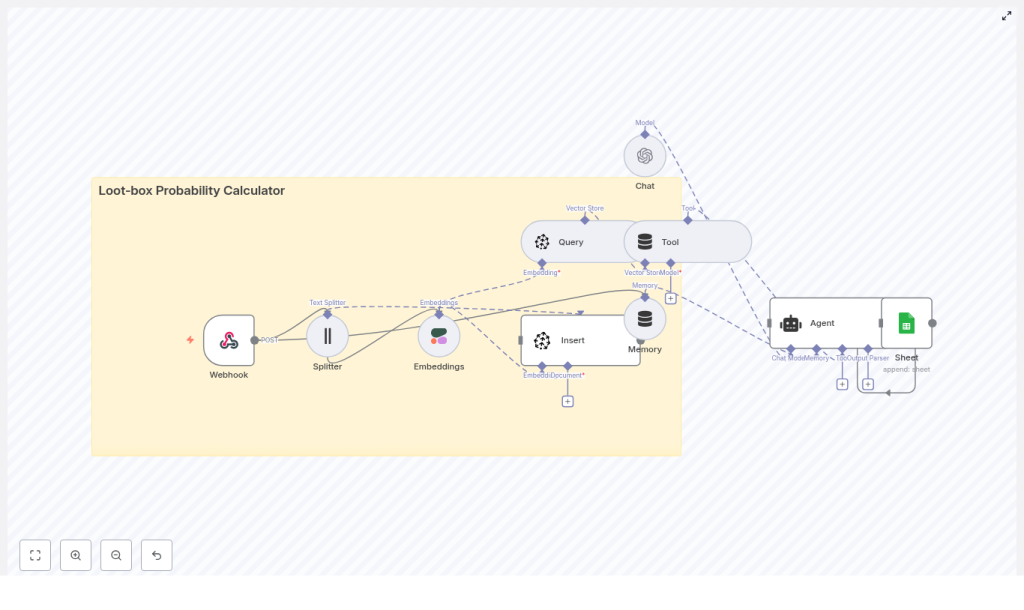
Loot-box Probability Calculator with n8n
Follow the story of a game designer who turns confusing loot-box math into a clear, automated system using an n8n workflow, vector search, and an AI agent that logs and answers probability questions on demand.
The designer, the angry players, and the missing math
By the time Mia opened her inbox that Monday morning, she already knew what she would find.
Her studio had just rolled out a new gacha system in their mobile RPG. The art was beautiful, the animation felt great, and the sound effects were perfect. Yet the support tickets all sounded the same:
- “What are my chances of getting at least one rare after 20 pulls?”
- “How many pulls do I need for a 90% chance at a legendary?”
- “Is there a pity system or not? How does it really work?”
Mia was the lead systems designer. She knew the drop rates. She could scribble the formulas on a whiteboard. But every time a new event launched, she found herself manually calculating probabilities in a spreadsheet, copying formulas, double checking exponents, and trying to translate all of it into language players and product managers would understand.
She kept thinking the same thing: this should not require a late-night spreadsheet session every single time.
What she needed was a loot-box probability calculator that could explain the math, stay consistent with the official rules, and be easy to plug into chatbots, dashboards, or internal tools. Most of all, she wanted something reproducible and auditable, so nobody had to wonder how she got to a number.
The discovery: an n8n template built for loot-box math
One afternoon, while searching for ways to connect their game backend with a more flexible automation layer, Mia stumbled on an n8n template for a loot-box probability calculator.
It promised exactly what she had been trying to hack together by hand:
- A webhook endpoint to accept probability questions or raw playtest logs
- Text splitting and embedding generation using Cohere, so she could feed in design docs and rules
- A Pinecone vector store to index and search those rules and past logs
- An AI agent using OpenAI that could read the rules, parse a question, compute the probability, and explain it clearly
- Google Sheets logging so every question and answer was stored for analytics and review
Instead of another fragile spreadsheet, this was an automated, explainable workflow. If she could wire it into her tools, anyone on the team could send a question and get a trustworthy answer in seconds.
Rising tension: when loot-box questions never stop
Before she adopted the template, Mia’s week looked like this:
- Product managers asking, “Can we say 40% or 45% chance in the event banner?”
- Community managers pinging her for “player friendly” explanations every time a patch note mentioned drop rates.
- Analysts needing a clean log of all probability assumptions for compliance and internal reviews.
Every answer required the same pattern: figure out the math, find the latest rules, interpret any pity system or guarantees, then translate all of it into clear language. She knew that a small mistake in a formula or a misread rule could damage player trust.
That pressure is what pushed her to test the n8n loot-box probability calculator template. If it worked, she could move from manual math and ad-hoc explanations to a structured system that combined deterministic formulas with AI-powered explanations.
How Mia wired the loot-box calculator into her workflow
Mia decided to walk through the n8n template step by step and adapt it to her game. Instead of treating it as a dry checklist, she imagined how it would feel as a player or teammate sending questions to an automated “loot-box oracle.”
Step 1 – The Webhook as the front door
First, she configured the Webhook node. This node would receive incoming POST requests with either:
- A direct probability query, or
- Raw event logs or design notes to store for later reference
For a typical question, the payload looked like this:
{  "type": "query",  "p": 0.02,  "n": 20,  "goal": "at_least_one"
}
That single endpoint became the front door for everyone who needed an answer. Support, analytics, internal tools, or even a game UI could send questions there.
Step 2 – Splitting design docs and creating embeddings
Mia’s loot-box system had plenty of edge cases, like event-only banners, rotating pools, and a pity system that guaranteed a legendary after a certain number of pulls. She wanted the AI agent to respect those rules.
To do that, she wired in the Splitter and Embeddings nodes:
- The Splitter broke long texts, such as design docs or conversation transcripts, into smaller chunks.
- The Embeddings node used Cohere to convert each chunk into a vector embedding.
These embeddings captured the meaning of her rules. Later, the AI agent could search them to understand specific details, like whether an open pool had a pity system or how guarantees stacked over time.
Step 3 – Storing and querying rules with Pinecone
Next, she connected to Pinecone as a vector store.
Every chunk of rule text or log data was inserted into a Pinecone index through the Vector Store Insert node. When a new question came in, a Vector Store Query node would search that index to retrieve the most relevant pieces of information.
This meant that the AI agent never had to guess how the game worked. It could always ground its reasoning in the official rules, such as:
- Whether certain banners had higher legendary rates
- How pity counters reset
- What counted as a “rare” or “legendary” in each pool
Step 4 – Memory and the AI agent as the “explainer”
Now Mia wanted the system to handle follow-up questions, like a player asking:
- “Ok, what about 50 pulls?”
- “How many pulls for 90% then?”
To support that, she enabled a Memory buffer inside the workflow. This memory stored recent interactions so the context of a conversation would not be lost.
Then she configured the Agent node using an OpenAI chat model. The agent received:
- The parsed input from the webhook
- Relevant documents from Pinecone
- Recent context from the memory buffer
Its job was to:
- Interpret the question (for example, “chance of at least one success” vs “expected number of legendaries”)
- Apply the correct probability formulas
- Format a human friendly explanation that Mia’s team could show to players or stakeholders
Step 5 – Logging everything to Google Sheets
Finally, Mia wanted a clear audit trail. If someone asked, “How did we get this number for that event?” she needed to show the exact question, the math, and the answer.
She connected a Google Sheets node and configured it so that every incoming request and every agent response was appended as a new row. Over time, that sheet became:
- A log of all probability queries
- A dataset for analytics and tuning
- A simple way to review edge cases and refine prompts
The math behind the magic: core loot-box probability formulas
Although the workflow used an AI agent for explanations, Mia insisted that the underlying math be deterministic and transparent. She built the system around a few core formulas, which the agent could reference and explain.
- Chance of at least one success in n independent trials:
1 - (1 - p)^n - Expected number of successes in n trials:
n * p - Expected trials until first success (geometric distribution mean):
1 / p - Negative binomial (trials to reach k successes, mean):
k / p
For example, when a colleague asked about a legendary with a single-pull drop rate of p = 0.01 over 50 pulls, the workflow produced:
1 - (1 - 0.01)^50 ≈ 1 - 0.99^50 ≈ 0.395About 39.5% chance of getting at least one legendary in 50 pulls. The agent then wrapped this in a plain language explanation that anyone on the team could understand.
The turning point: sending the first real queries
With the template configured, Mia was ready to test it with real questions instead of hypothetical ones.
She opened a REST client and sent a webhook POST request to the n8n endpoint:
{  "type": "query",  "single_pull_prob": 0.02,  "pulls": 30,  "question": "What is the chance to get at least one rare item?"
}
Within seconds, the agent responded with something like:
{  "result": "1 - (1 - 0.02)^30 = 0.452",  "explanation": "About 45.2% chance to get at least one rare in 30 pulls."
}
She checked the math. It was correct. The explanation was clear. The request and response were logged in Google Sheets, and the agent had pulled relevant notes on how the “rare” tier was defined from her design documentation stored in Pinecone.
For the first time, she felt that the system could handle the repetitive probability questions that had been eating her time for months.
What Mia needed in place before everything clicked
To get to this point, Mia had to prepare a few essentials. If you follow her path, you will want the same prerequisites ready before importing the template.
- An n8n instance, either cloud hosted or self hosted
- An OpenAI API key for the chat model used by the agent
- A Cohere API key for generating embeddings, or an equivalent embedding provider
- A Pinecone account and index for vector storage
- A Google account with Sheets API credentials to log all requests and responses
Once she had these, she set credentials in n8n for each external service, imported the workflow JSON template, and tweaked:
- Chunk sizes in the Splitter node, based on how long her design documents were
- Embedding model settings, balancing accuracy with token and cost considerations
How she kept the calculator robust and trustworthy
Mia knew that even a powerful workflow could mislead people if inputs were messy or rules were unclear. So she added a layer of practical safeguards and best practices around the template.
Input validation and edge cases
- She validated that probabilities were in the range
(0, 1]and that the number of pulls was a nonnegative integer. - For pity systems, she modeled guarantees explicitly. For example, if a legendary was guaranteed at pull 100, she treated probabilities as piecewise, with a separate logic for pulls below and above that threshold.
Cost control and caching
- She watched embedding and chat token usage, since those could add up in a live system.
- For frequent or identical queries, she cached results and reused them instead of recomputing every time.
Explainability and transparency
- Every response included the math steps, which were logged to Google Sheets.
- Designers and analysts could review those steps to verify the agent’s reasoning or adjust formulas if needed.
Security and data handling
- She avoided sending any personally identifiable information to embedding or LLM providers.
- Where sensitive data might appear, she filtered or anonymized fields in n8n before they reached external APIs, in line with the studio’s data policy.
When things broke: how she debugged the workflow
Not everything worked perfectly on the first try. During setup, Mia hit a few common problems that you might encounter too.
- Webhook not firing
She discovered that the incoming requests were not usingPOSTor that the URL did not match the one n8n generated. Fixing the method and endpoint path solved it. - Embeddings failing
A missing or incorrect Cohere API key caused errors. In other cases, the input text was empty because an earlier node did not pass data correctly. Once she fixed the credentials and ensured nonempty chunks, embeddings worked reliably. - Vector store errors
Pinecone complained when the index name in the workflow did not match the one in her account or when she exceeded her quota. Aligning the index configuration and checking quotas resolved this. - Agent making incorrect statements
When the agent occasionally made loose approximations, she tightened prompt engineering and, for critical calculations, added a Function node inside n8n to compute probabilities deterministically. The agent then focused on explanation, not on inventing math.
Beyond the basics: how Mia extended the template
Once the core calculator was stable, Mia started to see new possibilities. The template was not just a one-off tool, it was becoming part of the game’s analytics and UX.
- She exposed an API endpoint to the game UI so players could see live probability estimates per pull or per banner.
- For larger scale analytics, she experimented with sending logs to a data warehouse such as BigQuery instead of, or in addition to, Google Sheets.
- She added player specific modifiers, like bonuses or pity counters, stored in a database and read by the workflow. The agent could then factor in a specific player’s state when answering questions.
- Her analytics team used the log data to run A/B tests and track how changes to drop rates affected player behavior over time.
The resolution: from late-night spreadsheets to a reliable system
Months later, Mia hardly touched her old probability spreadsheets.
Support teams could hit the webhook, get a clear answer, and paste the explanation into responses. Product managers could sanity check event banners by sending a quick query. Analysts had a full history of all probability questions and answers in a single place.
The n8n loot-box probability calculator template gave her exactly what she needed:
- A repeatable and auditable way to answer loot-box questions
- Deterministic math combined with AI assisted explanations
- A workflow that was easy to extend with new rules, pools, or systems
If you design or analyze gacha systems, or even if you are a curious player who wants clear answers, this setup can turn opaque probabilities into transparent, shareable insights.
