


Mastering the n8n HTTP Request Node: Splitting, Scraping, and Pagination at Scale
The HTTP Request node is a foundational component in n8n for building robust, production-grade automations. It acts as the primary interface between your workflows and external systems, whether you are consuming REST APIs, scraping HTML pages, or iterating through large, paginated datasets.
This article walks through a practical n8n workflow template that demonstrates three advanced patterns with the HTTP Request node:
- Splitting JSON API responses into individual items for downstream processing
- Scraping and extracting structured data from HTML pages
- Implementing reliable pagination loops for multi-page endpoints
The goal is to move beyond simple requests and show how to combine HTTP Request with nodes like Item Lists, HTML Extract, Set, and If to create maintainable, scalable automations.
The Role of the HTTP Request Node in n8n Architectures
From a system design perspective, the HTTP Request node is your general-purpose integration gateway. It supports:
- Standard HTTP methods such as GET, POST, PUT, PATCH, and DELETE
- Authenticated calls using headers, API keys, OAuth, and more
- Flexible response handling, including JSON, text, and binary data such as HTML or files
When combined with complementary nodes, it enables:
- Item-level processing using Item Lists, Set, and Function nodes
- Conditional logic and branching using If nodes
- Advanced parsing and extraction using HTML Extract for web pages
The workflow template described below illustrates how to orchestrate these capabilities in a single, coherent automation.
Workflow Template Overview
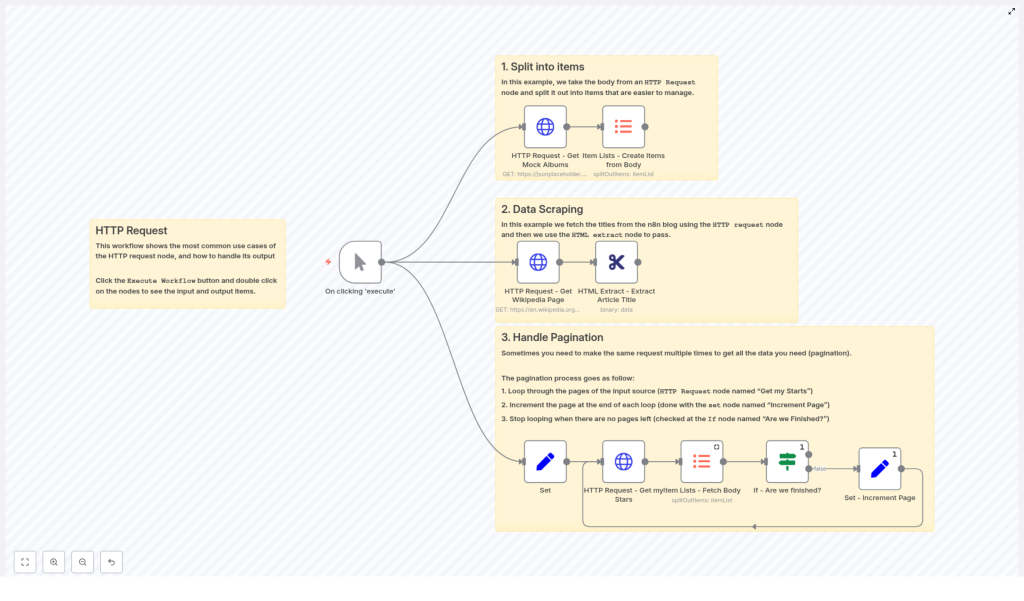
The reference workflow, available as an n8n template, is organized into three distinct sections, each focused on a common integration pattern:
- Split API responses into items using HTTP Request and Item Lists
- Scrape and extract HTML content using HTTP Request and HTML Extract
- Implement pagination loops using Set, HTTP Request, Item Lists, and If
Each section is independent, so you can reuse the patterns individually or combine them in your own workflows. The following sections break down each pattern, configuration details, and best practices for automation professionals.
Pattern 1: Splitting JSON API Responses into Items
Use Case: Processing Arrays Returned by APIs
Many APIs return data as an array of objects in the response body. To process each object independently in n8n, you should convert that array into separate items. This enables item-by-item transformations, conditionals, and integrations without manual scripting.
In the template, this pattern is demonstrated with a simple GET request to a mock API:
https://jsonplaceholder.typicode.com/albums
The HTTP Request node retrieves a JSON array of album objects, and the Item Lists node is then used to split that array into individual workflow items.
Node Configuration: HTTP Request → Item Lists
- HTTP Request node
- Method:
GET - URL:
https://jsonplaceholder.typicode.com/albums - Response Format: JSON
- If you require headers, status codes, or raw body, enable the Full Response option.
- Method:
- Item Lists node (Create Items from Body)
- Operation: Create Items from List (or equivalent option in your n8n version)
- Field to split: typically
bodyor a JSON path to the array, for examplebodyif the response is a top-level array - Result: each element of the array becomes a separate item for downstream nodes
Why Splitting into Items is a Best Practice
Splitting arrays early in the workflow promotes a clean, item-centric design:
- Mapping fields in Set or other integration nodes becomes straightforward
- If nodes can evaluate conditions per record, not per batch
- Function nodes can operate on a single item context, reducing complexity
This approach aligns well with n8n’s data model and improves maintainability for large or evolving workflows.
Pattern 2: Scraping and Extracting Data from HTML Pages
Use Case: Structured Data from Websites without APIs
In many real-world scenarios, the data you need is only exposed via HTML pages, not via a formal API. n8n can handle this by retrieving the HTML as binary data and then applying CSS or XPath selectors to extract specific elements.
The template uses a random Wikipedia article as a demonstration target:
https://en.wikipedia.org/wiki/Special:Random
The workflow fetches this page and then extracts the article’s title element using the HTML Extract node and the selector #firstHeading.
Node Configuration: HTTP Request → HTML Extract
- HTTP Request node
- Method:
GET - URL:
https://en.wikipedia.org/wiki/Special:Random - Response Format: File or Binary so that the HTML is handled as binary data
- Method:
- HTML Extract node
- Input: binary HTML data from the HTTP Request node
- Selector type: CSS selector or XPath
- Example selector:
#firstHeadingto extract the main article title on Wikipedia - Output: structured fields containing the text or attributes you selected
Operational Best Practices for Web Scraping
- Compliance: Always review and respect the target site’s
robots.txtfile and terms of service. Unauthorized scraping can be disallowed. - Rate limiting: Use Wait nodes or custom throttling logic to space out requests and avoid overloading the site.
- Headers and user agents: Set appropriate headers, such as a descriptive User-Agent string, to identify your integration transparently.
- Selector validation: Test CSS or XPath selectors in your browser’s developer tools before finalizing them in n8n.
By encapsulating scraping logic in a dedicated sub-workflow or segment, you can reuse it across multiple automations while keeping compliance and performance under control.
Pattern 3: Implementing Robust Pagination Loops
Use Case: Iterating Through Multi-page API Responses
Most production APIs limit the number of records returned per request and expose a pagination mechanism. To retrieve complete datasets, your workflow must iterate until there are no more pages available. The template includes a simple yet reliable loop that illustrates this pattern.
The example scenario uses GitHub’s starred repositories endpoint with typical page-based parameters:
per_pageto control the number of items per pagepageto specify the current page index
Core Loop Structure
The pagination loop in the workflow uses the following nodes:
- Set – Initialize Page: defines initial variables such as
page,perpage, andgithubUser - HTTP Request: sends a request for the current page using these variables in the query string
- Item Lists: splits the response body into individual items
- If node: checks whether the response is empty and decides whether to continue or stop
- Set – Increment Page: increases the page number and loops back to the HTTP Request node
Step-by-step Configuration
- Initialize page state using a Set node:
page = 1perpage = 15githubUser = 'that-one-tom'
- Build the request URL in the HTTP Request node using n8n expressions, for example:
?per_page={{$node["Set"].json["perpage"]}}&page={{$node["Set"].json["page"]}} - Extract items with the Item Lists node so each element from the response body becomes an individual item.
- Evaluate continuation in an If node:
- Condition: check whether the HTTP response body is empty or contains no items
- If empty: terminate the loop
- If not empty: proceed to increment the page
- Increment page in a Set node, for example:
page = $json["page"] + 1or equivalent expression
This pattern creates a controlled loop that continues until the API stops returning data.
Common Pagination Strategies and How to Handle Them
Not all APIs use the same pagination model. Typical approaches include:
- Page-based pagination
- Parameters:
pageandper_pageor similar - Implementation: similar to the GitHub example, increment page until no data is returned
- Parameters:
- Cursor-based pagination
- API returns a cursor or token such as
next_cursorin the response - Workflow stores this cursor in a Set node and passes it back in the next HTTP Request
- API returns a cursor or token such as
- Link header pagination
- Next and previous URLs are provided in the HTTP
Linkheader - Use the HTTP Request node with Full Response enabled to read headers and follow the
nextlink until it is no longer present
- Next and previous URLs are provided in the HTTP
Implementation and Reliability Tips
- Stop conditions: base loop termination on explicit signals, such as an empty body, missing
nextlink, or null cursor, rather than assumptions. - Rate limits: honor provider limits by:
- Adding delays between pages
- Implementing exponential backoff on 429 or 5xx responses
- Inspecting rate limit headers such as
X-RateLimit-Remainingwhen available
- Observability: log key metrics such as current page, item counts, and error messages to support debugging and partial re-runs.
Advanced HTTP Request Techniques and Troubleshooting
For production workflows, you often need more control over authentication, error handling, and response formats. The following practices help harden your HTTP-based integrations.
- Authentication
- Use built-in n8n credentials for OAuth, API keys, or token-based auth where possible.
- Set custom headers (for example,
Authorization,X-API-Key) directly in the HTTP Request node if needed.
- Error handling and retries
- Use the Error Trigger node for centralized failure handling.
- Implement If nodes around HTTP Request to branch on status codes or error messages.
- Add retry logic or backoff patterns for transient failures.
- Choosing between JSON and binary
- Use JSON for structured API responses that you want to map and transform.
- Use Binary for HTML pages, files, or other non-JSON payloads that will be processed by nodes such as HTML Extract or Binary data transformers.
- Full Response mode
- Enable Full Response when you need access to status codes, headers, or raw body data for advanced logic, such as pagination using headers or conditional branching based on HTTP status.
- Interactive debugging
- Run the workflow step-by-step and inspect node input and output to validate expressions, selectors, and transformations.
- Use sample items to refine mapping before scaling the workflow.
Sample n8n Expression for Page-based Queries
The following snippet illustrates how to construct a GitHub API request using n8n expressions for page-based pagination:
// Example: page-based query parameters in n8n expression
https://api.github.com/users/{{$node["Set"].json["githubUser"]}}/starred?per_page={{$node["Set"].json["perpage"]}}&page={{$node["Set"].json["page"]}}
This pattern generalizes to many APIs that accept similar query parameters for pagination.
Conclusion: Building Production-ready HTTP Integrations in n8n
By combining the HTTP Request node with Item Lists, HTML Extract, Set, and If, you can construct highly flexible workflows that:
- Split API responses into granular items for detailed processing
- Scrape and extract structured data from HTML pages when no API is available
- Iterate safely through paginated endpoints until all records are retrieved
Use the template as a reference implementation: start with splitting responses, then layer in HTML extraction and pagination logic as your use cases demand. Validate each segment independently, then integrate them into your broader automation architecture.
If you are integrating with APIs such as GitHub, Stripe, or Shopify, you can adapt these patterns directly by adjusting URLs, parameters, and authentication settings.
Call to action: Open n8n, import or recreate this workflow, and test each node step-by-step. For a downloadable version of the template or assistance tailoring it to your specific APIs and infrastructure, reach out for expert support.
