


Match Interviewers With Contacts in n8n (Step-by-Step Tutorial)
Recruiting and HR teams often need to connect interview records from one system with people profiles stored in another. This tutorial walks you through an n8n workflow template that does exactly that.
You will learn:
- Why matching interviewer IDs with contact records is important
- How the sample n8n workflow is structured
- Why a simple Merge node can fail when working with arrays
- How to use a Function node to reliably match multiple interviewers per interview
- How to troubleshoot and extend this pattern in your own automations
The goal is to give you a clear, instructional walkthrough so you can confidently adapt this pattern to your own n8n workflows.
1. Why match interviewers with contacts in n8n?
Most interview scheduling tools store interviews with only basic identifiers, such as an interviewer ID. At the same time, your people directory (like Airtable, an HRIS, or a CRM) holds the rich profile data you actually want to use:
- Full name
- Job title
- Photo URL
- Employee ID (eid)
By matching interview records to people records, you unlock powerful automation use cases:
- Show interviewer photos and job titles in calendar invites
- Send enriched email or Slack notifications with real names instead of IDs
- Build reports that connect interview activity to employee metadata
In n8n, this requires joining two data sources: interviews and people. The template you are working with demonstrates one way to do this and then introduces a more robust alternative.
2. Understanding the sample n8n workflow
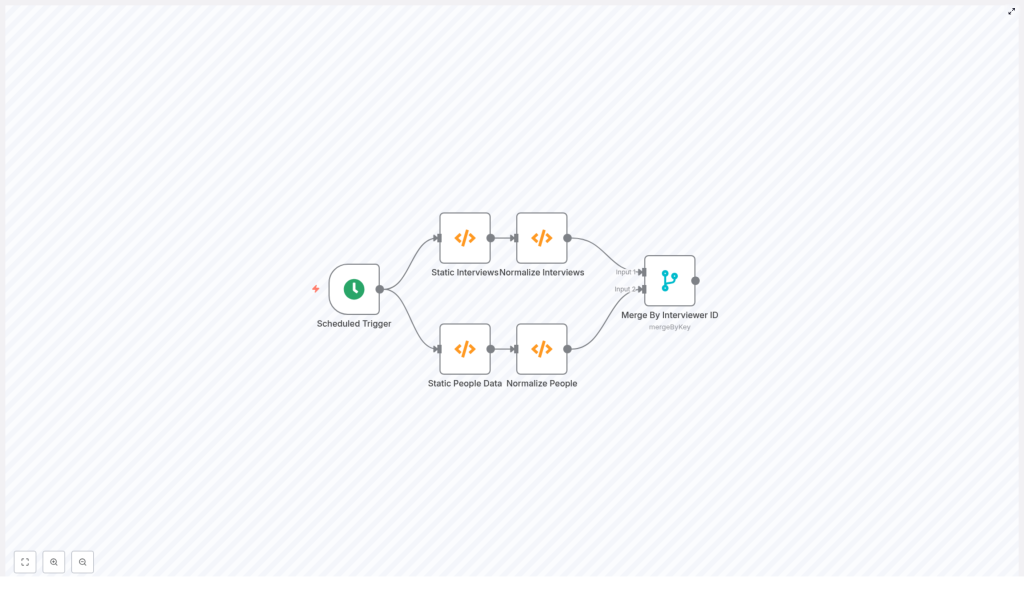
Before we improve the workflow, it helps to understand the basic structure of the example provided. The sample n8n workflow includes the following nodes:
- Scheduled Trigger – Starts the workflow on a schedule.
- Static Interviews (Function) – Provides a sample interview payload with an
interviewers[]array. - Static People Data (Function) – Provides a sample people array, where each record has
fields.eidas an identifier. - Normalize Interviews – Converts
interviews.datainto multiple n8n items, one item per interview. - Normalize People – Converts the people array into multiple n8n items, one item per person.
- Merge By Interviewer ID – Tries to match interview items with people items by comparing
interviewers[0].idtofields.eid.
This design can work under one strict condition: each interview must have exactly one interviewer, and that interviewer must always be at interviewers[0].
In real systems, interviews often involve several interviewers. Once you have multiple entries in interviewers[], the Merge node configuration becomes fragile.
3. Why the Merge node is brittle for array-based keys
The Merge node in n8n is useful when you can rely on simple, direct key comparisons. However, when keys are buried inside arrays, like interviewers[], several problems appear.
3.1 Limitation of fixed property paths
- A path such as
interviewers[0].idonly ever looks at the first interviewer. - If an interview has multiple interviewers, only the first one is considered. Others are completely ignored.
This means that if the “correct” interviewer is at index 1 or 2, the Merge node will not find it.
3.2 Strict key matching rules
The Merge node in mergeByKey mode compares specific properties from the two input streams:
- If a property path does not exist on an item, that item will not match.
- If types differ (for example, number vs string) or there is extra whitespace, the comparison fails.
- The Merge node does not iterate through arrays to find “any matching element” inside them.
So if your requirement is “match any interviewer in interviewers[] with a person whose fields.eid matches the ID”, the Merge node alone is not flexible enough.
To handle this pattern safely, you typically need a Function node that can:
- Loop through all interviewers in an interview
- Normalize identifiers (for example, convert to strings and trim)
- Attach the full person record when a match is found
4. Recommended pattern: use a Function node for flexible matching
Instead of relying on a Merge node with fragile array indexing, you can:
- Normalize interviews and people into two clean data sets.
- Feed both into a single Function node.
- Inside the Function node, build a lookup table of people keyed by
eid. - Loop through each interview and every interviewer in
interviewers[]. - Attach the matched person record to each interviewer entry.
This approach has several advantages:
- Supports any number of interviewers per interview
- Handles IDs as strings or numbers, with or without whitespace
- Lets you enrich each interviewer with extra profile data, such as job title or photo URL
- Avoids Merge node edge cases where some items silently fail to join
5. Step-by-step: building the Function node solution
In this section, you will see the Function node code and a breakdown of what it does. You can paste this directly into an n8n Function node that receives two inputs:
- Input 1 – An object with
datacontaining an array of interviews. - Input 2 – An array of people records with
fields.eid.
5.1 Function node code
// Input: items[0] = { json: { data: [...] } } (interviews)
//  items[1] = { json: [...] } (people)

const interviews = items[0].json.data || [];
const people = items[1].json || [];

// Build lookup by eid (string normalized)
const peopleByEid = {};
for (const p of people) {  const eid = (p.fields && p.fields.eid != null) ? String(p.fields.eid).trim() : null;  if (eid) peopleByEid[eid] = p;
}

const output = [];
for (const interview of interviews) {  // deep clone interview to avoid mutation  const cloned = JSON.parse(JSON.stringify(interview));  // Ensure interviewers is an array and normalize each one  cloned.interviewers = (cloned.interviewers || []).map(iv => {  const id = (iv.id != null) ? String(iv.id).trim() : null;  const person = id ? (peopleByEid[id] || null) : null;  // attach matched person record under `person` key  return Object.assign({}, iv, { person });  });  output.push({ json: cloned });
}

return output;
5.2 What the Function node does, step by step
- Read the inputs
interviewsis taken fromitems[0].json.dataandpeoplefromitems[1].json. If either is missing, it falls back to an empty array. - Create a people lookup table
It loops over every person record and builds a dictionary calledpeopleByEidwhere the key is a normalizedeid:- Converts
fields.eidto a string - Trims whitespace
- Stores the full person object using that normalized key
- Converts
- Clone each interview
For each interview, it creates a deep clone usingJSON.parse(JSON.stringify(...)). This prevents accidental mutation of the original input data. - Loop through all interviewers
It ensurescloned.interviewersis an array, then uses.map()to process each interviewer:- Normalizes
iv.idto a trimmed string. - Looks up the corresponding person record in
peopleByEid. - Returns a new interviewer object that includes a
personproperty.
- Normalizes
- Attach person data or null
If a match is found,personcontains the full person record. If not,personis set tonull. This makes it easy for downstream nodes to detect missing matches. - Return one item per interview
Each enriched interview is pushed intooutputas an n8n item:{ json: cloned }. At the end, the Function returns theoutputarray.
5.3 Summary of the Function node behavior
- Builds a dictionary of people keyed by normalized
fields.eid. - Walks through each interview and every interviewer inside it.
- Attaches a
personproperty to each interviewer, containing the matched person record ornull. - Outputs one item per interview with fully enriched interviewer data.
6. Example of the enriched output
After the Function node runs, a single interview item in n8n will look similar to this:
{  "pointer": "12345",  "panel": "234234",  "subject": "Blah Blah",  "interviewers": [  {  "id": "111222333",  "name": "Bobby Johnson",  "email": "bobbyj@example.com",  "person": {  "name": "test",  "fields": {  "FirstName": "Bobby",  "LastName": "Johnson",  "JobTitleDescription": "Recruiter",  "Photo": [{ "url": "http://urlto.com/BobbyPhoto.jpg" }],  "eid": "111222333"  }  }  }  ]
}
This structure is ideal for downstream automation. You can now safely reference:
interviewers[0].person.fields.FirstNameinterviewers[0].person.fields.JobTitleDescriptioninterviewers[0].person.fields.Photo[0].url
For example, you can use these values in calendar invites, notification messages, or reporting workflows.
7. Best practices when matching interviewers and people
7.1 Normalize identifiers consistently
IDs often come in different shapes:
- Numbers in one system and strings in another
- Values with leading or trailing spaces
To avoid subtle mismatches, always:
- Convert IDs to strings, for example
String(value) - Trim whitespace with
.trim() - Apply the same normalization logic to both sides of the comparison
7.2 Handle missing matches explicitly
Not every interviewer ID will have a corresponding person record. Instead of failing silently, design your workflow so you can detect and handle these cases:
- Keep
personasnullwhen no match is found. - Downstream, check for
person === nulland implement fallbacks, such as:- Sending an alert to an operations channel
- Falling back to the raw ID without enrichment
- Triggering a secondary lookup in another system
7.3 Supporting multiple interviewer arrays
The Function node approach works naturally with any number of interviewers in interviewers[]. If you want to continue using the Merge node instead, you must first reshape your data so each item exposes a single interviewer ID at a direct property path.
That usually means:
- Splitting each interview into multiple items, one per interviewer, using a Function node or a SplitInBatches pattern.
- Writing the interviewer ID to a simple property like
interviewerIdon each item. - Using the Merge node in
mergeByKeymode with:propertyName1 = interviewerIdpropertyName2 = fields.eid
This works, but is more complex than using a single Function node that handles everything in one place.
7.4 Enrich calendar invites and notifications
Once you have enriched interview data, you can plug it into many other n8n nodes, for example:
- Google Calendar: Create events that include interviewer display names and photos (via HTML in the event description).
- Slack or Microsoft Teams: Send notifications that list interviewer names, roles, and profile images.
- Source system updates: Write matched person IDs or enrichment status back to your interview source for better auditability.
7.5 Performance and scaling considerations
On small datasets, you can safely load all people records in each workflow run. For larger directories, consider:
- Fetching only the subset of people whose IDs you need for the current batch of interviews.
- Caching the people lookup in an external cache or database and reusing it across runs.
- Monitoring execution time and memory usage as your data grows.
8. Troubleshooting checklist for n8n merges and lookups
If your workflow is not matching interviewers and people as expected, walk through this checklist:
- Check normalization outputs: Confirm that your “Normalize Interviews” and “Normalize People” nodes truly output one interview or person per item.
- Inspect intermediate data: Use a Debug node or an HTTP Request node that echoes data to log intermediate payloads. Verify that the properties you expect actually exist.
- Verify property paths: In Merge nodes, make sure
propertyName1andpropertyName2are correct. Use the Expression editor to test each path on a sample item. - Check types and whitespace: If Merge returns no items, inspect the raw values. Convert both sides to strings and trim whitespace to ensure they really match.
- Confirm array handling: If IDs are inside arrays, verify whether you are using a fixed index like
[0]or looping through all elements in a Function node.
9. When it still makes sense to use the Merge node
The Function node approach is more flexible, but the Merge node is still useful in some scenarios. You can rely on Merge when:
- Your input shape is fixed and simple.
- Each interview has exactly one interviewer.
- Or you have already split interviews into single-interviewer items with a direct property like
interviewerId.
In that case, the Merge node in mergeByKey mode is convenient and requires no custom JavaScript. Just be sure to set:
- <
