


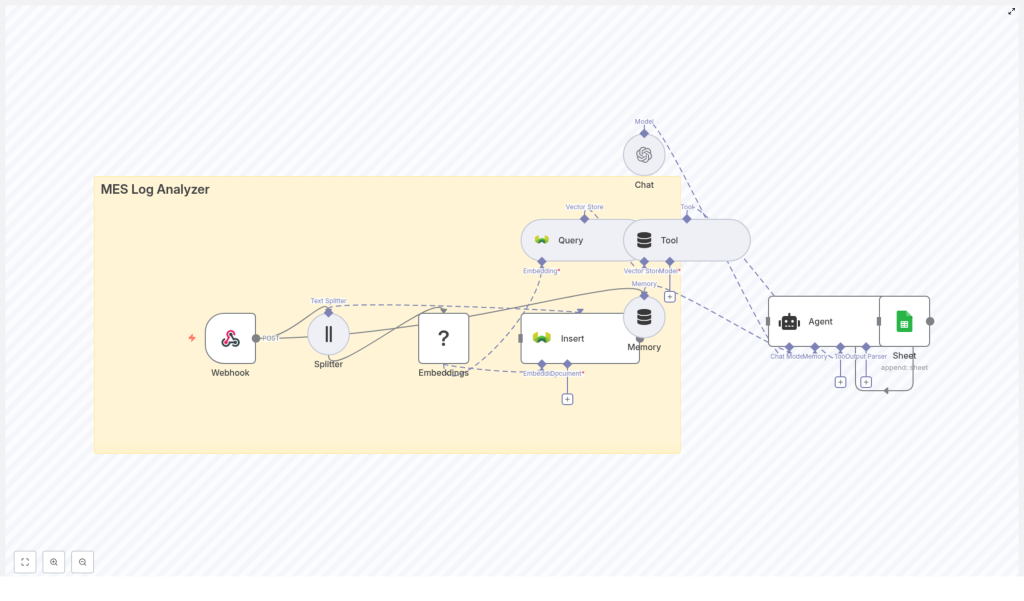
MES Log Analyzer: n8n Vector Search Workflow Template
Manufacturing Execution Systems (MES) continuously generate high-volume, semi-structured log data. These logs contain essential signals for monitoring production, diagnosing incidents, and optimizing operations, but they are difficult to search and interpret at scale. This reference guide describes a complete MES Log Analyzer workflow template in n8n that uses text embeddings, a vector database (Weaviate), and LLM-based agents to deliver semantic search and contextual insights over MES logs.
1. Conceptual Overview
This n8n workflow implements an end-to-end pipeline for MES log analysis that supports:
- Real-time ingestion of MES log events through a Webhook trigger
- Text chunking for long or multi-line log entries
- Embedding generation using a Hugging Face model (or compatible embedding provider)
- Vector storage and similarity search in Weaviate
- LLM-based conversational analysis via an agent or chat model
- Short-term conversational memory for follow-up queries
- Persistence of results and summaries in Google Sheets
The template is designed as a starting point for production-grade MES log analytics in n8n, with a focus on semantic retrieval, natural-language querying, and traceable output.
2. Why Use Embeddings and Vector Search for MES Logs?
Traditional keyword search is often insufficient for MES environments due to noisy, heterogeneous log formats and the importance of context. Text embeddings and vector search provide several advantages:
- Semantic similarity – Retrieve log entries that are conceptually related, not just those that share exact keywords.
- Natural-language queries – Support questions like “Why did machine X stop?” by mapping the question and logs into the same vector space.
- Context-aware analysis – Summarize incident timelines and surface likely root causes based on similar past events.
By embedding log text into numeric vectors, the workflow enables similarity search and contextual retrieval, which are critical for incident triage, failure analysis, and onboarding scenarios.
3. Workflow Architecture
The workflow template follows a linear yet modular architecture that can be extended or modified as needed:
MES / external system → Webhook (n8n) → Text Splitter → Embeddings (Hugging Face) → Weaviate (Insert) → Weaviate (Query) → Agent / Chat (OpenAI) + Memory Buffer → Google Sheets (Append)
At a high level:
- Ingestion layer – Webhook node receives MES logs via HTTP POST.
- Preprocessing layer – Text Splitter node segments logs into chunks suitable for embedding.
- Vectorization layer – Embeddings node converts text chunks into dense vectors.
- Storage & retrieval layer – Weaviate nodes index and query embeddings with metadata filters.
- Reasoning layer – Agent or Chat node uses retrieved snippets to answer questions and summarize incidents, with a Memory Buffer node for short-term context.
- Persistence layer – Google Sheets node records results, summaries, and audit information.
4. Node-by-Node Breakdown
4.1 Webhook Node – Log Ingestion
Role: Entry point for MES logs into n8n.
- Method: HTTP
POST - Typical payload fields:
timestampmachine_idlevel(for example, INFO, WARN, ERROR)message(raw log text or multi-line content)batch_idor similar contextual identifier
Configuration notes:
- Standardize the event schema at the source or in a pre-processing step inside n8n to ensure consistent fields.
- Implement basic validation and filtering in the Webhook node or immediately downstream to drop malformed or incomplete events as early as possible.
Edge cases:
- Events missing required fields (for example, no
message) should be discarded or routed to an error-handling branch. - Very large payloads might need upstream truncation policies or batching strategies before they reach this workflow.
4.2 Text Splitter Node – Chunking Log Content
Role: Break long or multi-line log messages into manageable text segments for embedding.
Typical parameters:
chunkSize: 400 characterschunkOverlap: 40 characters
Behavior: The node takes the message field (or equivalent text payload) and produces a list of overlapping chunks. Overlap ensures that context spanning chunk boundaries is not lost.
Considerations:
- For very short log lines, chunking may produce a single chunk per entry, which is expected.
- For extremely verbose logs, adjust
chunkSizeandchunkOverlapto balance context preservation with embedding performance.
4.3 Embeddings Node (Hugging Face) – Vector Generation
Role: Convert each text chunk into a numeric vector suitable for vector search.
Configuration:
- Provider: Hugging Face embeddings node (or a compatible embedding service).
- Model: Choose a model optimized for semantic similarity, not classification. The exact model selection is up to your environment and constraints.
Data flow: Each chunk from the Text Splitter node is sent to the Embeddings node. The output is typically an array of vectors, one per chunk, which will be ingested into Weaviate along with the original text and metadata.
Trade-offs:
- Higher quality models may increase latency and cost.
- On-prem or private models may be preferable for sensitive MES data, depending on compliance requirements.
4.4 Weaviate Insert Node – Vector Store Indexing
Role: Persist embeddings and associated metadata into a Weaviate index.
Typical configuration:
- Class / index name: for example,
mes_log_analyzer - Stored fields:
- Vector from the Embeddings node
- Original text chunk (
raw_textor similar) - Metadata such as:
timestampmachine_idlevelbatch_id
Usage: Rich metadata enables precise filtering and scoped search, for example:
machine_id = "MX-101" AND level = "ERROR"
Edge cases & reliability:
- Failed inserts should be logged and, if necessary, retried using n8n error workflows or separate retry logic.
- Ensure the Weaviate schema is created in advance or managed through a separate setup process so that inserts do not fail due to missing classes or field definitions.
4.5 Weaviate Query Node – Semantic Retrieval
Role: Retrieve semantically similar log snippets from Weaviate using vector similarity.
Query modes:
- Embedding-based query: Embed a user question or search phrase and use the resulting vector for similarity search.
- Vector similarity API: Directly call Weaviate’s similarity search endpoint with a vector from the Embeddings node.
Filtering options:
- Time window (for example, last 30 days based on
timestamp) - Machine or equipment identifier (for example,
machine_id = "MX-101") - Batch or production run (
batch_id) - Log level (
level = "ERROR"or"WARN")
Performance considerations:
- If queries are slow, check Weaviate’s indexing configuration, replica count, and hardware resources.
- Limit the number of returned results to a reasonable top-k value to control latency and reduce token usage in downstream LLMs.
4.6 Agent / Chat Node (OpenAI) – Contextual Analysis
Role: Use retrieved log snippets as context to generate natural-language answers, summaries, or investigative steps.
Typical usage pattern:
- Weaviate Query node returns the most relevant chunks and metadata.
- Agent or Chat node (for example, OpenAI Chat) is configured to:
- Take the user question and retrieved context as input.
- Produce a structured or free-form answer, such as:
- Incident summary
- Likely root cause
- Recommended next actions
Memory Buffer: A Memory Buffer node is typically connected to the agent to maintain short-term conversational context within a session. This allows follow-up queries like “Show similar events from last week” without re-specifying all parameters.
Error handling:
- If the agent receives no relevant context from Weaviate, it should respond accordingly, for example by stating that no similar events were found.
- Handle LLM rate limits or timeouts using n8n retry options or alternative paths.
4.7 Google Sheets Node – Persisting Insights
Role: Append structured results to a Google Sheet for traceability and sharing with non-technical stakeholders.
Common fields to store:
- Incident or query timestamp
- Machine or line identifier
- Summarized incident description
- Suspected root cause
- Recommended action or follow-up steps
- Reference to original logs (for example, link or identifier)
Use cases:
- Audit trails for compliance or quality assurance.
- Shared incident dashboards for maintenance and operations teams.
5. Configuration & Credential Notes
To use the template effectively, you must configure the following credentials in n8n:
- Hugging Face (or embedding provider) credentials for the Embeddings node.
- Weaviate credentials (URL, API key, and any TLS settings) for both Insert and Query nodes.
- OpenAI (or chosen LLM provider) credentials for the Agent / Chat node.
- Google Sheets credentials with appropriate access to the target spreadsheet.
After importing the workflow template into n8n, bind each node to the appropriate credential and verify connectivity using test operations where available.
6. Best Practices for Production Readiness
6.1 Metadata Strategy
- Index rich metadata such as machine, timestamp, shift, operator, and batch to enable fine-grained filtering.
- Use consistent naming and data types across systems to avoid mismatched filters.
6.2 Chunking Strategy
- Keep chunks short enough for embeddings to capture context without exceeding model limits.
- Avoid overly small chunks that fragment meaning and reduce retrieval quality.
6.3 Embedding Model Selection
- Evaluate models on actual MES data for semantic accuracy, latency, and cost.
- Consider private or on-prem models for sensitive or regulated environments.
6.4 Retention & Governance
- Define retention policies or TTLs for vector data if logs contain PII or sensitive operational details.
- Archive older embeddings or raw logs to cheaper storage when they are no longer needed for real-time analysis.
6.5 Monitoring & Observability
- Track ingestion rates, failed Weaviate inserts, and query latency.
- Monitor for data drift in log formats or embedding quality issues that may degrade search relevance.
7. Example Use Cases
7.1 Incident Search and Triage
Operators can query the system with natural-language prompts such as:
“Show similar shutdown events for machine MX-101 in the last 30 days.”
The workflow retrieves semantically similar log snippets from Weaviate, then the agent compiles them into a contextual response including probable root causes and timestamps.
7.2 Automated Incident Summaries
During an error spike, the agent can automatically generate a concise incident summary that includes:
- What occurred
- Which components or machines were affected
- Suggested next steps
- Confidence indications or qualitative certainty
This summary is then appended to a Google Sheet for review by the maintenance or reliability team.
7.3 Knowledge Retrieval for Onboarding
New engineers can ask plain-language questions about historical incidents, for example:
“How were past temperature sensor failures on line 3 resolved?”
The workflow surfaces relevant past events and their resolutions, reducing time-to-resolution for recurring issues and accelerating onboarding.
8. Troubleshooting Common Issues
8.1 Low-Quality Search Results
- Review
chunkSizeandchunkOverlapsettings. Overly small or large chunks can harm retrieval quality. - Verify that the embedding model is suitable for semantic similarity tasks.
- Ensure metadata filters are correctly applied and not excluding relevant results.
- Consider additional preprocessing, such as:
- Removing redundant timestamps inside the
messagefield. - Normalizing machine IDs to a consistent format.
- Removing redundant timestamps inside the
8.2 Slow Queries
- Check Weaviate configuration, including index settings and replicas.
- Reduce the number of returned results (top-k) for each query.
- Investigate embedding latency if you are generating query embeddings at runtime.
