


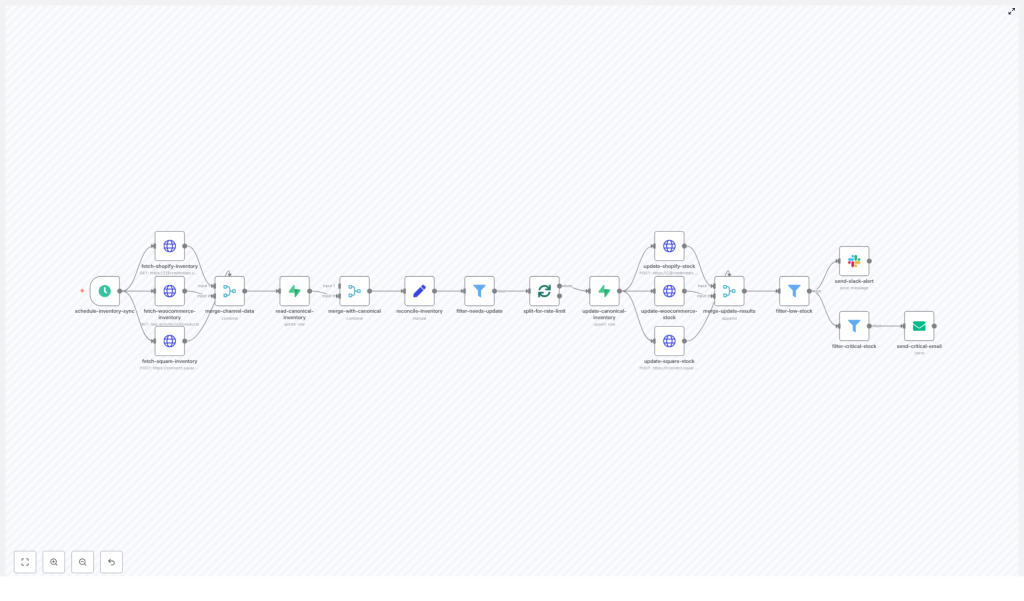
Multi-Channel Inventory Orchestrator with n8n
Keeping inventory synchronized across Shopify, WooCommerce, and Square is a recurring challenge for e-commerce teams that sell on multiple channels. This reference guide documents an n8n workflow template – the Multi-Channel Inventory Orchestrator – that centralizes inventory logic in Supabase, reconciles stock across channels, applies rate-limited updates, and dispatches alerts when stock levels fall below defined thresholds.
1. Solution Overview
The workflow is designed as a reusable n8n automation that:
- Runs on a fixed schedule (every 10 minutes in the template)
- Pulls inventory from Shopify, WooCommerce, and Square via HTTP Request nodes
- Merges per-channel quantities into a unified inventory representation
- Reconciles that data with a canonical
inventorytable in Supabase - Upserts reconciled records back into Supabase as the source of truth
- Propagates final stock values back to each sales channel
- Sends Slack notifications for low stock and email alerts for critical stock
By centralizing inventory orchestration in n8n and Supabase, the workflow helps prevent overselling, reduces manual updates, and provides a consistent, auditable inventory record across all connected systems.
2. Architecture & Data Flow
2.1 High-Level Data Flow
- Trigger – A Schedule Trigger node starts the workflow at a configured interval.
- Data Ingestion – HTTP Request nodes fetch inventory data from Shopify, WooCommerce, and Square APIs.
- Normalization & Merge – A merge node consolidates per-channel responses into a unified structure.
- Canonical Read – A Supabase node reads the existing canonical
inventorytable. - Reconciliation – A Set node calculates per-SKU fields such as per-channel quantities,
total_stock, andneeds_update. - Filtering & Batching – Only records flagged as
needs_updateare passed to a Split In Batches node to respect API rate limits. - Canonical Upsert – The Supabase node upserts reconciled records with
onConflict: sku. - Channel Updates – HTTP Request nodes push updated stock levels back to Shopify, WooCommerce, and Square.
- Alerts – Slack and Email nodes send notifications for low and critical stock levels.
2.2 Core Design Goals
- Single source of truth – Supabase
inventorytable acts as the canonical store. - Idempotent updates – Repeated workflow runs should not create duplicate or inconsistent changes.
- Rate-limit awareness – All external API calls are batched to comply with provider rate limits.
- Extensibility – Additional channels or reconciliation rules can be added without redesigning the entire flow.
3. Node-by-Node Breakdown
3.1 schedule-inventory-sync (Schedule Trigger)
Type: Schedule Trigger node
Role: Initiates a full inventory reconciliation and sync on a fixed interval.
- Default configuration: Runs every 10 minutes.
- Usage: Adjust the interval based on order volume and API rate limits. For high-volume stores, shorter intervals improve freshness but increase API usage.
Key considerations:
- Ensure the configured interval plus total workflow runtime does not lead to overlapping runs, especially if inventory updates are not strictly idempotent.
- For testing, you can temporarily switch to manual execution or a longer interval to observe behavior.
3.2 fetch-*-inventory (HTTP Request nodes)
Type: HTTP Request nodes
Role: Retrieve current inventory state from each sales channel.
There are three dedicated HTTP Request nodes, each using its own credentials and endpoint configuration:
3.2.1 Shopify Inventory Fetch
- API: Shopify REST API
- Endpoints: Products / Inventory-related endpoints
- Key fields:
inventory_item_id,location_id, and quantity
The node calls Shopify product or inventory endpoints and maps each inventory item to its associated location. The resulting data is normalized so that each SKU can be associated with a Shopify-specific quantity field, typically exposed as shopify_qty during reconciliation.
3.2.2 WooCommerce Inventory Fetch
- API: WooCommerce REST API
- Endpoint: Products endpoint
- Key field:
stock_quantity
The WooCommerce node retrieves product data and extracts stock_quantity for each item. This quantity is later mapped to woocommerce_qty in the unified inventory record.
3.2.3 Square Inventory Fetch
- API: Square Inventory & Catalog APIs
- Endpoint: Batch retrieve inventory counts & catalog objects
- Key fields:
catalog_object_id, per-location counts
The Square node uses batch-retrieve calls to obtain inventory counts associated with catalog IDs. These are then normalized to a per-SKU quantity, typically represented as square_qty in the reconciliation step.
Authentication: Each node uses n8n credential objects for secure API key or OAuth storage. Configure these credentials once and reference them in the HTTP Request nodes.
3.3 merge-channel-data & read-canonical-inventory
This stage combines the data from all channels and aligns it with the canonical Supabase dataset.
3.3.1 merge-channel-data (Merge node)
Type: Merge node
Role: Aggregate responses from Shopify, WooCommerce, and Square into a single item stream keyed by SKU or other product identifier.
The merge node is responsible for:
- Matching records from multiple channels based on a shared identifier (commonly SKU).
- Producing one consolidated item per SKU that contains all per-channel quantities.
3.3.2 read-canonical-inventory (Supabase node)
Type: Supabase node (Read operation)
Role: Load the current canonical inventory snapshot from Supabase.
- Table:
inventory - Usage: Provides baseline data such as previous sync quantities, SKU mappings, and any historical fields required for decision-making.
The canonical dataset is used to determine whether a record has diverged from the last known state and to compute fields like needs_update and last_sync.
3.4 reconcile-inventory (Set node)
Type: Set node
Role: Build a unified inventory record per SKU and compute derived fields.
Typical fields computed in this node include:
- sku – Primary identifier for the product or variant.
- shopify_qty – Quantity reported by Shopify.
- woocommerce_qty – Quantity reported by WooCommerce.
- square_qty – Quantity reported by Square.
- total_stock – Aggregated quantity across channels, commonly the sum of all channel quantities.
- needs_update – Boolean flag indicating that the canonical record differs from current channel data and requires synchronization.
- low_stock – Boolean or flag field used later for alerting when quantity is below a threshold.
- last_sync – Timestamp of the last time this SKU was reconciled.
Reconciliation logic:
- By default, the template uses a simple aggregation strategy:
total_stockis computed as the sum of all available channel quantities. - In more advanced scenarios, you may treat certain channels as authoritative. For example, you might prioritize Square for in-store inventory and Shopify for online availability, and adjust
total_stockaccordingly. - The
needs_updateflag typically compares the newly calculated values with the existing canonical record. If they differ, the record is marked for update.
All logic in this node should be explicit and deterministic. This simplifies debugging and makes it easier to evolve reconciliation rules as business requirements change.
3.5 filter-needs-update & split-for-rate-limit
3.5.1 filter-needs-update (Filter node)
Type: Filter or IF node
Role: Pass only items where needs_update is true.
This step ensures that only SKUs with actual discrepancies proceed to update operations, reducing unnecessary API calls and load on external systems.
3.5.2 split-for-rate-limit (Split In Batches node)
Type: Split In Batches node
Role: Process inventory updates in controlled batch sizes to respect rate limits.
- Default batch size:
batchSize: 50 - Behavior: Items are processed in chunks of up to 50 per iteration.
Adjust batchSize based on:
- Provider-specific API rate limits (Shopify, WooCommerce, Square).
- Typical number of SKUs and frequency of syncs.
3.6 update-canonical-inventory (Supabase upsert)
Type: Supabase node (Insert/Upsert)
Role: Persist reconciled inventory records into the canonical Supabase table.
- Table:
inventory - Operation: Upsert with
onConflict: sku
Using onConflict: sku ensures that each SKU is unique in the table:
- If the SKU exists, the record is updated with the latest quantities and metadata.
- If the SKU does not exist, a new record is inserted.
This canonical store provides:
- A historical trail of inventory changes (when combined with audit fields).
- A stable reference for cross-channel reconciliation.
- A convenient integration point for reporting, analytics, or downstream automations.
3.7 update-*-stock (Channel update nodes)
Type: HTTP Request nodes
Role: Apply the final reconciled stock levels back to each sales channel.
3.7.1 Shopify Stock Update
- Endpoint:
inventory_levels/set - Identifiers:
inventory_item_id,location_id
The node sets inventory levels for each Shopify item using stable identifiers. Ensure that the payload includes both inventory_item_id and location_id so the operation is idempotent and updates the correct location-specific quantity.
3.7.2 WooCommerce Stock Update
- Endpoint:
products/{id}(PUT) - Field:
stock_quantity
This node issues a PUT request to the WooCommerce products endpoint, updating stock_quantity for each product ID. The call overwrites the existing stock quantity with the reconciled value from Supabase.
3.7.3 Square Stock Update
- Endpoint:
inventory/changes/batch-create - Type: Inventory adjustment
The Square update node creates inventory adjustments using a batch-create changes endpoint. Each adjustment references the appropriate catalog_object_id and applies the required quantity change.
Idempotency considerations:
- Always include stable identifiers (inventory item IDs, location IDs, catalog object IDs) so repeated runs do not create duplicated or conflicting entries.
- Design requests to set absolute quantities where possible, not just relative adjustments, to avoid drift.
3.8 Alerts: Slack and Email
Type: Slack and Email nodes
Role: Notify relevant teams when stock drops below configured thresholds.
After channel updates, the workflow merges results and filters items based on their low_stock or similar flag.
- Slack alerts: A Slack node sends a message containing key fields such as SKU, product name, and per-channel quantities. This is intended for general team awareness and routine monitoring.
- Email alerts: When stock reaches a critical level (for example, less than 5 units), an Email node sends a more urgent notification to operations or purchasing stakeholders.
Use these alerts to trigger manual or automated replenishment actions and to ensure that critical SKUs do not run out unexpectedly.
4. Configuration & Operational Notes
4.1 Authentication and Credentials
- Store all API keys, secrets, and tokens in n8n Credentials rather than hard-coding them in node parameters.
- Use least-privilege keys that only grant the required access for inventory operations.
- Regularly rotate credentials in line with your security policies.
- For Supabase, consider role-based access control so that the user used by n8n can only access the required tables and operations.
4.2 Error Handling and Retries
- Wrap external API calls in n8n error handling constructs, such as error workflows or Try/Catch-style patterns.
- Enable retries with exponential backoff where appropriate to handle transient network or rate-limit errors.
- Log failures with enough context (SKU, channel, error message) to support troubleshooting.
- Consider compensating actions or partial rollback strategies if a subset of channels fails during an update.
4.3 Idempotency and Conflict Resolution
- Treat the Supabase
inventorytable as the single source of truth for stock values. - Ensure update calls to Shopify, WooCommerce, and Square are idempotent by:
- Using stable identifiers like
inventory_item_id,location_id,catalog_object_id. - Setting absolute quantities rather than incremental deltas where supported.
- Using stable identifiers like
- Define conflict resolution policies when channels disagree, such as:
- Last-write-wins based on the most recent update timestamp.
- Channel-priority rules where certain systems override others.
4.4 Monitoring, Logging, and Auditing
- Export metrics like:
- Workflow run duration
- Number of SKUs processed
- Number of updates per channel
- Success vs failure counts
- Integrate with monitoring tools such as Datadog or Prometheus if available.
