


Build an n8n AI Agent to Analyze YouTube Videos, Comments and Thumbnails
Tired of pausing YouTube every 3 seconds to take notes, scroll through 800 comments, then squint at thumbnails to guess why one got all the clicks? This n8n workflow template politely takes all that repetitive work off your plate by combining the YouTube Data API, Apify and OpenAI into a single automated research sidekick.
Imagine this: YouTube “research” without the rabbit hole
You sit down to do some quick YouTube research. Two hours later you are deep in a comment thread argument from 2021, you forgot what you were supposed to be analyzing, and you still have no structured insights to show your team.
Creators, marketers and product teams all run into the same problem. You need fast, structured insight from video content and audience feedback, but manually reviewing videos, comments and thumbnails gets old fast. That is where an n8n AI agent for YouTube comes in. It automates the boring parts so you can focus on decisions instead of detective work.
What this n8n YouTube AI agent actually does
This workflow template acts like a YouTube research assistant that never gets tired, distracted or stuck in the recommendation loop.
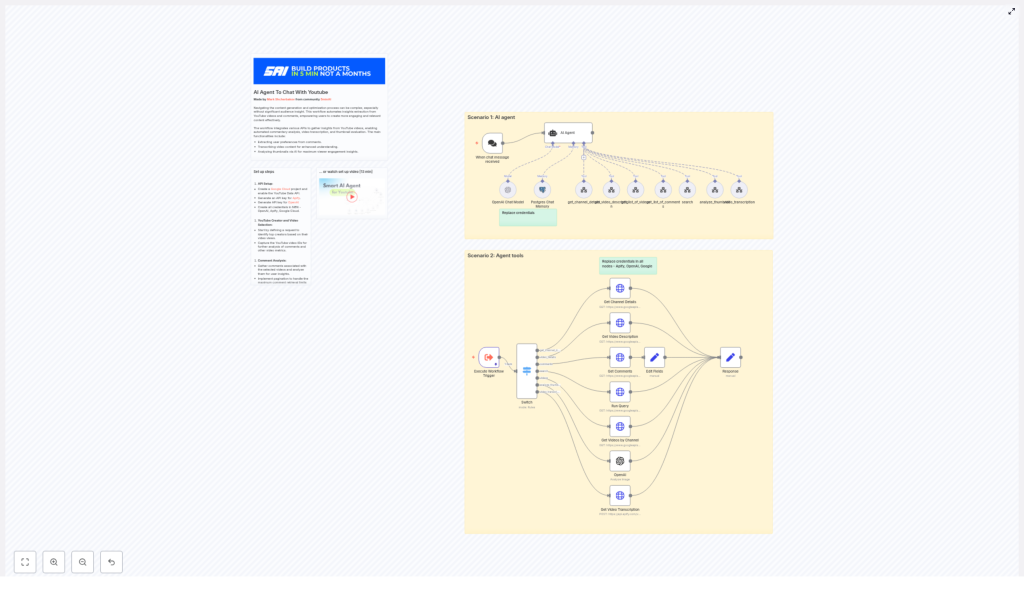
At a high level, the n8n workflow orchestrates several tools to collect and analyze everything that matters about a channel or video:
- Channel and video metadata via the YouTube Data API so you get structured info instead of endless tab hopping.
- Video transcription using Apify or another transcription API so the AI can read the whole video instead of just guessing from the title.
- Comment collection and analysis to extract viewer sentiment, recurring questions and preferences.
- Thumbnail evaluation with OpenAI image analysis to assess composition, color, messaging and click-worthiness.
- An AI agent brain powered by OpenAI that coordinates all of the above and returns concise, actionable insights.
In other words, it gathers channel details, video stats, full transcripts, audience comments and thumbnail feedback, then bundles everything into one coherent answer instead of 20 open tabs.
How the workflow is wired together
Under the hood, this template is a collection of n8n nodes that talk to each other in a fairly civilized way. Here is how the main components connect.
1. Trigger and smart routing with Switch
The workflow kicks off when a chat request or webhook hits your n8n instance. That incoming request tells the AI agent what you are trying to do, for example:
- “Analyze this channel”
- “Audit this specific video”
- “Check comments for pain points”
- “Review this thumbnail”
A Switch node then routes the command to the right toolchain. Depending on the request, it can trigger search, channel lookup, video details, comments analysis, transcription or thumbnail inspection. No more manual copy and paste of URLs into different tools.
2. YouTube Data API requests
Several nodes call the YouTube Data API to pull structured data that your agent can reason about. The main operations are:
get_channel_details– resolves a handle or channel URL into achannel_idand fetches the channel snippet.get_list_of_videos– retrieves recent or top videos from a channel, with support for ordering bydateorviewCount.get_video_description– fetchessnippet,contentDetailsandstatisticsfor a specific video.get_list_of_comments– pullscommentThreadsfor a given video, with pagination support for larger discussions.
This turns the YouTube interface into clean JSON that your AI agent can analyze without needing caffeine or context switching.
3. Video transcription for deep content understanding
To understand what is actually said in the video, the workflow calls an Apify actor or another transcription service. This generates a full text transcript of the video audio.
Once the transcript is available, the AI agent can:
- Summarize the full video in a few paragraphs.
- Extract key topics, themes and repeated concepts.
- Suggest repurposing ideas such as short clips, social posts or blog outlines.
No more manually scrubbing through 45 minutes of content to find that one quote you vaguely remember.
4. Thumbnail analysis with OpenAI
Thumbnails have one job: get the click. The workflow sends thumbnail URLs to an OpenAI image analysis tool that reviews the design and provides feedback.
The analysis can cover:
- Headline placement and readability.
- Face visibility and emotional expression.
- Color contrast and visual hierarchy.
- Persuasive elements that are likely to improve CTR.
Instead of arguing about colors in a meeting, you can ask the agent what might actually help people notice and click.
5. OpenAI agent with conversation memory
At the center of it all is an OpenAI-based agent. It plans which tools to call, runs them in the right order and then synthesizes the results into a human-friendly response.
To keep things context aware, the workflow can store conversation history in Postgres. This memory lets the agent:
- Remember what you already analyzed in a session.
- Handle follow up questions without starting from scratch.
- Support iterative analysis, for example “Now compare that video to the previous one.”
Quick setup checklist for the template
Before your AI agent can start binge-watching for you, you need a few keys and accounts. Here is the setup checklist, minus the stress.
- Google Cloud Project and YouTube Data API
Create a Google Cloud project and enable the YouTube Data API. Then generate an API key or OAuth credentials suitable for server-to-server requests. - Apify account
Sign up for Apify and grab an API token if you plan to use Apify actors to fetch transcripts or scrape content that is not directly exposed via the YouTube API. - OpenAI API key
Create an OpenAI API key to power the AI agent and the image analysis for thumbnails. - n8n credentials
In your n8n instance, configure credentials for all nodes that require them:- YouTube Data API authentication for queries.
- Apify API token.
- OpenAI API key.
- Postgres connection details if you use chat memory.
- Postgres database (optional but helpful)
Set up a Postgres DB if you want persistent session memory or to save processed results for later reuse. It is optional, but your future self will probably thank you.
How to use the workflow in real life
Once everything is wired up, you can use this n8n YouTube AI agent in several practical ways. Here are the main usage patterns.
Channel research without the manual grind
Point the workflow at a YouTube channel to:
- Collect channel metadata and top performing videos.
- Analyze comments at scale to find recurring viewer questions and complaints.
- Review transcripts to uncover topics that resonate with the audience.
This is ideal for competitive research, audience analysis or planning your own content strategy based on real viewer behavior instead of vibes.
Video level audits for deeper insights
For a specific video, you can run a more detailed audit. The workflow can help you:
- Generate a structured summary from the full transcript.
- List viewer objections, pain points and frequently mentioned themes from comments.
- Suggest timestamps for clips that are perfect for shorts or social media.
It is like having a content strategist watch the video and hand you a ready made brief.
Tips, best practices and a few sanity savers
To keep your workflow efficient, accurate and budget friendly, keep these practical recommendations in mind.
Filtering, pagination and cost control
- Filter out Shorts when needed – many channel queries return short videos by default. If you need long form content, discard videos under one minute so your analysis focuses on substantial pieces.
- Paginate comments – YouTube limits how many comments you can fetch per request. Implement pagination to capture a representative sample instead of just the first handful of replies.
- Manage transcription and model costs – long videos plus large models can get expensive. Consider sampling sections of the video or clipping it before transcription if you only need specific segments.
Data privacy and responsible storage
- Handle user data carefully – if you store comments or transcripts externally, be mindful of PII.
- Mask or anonymize sensitive data – remove or obfuscate personal details in any long term storage or reporting.
What kind of outputs you can expect
Once the workflow is running, your AI agent can generate a variety of useful deliverables that beat a messy notes doc every time.
- Channel brief that includes title, a summarized description and key audience signals based on content and comments.
- Viewer pain point report with topic clusters derived from comments, plus suggested content angles to address them.
- Transcript based assets such as show notes, timestamps and ideas for short clips and social posts.
- Thumbnail critique with specific suggestions to improve CTR, including color tweaks, headline changes and face cropping adjustments.
Scaling up: from one video to entire channels
Once you trust the workflow on a single video or channel, you can scale it into a full YouTube insights system.
Some automation ideas:
- Batch process entire playlists or channels on a schedule.
- Store aggregated metrics and insights in a database.
- Feed those metrics into a BI tool or send regular reports to Slack.
- Combine insights with A/B thumbnail testing and track CTR changes over time.
That way, your YouTube analysis becomes an ongoing process instead of a one time research sprint every quarter.
Limitations and things to keep an eye on
As powerful as this setup is, it is not magic. A few constraints still apply:
- Input quality matters – poor audio, private captions or missing comments will limit how much value you can get from transcriptions and sentiment analysis.
- AI and sarcasm are not best friends – automated models can misinterpret jokes or sarcasm in comments, so keep a human in the loop for final editorial decisions and nuanced judgment.
Get started: from template to working AI agent
Ready to let automation do the boring YouTube work for you? Here is a simple path to get your n8n AI agent up and running.
- Import or download the n8n workflow template into your n8n instance.
- Replace the placeholder credentials with your own YouTube, Apify and OpenAI keys.
- Run a test on a single channel or video and review the outputs, including comments analysis, transcript based insights and thumbnail feedback.
If you want help installing the template or tailoring it to your specific use case, you can reach out for support or watch the setup video that walks through the full configuration and a live demo.
Ready to automate your YouTube research? Import the n8n template, plug in your keys and start extracting audience insights without sacrificing your entire afternoon to the algorithm.
