


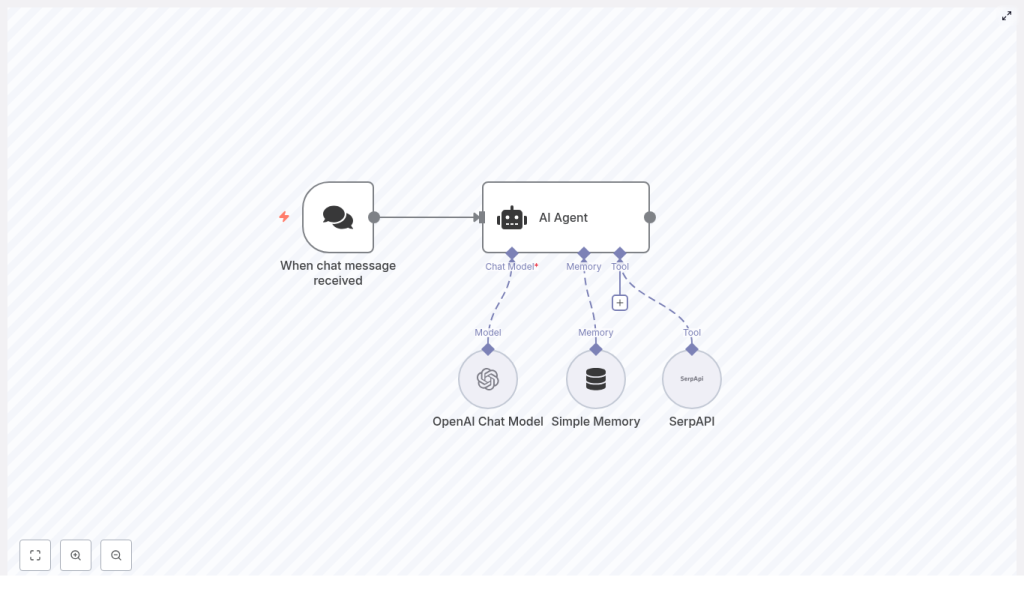
Automate intelligent, context-aware conversations and real-time search with this production-ready n8n workflow template. It connects an n8n AI Agent to an OpenAI Chat Model, SerpAPI for web search, and a Simple Memory buffer so your chatbot can remember prior messages and fetch live data on demand. This guide explains the architecture, node configuration, credential setup, and recommended practices for building a robust automation that scales.
Architecture overview
This workflow combines several n8n AI components into a compact but highly capable automation. At a high level, it consists of:
- Chat trigger / webhook – receives incoming user messages from your chat channel.
- AI Agent – orchestrates the language model, memory, and external tools.
- OpenAI Chat Model – generates natural-language responses and interprets intent.
- Simple Memory – stores short-term conversational context and user data.
- SerpAPI – performs web searches for current information and external resources.
The AI Agent node sits at the center of the workflow. It uses the OpenAI Chat Model for reasoning and response generation, consults Simple Memory for contextual continuity, and selectively invokes SerpAPI when a query requires fresh, external data.
Why combine AI Agent, OpenAI, SerpAPI, and memory in n8n?
Modern automation teams expect chatbots to do more than static FAQ responses. They must understand context, act on up-to-date information, and be maintainable within an automation platform. This design delivers:
- Context-aware behavior – Simple Memory preserves recent turns and user attributes so the agent can reference prior messages and personalize replies.
- Real-time information retrieval – SerpAPI provides live web search results when the agent detects questions that depend on current facts, URLs, or news.
- Advanced language capabilities – OpenAI models handle complex instructions, summarization, and nuanced conversation flows.
- No-code orchestration – n8n’s visual workflow builder lets you extend, monitor, and maintain the logic without custom backend code.
This combination is particularly suited to automation professionals who need a repeatable pattern for AI-powered chat that can be integrated into broader workflows, CRMs, or internal tools.
Key workflow components
Chat trigger: entry point for user messages
The workflow starts with the When chat message received node. This node can operate as a webhook or a native chat integration trigger, depending on the channel you use. Typical configurations include:
- Slack or Microsoft Teams bots
- Telegram or other messaging platforms
- Custom web chat widgets posting to an n8n webhook
Configure this node so that each incoming message is normalized into a consistent structure that the AI Agent can consume, including user identifiers, message text, and any metadata you need for routing or personalization.
AI Agent: orchestration and decision logic
The AI Agent node is responsible for:
- Receiving the user message from the trigger
- Calling the configured OpenAI Chat Model
- Reading from and writing to the Simple Memory node
- Invoking SerpAPI as a tool when a web search is appropriate
Within the agent configuration, you define the system instructions, tool usage policies, and how memory is applied. The agent effectively becomes the control plane that decides when to answer directly, when to consult memory, and when to query the web.
OpenAI Chat Model: language understanding and response generation
The OpenAI Chat Model node provides the core LLM capabilities. In n8n, you authenticate this node using your OpenAI API key and choose a model that matches your performance and cost requirements. Common choices include:
gpt-4o-minifor cost-efficient, responsive interactionsgpt-4orgpt-4ofor higher quality responses and complex reasoning
This node is then referenced by the AI Agent as its primary language model. You can fine-tune parameters such as temperature and max tokens depending on how deterministic or creative you want responses to be.
Simple Memory: short-term conversational context
The Simple Memory node acts as a lightweight, windowed memory buffer. It stores recent conversational turns or key-value pairs about the user, for example:
- Previous questions and answers
- Declared preferences or locations
- Session-specific metadata
Configure the memory node to:
- Define the memory window size (number of recent entries to retain)
- Specify which fields from incoming messages should be stored
- Control how memory is passed back into the AI Agent as context
This approach avoids uncontrolled context growth and provides a predictable, manageable state for your agent.
SerpAPI: web search tool for live data
SerpAPI is integrated as a tool that the AI Agent can call when it determines that a query requires up-to-date information. Typical use cases include:
- Checking current regulations, pricing, or incentives
- Retrieving URLs and documentation from the public web
- Confirming recent events or time-sensitive facts
Within n8n, you configure the SerpAPI node with your API key and any default search parameters such as region or language. The AI Agent is then granted access to this node as a tool, allowing it to dispatch search queries programmatically.
Step-by-step configuration
1. Import the workflow template
Begin by importing the provided JSON template into your n8n instance, or recreate the structure manually. Ensure the connections are set up so that:
- The When chat message received node feeds into the AI Agent.
- The AI Agent is connected to the OpenAI Chat Model, Simple Memory, and SerpAPI nodes.
This wiring allows the agent to treat the model, memory, and search as coordinated resources.
2. Configure the chat trigger node
In the When chat message received node:
- Set up the webhook URL or enable the specific chat integration you are using.
- Configure any required authentication or signing secrets.
- Normalize the payload so the message text and user identifiers are clearly mapped to fields the agent will consume.
Verify that test messages from your chat platform appear in n8n executions before proceeding.
3. Set up OpenAI credentials and model
Next, configure the OpenAI Chat Model node:
- Create a new OpenAI credential in n8n and store your API key securely.
- Select the preferred chat model (for example
gpt-4o-mini,gpt-4, orgpt-4o). - Adjust model parameters such as temperature and maximum tokens according to your use case.
Once configured, reference this node in the AI Agent as its language model.
4. Integrate SerpAPI for live search
To enable web search:
- Register with SerpAPI and obtain your API key.
- In n8n, create a SerpAPI credential and assign the key.
- Add a SerpAPI node to the workflow and connect it to the AI Agent as a tool.
Within the agent configuration, expose this node under a clear tool name such as web_search. The agent will call it only when its instructions indicate that a live lookup is required.
5. Configure Simple Memory behavior
For the Simple Memory node:
- Set the memory window size to control how many recent messages or entries are retained.
- Define which parts of each message (for example user message, agent reply, user ID) are stored.
- Ensure that the memory output is correctly passed back into the AI Agent node as context.
Careful configuration here ensures your agent has enough context to be helpful without accumulating excessive or sensitive data.
6. Finalize AI Agent configuration
Within the AI Agent node, link all components:
- Set the Chat Model node as the agent’s language model.
- Specify the Simple Memory node as the memory store.
- Register the SerpAPI node as a tool for web search.
Then define the core behavior:
- Provide a clear system prompt describing the agent’s role, tone, and decision rules.
- Set fallback messages for cases where tools fail or responses must be constrained.
- Specify tool usage policies, for example: only call SerpAPI when the user asks about current events, recent regulations, or specific URLs.
Example: agent prompt and tool strategy
The following example illustrates how to instruct the agent to use memory and SerpAPI effectively:
System: You are an assistant that answers user questions. Use the web_search tool (SerpAPI) only when you need current facts, URLs, or to confirm recent events. Keep responses concise.

User message: "What's the latest on solar panel incentives in California?"

Agent: Check memory for user's location. If no location, ask a clarifying question. Then call web_search with query: "California solar panel incentives 2025". Summarize top results and provide sources.
This pattern demonstrates a best practice: consult memory first, then use tools selectively, and always summarize external results instead of returning raw search output.
Representative use cases
- Customer support chatbots that combine historical conversation context with real-time product information or order tracking.
- Sales assistants that remember lead details, recall prior interactions, and pull pricing or competitive data from the web.
- Internal knowledge helpers for knowledge workers who need quick access to public documentation, standards, or news.
- Educational bots that track learner progress, recall previous topics, and surface current learning resources or references.
Operational best practices
Secure handling of API keys
Store OpenAI and SerpAPI keys exclusively in n8n’s encrypted credentials store. Avoid logging raw credentials or exposing them in node output. Restrict access to credentials based on roles and environments.
Memory management and retention
Unbounded memory can lead to performance, cost, and compliance issues. To manage this effectively:
- Use a sliding window to retain only the most relevant recent messages.
- Consider summarization steps if conversations become long but key context must be preserved.
- Apply retention policies or disable memory for highly sensitive workflows.
Tool usage governance
Each web search introduces latency and additional cost. To control usage:
- Specify explicit rules in the system prompt about when SerpAPI may be called.
- Optionally add a simple intent classifier or heuristic node to pre-filter which messages should trigger a search.
- Monitor search frequency and adjust prompts or thresholds as needed.
Handling rate limits and failures
Both OpenAI and SerpAPI enforce rate limits and may occasionally return errors. To maintain reliability:
- Implement retry logic with exponential backoff in n8n where appropriate.
- Design graceful degradation paths, such as responding with: “I can’t fetch that right now, but I can provide a general summary instead.”
- Log errors and track failure patterns so you can adjust model choices, quotas, or usage patterns.
Troubleshooting and diagnostics
- Node not executing: Confirm the webhook URL is correctly configured in your chat platform and that the When chat message received node is being triggered in n8n.
- Memory not applied: Ensure the AI Agent is explicitly connected to the Simple Memory node and that memory keys are being written and read correctly.
- Empty SerpAPI results: Verify your SerpAPI credentials, inspect the query parameters (region, language, query string), and test the same query directly in SerpAPI.
- Slow response times: Switch to a faster model, limit unnecessary tool calls, or consider asynchronous patterns where the bot acknowledges the request and follows up once the search completes.
Security, privacy, and compliance
When capturing user data in memory or logs, align the workflow with relevant regulations such as GDPR or CCPA. Recommended actions include:
- Defining explicit data retention periods and automating deletion where required.
- Providing users with a way to request deletion of stored context or to view what is stored.
- Avoiding or masking sensitive PII unless it is strictly necessary and properly protected.
n8n’s infrastructure and credential management capabilities should be combined with your organization’s security policies for a compliant deployment.
Scaling, monitoring, and observability
As usage grows, treat this workflow as a production service:
- Monitor API consumption and set budgets or alerts for OpenAI and SerpAPI usage.
- Use n8n execution logs to track performance, failures, and atypical patterns.
- Optionally integrate with observability tools such as Prometheus or Sentry to capture metrics and error traces for advanced monitoring.
Advanced customization ideas
- Persistent user profiles: Connect a database node (for example Postgres or MongoDB) to store long-term user attributes beyond the Simple Memory window.
- Pre-processing and intent detection: Add a validation or classification layer that normalizes inputs and detects intent before passing messages to the AI Agent.
- Multi-tool agents: Extend the agent with additional tools such as internal knowledge-base search, calendar access, or ecommerce APIs.
- Memory summarization: Introduce summarization steps that compress long conversations into concise notes, which are then stored as memory instead of raw transcripts.
Conclusion and next steps
By connecting an n8n AI Agent with the OpenAI Chat Model, SerpAPI, and Simple Memory, you create a flexible conversational automation that understands context and retrieves live information when needed. This pattern is well suited for support, sales, internal tools, and educational assistants that must operate reliably at scale.
Get started now: import the template into your n8n instance, configure your OpenAI and SerpAPI credentials, and run a few end-to-end tests from your chat channel. Iterate on the system prompt, memory window, and tool policies based on real user interactions.
Implementation tip: begin with a small memory window and a single, clearly defined web-search rule. As you observe behavior and gather logs, refine the agent’s instructions and gradually introduce more advanced logic.
