

How One Marketer Stopped Dreading Newsletter Day With an n8n AI Pipeline
Every Tuesday at 4:30 p.m., Mia’s stomach dropped.
She was a growth marketer at a fast-moving AI startup, and Tuesday was “newsletter day.” The company promised a weekly AI recap to thousands of subscribers. In theory, it was great for brand and engagement. In practice, it meant Mia spent late afternoons frantically collecting links, scanning markdown files, trying not to repeat last week’s stories, and begging colleagues on Slack to help with subject lines.
She knew there had to be a better way to turn raw content into a polished AI newsletter, but every “solution” she tried still left her copying, pasting, and double checking everything by hand.
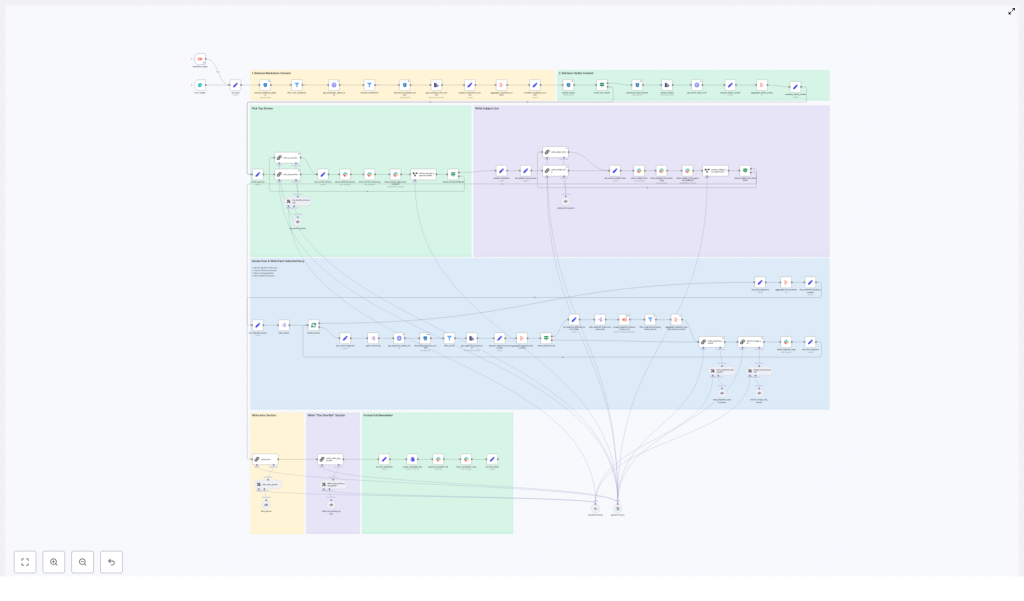
That changed when she discovered an n8n workflow template built specifically for an AI newsletter pipeline. It did not just automate a few tasks. It orchestrated the entire journey, from content ingestion to Slack review, using LLMs and modular steps inside n8n.
The Pain: Manual Newsletter Production That Never Scales
Mia’s process looked like this:
- Hunt through an S3 bucket and internal docs for markdown files and tweets
- Skim everything to find top stories and avoid duplicates from previous editions
- Write summaries and “The Recap” style sections from scratch
- Brainstorm subject lines, then send them to a Slack channel for feedback
- Copy the final markdown into her email platform and archive everything manually
She could feel the opportunity cost. Instead of thinking strategically about content, she was stuck in repetitive curation and formatting. Consistency suffered whenever she got busy, and the team’s “AI newsletter” sometimes went out late or not at all.
So when a colleague shared an n8n AI newsletter pipeline template that promised to turn raw markdown and tweets into a production-ready AI newsletter, Mia decided to rebuild her process from the ground up.
The Discovery: An n8n Template Built for AI Newsletters
The template she found was not a toy. It was a production-ready n8n workflow specifically designed to generate an AI-focused email newsletter from raw content. It combined:
- Content ingestion from S3 or R2
- Metadata enrichment and filtering via HTTP APIs
- Top-story selection using an LLM with a structured JSON output
- Automated section writing in a “The Recap” or Axios-like style
- Subject-line and preheader optimization
- Slack-based review, file export, and archival
Everything ran inside n8n, with LLMs like Gemini, Claude, or OpenAI wired in through LangChain-style nodes. The promise was simple: once configured, Mia could trigger the workflow, review the draft in Slack, and ship.
Behind the Scenes: How the Automated Newsletter Pipeline Works
Before she trusted it with a real edition, Mia walked through the architecture. The workflow followed a clear pipeline:
- Input trigger and content discovery
- Metadata enrichment and filtering
- Combining markdown content and tweets
- LLM-driven story selection
- Iterative section writing for each chosen story
- Subject-line and preheader generation
- Slack review, packaging, and archival
What impressed her most was that each stage was modular. She could swap models, tweak prompts, or adjust filters without breaking the entire flow.
Rising Action: Mia Sets Up Her First Automated Edition
Step 1: A Simple Trigger That Starts Everything
On newsletter day, Mia did not open a dozen tabs. She opened a simple form trigger in n8n.
The workflow started with:
- A form trigger where she entered the newsletter date
- An optional field to paste the previous newsletter’s markdown, so the pipeline could avoid duplicate coverage
As soon as she submitted the form, an S3 search node sprang into action. It scanned the data-ingestion bucket (R2 or any AWS S3 compatible storage) for all markdown files matching that date or prefix. Then it downloaded each candidate file for analysis.
Step 2: Metadata Enrichment That Filters The Noise
Previously, Mia had to eyeball filenames to figure out what was worth including. Now the workflow did that thinking for her.
For each downloaded content file, n8n called an internal file-info HTTP API that returned useful metadata:
- Content type
- Source name
- Authors
- External source URLs
With that metadata, the workflow applied filters to:
- Exclude non-markdown content
- Skip any items that had already appeared in previous newsletters stored in the same bucket
What used to be a messy bucket of files now felt like a curated set of candidates, ready for AI to evaluate.
Step 3: Combining Markdown Content And Tweets
Mia’s newsletter did not just link to long-form articles. It also highlighted key tweets from the week.
The workflow mirrored that editorial style. Once markdown pieces passed the filters, they were assembled into a single combined corpus. In parallel, the pipeline:
- Searched for related tweets using a prefix like
tweet.<date>in the same storage - Extracted tweet metadata and direct URLs
All of this became the raw material that the LLM would later use to choose the top stories.
The Turning Point: Letting The LLM Decide What Matters
Step 4: LLM-Driven Story Selection
This was the part Mia was most skeptical about. Could an LLM really pick the right stories, not just the longest ones?
At the core of the template was a LangChain-style LLM node configured to use Gemini, Claude, OpenAI, or another compatible model. The prompt it used was not a simple “summarize this” instruction. It was a detailed, guarded prompt that told the model to:
- Analyze all input content, including tweets and markdown
- Select exactly four top stories, with the first one treated as the lead
- Output a structured JSON object with:
- Titles
- Summaries
- Identifiers that point back to the original content pieces
- External source links
The prompt also requested detailed chain-of-thought internally and insisted on including reliable source identifiers. That way, downstream nodes could fetch the exact articles or tweets that corresponded to each chosen story.
When Mia inspected the JSON output for the first time, she saw something she had never had before: a clean, structured list of the week’s most important AI stories, with pointers back to the original data.
Step 5: Automated Section Writing In “The Recap” Style
Story selection was only half the battle. Mia still needed readable sections that matched her brand’s voice.
The template solved this with an iterative loop. For each chosen story, the workflow:
- Split the JSON stories into batches
- Resolved the identifiers for each story
- Downloaded the relevant content items
- Aggregated the text, plus any external source scrapes
- Called an LLM writer node to produce a fully formed newsletter section
The prompt for this writer node followed an editorial style Mia recognized, similar to Axios or “The Recap” format:
- The Recap: a short, clear overview
- Unpacked bullet points that broke down the details
- Bottom line: a concise takeaway
Instead of writing every section from scratch, Mia now had a draft that already felt close to her tone. She could still tweak phrases, but the heavy lifting was done.
Step 6: Smart Subject Line And Preheader Generation
Subject lines had always been a last-minute headache. She knew they were crucial for open rates, yet they often got less than five minutes of attention.
The n8n workflow treated them as a first-class step. A dedicated LLM prompt analyzed the top story and generated:
- A subject line of 7 to 9 words
- A complementary preheader
The node did not stop at one idea. It kept alternative options and a short reasoning field, which the workflow later surfaced in Slack. That made it easy for Mia and her team to quickly choose the best option or iterate on it.
Resolution: Review In Slack, Then Ship With Confidence
Step 7: Slack Review, Packaging, And Archival
By this point, the workflow had:
- Selected stories
- Written sections
- Generated subject lines and preheaders
Now it was time for human judgment.
The final assembled markdown, complete with sections and subject line ideas, was automatically posted to a Slack channel for review. The message included interactive buttons so the team could:
- Approve the draft
- Add feedback or request changes
In the background, the pipeline also:
- Created a markdown file of the final edition
- Uploaded it to Slack as a file for easy download
- Stored a copy in the S3 or R2 bucket for long-term archival
For the first time, Mia’s Tuesday afternoon ended with a clear “Approved” click instead of a scramble.
What Mia Had To Configure Before Her First Run
The template was powerful, but not plug-and-play out of the box. Mia spent a short setup session wiring it to her stack. Her checklist looked like this:
- n8n credentials for S3 or R2 / AWS with access to the correct bucket and prefixes
- Internal admin API key for file metadata calls, or adjusted nodes that pointed to her CMS instead
- LLM credentials for Google Gemini, Anthropic, OpenAI, or another provider, plus LangChain node configuration
- Slack OAuth credentials for the review and notification channels
- Optional scraper workflow that handled external-source-urls, which this newsletter template could invoke as a separate workflow
Once these were in place, running the pipeline was as simple as submitting the form trigger.
Why Prompt Design Made Or Broke Her Results
Mia quickly learned that prompt design was not an afterthought. The difference between “usable draft” and “hours of cleanup” came down to the instructions baked into the template.
The workflow included specific prompt rules for:
- Story selection constraints, like:
- Use only content within a certain date window
- Avoid repeats from previous editions
- Skip political items if they were not relevant to the brand
- Section structure, enforcing:
- The Recap:
- Unpacked bullets
- Bottom line
- Linking rules that kept things safe and clean:
- Use only provided URLs
- Prefer deep links over generic homepages
- Use at most one link per bullet
When she customized these prompts for her brand’s voice, she kept the core guardrails intact. That preserved consistency, reduced legal risk, and made sure the LLM stayed within predictable boundaries.
When Things Go Wrong: Troubleshooting The Workflow
Like any production workflow, issues cropped up during Mia’s first tests. The template had built-in strategies to handle them.
- Malformed JSON from the LLM
She enabled the workflow’s output-parser-autofixing node and added strict schema validators to catch and correct bad responses. - Mysterious downstream errors
She reduced batch sizes while testing, which made it easier to trace which specific content identifier was causing problems. - Need for auditability
She configured the workflow to log responses to a temporary S3 path. That gave her a clear trail for debugging and compliance. - External scrapes failing
The pipeline was configured so that if external scrapes failed, the flow continued withonError: continueRegularOutput. Mia learned to inspect the aggregated external content node to find and fix broken URLs.
Scaling The Newsletter Without Losing Control
Once Mia’s team saw how smoothly the pipeline worked, they wanted to expand it. That meant thinking about cost, governance, and safety.
For production use, they implemented a few best practices:
- Rate limiting and quotas on LLM calls to control API costs
- Human-in-the-loop approval for the final publish step, so nothing went out without a person signing off
- PII audit and sanitization to ensure any personally identifiable information in source content was removed before inclusion in the newsletter
The result was a system that felt both automated and safe. The workflow did the heavy lifting, but humans still held the final say.
How Mia Adapted The Template To Her Own Use Cases
After a few weeks, Mia started to see the template as more than a single-purpose tool. It became a flexible foundation for different newsletter experiments.
Some of her favorite customization ideas included:
- Multi-language support, by routing the same stories through different LLM prompts to generate localized editions
- Analytics integration, using subject line variants to A/B test open rates and click rates
- CMS publishing, wiring the final markdown into WordPress or Ghost so approved editions could be pushed automatically
- Image selection and thumbnails, connecting to an image model or API to suggest relevant images and generate thumbnails
All of this built on the same core pipeline: ingest markdown and tweets, use LLMs for selection and writing, optimize subject lines, then review in Slack.
What This Template Ultimately Gave Her
By the time Mia’s third automated edition went out, “newsletter day” felt different. She was no longer dreading a wall of manual work. Instead, she was:
- Confident that the pipeline would surface the best AI stories
- Spending time on nuance and strategy instead of copy-paste tasks
- Publishing on a consistent cadence, even when the

