


n8n: Turn Bank SMS Alerts Into Smart Telegram Notifications (RAG + Supabase)
Imagine never having to dig through a messy SMS inbox again just to confirm a transaction, check a balance, or spot something suspicious. With the right automation, every bank SMS alert can turn into a structured, searchable, and enriched Telegram notification that you and your team can act on in real time.
This guide walks you through an n8n workflow template that does exactly that. It receives bank SMS alerts through a webhook, splits and embeds the message content, stores vectors in Supabase, and uses a Retrieval-Augmented Generation (RAG) agent to enrich and log alerts. You will also see how to add error notifications via Slack and log events to Google Sheets.
More than just a tutorial, think of this as a starting point for a more focused, automated way of working. Once this workflow is in place, you free yourself from manual checks and open the door to deeper insights, fraud detection, and smarter decision making.
The Problem: Scattered SMS, Missed Signals, Constant Context Switching
Bank SMS alerts are valuable, but they often arrive at the worst possible moment. You might be in a meeting, working deeply on a project, or away from your phone. Over time, your SMS inbox becomes a long, unstructured list of messages that are hard to search and even harder to analyze.
Key challenges you might recognize:
- Important transaction alerts get buried under other messages.
- Reviewing past transactions means scrolling endlessly through SMS threads.
- Teams cannot easily collaborate around alerts that live on one person’s phone.
- Spotting anomalies or patterns is nearly impossible without structured data.
If this sounds familiar, you are not alone. The good news is that you do not have to stay stuck in this reactive mode. With n8n, Supabase, and a RAG workflow, you can transform these raw SMS alerts into a real-time, intelligent notification system.
The Mindset Shift: From Manual Monitoring To Automated Insight
Automation is not just about saving time. It is about upgrading how you work. Instead of checking SMS messages manually, you can:
- Receive alerts in a centralized Telegram channel where your team can see and act on them.
- Build a searchable history of transactions using embeddings and a vector database.
- Use AI-powered enrichment to summarize transactions and highlight anomalies.
- Log everything in Google Sheets for reporting, audits, or downstream workflows.
When you adopt this mindset, each workflow you build becomes a stepping stone toward a more focused, less interrupt-driven day. You stop reacting and start designing how information flows to you.
The Solution: An n8n Workflow Template For Bank SMS To Telegram
The template you are about to use connects SMS to Telegram through a RAG pipeline and Supabase vector store. It is designed to be practical, extensible, and easy to adapt to your own needs.
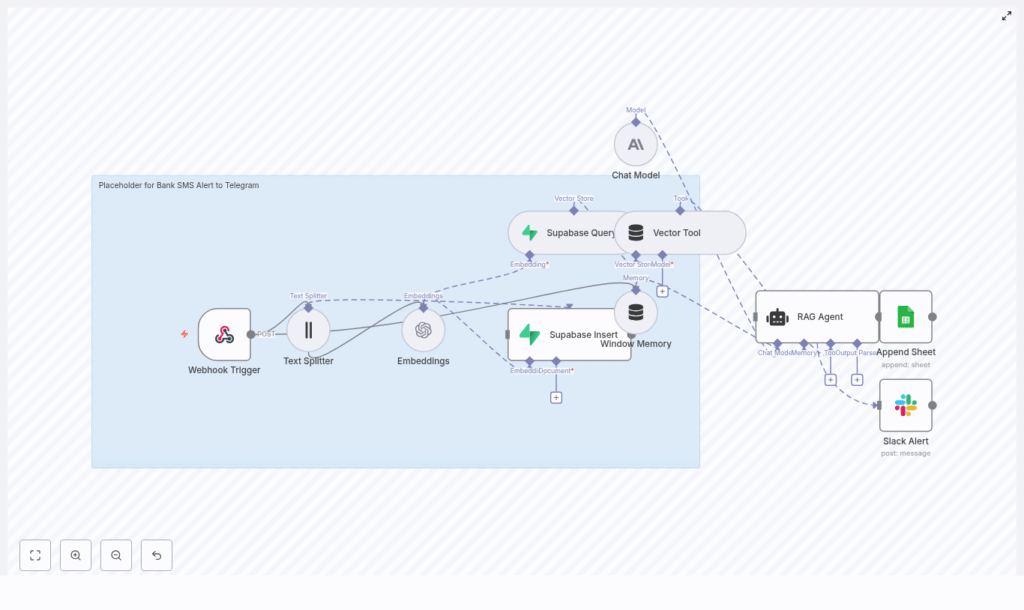
At a high level, the workflow does the following:
- Receives SMS alerts via a Webhook Trigger.
- Splits the SMS text into chunks using a Text Splitter.
- Generates embeddings (OpenAI) for semantic understanding.
- Stores vectors and metadata in a Supabase vector table.
- Queries Supabase for related alerts and passes context to a RAG agent.
- Uses a Chat Model (Anthropic or similar) to summarize and structure the alert.
- Logs results to Google Sheets.
- Sends Slack alerts if anything goes wrong.
This foundation gives you a robust, scalable way to manage financial alerts. From here, you can add Telegram delivery, fraud detection, dashboards, and more.
Architecture Overview: How The Pieces Work Together
To understand the power of this template, it helps to see how each component contributes to the end result.
- Webhook Trigger – Receives incoming SMS payloads (HTTP POST) from your SMS provider or gateway.
- Text Splitter – Splits longer SMS content into chunks for better embeddings.
- Embeddings (OpenAI) – Converts text chunks into semantic vectors.
- Supabase Insert & Query – Stores vectors and metadata, and retrieves relevant context.
- Vector Tool (RAG) – Exposes the Supabase vector index to the RAG agent.
- Window Memory – Keeps recent conversation history for richer responses.
- Chat Model (Anthropic or similar) – Powers the reasoning and summarization.
- RAG Agent – Combines retrieved context and model output to generate structured, enriched results.
- Append Sheet (Google Sheets) – Logs alerts and parsed fields for analysis.
- Slack Alert – Notifies you if the workflow encounters errors.
Together, these nodes form a complete path from raw SMS to intelligent, actionable data. Next, you will walk through the setup step by step so you can bring this architecture to life in your own n8n instance.
Step-by-Step: Building The Workflow In n8n
1. Start With The Webhook Trigger
Begin in your n8n instance, whether self-hosted or on n8n.cloud. Create a new workflow and add a Webhook Trigger node.
- Set HTTP Method to
POST. - Choose a path, for example
/bank-sms-alert-to-telegram.
This webhook URL becomes the endpoint that your SMS gateway or forwarding service will call whenever a bank SMS arrives. It is the entry point to your new automated alerting system.
2. Add A Text Splitter For Flexible Message Lengths
Even though many bank SMS alerts are short, your workflow should be ready for longer messages, concatenated SMS, or extra metadata like merchant notes and tags. Add a Text Splitter node after the webhook.
Suggested settings:
- chunkSize = 400
- chunkOverlap = 40
These values help preserve context across chunks so your embeddings and downstream RAG logic remain accurate. You can adjust them later as you see how your real data behaves.
3. Generate Embeddings With OpenAI
Next, connect the Text Splitter to an Embeddings node. In the template, text-embedding-3-small from OpenAI is used.
- Configure your OpenAI API credentials in the n8n credentials manager.
- Select the embedding model (such as
text-embedding-3-small).
Embeddings transform your text chunks into vectors that capture meaning instead of just keywords. This is what enables semantic search and context-aware responses later on.
4. Store Vectors In Supabase
Now it is time to persist your embeddings. Add a Supabase Insert node (or a custom HTTP Request node if you prefer managing the API manually).
- Create or use a Supabase table configured as a vector store.
- Choose an index name such as
bank_sms_alert_to_telegram. - Store:
- The original SMS message.
- Metadata like phone number and timestamp.
- The embedding vector itself.
By storing both vectors and metadata, you build a rich history of alerts that you can query for patterns, similar transactions, or suspicious behavior.
5. Query The Vector Store For Context
When a new SMS comes in, you can use a Supabase Query node to search for related past alerts or contextual documents.
- Configure similarity search against your vector column.
- Return the most relevant previous alerts based on the new message.
Feed these query results into a Vector Tool node, available through the n8n LangChain integration. This tool exposes the Supabase index as a retriever for your RAG agent, giving it historical context to work with.
6. Configure The Chat Model And RAG Agent
Now you bring intelligence into the flow. Add a Chat Model node. The template uses Anthropic, but you can also use OpenAI or another model supported by n8n LangChain.
Then configure a RAG Agent node and connect:
- The Vector Tool for retrieval.
- The Chat Model for reasoning and generation.
- Window Memory to keep recent conversation context if needed.
Use a system prompt tailored to your use case, for example:
“You are an assistant for Bank SMS Alert to Telegram: summarize transaction, detect anomalies, and output structured fields for logging.”
This prompt guides the agent to produce concise, human-friendly summaries and structured fields like status, amount, and transaction ID.
7. Log Results And Handle Errors Gracefully
To turn this into a reliable system, you need logging and error handling.
First, connect the RAG Agent output to a Google Sheets Append node:
- Log fields such as Status, Summary, Amount, Transaction ID, and Timestamp.
- Use this sheet for reporting, audits, or additional automations.
Next, add an error handler branch for the RAG Agent and connect it to a Slack Alert node:
- Send a Slack message whenever processing fails.
- Include diagnostic details, but never include secrets or sensitive data.
With this setup, you not only gain insight from every alert, you also gain confidence that you will be notified if something breaks.
Node-by-Node: How Each Piece Supports Your Automation
Webhook Trigger
The Webhook Trigger node is your gateway from SMS to automation. It receives the incoming SMS payload from providers like Twilio, Nexmo, or your telco’s webhook integration.
For security, if your webhook is exposed publicly, consider:
- API key headers.
- HMAC signatures.
- IP allowlists.
Text Splitter
The Text Splitter node ensures that even long or combined messages are handled effectively. By breaking messages into overlapping chunks, you keep semantic boundaries intact and reduce the risk of losing important context.
Embeddings
The Embeddings node converts text into vector space using a model like OpenAI’s text-embedding-3-small. These vectors enable:
- Similarity searches across past alerts.
- Context retrieval for the RAG agent.
- Better understanding of transaction patterns over time.
Supabase Insert & Query
Supabase acts as your vector database in this template. With it you can:
- Insert vectors along with metadata such as merchant, phone number, timestamp, or amount.
- Query by similarity to find related messages, such as same merchant or similar amounts.
- Use results to power enrichment and anomaly detection.
Window Memory & Vector Tool
The Window Memory node keeps track of recent interactions so the RAG agent can respond with awareness of previous messages in the same conversation.
The Vector Tool node exposes your Supabase index as a retriever so the agent can pull in domain-specific documents or earlier alerts and reason over them.
RAG Agent + Chat Model
The RAG Agent combines the retrieved context from Supabase with the reasoning power of the Chat Model. This enables it to:
- Summarize each transaction in a clear, human-friendly way.
- Detect potential anomalies, such as duplicate charges or unusually large amounts.
- Produce structured output ready for logging and downstream processing.
Security & Best Practices For Financial Data
Because you are working with financial alerts, security is essential. Keep these practices in mind:
- Avoid storing raw sensitive data unless you have proper encryption and compliance in place.
- Redact or tokenize account numbers and personally identifiable information (PII).
- Use HTTPS and webhook verification between your SMS provider and n8n, such as IP whitelisting or HMAC signatures.
- Restrict access to Supabase using API keys and row-level security policies.
- Store credentials in environment variables in n8n and rotate API keys regularly.
- Retain only the minimum necessary data and purge old vectors if they are no longer needed.
Troubleshooting & Optimization Tips
As you experiment and improve the workflow, you might run into small issues. Here are some quick checks:
- If embeddings fail, verify your OpenAI credentials and confirm the model name in n8n.
- If Supabase inserts or queries fail, check CORS settings and database permissions.
- If important context seems lost or duplicated, adjust the Text Splitter chunkSize and chunkOverlap.
- Use the Slack Alert node to get immediate visibility into runtime errors, but avoid sending secrets or full payloads.
Each issue you solve makes your automation more resilient and prepares you to build even more advanced workflows.
Where To Go Next: Enhancements & Growth Ideas
Once this template is running, you have a solid foundation. From here, you can grow your automation in powerful ways:
- Send alerts to Telegram by adding a Telegram node that posts enriched alerts directly to a channel or bot, with formatted amounts and inline buttons.
- Add fraud detection by integrating a dedicated model that flags suspicious transactions and escalates to security teams.
- Enrich metadata using fields like merchant name or geolocation to build smarter rules and correlation workflows.
- Build a dashboard with tools like Grafana or Supabase Studio to review and search historical alerts using semantic search.
Each enhancement helps you move from simple notification handling toward a full financial intelligence layer powered by automation.
Sample Webhook Payload
Here is an example of the payload your webhook might receive from an SMS gateway:
{  "from": "+1234567890",  "to": "+1098765432",  "message": "Debited 500.00 USD at ACME Store on 2025-01-10. Balance: 1200.00 USD",  "timestamp": "2025-01-10T12:34:56Z"
}
You can use this sample to test your n8n workflow before connecting a live SMS provider.
Bringing It All Together: Your Next Step In Automation
This n8n template – Webhook → Text Splitter → Embeddings → Supabase → RAG Agent → Google Sheets / Slack – gives you a powerful starting point for real-time, enriched bank SMS alerting to Telegram.
It is flexible enough to grow with you, whether you want simple notifications, advanced fraud detection, multi-channel alerts, or full reporting dashboards. Most importantly, it helps you reclaim your attention by letting automation handle the repetitive monitoring work.
To get started:
- Deploy the template in your n8n environment.
- Secure your API keys and review your data handling practices.
- Experiment with prompts, text splitting, and vector indexing strategies.
- Test with sample SMS payloads, then connect your real SMS gateway.
Use this workflow as a foundation, then keep iterating. Each small improvement compounds into a smoother, more intelligent system that supports your personal or business growth.
Ready to automate more of your financial workflows? Spin up this template in your n8n instance, explore how it fits your processes, and do not hesitate to adapt it
