

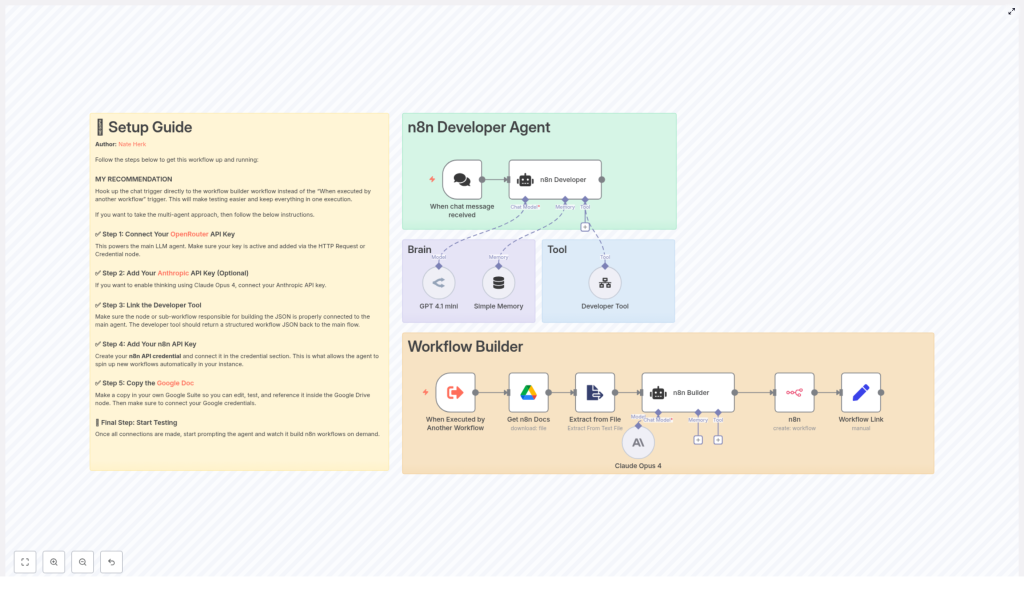
n8n Developer Agent: How One Developer Started Building Workflows Automatically
By the time Alex opened their laptop that Monday morning, they were already behind.
As the only automation-focused developer in a fast-growing team, Alex was drowning in requests. Marketing wanted a lead-enrichment workflow. HR needed a new onboarding flow. Product asked for an alerting pipeline for their latest service. Every request started the same way: a vague natural language description in a chat thread, followed by hours of manual workflow building in n8n.
Alex loved n8n, but hated repeating the same boilerplate over and over. They kept thinking: “If the team can describe what they want in plain language, why can’t something just turn that into a real workflow?”
That question is what led Alex to discover the n8n Developer Agent template, a pre-built multi-agent system that promised to do exactly that: listen to natural language requests and turn them into fully importable n8n workflows, created automatically via the n8n API.
The Problem: Manual Workflow Building At Scale
Alex’s situation was familiar to many automation developers and technical founders:
- Stakeholders described automations in chat, not in JSON or node configurations.
- Alex spent hours translating those descriptions into valid n8n workflows.
- Every new flow started with the same boilerplate nodes and patterns.
- Programmatic workflow creation was possible via the n8n API, but wiring it up felt like one more project.
What Alex needed was a way to bridge that gap automatically. Something that could:
- Understand natural language requests.
- Generate complete n8n workflow JSON that followed internal standards.
- Create and link those workflows directly in their n8n instance.
- Stay flexible enough to swap LLM providers or tools over time.
They did not want another “AI demo.” They wanted a production-ready n8n developer agent that could build real workflows on demand.
The Discovery: A Template Built For Workflow Developers
After some searching, Alex landed on the n8n Developer Agent template. It was not just a single node or a trivial example. It was a full, opinionated architecture that combined:
- A chat-based trigger so non-technical teammates could make requests.
- Multiple LLM agents (OpenRouter GPT 4.1 mini by default, plus optional Claude Opus 4) for reasoning and orchestration.
- A dedicated Developer Tool sub-workflow that produced valid n8n workflow JSON.
- Integration with the n8n API to create workflows programmatically and return direct links.
- Support for internal documentation, so the agent could follow Alex’s own n8n standards.
In short, it was exactly what Alex had been sketching on whiteboards for months, only already implemented as a reusable template.
Inside The n8n Developer Agent: How The Architecture Works
Before trusting it in production, Alex wanted to understand exactly how this agent worked. On the canvas, the template was split into two main zones:
- n8n Developer Agent (top-right) – the “brain” that talks to users, manages memory, and calls tools.
- Workflow Builder (bottom) – the specialist that constructs valid workflow JSON and hands it off to the n8n API.
Alex followed the flow step by step:
- A chat trigger receives a user’s request, such as “Create an onboarding workflow that sends a welcome email, creates a Trello card, and assigns a Slack channel.”
- The request is forwarded to an AI agent powered by OpenRouter’s GPT 4.1 mini by default.
- An optional Claude Opus 4 node is available as an auxiliary model for deeper “thinking” or complex code generation.
- The agent calls the Developer Tool sub-workflow, which assembles a full, valid n8n workflow JSON object.
- The n8n API node receives that JSON, creates the workflow in Alex’s n8n instance, and a final node constructs a sharable workflow link.
If everything worked, Alex’s teammates would be able to describe what they wanted in plain language and get a direct link to a newly created workflow, all within a single automated pipeline.
Meet The Cast: Key Nodes As Characters In The Story
When Chat Message Received: The Doorway
For Alex, the chat trigger node became the front door to the entire system. It listened for incoming messages from a chat UI or webhook and passed the raw request into the agent pipeline. No forms, no complex UI, just a natural language message that kicked everything off.
n8n Developer (Agent): The Orchestrator
The n8n Developer (Agent) node acted like a conductor. It took the user’s message, applied system instructions, used memory if needed, and decided when to call tools such as the Developer Tool or documentation reference. Alex configured strict system messages here to enforce one critical rule: when the agent returned workflow JSON, it had to be pure JSON only, with no extra commentary that could break imports.
Developer Tool (toolWorkflow): The Builder
The Developer Tool node was where the actual workflow took shape. It pointed to a sub-workflow that received the agent’s structured instructions and produced the final n8n workflow JSON. The output had to match n8n’s API requirements, including:
namefor the workflow.- A
nodesarray with configured nodes. - A
connectionsobject linking nodes correctly. - Optional
settingsand metadata for internal standards.
Alex liked that this part was modular. If they wanted to swap in a different JSON generator or add validation logic, they could do it here without touching the rest of the agent.
Claude Opus 4 / GPT 4.1 mini: The Brains
The template used two models for different roles:
- GPT 4.1 mini via OpenRouter for conversational orchestration, tool calling, and general reasoning.
- Claude Opus 4 as an optional, more advanced reasoning engine for complex code or workflow logic.
Alex appreciated that both were pluggable. If costs changed or a new provider came along, they could swap models without rewriting the entire workflow.
Get n8n Docs & Extract from File: The Librarian
Alex’s team had internal rules for how workflows should be named, tagged, and documented. The template anticipated that. A Google Drive node called Get n8n Docs pulled a reference document, and an Extract from File node converted it into plain text. The agent could then read and follow those internal standards while generating workflows.
n8n (API) & Workflow Link: The Final Delivery
Finally, the n8n API node used Alex’s n8n API credential to create the workflow programmatically. A downstream node then built a clean, user-facing URL so the person who made the request could click straight into their new workflow.
In theory, this meant Alex could go from “describe the automation in chat” to “here is your live workflow link” in a single run.
Rising Action: Setting Up The Developer Agent
Understanding the architecture was one thing. Getting it running in Alex’s own n8n instance was the real test. They followed a series of setup steps, each unlocking another piece of the system.
Step 1 – Connect OpenRouter For The Main Agent
First, Alex added their OpenRouter API key as a credential in n8n. This powered the main LLM agent that handled conversation and orchestration. Without it, the Developer Agent would have no way to understand requests or decide which tools to call.
Step 2 – (Optional) Enable Anthropic For Deep Reasoning
Because some of Alex’s workflows were complex, they decided to enable Claude Opus 4 as well. They added an Anthropic API key in the Anthropic credential node. This gave the template access to a more advanced reasoning model when needed, while still keeping GPT 4.1 mini as the default conversational engine.
Step 3 – Configure The Developer Tool
Next, Alex opened the Developer Tool configuration. The template expected this node to either:
- Call a sub-workflow that assembled workflow JSON, or
- Connect to an external generator that returned a JSON object.
Alex made sure the tool always returned a single, valid JSON object that started with { and ended with }, with no extra text. This constraint was crucial for smooth imports through the n8n API.
Step 4 – Add n8n API Credentials
To let the agent actually create workflows, Alex added an n8n API credential. They used either the HTTP node or the dedicated n8n API node credential, depending on their setup. Before letting the agent run autonomously, Alex tested the API node manually with a sample payload to confirm authentication, base URL, and permissions were all correct.
Step 5 – Connect Internal n8n Documentation
Finally, Alex made a copy of the included Google Doc that served as an n8n documentation reference. They saved it in their own Drive and attached a Google Drive credential to the Get n8n Docs node. Now, the agent could pull internal policies, naming conventions, and examples, then apply them when generating workflows.
With these steps complete, the Developer Agent was technically ready. The real question was whether it could handle a real request from Alex’s team.
The Turning Point: The First Real Workflow Request
Later that week, HR pinged Alex with a familiar message: “Can we get a new onboarding workflow that sends a welcome email, creates a Trello card, and assigns a Slack channel for each new hire?”
Instead of opening the n8n canvas and starting from scratch, Alex pointed HR to the chat interface connected to the Developer Agent and asked them to describe what they wanted in their own words.
HR typed:
Create an onboarding workflow that sends a welcome email, creates a Trello card, and assigns a Slack channel for every new employee we add.
Behind the scenes, the following happened:
- The chat trigger node captured the message and sent it to the n8n Developer (Agent).
- The agent parsed the request, checked its memory, and optionally consulted the internal docs from Google Drive.
- It then called the Developer Tool, passing a structured description of the desired workflow, including triggers, actions, and any relevant standards.
- The Developer Tool built a complete workflow JSON object with nodes for email, Trello, and Slack, plus connections that defined the execution order.
- The n8n API node received that JSON, created a new workflow in Alex’s instance, and the final node returned a clean workflow link back to HR.
Within a single run, HR had a real, editable n8n workflow instead of a ticket in a backlog. Alex opened the link to review it and found that the structure matched their expectations, right down to naming conventions pulled from the internal docs.
Refining The Agent: Best Practices Alex Adopted
That first success was a turning point, but Alex knew automation at this level needed guardrails. They tweaked the template using a few best practices that made the Developer Agent more reliable and production ready.
Enforcing Pure JSON Output
In the agent’s system messages, Alex required that the Developer Tool return only JSON. No explanations, no markdown, no comments. This avoided a common issue where the n8n API import would fail because of extra text around the JSON object.
Adding JSON Validation
Before calling the n8n API node, Alex inserted a small safety step that attempted to parse the JSON and perform basic schema checks. If the JSON failed validation, the workflow could respond with an error message instead of trying to create a broken workflow.
Controlling Model Costs
Since Claude Opus 4 was powerful but more expensive, Alex limited its use to specific reasoning steps and set token limits where appropriate. Most conversational orchestration remained with GPT 4.1 mini to keep costs predictable.
Versioning And Logging
Alex added a simple version field inside the generated workflow JSON and logged each created workflow. This made it easier to audit changes over time and roll back if a particular generation did not meet expectations.
When Things Go Wrong: Troubleshooting In Practice
Not every run was perfect. During the first week, Alex ran into a few common issues and used the template’s structure to debug them quickly.
Invalid JSON From The Developer Tool
Occasionally, the Developer Tool slipped in extra whitespace or text. Alex tightened the system instructions and kept the validation step in place. If the JSON failed parsing, the workflow would log the issue and respond with a clear error instead of silently failing.
n8n API Authentication Errors
When the n8n API node threw authentication errors, Alex double checked the API key, base URL, and permission scopes. Running a manual execution of the API node with a known-good payload helped isolate configuration issues quickly.
Truncated Model Responses
For very large workflows, some model responses were truncated. Alex increased the maximum token settings where needed and, in a few cases, considered splitting generation into smaller steps for complex flows.
Debugging With Manual Executions
Whenever something looked off, Alex ran the Developer Tool in isolation with manual executions, inspected intermediate outputs, and used sticky notes on the n8n canvas to document assumptions and mark nodes that still needed credentials or configuration.
Security And Governance: Keeping Automation Under Control
Programmatic workflow creation is powerful, but Alex knew it could be risky if left wide open. They added a few governance measures around the Developer Agent:
- Restricted who could trigger the agent, using authenticated chat users only.
- Configured the agent to create workflows in a controlled sandbox workspace first, not directly in production.
- Set up a periodic review process to inspect generated workflows for security and compliance risks before promoting them.
With these safeguards in place, Alex felt confident letting more teammates use the system without sacrificing control.
How Alex’s Team Uses The Developer Agent Today
Within a few weeks, the Developer Agent had moved from experiment to everyday tool. Different teams used it in different ways:
- HR used it to generate onboarding automation workflows for new employees, starting from a short prompt that described their ideal process.
- Product and engineering used it to create webhook or API based integrations from natural language descriptions, then fine tuned the generated flows manually.
- Ops and SRE used it to auto generate monitoring or alerting flows whenever a new service was launched, based on a quick summary of the service’s behavior.
Alex was no longer the bottleneck for every new automation idea. Instead, they

