


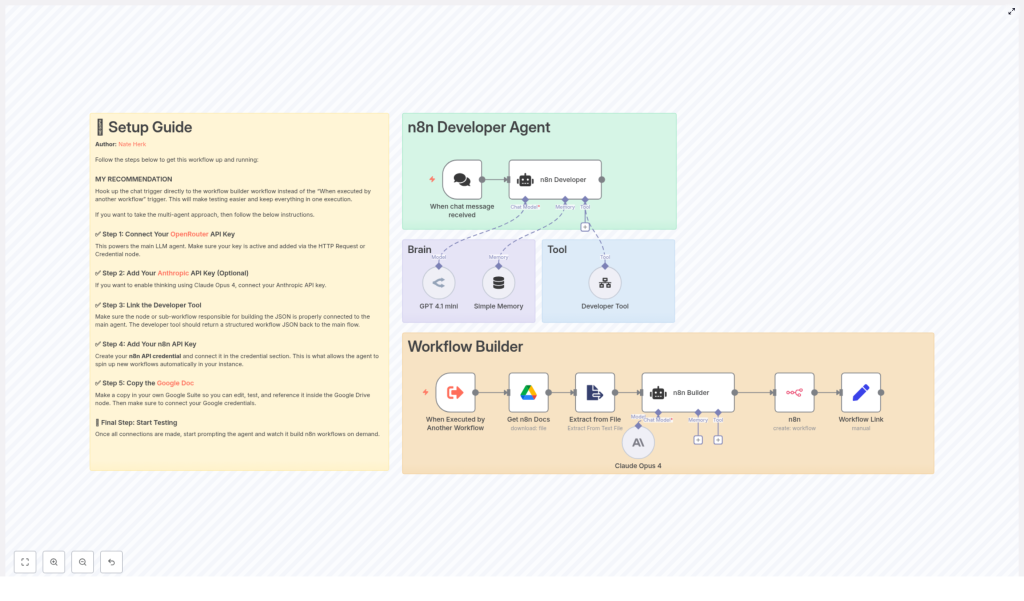
n8n Developer Agent: Build Workflows with AI
Every automation builder hits the same wall at some point. You have more ideas than time, more requests than capacity, and a growing list of “I’ll build this workflow later.” The n8n Developer Agent template is designed to help you break through that wall.
By combining a chat-triggered AI agent with the n8n API, OpenRouter, Anthropic Claude Opus 4, and Google Drive, this template turns natural language into ready-to-import n8n workflows. It is not just a convenience feature, it is a way to reclaim time, move faster, and open the door to a more automated, focused way of working.
This guide walks you through that journey: from the problem of manual workflow creation, to a new mindset about automation, and finally to the concrete steps for using the n8n Developer Agent template as your practical tool for growth.
SEO keywords: n8n Developer Agent, n8n workflow, workflow automation, AI agents, OpenRouter, Claude Opus 4, n8n template.
The problem: Manual workflows slow you down
Building n8n workflows by hand is powerful, but it can also be slow. You need to:
- Translate vague requests into clear automation logic
- Wire up nodes, connections, and credentials
- Iterate through multiple versions before something feels right
Over time, this can turn into a bottleneck. Product teams wait on automation. Operations teams stay stuck in repetitive tasks. You know automation can help, but the friction of starting each new workflow from scratch holds you back.
The n8n Developer Agent template is built to change this dynamic. Instead of manually crafting every workflow, you describe what you want in plain language and let an AI agent generate a complete n8n workflow JSON that you can review, refine, and import.
The shift in mindset: From “builder of everything” to “designer and reviewer”
Using AI to generate n8n workflows is more than a technical trick. It is a mindset shift.
Instead of spending your time on repetitive configuration, you spend it on:
- Clarifying what the business really needs
- Designing the logic and guardrails of your automations
- Reviewing and improving workflows generated by the agent
This is where your expertise creates the most value. The n8n Developer Agent template becomes your assistant, not your replacement. It handles the boilerplate so you can focus on strategy, quality, and impact.
Think of this template as a starting point that you can customize, extend, and refine over time. Each workflow you generate is a chance to learn, improve your prompts, and gradually build a library of automations that reflect your best practices.
What the n8n Developer Agent actually does
At its core, the n8n Developer Agent template accepts a natural-language request via a chat trigger and converts that request into a fully formed, importable n8n workflow JSON. From there, it can automatically create the workflow in your n8n instance and give you a direct link to review it.
Key capabilities include:
- Chat-triggered workflow generation using an AI agent
- Optional deeper reasoning and refinement using Anthropic Claude Opus 4 or GPT 4.1 mini
- Integration with Google Drive so the agent can reference documentation or internal templates
- Automatic creation of a new workflow in your n8n instance via the n8n API
- Generation of a clickable link to open and review the created workflow
The result is a faster, more fluid way to move from “idea” to “working n8n workflow.”
Inside the template: Nodes, roles, and how they work together
To understand how this template unlocks that speed, it helps to see the main building blocks and how each contributes to the overall flow.
Primary nodes and their roles
- When chat message received – This is your entry point. A user sends a natural-language request through chat, and this trigger starts the automation.
- n8n Developer (AI agent) – This is the central LLM-powered agent. It reads the user’s request, coordinates with tools, and ensures that the final output is a valid n8n workflow JSON.
- Developer Tool – A sub-workflow or tool node dedicated to generating developer-grade n8n workflow JSON. Its job is to return a single, valid JSON object representing the complete workflow, ready for import.
- Get n8n Docs (Google Drive) – This node fetches reference documentation or template files from Google Drive so the agent can align the generated workflows with your internal best practices.
- Extract from File – Converts Google Docs into plaintext that the AI agent can easily read and use.
- Claude Opus 4 / GPT 4.1 mini – Optional “thinking” nodes that can provide deeper reasoning, validation, or interpretation of reference docs. These are especially useful for complex or multi-step workflows.
- n8n (create workflow) – Uses your n8n API credentials to automatically create a new workflow from the generated JSON.
- Workflow Link – Produces a direct, clickable link to the newly created workflow so a human can review, test, and refine it.
Visual guide and sticky notes for smooth setup
The template includes visual sticky notes that act as an internal guide. You will find:
- Setup instructions for each key integration
- Recommended credential connections
- Common troubleshooting tips
These notes are there to help you move from “template imported” to “template working” as quickly and safely as possible.
From idea to workflow: How the generation flow works
Once the template is configured, the magic is in the flow. Here is what happens behind the scenes when someone makes a request.
- The user sends a natural-language request through the chat trigger.
- The request is passed as-is to the n8n Developer agent.
- The agent forwards the request to the Developer Tool, which constructs a complete n8n workflow JSON with nodes, connections, and key settings.
- Optional LLM nodes such as Claude Opus 4 or GPT 4.1 mini can refine or validate the JSON and extract additional context from Google Drive docs if needed.
- The n8n (create workflow) node calls your n8n API and creates a new workflow record using the generated JSON.
- The Workflow Link node returns a URL that lets the user open and review the workflow in the n8n UI.
In practice, this means you can say something like “Create a workflow that reads a Google Sheet and sends an email when a new row is added” and receive a ready-made workflow that you can immediately inspect and adjust.
Step-by-step setup: Turning potential into reality
To unlock this capability, you only need to walk through a few configuration steps. Treat this as the foundational work that will pay off every time you generate a new workflow.
- Connect OpenRouter (recommended)
Add your OpenRouter API key. This powers the main conversational model used by the n8n Developer agent. Once connected, the agent can understand your natural-language prompts and coordinate the Developer Tool.
- Connect Anthropic (optional, but powerful)
If you want deeper reasoning for more complex automations, add your Anthropic API credentials and enable Claude Opus 4. This is especially helpful when you expect multi-step planning or nuanced logic in your workflows.
- Link the Developer Tool
Make sure the Developer Tool node or sub-workflow is configured to output a single, valid JSON object representing the entire workflow. In the system message for the agent, clearly instruct the tool to return only the final JSON, wrapped from
{to}, without extra commentary. - Add your n8n API credentials
Create an n8n API key or set up an n8n credential, then connect it to the n8n (create workflow) node. This is what allows the template to programmatically create workflows in your n8n instance.
- Connect Google Drive
Copy the provided n8n documentation or your own internal docs to Google Drive. Authorize the Google Drive node so the agent can read these files. The more aligned your docs are with your standards, the more your generated workflows will reflect those best practices.
- Test with a sandbox prompt
Start in a safe environment. Use a simple request such as “Create a workflow that reads a Google Sheet and sends an email when a new row is added” and iterate until the generated JSON imports cleanly into n8n. This is where you fine-tune prompts and verify that the Developer Tool is behaving as expected.
Best practices: Build confidence as you automate faster
As you move from experimentation to real use, a few best practices will help you keep things safe, reliable, and maintainable.
Validate and test incrementally
Always validate generated JSON in a development or test environment before enabling automatic creation in production. A practical workflow might look like this:
- Start with small, contained tasks
- Export the generated JSON and inspect node parameters and credentials
- Import into a test n8n instance and run controlled test executions
- Only then, promote the workflow to production with appropriate checks
Isolate credentials for safety
Use separate credentials for development and production n8n environments. Limit the scope of your n8n API keys to only what is necessary, and rotate keys regularly. This keeps experimentation safe while you scale up your use of the Developer Agent.
Handle ambiguous prompts with clarification
AI agents work best with clear instructions. If the agent receives a vague or incomplete request, add a clarification step. Have the system respond to the user with follow-up questions before generating the workflow JSON. This simple pattern reduces invalid outputs and rework.
Common errors and how to fix them
- Invalid JSON: Tighten validation in the Developer Tool. Make sure the agent is instructed to return only valid JSON, wrapped from
{to}, with no additional text. - Missing credentials in generated nodes: Configure the Developer Tool to insert placeholders or clear instructions where credentials must be set manually after import.
- Permission denied when creating workflows: Double-check that your n8n API key has the correct permissions and that the n8n base URL in the node configuration is correct.
Use cases: Where this template can transform your work
Once the n8n Developer Agent template is running, you can apply it across many parts of your organization.
- Rapid prototyping of automations – Turn product or operations requests into working workflows in minutes instead of days. Quickly explore ideas, then refine the best ones.
- Internal developer productivity – Let non-technical stakeholders describe what they need in plain language. Developers can then review, adjust, and approve the generated workflows instead of building every detail from scratch.
- Template generation – Produce standardized starter workflows for onboarding, monitoring, alerts, and recurring processes. Use the agent to generate variations that all follow your core patterns.
- Documentation-driven workflows – Connect the Google Drive docs to your internal guidelines. The agent can reference these documents to align new workflows with your best practices and architecture decisions.
Security and governance: Automate with intention
Because this template can programmatically create workflows, good governance is essential. The goal is not just speed, but safe and sustainable automation.
- Review generated workflows before granting production permissions, especially for high-impact automations.
- Implement an approval or human-in-the-loop step where needed, for example for workflows that touch sensitive data or perform critical actions.
- Log all generation requests and created workflow IDs so you have an audit trail of what was generated, when, and by whom.
With these guardrails in place, you can confidently expand your use of AI-generated workflows across the organization.
Your next step: Turn this template into your automation ally
The n8n Developer Agent template is more than a demo. It is a practical foundation for a more automated way of working. By connecting OpenRouter, optionally Anthropic Claude Opus 4, Google Drive, and your n8n API credentials, you give yourself a repeatable way to turn ideas into workflows at high speed.
From there, every new prompt is an opportunity to:
- Save time on repetitive configuration
- Empower teammates to request automations directly
- Refine your internal standards and encode them into the system
Ready to try it? Import the template into a sandbox n8n instance, connect your API keys, and start with simple prompts. Use each run as a learning loop: improve your instructions, tweak the Developer Tool, and gradually expand to more complex workflows.
If you want a guided walkthrough or help customizing the Developer Tool to match your stack and standards, contact our team or download the template to get started.
Call-to-action: Import the n8n Developer Agent template, then run a test prompt like “Create a workflow that watches a Google Sheet and posts to Slack when a new row is added.” Review the generated workflow, adjust anything you like, and iterate until it feels exactly right. Each iteration brings you closer to a fully automated, distraction-free workflow environment.
