


n8n + ERPNext: AI-Powered Candidate Shortlisting Workflow
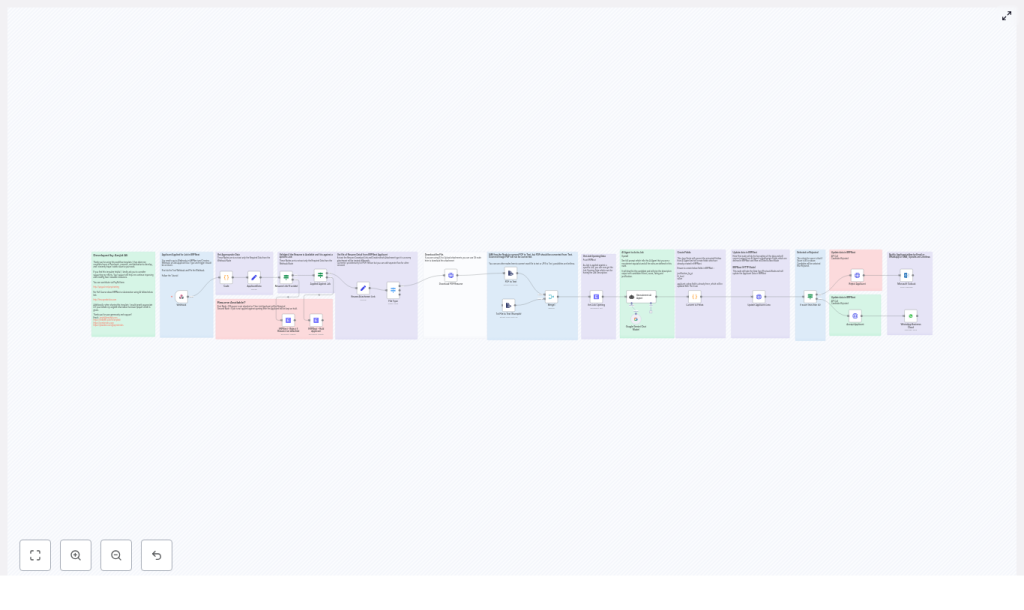
This reference guide documents an n8n workflow template that integrates ERPNext, automated resume parsing, and an AI evaluation agent (Google Gemini or OpenAI style) to perform first-pass candidate shortlisting. It is written for technical users who want to understand the workflow structure, node configuration, and data flow in detail.
1. Workflow Overview
The workflow automates screening of job applicants created in ERPNext by:
- Receiving Job Applicant events from ERPNext via webhook
- Validating that a resume exists and that the applicant is linked to a Job Opening
- Downloading and extracting resume text (PDF or plain text)
- Fetching the corresponding Job Opening record and job description from ERPNext
- Sending resume + job description to an AI agent for fit evaluation
- Mapping the AI output to ERPNext-specific fields
- Updating the applicant status (Accepted / Rejected / Hold) and triggering notifications
The template is designed as a reusable automation pattern that can be imported into any n8n instance (self-hosted or cloud) and connected to an existing ERPNext deployment.
2. Architecture & Data Flow
2.1 High-Level Process
- Trigger: ERPNext sends a POST request to an n8n Webhook node when a Job Applicant is created.
- Validation: If / Switch nodes verify:
- Presence of a resume file or URL
- Association with a valid Job Opening
- Resume Processing: The workflow downloads the resume and extracts text from PDF or plain text files.
- Job Data Retrieval: An ERPNext node retrieves the Job Opening document and its job description.
- AI Evaluation: A LangChain / Gemini / OpenAI style node compares resume text with the job description and returns a structured evaluation.
- Field Mapping: A Code node parses the AI response and maps values to ERPNext fields (rating, score, fit level, justification).
- Status & Notification: Based on score thresholds, the workflow updates the applicant status in ERPNext and optionally sends notifications through email, WhatsApp, SMS, or Outlook nodes.
2.2 Core Integrations
- ERPNext: Used for Job Applicant and Job Opening records, webhooks, and applicant status updates.
- n8n: Orchestrates triggers, branching logic, file handling, API calls, and AI integration.
- AI Provider: Google Gemini or OpenAI, accessed via an agent node (LangChain or native AI node) to perform resume-to-job matching.
- File Handling: Built-in n8n file and PDF nodes for resume download and text extraction.
3. Node-by-Node Breakdown
3.1 Webhook Node (Trigger)
Purpose: Initiates the workflow when ERPNext creates or updates a Job Applicant and fires a webhook.
- Input: HTTP POST from ERPNext containing Job Applicant payload (e.g., applicant name, email, resume link, job opening reference).
- Configuration:
- Method:
POST - Path: Custom path configured in ERPNext webhook settings
- Recommended: Pin the webhook URL during development to avoid changes while testing.
- Method:
- ERPNext Setup: Configure a webhook on the
Job ApplicantDocType, pointing to the n8n webhook URL and sending relevant fields (including resume link and job opening reference).
Edge cases:
- If ERPNext sends incomplete data (missing job opening or resume link), subsequent validation nodes will handle this and can move the applicant to a Rejected or Hold state.
3.2 Validation Nodes (If / Switch)
Purpose: Ensure that the workflow only proceeds when required data is present.
- Checks performed:
- Resume link or file is present in the Job Applicant payload.
- Applicant is associated with a specific
Job Openingdocument.
- Typical configuration:
- If node: Evaluate expressions like:
={{ $json["resume_link"] !== undefined && $json["resume_link"] !== "" }}={{ $json["job_opening"] !== undefined && $json["job_opening"] !== "" }}
- Switch node: Optionally used to route different failure modes (missing resume vs missing job opening) to different status updates.
- If node: Evaluate expressions like:
- Outcomes:
- If checks pass, the workflow continues to resume download and job opening retrieval.
- If a check fails, the template can:
- Set applicant status to Rejected or Hold in ERPNext.
- Optionally skip AI evaluation and notifications.
3.3 Resume Download & Text Extraction
Purpose: Retrieve the applicant’s resume file and convert it to plain text for AI processing.
- Supported formats in the template:
- PDF (non-scanned, text-based)
- Plain text files
- Typical node usage:
- HTTP Request / Binary Download node: Downloads the file from a URL provided by ERPNext.
- PDF Extract node or similar: Extracts text from PDF files.
- Text handling node: Handles plain text resumes without conversion.
Important limitation:
- Scanned image PDFs are not converted by default. They require OCR.
OCR handling (optional extension):
- If you expect scanned resumes:
- Add OCR-specific nodes or services to convert JPG/PNG or image-based PDFs to text.
3.4 ERPNext: Get Job Opening
Purpose: Retrieve the Job Opening document that the candidate applied for, including the full job description.
- Node type: ERPNext node (or HTTP Request node configured with ERPNext API).
- Input: Job Opening identifier from the Job Applicant payload (e.g.,
job_openingfield). - Configuration:
- DocType:
Job Opening - Operation: Get record
- Record ID: Expression referencing the applicant’s job opening field.
- DocType:
- Output:
- Job title, job description, and any other relevant fields used for AI evaluation.
The job description is used as the reference text for skills, responsibilities, and requirements that the AI agent compares against the resume.
3.5 Recruitment AI Agent (LangChain / Gemini / OpenAI)
Purpose: Evaluate the candidate’s resume against the job description using an AI model and return a structured assessment.
- Node type: AI agent node (e.g., LangChain integration) configured to call Google Gemini or OpenAI.
- Inputs:
- Extracted resume text.
- Job description from the Job Opening record.
- Expected structured output fields:
- Fit Level: Strong / Moderate / Weak
- Score: 0-100
- Rating: 0-5
- Justification: Concise explanation of the evaluation.
- Prompt design:
- Use a clear system prompt that:
- Defines scoring thresholds and what Strong / Moderate / Weak mean.
- Specifies the numeric ranges for score and rating.
- Enforces a consistent response format that the Code node can parse.
- The template includes a ready-made prompt optimized for recruitment analysis.
- Use a clear system prompt that:
Error handling considerations:
- If the AI provider returns an error (rate limit, timeout, invalid credentials), you can:
- Use n8n error workflows or additional nodes to log the failure.
- Fallback to a default status (e.g., Hold) in ERPNext until the issue is resolved.
- Changes to the prompt or model can alter the response format. This may require updates to the parsing logic in the Code node.
3.6 Code Node: Convert AI Output to ERPNext Fields
Purpose: Transform the AI agent’s textual or JSON-like output into concrete fields compatible with ERPNext.
- Node type: Code node (JavaScript).
- Typical tasks:
- Parse the AI response, which may be structured text or JSON.
- Extract:
fit_levelscoreratingjustification
- Map these values to ERPNext-specific field names:
applicant_ratingcustom_justification_by_aicustom_fit_levelcustom_score
- Implementation detail:
- The template includes an example regex-based extractor to parse the AI output.
- If you adjust the AI prompt or change the output format (e.g., switch from text to JSON), update the parsing logic accordingly.
Edge cases:
- Missing or malformed fields from the AI response should be handled gracefully:
- Use default values (e.g., score 0, fit level Weak) if parsing fails.
- Optionally route such cases to a manual review queue.
3.7 Update Applicant Status & Notify Candidate
Purpose: Persist AI evaluation results in ERPNext and optionally inform the candidate.
- Applicant status logic:
- Based on the numeric score returned by the AI agent, the workflow applies simple rules, for example:
score >= 80→ Status = Acceptedscore < 80→ Status = Rejected or Hold (depending on your configuration)
- These thresholds are configurable and can be adjusted in the Code node or in a separate decision node.
- Based on the numeric score returned by the AI agent, the workflow applies simple rules, for example:
- ERPNext update:
- Using ERPNext or HTTP Request nodes, the workflow:
- Updates the
Job Applicantdocument with:applicant_ratingcustom_justification_by_aicustom_fit_levelcustom_score- Updated
status(Accepted / Rejected / Hold)
- Updates the
- Using ERPNext or HTTP Request nodes, the workflow:
- Notifications:
- Once the ERPNext record is updated, you can connect:
- Email node
- WhatsApp Business Cloud node
- SMS node
- Outlook node
- These nodes can send tailored messages based on the applicant’s status or score.
- Once the ERPNext record is updated, you can connect:
Note: Notification content and timing should align with your organization’s recruitment policies and local regulations.
4. Configuration & Setup Checklist
4.1 Prerequisites
- Operational n8n instance:
- Self-hosted or n8n cloud.
- ERPNext environment with:
- API access enabled.
- Credentials configured in n8n Credentials Manager.
- Webhook set up on the
Job ApplicantDocType, pointing to the n8n Webhook node.
- AI provider credentials:
- Google Gemini or OpenAI API key configured in n8n.
- Agent node correctly linked to these credentials.
- File extraction nodes:
- PDF/text extraction nodes configured for resume parsing.
- Optional OCR integration if you expect scanned-image PDFs or image files.
4.2 Required ERPNext Custom Fields
To store AI evaluation results, ensure the following fields exist on the Job Applicant DocType:
justification_by_ai(e.g., Text or Small Text)fit_level(e.g., Select or Data)score(e.g., Int or Float)- Existing or custom
applicant_ratingfield (e.g., Int, Float, or Rating-type field)
Field names in the Code node should match these ERPNext fieldnames exactly.
5. Advanced Customization Options
5.1 Scoring Logic & Thresholds
- Modify score thresholds to match your hiring criteria:
- Example: 90+ for strong acceptance, 70-89 for review, below 70 for rejection.
- Adjust how skills, years of experience, or specific technologies influence the score by updating the AI prompt.
- Implement more complex branching in n8n to:
- Route high-score candidates directly to interviews.
- Send medium-score candidates to a manual review queue.
5.2 Additional File Types
- Extend the workflow to support:
- DOCX resumes using document parsing integrations.
- PNG/JPEG resumes via OCR services.
