


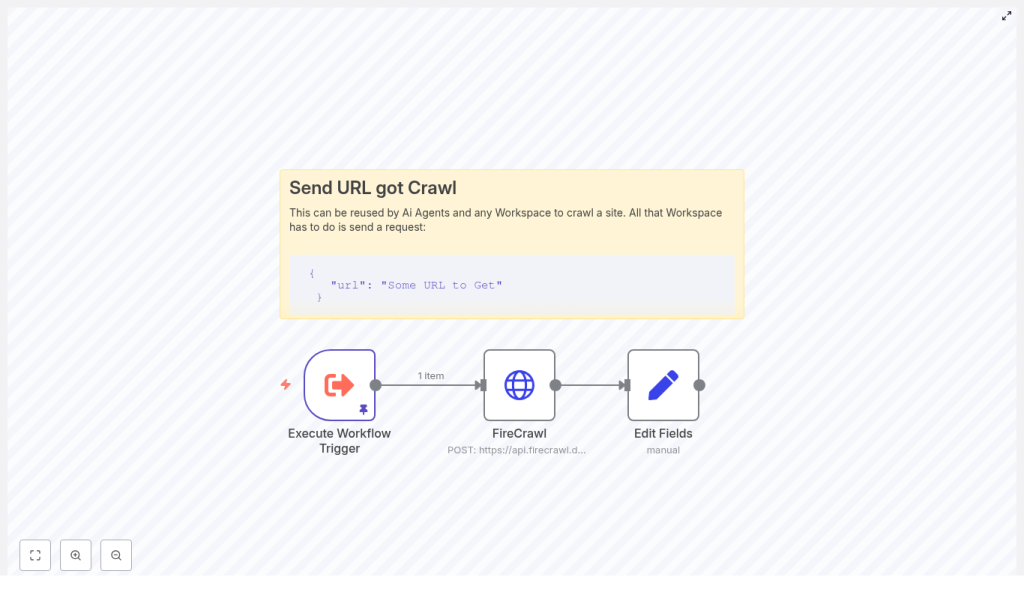
n8n + FireCrawl: Turn Any Web Page Into Markdown, Automatically
Imagine turning any article, documentation page, or product listing into clean, ready-to-use Markdown with a single automated workflow. No more copy-paste, no more manual cleanup, just structured content flowing straight into your notes, databases, or AI pipelines.
That is exactly what this n8n + FireCrawl workflow template helps you do. You will send a URL to the FireCrawl scraping API and receive back beautifully formatted Markdown that can power research, content creation, monitoring, and more.
This guide walks you through that journey. You will start from the problem of repetitive scraping work, shift into an automation-first mindset, then put that mindset into action with a practical n8n workflow you can reuse, extend, and make your own.
The Problem: Manual Scraping Slows You Down
If you find yourself repeatedly:
- Copying text from web pages into your notes or tools
- Cleaning up formatting so it is readable or usable by an AI agent
- Checking the same sites for updates and changes
- Building knowledge bases from scattered online sources
then you are doing valuable work in a time consuming way. Every manual scrape, every formatting fix, every repeated visit to the same URL is attention that could be going toward strategy, creativity, or deep problem solving.
Web scraping is a foundational automation task for modern teams. It powers:
- Content aggregation for newsletters and blogs
- Research and competitive analysis
- Monitoring product pages or news for changes
- Knowledge ingestion for AI agents and RAG systems
The challenge is doing this at scale without drowning in technical complexity or repetitive effort.
The Possibility: Let Automation Do the Heavy Lifting
When you connect n8n with FireCrawl, you create a powerful combination:
- n8n gives you a visual, low-code automation platform where you can orchestrate workflows, connect tools, and build logic.
- FireCrawl provides a robust scraping API that returns clean output in formats like Markdown and JSON.
Together they let you:
- Scrape a page once or on a schedule
- Receive structured Markdown that is easy to store, search, or feed into AI
- Plug this step into larger automations, agents, or internal apps
Instead of thinking “I need to scrape this page,” you can start thinking “How can I design a repeatable system that handles this for me, every time?” This workflow template is a small but powerful step toward that mindset.
The Template: A Reusable n8n Workflow for Web Page to Markdown
The workflow you will build is intentionally simple and reusable. It is designed to be a building block that you can drop into other automations.
At a high level, the workflow:
- Accepts a URL as input using an Execute Workflow Trigger
- Sends that URL to the FireCrawl scraping API using an HTTP Request node
- Requests Markdown output from FireCrawl
- Uses a Set node to store the returned Markdown in a clean, top level field
- Outputs the Markdown so that other nodes or services can use it immediately
You can run it manually, call it from other workflows, or integrate it into larger systems that research, monitor, or archive web content.
How the Core Nodes Work Together
1. Execute Workflow Trigger – Your Entry Point
The Execute Workflow Trigger node is the front door to this automation. It can be:
- Run manually while you are testing
- Invoked by another workflow
- Called via API if you expose it through an HTTP trigger upstream
In the template, the trigger uses pinned data with a JSON payload that contains the URL you want to scrape.
Example pinned JSON payload for testing:
{  "query": {  "url": "https://en.wikipedia.org/wiki/Linux"  }
}
This gives you a reliable way to test the workflow quickly and see the entire path from input URL to Markdown output.
2. FireCrawl HTTP Request – The Scraping Engine
The next step is the HTTP Request node that talks to the FireCrawl API. This is where the actual scraping happens.
Configure the node with:
- Method:
POST - Endpoint:
https://api.firecrawl.dev/v1/scrape - Body: JSON that includes the URL to scrape and the desired formats array
- Authentication: API key or header based credentials stored securely in n8n
Example request body:
{  "url": "https://en.wikipedia.org/wiki/Linux",  "formats": [  "markdown"  ]
}
In the workflow, you will not hard code the URL. Instead, you will pass in the URL from the trigger node, for example:
{{ $json.query.url }}
FireCrawl then returns a structured response that includes a markdown field inside data. That is the content you will carry forward.
3. Edit Fields (Set) – Clean, Friendly Output
To make the result easy to use in any downstream node, you add a Set node.
In the template, the FireCrawl response contains the Markdown at data.markdown. The Set node maps this to a top level field named response:
response = {{ $json.data.markdown }}
Now any node that follows can simply reference {{$json.response}} to access the scraped Markdown. This tiny step makes the workflow much easier to reuse and extend.
Step by Step: Building the Workflow in n8n
Here is how to assemble this workflow from scratch in n8n. Treat it as your first version, then adapt it as your needs grow.
-
Create a new workflow in n8n and add an Execute Workflow Trigger node (or another trigger such as HTTP Request if you prefer an API endpoint).
-
Add an HTTP Request node and configure it to:
- Use method
POST - Send the request to
https://api.firecrawl.dev/v1/scrape - Use a JSON body with:
urlset to the incoming value, for example{{ $json.query.url }}formatsset to["markdown"]
- Use method
-
Configure credentials in n8n for the FireCrawl API and attach them to the HTTP Request node. Use HTTP Header Auth or API key credentials so you never hard code secrets in the workflow itself.
-
Add a Set node to map the returned Markdown into a clean field:
response = {{ $json.data.markdown }}This makes your output predictable and easy to integrate with other nodes.
-
Optionally add storage or processing nodes after the Set node. For example:
- Save the Markdown to Google Drive, S3, Notion, or a database
- Send it to an AI agent for summarization or tagging
- Index it in a vector store for retrieval augmented generation
With these steps, you have a working, end to end automation that converts any URL you provide into reusable Markdown.
Turning One Workflow Into a Reliable System
Once the basic flow works, the next step is reliability. A dependable scraping pipeline saves you time not just once, but every time it runs.
Error Handling and Reliability
To make your n8n + FireCrawl workflow robust, consider adding:
- Retry logic
Use n8n’s built in retry options on the HTTP Request node, or create a loop with a delay node to handle transient network or API issues. - Error branching
Add an IF node to check the HTTP status code. Route failures to a notification node such as Slack or email so you know when something needs attention. - Timeouts and rate limiting
Configure timeouts on the HTTP Request node and respect FireCrawl’s rate limits. This helps avoid throttling and keeps your workflow responsive. - Logging and auditing
Store request and response metadata in a log storage. Include details like timestamps, URL, status code, and response size. This makes troubleshooting and monitoring much easier.
These improvements turn a simple demo into a dependable part of your automation stack.
Growing the Workflow: Common Enhancements
As your needs expand, this template can grow with you. Here are some powerful enhancements you can add on top.
- Parallel scraping
Use the SplitInBatches node to scrape multiple URLs in parallel while keeping concurrency under control. This is ideal for bulk research or monitoring. - Content filtering
Post process the Markdown to remove boilerplate, navigation links, ads, or unrelated sections before saving. You can use additional nodes or code to clean the content. - Structured output
If you also need structured data, request JSON or additional formats from FireCrawl and map specific fields into objects for analytics or dashboards. - AI enrichment
Send the Markdown into an LLM pipeline to summarize, extract entities, classify topics, or generate metadata. This is a powerful way to turn raw pages into knowledge.
Each enhancement is a chance to tailor the workflow to your unique processes and goals.
Real World Use Cases: From Idea to Impact
Here are some concrete ways teams use this n8n + FireCrawl pattern:
- Research automation
Pull articles, documentation, or blog posts and convert them to Markdown for your notes, internal wikis, or knowledge bases. - Content monitoring
Scrape product pages or news sites on a schedule, then trigger alerts when something important changes. - Knowledge ingestion for AI
Feed cleaned page Markdown into vector stores or RAG systems so your AI assistants can answer questions based on fresh information. - Data archiving
Periodically snapshot key pages and store the Markdown in S3 or a CMS so you have a historical record.
Each of these starts with the same simple building block: a URL in, Markdown out, fully automated.
Security, Respect, and Best Practices
Powerful automation comes with responsibility. As you scale your scraping workflows, keep these best practices in mind:
- Protect your API keys
Store FireCrawl and other secrets in n8n credentials. Never hard code them in nodes or share them in screenshots. - Respect websites
Follow robots.txt and site terms of service. Only scrape where it is allowed and appropriate. - Throttle requests
Pace your scraping to avoid overloading target sites and to stay within FireCrawl usage limits. - Sanitize inputs
Validate and sanitize URLs before sending them to the API. This helps prevent SSRF style issues and keeps your environment secure.
These habits help you build automation that is not only powerful but also sustainable and safe.
From Markdown to Storage: Putting the Output to Work
Once the Set node has stored the Markdown in response, you can route it anywhere.
For example, you might:
- Upload a
.mdfile to Google Drive - Store it in S3 using a Put Object node
- Insert it into a database or CMS
Here is some pseudocode that illustrates storing the Markdown as a file using a hypothetical File node:
// Pseudocode for storing the markdown as a file
fileName = "page-scrape-{{ $now.format("YYYYMMDD-HHmm") }}.md"
content = {{ $json.response }}
// send fileName and content to your storage node
By consistently naming and storing these files, you create a growing, searchable archive of the web pages that matter most to you.
Troubleshooting: When Things Do Not Look Right
If your workflow is not behaving as expected, these checks can help you diagnose the issue quickly:
- Empty response
Inspect the FireCrawl response body for error messages or rate limit headers. There may be a clear explanation. - URL issues
Confirm that the incoming URL is valid, correctly formatted, and reachable from the network where n8n is running. - Node execution details
Open the HTTP Request node execution details in n8n to view request and response headers, payloads, and status codes.
With these tools, you can quickly refine and strengthen your workflow.
Conclusion: A Small Workflow With Big Potential
This n8n + FireCrawl workflow is more than a neat trick. It is a compact, reusable building block that helps you:
- Scrape web pages into clean Markdown
- Feed downstream systems, LLM pipelines, and knowledge bases
- Replace manual copy-paste with reliable, repeatable automation
By setting it up once and investing in good error handling and best practices, you create a dependable scraping pipeline that supports your work in minutes, then keeps saving you time every day.
Think of this as a starting point. As you get comfortable, you can connect more triggers, add more destinations, and weave this template into larger automation systems that free you to focus on higher value work.
Next Step: Put the Template to Work
You are ready to turn this idea into something real.
- Create a new workflow in n8n.
- Add the Execute Workflow Trigger, HTTP Request, and Set nodes as described.
- Configure your FireCrawl API key in n8n credentials.
- Test with a pinned URL and watch Markdown flow through your workflow.
If you want a ready made starting point or a guided walkthrough, you can grab the template and adapt it to your needs.
