


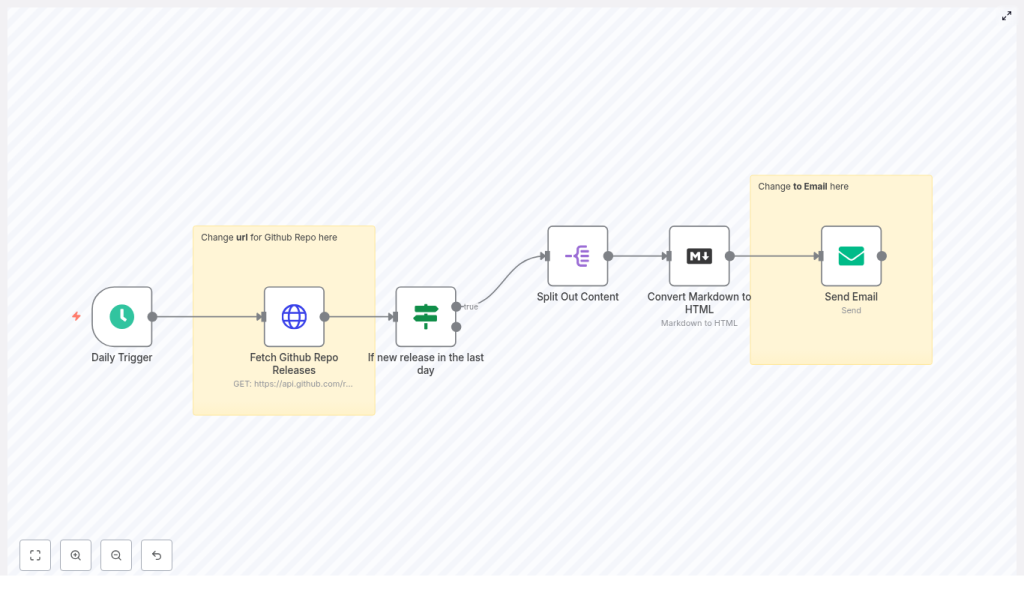
n8n GitHub Release Email Notifier – Automated Release Alerts
Use n8n to automatically email your team whenever a GitHub repository publishes a new release. In this tutorial-style guide, you will learn how to set up an n8n workflow template that:
- Checks a GitHub repository on a schedule
- Detects if a new release was published in the last 24 hours
- Converts release notes from Markdown to HTML
- Sends the formatted notes via email using SMTP
What you will learn
By the end of this guide, you will be able to:
- Configure a Schedule Trigger in n8n for daily GitHub checks
- Call the GitHub Releases API using the HTTP Request node
- Use an If node to compare release dates and filter recent releases
- Split and process release content with a Split Out node
- Convert Markdown release notes to HTML for email clients
- Send release notifications using the Email Send node and SMTP
- Test, secure, and extend the workflow for your own use cases
Why automate GitHub release notifications with n8n?
Manually checking GitHub for new releases is easy to forget and does not scale across multiple repositories. With n8n, you can build a reusable automation that:
- Runs on a schedule without manual effort
- Integrates directly with GitHub and any SMTP email provider
- Formats release notes nicely by converting Markdown to HTML
- Can be extended to other channels such as Slack, Microsoft Teams, RSS, or Notion
This workflow is lightweight, flexible, and ideal for teams that want to stay informed about internal or third-party project releases.
Concepts and workflow structure
The n8n GitHub release notifier template is built from a sequence of nodes. Understanding the role of each node will make configuration and customization much easier.
Main nodes in the workflow
- Schedule Trigger – Starts the workflow on a defined schedule, for example once per day.
- HTTP Request (Fetch GitHub Repo Releases) – Calls the GitHub Releases API endpoint
https://api.github.com/repos/:owner/:repo/releases/latest. - If (New release in the last day) – Compares the release
published_attimestamp with the current time minus one day. - Split Out Content – Iterates over release content if you need to process multiple items, for example body sections or assets.
- Markdown (Convert Markdown to HTML) – Transforms the Markdown release notes into HTML suitable for email.
- Email Send – Sends the formatted HTML release notes to your chosen recipients via SMTP.
Next, you will configure each of these nodes step by step inside n8n.
Step-by-step setup in n8n
Step 1 – Configure the Schedule Trigger
The Schedule Trigger controls how often n8n checks GitHub for a new release.
- Drag a Schedule Trigger node onto your n8n canvas.
- Set the trigger to run at your preferred interval:
- Daily (common for most use cases)
- Hourly (if you want more frequent checks)
- Weekly (if releases are rare)
- Save the node. This schedule defines how often the GitHub API will be called.
Step 2 – Fetch the latest GitHub release (HTTP Request)
Next, you will call the GitHub Releases API to retrieve the latest release from a specific repository.
1. Add the HTTP Request node
- Add an HTTP Request node and connect it after the Schedule Trigger.
- Set the Method to
GET. - In the URL field, use the GitHub Releases API endpoint, replacing
:ownerand:repo:https://api.github.com/repos/:owner/:repo/releases/latest - Set Response Format to
JSON.
2. Add authentication to avoid rate limits
To access private repositories and reduce the risk of hitting rate limits, use a GitHub Personal Access Token.
- Create a GitHub Personal Access Token with appropriate scopes (for private repos, include
reposcope). - In n8n, store this token using the credentials system instead of hard-coding it.
- In the HTTP Request node, add an Authorization header using the token. A typical header looks like:
{  "Authorization": "token YOUR_GITHUB_PERSONAL_ACCESS_TOKEN",  "Accept": "application/vnd.github.v3+json"
}
After this step, the node should return the latest release as JSON, including fields such as tag_name, body, published_at, assets, and more.
Step 3 – Check if the release is new (If node)
You only want to send an email when a release is recent. The If node compares the release date to a time window, typically the last 24 hours.
1. Add the If node
- Add an If node after the HTTP Request node.
- Configure it to examine the
published_atfield from the GitHub response.
2. Configure the date comparison
In n8n, you can use expressions to compare timestamps. The goal is to check whether published_at is after “now minus one day”. A typical configuration is:
Left:  =<= $json.published_at.toDateTime() =>
Right:  =<= DateTime.utc().minus(1, 'days') =>
Operator: dateTime after
This condition is true when the release was published within the last 24 hours. If you run the workflow less frequently, adjust the duration accordingly, for example 2 days or 7 days.
Only the items that pass this check (the true branch of the If node) will move on to the email step.
Step 4 – Split and prepare release content (Split Out node)
Some releases may include multiple pieces of content you want to process, such as different body sections or multiple assets. The Split Out node helps you iterate over these parts.
- Add a Split Out node to the true output of the If node.
- Configure it to split the field you want to iterate over. In the template, it typically uses the
bodyfield of the release.
This allows each iteration to be processed separately. For many use cases, you may only need to handle a single body of release notes, but keeping this node makes the workflow more flexible if you later include assets or multiple sections.
Step 5 – Convert Markdown release notes to HTML
GitHub release notes are commonly written in Markdown. Email clients, however, work best with HTML. The Markdown node in n8n handles this conversion.
1. Add the Markdown node
- Add a Markdown node after the Split Out node.
- Set the Mode to
Markdown to HTML.
2. Point the node to the release notes field
Tell the Markdown node which field contains the Markdown text. For GitHub releases, this is usually the body field:
={{ $json.body }}The node will output a new field that contains the HTML version of the release notes, often accessible as something like $json.html depending on your configuration. This HTML will be used as the body of your email.
Step 6 – Send the formatted release email (Email Send node)
The final step is to send an email with the HTML content generated by the Markdown node.
1. Add the Email Send node
- Add an Email Send node after the Markdown node.
- Configure your SMTP credentials in n8n, or connect to a provider such as SendGrid or Amazon SES.
2. Set email details
- To: Set the recipient or list of recipients, for example
email@example.comor your team distribution list. - From: Use a valid sender address that your SMTP provider accepts.
- Subject: You can include dynamic values from the GitHub release, for example:
New release: {{$json.tag_name}}- Or a fixed subject like
New n8n release
- HTML: Set this to the HTML output from the Markdown node, for example:
={{ $json.html }}
Once configured, every time a new release is detected, the workflow will send a nicely formatted email containing the release notes.
Testing and validating your n8n GitHub notifier
Before you rely on the workflow in production, walk through a few checks.
- Test the HTTP Request node Run the workflow manually and inspect the output of the HTTP Request node. Confirm you receive the expected JSON, including
tag_name,body, andpublished_at. - Verify the If node logic Check the true and false branches of the If node. Make sure releases that are within your chosen time window are correctly routed to the true output. Adjust the DateTime expressions or timezone handling if needed.
- Check Markdown rendering Inspect the output of the Markdown node. Confirm that headings, lists, links, and images look correct in HTML. Keep in mind that some email clients block remote images by default.
- Send test emails Use test addresses (including accounts on different providers) to check:
- If the email is delivered successfully
- Whether it lands in the inbox or spam folder
- How the HTML formatting appears across clients
If you use a custom domain, verify that SPF and DKIM records are correctly configured.
Security, credentials, and rate limits
Since this workflow interacts with external APIs and email providers, it is important to treat credentials and limits carefully.
- Use GitHub Personal Access Tokens safely Always store your GitHub Personal Access Token in n8n credentials, not directly in node fields. This keeps the token hidden and easier to rotate. Ensure the token has only the scopes you need, such as
repofor private repositories. - Respect GitHub rate limits Authenticated requests have higher rate limits than anonymous ones, but they are still limited. If you monitor many repositories or need near real-time updates, consider switching to GitHub Webhooks instead of polling on a short interval.
- Protect SMTP credentials Store SMTP or email provider credentials in the n8n credentials store. Restrict access to your n8n instance and avoid sharing workflows that expose sensitive connection details.
Enhancing and extending the workflow
Once your basic GitHub release email notifier is working, you can evolve it into a more powerful automation.
- Use GitHub Webhooks instead of polling Reduce API calls and get real-time notifications by configuring a GitHub Webhook that triggers n8n when a release is published. This removes the need for a frequent Schedule Trigger.
- Notify other channels In addition to email, you can:
- Send messages to Slack or Microsoft Teams
- Create an RSS feed entry
- Save release notes to Notion or another documentation tool
- Include release assets The GitHub release JSON includes an
assetsarray. You can parse this array and add download links directly into your email, helping your team quickly access installers or binaries. - Customize email content Localize or template your email body to include dynamic fields such as:
tag_name(version number)author.login(release author)- Direct links to the GitHub release page
This makes the notification more informative and user friendly.
Troubleshooting common issues
- No releases returned
- Double check the repository path in the API URL (
:owner/:repo). - Confirm your GitHub token has the required scopes, especially for private repositories.
- Verify that the repository actually has at least one published release.
- Double check the repository path in the API URL (
- Emails are not delivered
- Check SMTP logs or your email provider dashboard for error messages.
- Verify SMTP credentials, ports, and encryption settings.
- Confirm SPF and DKIM are configured if you use a custom sending domain.
- Test sending a very simple text email first to rule out HTML issues.
- Date comparison behaves unexpectedly
- Inspect the
published_atvalue coming from GitHub. - Ensure you are using
DateTime.utc()or a consistent timezone in expressions. - Adjust the duration in
minus(1, 'days')if your schedule or use case requires a different window.
- Inspect the
Quick recap
To summarize, your n8n GitHub Release Email Notifier workflow:
- Uses a Schedule Trigger to run on a fixed interval.
- Calls the GitHub Releases API with an HTTP Request node.
- Checks if the latest release is recent using an If node and date comparison.
- Optionally iterates over content with a Split Out node.
- Converts Markdown release notes to HTML using a Markdown node.
- Sends a formatted email via the Email Send node and SMTP.
This gives you a robust, extensible foundation for keeping your team informed about new releases with minimal manual work.
FAQ
Can I monitor multiple GitHub repositories?
Yes. You can duplicate the HTTP Request and downstream nodes for each repository, or parameterize the owner and repo fields to iterate over a list of repositories.
What if I want instant notifications instead of daily checks?
Replace the Schedule Trigger with a GitHub Webhook that calls n8n when a release event occurs. This avoids polling and gives near real-time notifications.
Do I have to use email?
No. Email is only one output. You can send the HTML or plain text content to Slack, Microsoft Teams, Notion, or any other service supported by n8n.
Can I customize the email layout?
Yes. You can wrap the converted HTML in your own email template,
