


GitHub Releases to Slack with n8n: A Simple Automation You’ll Actually Use
Ever shipped a new release on GitHub, told yourself you’d “announce it in Slack in a minute,” then got distracted and forgot? You’re not alone.
This n8n workflow template quietly solves that problem for you. It listens for GitHub release events in a specific repository and automatically posts a nicely formatted message in a Slack channel. No copy-pasting, no missed updates, no “oops, I forgot to tell the team.”
In this guide, we’ll walk through what the workflow does, when it’s useful, how to set it up in n8n, and a few ideas to customize it for your own team.
What This n8n GitHub-to-Slack Workflow Actually Does
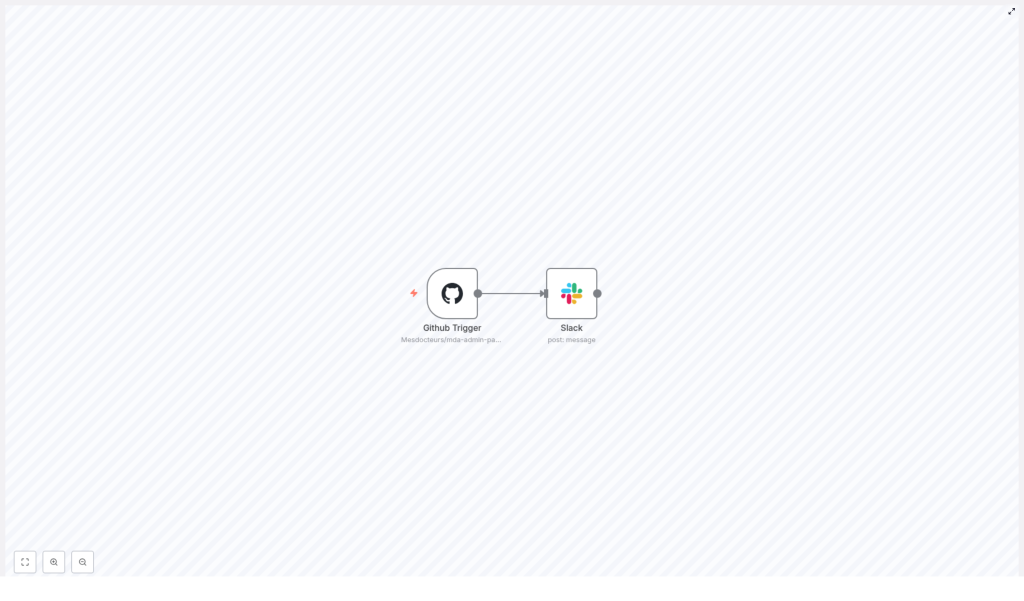
The template, called Extranet Releases, connects GitHub and Slack so your team is always up to date on new releases.
Here is what it handles for you:
- Watches a specific GitHub repository:
Mesdocteurs/mda-admin-partner-api. - Listens for release events: whenever a new release is created or updated.
- Pulls key details from the GitHub payload:
- Release tag name
- Release body / changelog
- Link to the release page (
html_url)
- Posts a Slack message in the
#extranet-mdchannel with all those details.
Once it is active, every new release on that repo quietly triggers a Slack notification. You just keep shipping, and your team stays informed.
Why Bother Automating GitHub Release Announcements?
You might be thinking, “I can just paste the link into Slack myself.” Sure, you can. But will you always remember?
Manual announcements tend to be:
- Slow – people might wait hours before hearing about a release.
- Inconsistent – sometimes you include the changelog, sometimes you forget.
- Error-prone – copy the wrong tag, miss the link, or post in the wrong channel.
With n8n handling it, you get:
- Instant notifications as soon as a release is created.
- Consistent formatting every single time.
- No-code / low-code setup that you can easily extend later.
And since this is n8n, you are not locked into just Slack. You can plug in filters, email, Jira, or anything else you like as your workflow grows.
Under the Hood: The Two Main Nodes in This Workflow
This template is intentionally simple. It uses just two core nodes in n8n:
1. GitHub Trigger Node
This is where everything starts. The GitHub Trigger node listens for events from a specific repository using the GitHub API.
In this template, it is configured as follows:
- Owner:
Mesdocteurs - Repository:
mda-admin-partner-api - Events:
release
Whenever a release event happens, GitHub sends a payload that includes details like:
- Tag name
- Release body (your changelog)
- Release URL
- Author and other metadata
That payload is what the next node uses to build the Slack message.
2. Slack Node
Once n8n receives the GitHub event, the Slack node composes and sends the message into your chosen channel.
In the template, the Slack node is set up with:
- Channel:
extranet-md - As user:
true - Text: an n8n expression that pulls values from the GitHub Trigger node
The message text uses an expression like this:
=New release is available in {{$node["Github Trigger"].json["body"]["repository"]["full_name"]}} !
{{$node["Github Trigger"].json["body"]["release"]["tag_name"]}} Details:
{{$node["Github Trigger"].json["body"]["release"]["body"]}}

Link: {{$node["Github Trigger"].json["body"]["release"]["html_url"]}}
In plain language, that expression says: “Look at the JSON from the GitHub Trigger node, grab the repository name, tag, body, and URL, and drop them into this Slack message.” That way, every notification is always up to date with the latest release info.
When This Workflow Is Especially Useful
This kind of GitHub to Slack automation fits nicely into a few common scenarios:
- Partner-facing releases
You ship new integration APIs or admin portals and want partners to know as soon as something new is available. - Internal release visibility
Backend or frontend teams can see what is going to production without digging through GitHub. - Triggering follow-up work
You can use the release event to kick off other processes, like updating documentation, dashboards, or tickets.
If your team ever asks “Is this live yet?” this workflow is an easy win.
How to Import and Turn On the Workflow in n8n
Ready to try it? Here is how to get the Extranet Releases workflow running in your own n8n instance.
- Open n8n and import the workflow
Go to Workflows > Import in your n8n UI and paste the JSON for the Extranet Releases template. - Set up your credentials
You will need:- A GitHub API credential
Use OAuth or a personal access token with appropriate repo webhook / read permissions. - A Slack API credential
Typically a bot token withchat:writeandchannels:read(or the equivalent scopes you need).
- A GitHub API credential
- Attach the credentials to the nodes
In the workflow editor, make sure:- The GitHub Trigger node uses your
Github APIcredential. - The Slack node uses your Slack credential (for example the one associated with the
extranet-mdbot).
- The GitHub Trigger node uses your
- Activate the workflow
Once everything is wired up, click Activate. From that point on, n8n will listen for GitHub release events on the configured repository.
Testing: Make Sure Everything Works Before Relying On It
Before you trust this workflow for production announcements, it is worth giving it a quick test.
- Create a release in GitHub
In the configured repository, create a draft or full release. You can also re-tag and publish an existing one if you prefer. - Check your webhook setup
If your GitHub Trigger relies on webhooks, confirm that the n8n webhook URL is correctly registered in your GitHub repo settings and is reachable from GitHub. - Review n8n execution logs
Open the workflow executions in n8n and verify that:- The GitHub Trigger receives the payload.
- The Slack node runs without errors.
- Look in Slack
Head to the#extranet-mdchannel and check that a message appeared with:- The correct repository name
- The release tag
- The changelog text
- A link to the GitHub release page
Make It Your Own: Customizations and Enhancements
The template is intentionally minimal so you can easily extend it. Once the basic GitHub to Slack flow is working, here are some ideas to level it up.
1. Improve Slack Message Formatting
Plain text is fine, but you can go further. Try:
- Using Slack Block Kit for sections, headings, and buttons.
- Adding attachments that highlight breaking changes or key features.
- Making the release link a clear call-to-action button.
All of this can be done directly in the Slack node by switching the message type and adjusting the JSON structure.
2. Add Filters and Conditional Logic
Maybe you do not want notifications for every single release. You can easily add an If node between GitHub and Slack to:
- Send messages only for published releases.
- Filter by tag patterns, such as only tags starting with
v(for examplev1.2.3). - Ignore pre-releases or drafts.
This keeps your Slack channels focused on the releases that truly matter to your audience.
3. Send Notifications to Multiple Channels or Tools
Different teams might need different levels of detail. You can:
- Add more Slack nodes to post tailored messages to different channels, such as engineering, product, or partners.
- Connect an Email node to send summary emails for important releases.
- Use Jira or other issue-tracking nodes to update tickets when a release goes live.
All of this can branch from the same GitHub Trigger event.
4. Attach or Link to Release Artifacts
If you publish assets with your releases, you can pull those in too. For example:
- Use the GitHub API node or an HTTP Request node to fetch release assets.
- Include download links in your Slack message.
- Store files in internal storage or other systems and share the links with your team.
This is especially handy if your releases include binaries, installers, or documentation bundles.
Security Tips, Reliability, and Troubleshooting
Since this workflow touches both GitHub and Slack, it is worth setting it up securely and knowing where to look if something breaks.
- Use least-privilege credentials
Create a GitHub token that is scoped only to the repositories and events you need. - Protect your n8n instance
If you expose webhooks to GitHub, secure n8n behind a firewall, VPN, or reverse proxy where possible. - Add retry logic
Configure error handling or retry behavior on the Slack node for transient network issues. - Check Slack permissions
If messages do not show up, verify:- The Slack app has permission to post in the target channel.
- The bot user is invited to that channel.
- Review GitHub webhook logs
In your GitHub repository settings, look at the webhook delivery logs to confirm:- Events are being sent.
- n8n is returning a successful HTTP status code.
Putting It All Together
Automating GitHub release announcements with n8n is a small change that removes a recurring manual task, reduces missed communications, and gives your team immediate visibility into what is shipping.
The Extranet Releases template is a lightweight starting point that you can set up in minutes:
- Import the JSON template into your n8n instance.
- Connect your GitHub and Slack credentials.
- Activate the workflow and publish a test release.
Watch your Slack channel fill with clean, consistent release messages, then tweak the formatting or add filters so it fits your exact workflow.
Want to try it now? Import the template, create a test release on GitHub, and see the Slack notification appear. From there you can experiment with Block Kit formatting, conditional logic, or extra integrations like email or Jira.
If you would like help adapting this workflow to your organization, adding attachments, or building more advanced automations around releases, feel free to reach out or drop a comment. It is a simple automation, but it can become the backbone of a very tidy release process.
