


n8n GraphQL Projects Template Explained
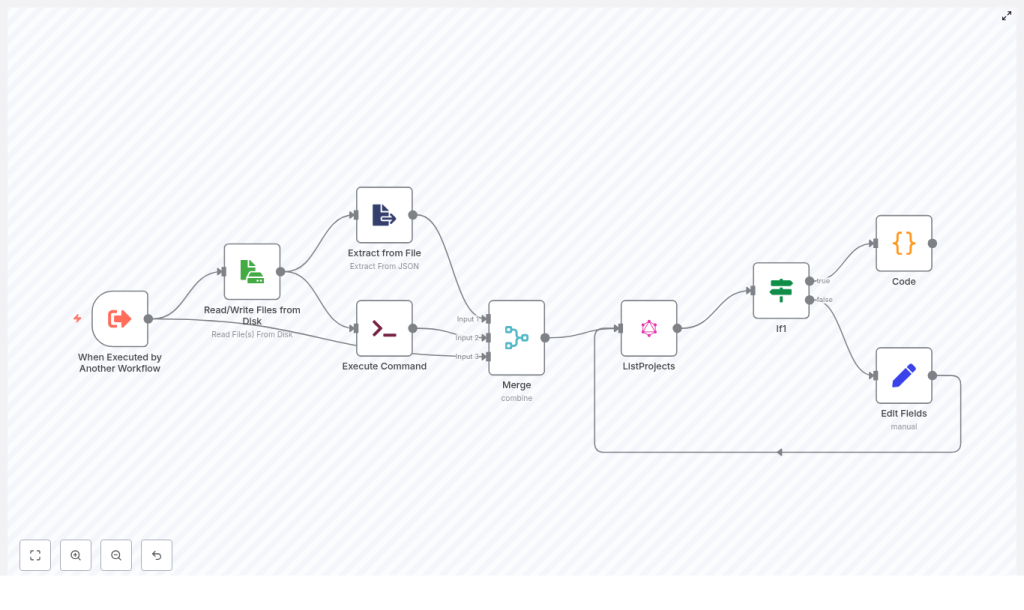
This article provides an in-depth explanation of an n8n workflow template that integrates with an AppSync GraphQL Projects API. The workflow is designed to query project data, support AppSync-style pagination with nextToken, merge multiple input sources, and adapt its behavior based on incoming parameters. If you operate n8n in a production or near-production environment and need a robust pattern for querying GraphQL endpoints, this guide breaks down the complete node structure, data flow, and recommended improvements.
Use Case and Core Capabilities
The primary objective of this template is to automate the retrieval of project records from a GraphQL API in a controlled and reusable way. It is optimized for scenarios where workflows must:
- Accept multiple input sources, such as a triggering workflow and a temporary session file
- Combine those inputs into a single, coherent request payload
- Handle AppSync pagination using
nextToken - Apply conditional logic and post-processing based on response data
The result is a pattern that can be dropped into broader automation chains to reliably fetch and normalize project data for downstream processing, reporting, or synchronization tasks.
High-Level Workflow Architecture
At a conceptual level, the workflow executes the following sequence:
- Receives parameters from a parent workflow through an Execute Workflow Trigger
- Reads a JSON session or authentication file from disk
- Parses the file content to extract the authentication token and related metadata
- Deletes the temporary file for security and housekeeping
- Merges all input sources into a single item
- Executes a ListProjects GraphQL query against the AppSync endpoint
- Evaluates the presence of
nextTokento determine if additional pages exist - Prepares variables for subsequent paginated calls when required
- Aggregates all pages into a unified result set using a Code node
Trigger and Input Handling
Execute Workflow Trigger – Entry Point
The workflow is not intended to run in isolation. It is initiated by another n8n workflow through the Execute Workflow Trigger node. This node typically receives parameters that influence the GraphQL query, such as:
fileName– the name of the session or token file to readstatus– a filter for project statusname– a filter for project name or partial match
These fields are later mapped into GraphQL variables and filters, which allows the calling workflow to dynamically scope which projects are retrieved.
Reading and Parsing Session Data
Read/Write Files from Disk
The next step is to load session-related information from disk. The Read/Write Files node reads a JSON file that contains session data, such as an auth_token. The file path is not hardcoded. Instead, it uses the fileName provided by the trigger or a fallback default.
This pattern is useful for short-lived credentials or tokens that are generated by an upstream process and persisted only for the duration of a single workflow execution.
Extract from File
Once the file has been read, the Extract from File step parses the JSON content and exposes individual fields as structured data within n8n. For example, the auth_token is extracted and made available to subsequent nodes so that the GraphQL request can set a dynamic Authorization header.
Secure Cleanup of Temporary Files
Execute Command
To avoid leaving sensitive material on disk, the workflow executes a shell command using the Execute Command node:
rm -rf {{ $json.fileName }}This deletes the temporary session file after it has been read and parsed. While this is effective for cleanup, it must be used with caution. Filenames should always be validated or sanitized to mitigate the risk of command injection or accidental deletion outside the intended directory.
Unifying Inputs Before the GraphQL Call
Merge Node – Combining Multiple Sources
The workflow then uses an n8n Merge node to consolidate data from three different branches:
- The initial trigger input (status, name, fileName, and any other parameters)
- The parsed session data from the JSON file (for example
auth_token) - The output of the command execution (if any relevant metadata is returned)
The Merge node is configured in combineByPosition mode, which aligns items from each input by index and merges their fields into a single item. This unified item is then used as the source of truth for the GraphQL node, ensuring all necessary variables and headers are available in one place.
GraphQL Integration With AppSync
ListProjects (GraphQL) Node
The core integration point is the ListProjects GraphQL node, which calls an AppSync endpoint with a ListProjects query. Key characteristics of this node include:
- The query requests a comprehensive set of nested fields, such as project squads, client details, tags, and meetings.
- GraphQL variables are constructed dynamically. If
statusornameare present in the merged input, they are included in the query filter. If they are omitted, the query runs without those constraints. - The
Authorizationheader is populated using theauth_tokenextracted from the JSON session file. n8n expressions are used to inject this token into the node configuration at runtime. - The
limitparameter is set to999to retrieve a large batch of projects per page. AppSync still returns anextTokenwhen more results are available, so subsequent pages can be fetched.
Pagination Logic and Control Flow
Conditional Routing Based on nextToken
If1 Node – Pagination Check
After each GraphQL request, the workflow needs to determine whether additional pages exist. This is handled by an If node that inspects the nextToken field in the GraphQL response.
- If
nextTokenis empty or null, the workflow follows the true branch. This indicates that the current response already contains the final page of results. - If
nextTokenis present, the workflow follows the false branch, which prepares a new request cycle for the next page.
Edit Fields (Set Node) for Subsequent Pages
When pagination needs to continue, the Edit Fields (Set) node on the false branch constructs the parameters required for the next GraphQL call. It explicitly sets:
nextToken– taken from the current GraphQL responseauth_token– preserved from the initial session datastatusandname– forwarded from the original input to maintain consistent filters across pages
These fields are fed back into the ListProjects node, allowing the workflow to request the next page of results using the same filter criteria and authentication context.
Aggregation of Paginated Results
Code Node – Pagination Collector
The final step in the pagination process is to consolidate all pages into a single coherent output. A Code node is used to:
- Iterate over the outputs of both branches of the If node across multiple executions
- Collect each project item from every GraphQL response
- Stop once no
nextTokenis present on any branch, indicating that all pages have been retrieved
The Code node effectively implements a do/while-style loop over the paginated responses. It assumes that n8n is configured to provide branch outputs as separate streams, which can be indexed by page index. The final output of this node is a unified array of project objects that can be consumed by downstream workflows.
How AppSync Pagination Is Implemented
AppSync uses a nextToken mechanism for pagination. The template encapsulates this pattern as follows:
- Each GraphQL request includes a
nextTokenvariable when one is available from the previous response. - The If node evaluates the presence of
nextTokenafter each call. - The Code node walks through the results of each iteration, aggregating items and checking for termination conditions.
This architecture gives you clear separation between the responsibilities of querying, branching, and aggregation, which is beneficial when you need to debug or extend the workflow.
Security, Reliability, and Best Practices
Security Considerations
- Avoid storing long-lived secrets on disk. Temporary files should be used only for short-lived session data and must be deleted promptly, as this template does using the Execute Command node.
- Always sanitize and validate filenames before passing them to shell commands. This reduces the risk of command injection and unintended file operations.
- Limit the exposure of sensitive tokens in logs, error messages, and node output where possible.
Reliability and Rate Limiting
- GraphQL or AppSync endpoints may enforce rate limits. Even with a high
limitvalue such as 999, you may need to introduce delays or backoff strategies to avoid throttling. - Use the built-in retry configuration on the GraphQL or HTTP Request node to automatically handle transient errors such as 5xx or 429 responses.
- For critical automations, consider adding global error handling via an Error Trigger workflow to capture and respond to failures consistently.
Recommended Enhancements and Customization Options
Retry and Backoff Strategies
For production workloads, you should wrap the GraphQL call with a resilient error handling pattern. Options include:
- Configuring node-level retries with exponential backoff for network or rate limit errors
- Using an Error Trigger to route failed executions to a remediation workflow
Refining the Pagination Pattern
If you prefer a different approach to pagination, you can:
- Implement an explicit loop using the n8n “Execute Workflow” pattern where each iteration calls the same workflow until no
nextTokenis returned. - Use a webhook or function-based iterative loop that performs repeated HTTP requests from a single Code node.
- Extract the pagination logic into a dedicated Function/Code node that is responsible solely for iterating until
nextTokenis absent.
More Secure Credential Management
While the template demonstrates reading an auth_token from disk, a more secure and maintainable approach is to use n8n Credentials or an OAuth2 integration if your GraphQL backend supports it. This provides:
- Centralized management of tokens and secrets
- Reduced reliance on temporary files
- Better alignment with security and compliance requirements
Optimizing Response Size and Performance
The reference query requests many nested fields. In performance-sensitive environments, you should:
- Request only the fields that are strictly required by downstream systems
- Reduce payload size to lower bandwidth usage and improve response times
- Consider lowering the
limitif your endpoint is sensitive to large result sets
Troubleshooting and Diagnostics
- Empty results: Verify that the
Authorizationheader is correctly set and that the token is valid and not expired. - Infinite or unexpected pagination: Temporarily log or inspect
nextTokenvalues to ensure the API is returning valid tokens and that the Code node logic is correctly detecting termination. - File deletion issues: If the Execute Command node fails, check file paths, permissions, and the working directory used by the node.
- General debugging: Use n8n’s Execution view to inspect node outputs step by step. This is particularly useful for catching misconfigured expressions, missing fields, or incorrect merge behavior.
When This Template Is a Good Fit
Consider using this n8n GraphQL Projects template when you need to:
- Retrieve large lists of projects from an AppSync or similar GraphQL endpoint
- Combine parameters from a triggering workflow with session data stored in a temporary file
- Handle GraphQL pagination and return a single, merged collection of project records
Pre-Production Checklist
- Move authentication tokens and secrets into n8n Credentials or an external secret manager instead of disk-based session files.
- Validate and sanitize any filenames passed into the Execute Command node, and confirm that file paths are correct.
- Review and adjust the GraphQL query, including requested fields and
limit, to meet your performance and data requirements. - Implement an appropriate error handling and retry strategy to address rate limiting and transient network issues.
Conclusion
This n8n GraphQL Projects template provides a robust foundation for querying AppSync-based project data with support for pagination, multi-source inputs, and secure cleanup of temporary artifacts. By refining credential management, tightening security controls around file handling, and tailoring the GraphQL query to your exact data needs, you can confidently run this pattern in production environments.
Call to action: Import this template into your n8n instance, connect it to a non-production AppSync endpoint, and adapt the query filters and fields to match your project model. Once validated, integrate it as a reusable component in your broader automation architecture.
