

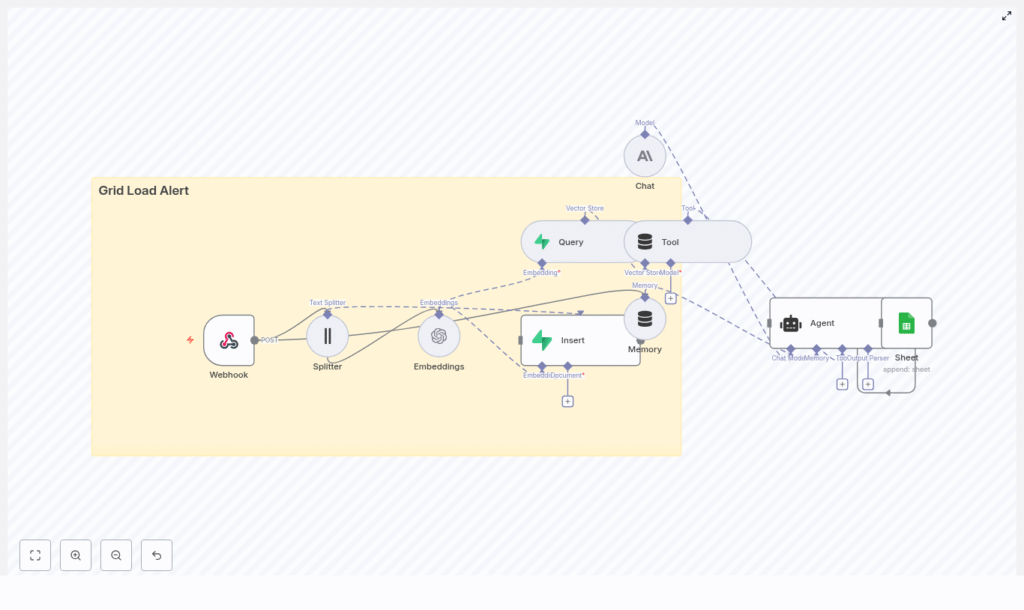
n8n Grid Load Alert with LangChain & Supabase
Implement a resilient, AI-assisted grid load alert workflow in n8n that ingests incoming alerts, generates and stores semantic embeddings, retrieves historical context, and automatically logs recommended actions to Google Sheets.
1. Solution Overview
This workflow template combines n8n, LangChain, Supabase, and a large language model (LLM) to provide context-aware triage for grid or infrastructure alerts. It is designed for environments where power grids or distributed systems emit large volumes of telemetry and textual messages that must be analyzed quickly and consistently.
Using this template, you can:
- Accept JSON alerts from external monitoring systems through an n8n Webhook
- Split alert text into manageable chunks and generate vector embeddings
- Persist embeddings in a Supabase vector index for long-term, semantic search
- Query similar historical incidents based on semantic similarity
- Provide the LLM with historical context and short-term memory to produce an action plan
- Append structured outcomes to Google Sheets for audit, reporting, and review
The template is suitable for operators who need AI-powered incident triage while retaining full visibility into how decisions are made.
2. High-Level Architecture
The workflow is composed of several n8n nodes that map directly to LangChain tools, vector store operations, and external services.
- Webhook (n8n) – entry point for incoming JSON alerts via HTTP POST
- Text Splitter (LangChain Character Text Splitter) – segments alert messages into overlapping chunks
- Embeddings (OpenAI) – converts text chunks into vector embeddings
- Insert (Supabase vector store) – persists embeddings into the
grid_load_alertindex - Query (Supabase) – retrieves nearest neighbor vectors for a new alert
- Tool (Vector Store Tool) – exposes the Supabase query as a LangChain tool for the Agent
- Memory (Buffer Window) – maintains a limited conversation history for context
- Chat (Anthropic or other LLM) – core reasoning and text generation model
- Agent – orchestrates tool usage, memory, and reasoning to produce a final recommendation
- Google Sheets – appends a row with the Agent’s decision and metadata
3. Data Flow and Execution Path
The workflow processes each incoming alert through the following stages:
- Alert ingestion
An external system sends an HTTPPOSTrequest to the n8n Webhook at path/grid_load_alert. The request body contains JSON describing the alert. - Text preprocessing
The Webhook output is passed to the Text Splitter. The alert message field is split into chunks with:chunkSize = 400chunkOverlap = 40
These values work well for descriptive grid alerts and help preserve continuity between segments.
- Embedding generation
Each chunk is sent to the OpenAI Embeddings node. The node uses the selected embeddings model (template uses the OpenAI “default” embedding model) to produce numeric vectors. - Vector persistence
The embeddings are written to Supabase using the Insert node configured for a vector store. All vectors are stored in the index namedgrid_load_alert, together with any relevant metadata such as source, type, or timestamp. - Context retrieval
For each new alert, a Supabase Query node searches thegrid_load_alertindex for semantically similar vectors. It returns the top K nearest neighbors, which represent historical incidents similar to the current alert. - Agent reasoning
The Agent node receives:- The raw incoming alert payload (mapped as
={{ $json }}into the prompt) - Vector store search results exposed through the Tool node
- Recent conversation history from the Memory node
The Agent uses the configured LLM (via the Chat node) to synthesize this information and produce a recommended action, severity, and references.
- The raw incoming alert payload (mapped as
- Outcome logging
The Agent’s output is mapped into a Google Sheets node with theappendoperation. Each execution results in one new row that records timestamp, severity, recommended actions, and any similarity metadata.
4. Node-by-Node Breakdown
4.1 Webhook Node (Alert Ingestion)
Purpose: Receive alert payloads from external monitoring or grid management systems.
- HTTP Method:
POST - Path:
grid_load_alert
Example payload structure:
{  "timestamp": "2025-08-31T09:12:00Z",  "source": "substation-7",  "type": "high_load",  "value": 98.6,  "message": "Transformer A nearing thermal limit. Load 98.6% for 12 minutes."
}
Ensure your external system sends valid JSON and that the message field contains the descriptive text that should be embedded and analyzed.
4.2 Text Splitter Node (LangChain Character Text Splitter)
Purpose: Break the alert message into overlapping segments suitable for embedding.
- Recommended configuration:
chunkSize: 400chunkOverlap: 40
This configuration helps capture enough context around key phrases without exploding the number of embeddings. For significantly longer messages, you can adjust these values, but keep overlap nonzero to avoid losing cross-boundary context.
4.3 Embeddings Node (OpenAI)
Purpose: Convert each text chunk into a vector representation.
- Provider: OpenAI
- Model: template uses the OpenAI “default” embedding model
- Credentials: OpenAI API key stored in n8n credentials
Connect the Splitter output to this node. Each item in the input will generate one embedding vector. Make sure the node is configured to read the correct text property from each item.
4.4 Supabase Insert Node (Vector Store Persistence)
Purpose: Store generated embeddings in Supabase for semantic search.
- Vector index name:
grid_load_alert
The template assumes a Supabase table with a vector column (using pgvector) or usage of the Vector Store helper provided by the n8n LangChain module. Configure:
- Supabase project URL and API key in n8n credentials
- Table or index mapping to
grid_load_alert - Field mapping from embedding vectors and metadata fields (for example,
source,type,timestamp)
4.5 Supabase Query Node (Nearest Neighbor Search)
Purpose: Retrieve the most similar historical alerts for the current embedding.
Configuration details:
- Use the same index or table name:
grid_load_alert - Pass the newly computed embedding vector as the query input
- Set top-K to control how many similar records are returned (for example, 3 to 10 neighbors)
The node returns items that include both similarity scores and any stored metadata. These results are later exposed to the Agent via the Tool node.
4.6 Vector Store Tool Node
Purpose: Expose Supabase query capabilities as a LangChain Tool that the Agent can call during reasoning.
This node wraps the vector store operations so that the Agent can request similar incidents as needed. The Agent does not need to know about Supabase directly, only that a “vector store tool” is available.
4.7 Memory Node (Buffer Window)
Purpose: Maintain a short rolling window of previous interactions and Agent outputs.
The Buffer Window Memory node stores recent messages and tool calls. This helps the Agent avoid repeating work and allows it to reference earlier steps in the same workflow execution. Keep the window relatively small for high-throughput alerting scenarios to control token usage.
4.8 Chat Node (LLM Configuration)
Purpose: Provide the base large language model for the Agent.
- Typical provider: Anthropic (as per template) or another supported LLM
- Role: Executes the reasoning and text generation based on prompts, memory, and tool outputs
Configure the Chat node with your chosen model, temperature, and other generation parameters. Connect it to your Anthropic (or equivalent) credentials in n8n.
4.9 Agent Node (Orchestration and Reasoning)
Purpose: Coordinate tool calls, memory, and LLM reasoning to produce a final, structured response.
- Prompt type:
define - Prompt input: the node maps
={{ $json }}to pass the raw incoming alert fields into the Agent prompt
Within the Agent configuration, you can:
- Reference the vector store tool so the Agent can fetch similar incidents
- Attach the Buffer Window Memory for short-term context
- Customize the system and user prompts to encode severity rules, escalation criteria, and output format
4.10 Google Sheets Node (Outcome Logging)
Purpose: Persist the Agent’s decision and metadata in a structured, easily accessible format.
- Operation:
append - sheetName:
Log - documentId: your target Google Sheets spreadsheet ID
Typical fields to map from the Agent output and alert payload include:
timestampsourcetypevalue- computed
severity - recommended action(s)
- similarity matches or incident references
- source alert ID or URL
5. Step-by-Step Configuration Guide
5.1 Configure the Webhook
- Add a Webhook node.
- Set HTTP Method to
POST. - Set Path to
grid_load_alert. - Save the workflow and copy the Webhook URL for your monitoring system.
Example JSON that the external system should send:
{  "id": "alert-2025-0001",  "timestamp": "2025-08-31T09:12:00Z",  "source": "region-east/substation-7",  "type": "high_load",  "value": 98.6,  "message": "Transformer A nearing thermal threshold. Load sustained above 95% for 12 minutes."
}
5.2 Add and Configure the Text Splitter
- Add a LangChain Character Text Splitter node.
- Connect it to the Webhook node.
- Set:
chunkSize = 400chunkOverlap = 40
- Ensure the node uses the correct field (for example,
message) as the input text.
5.3 Generate Embeddings with OpenAI
- Add an OpenAI Embeddings node.
- Connect it to the Text Splitter node.
- Select the embeddings model (template uses the “default” OpenAI embeddings model).
- Attach your OpenAI credential from n8n.
5.4 Persist Embeddings in Supabase
- Add a Supabase Insert node configured as a vector store operation.
- Connect it to the Embeddings node.
- Set the vector index or table name to
grid_load_alert. - Ensure Supabase is configured with:
- A table that includes a
pgvectorcolumn for embeddings - Additional columns for metadata if required
- A table that includes a
- Provide Supabase URL and API key via n8n credentials.
5.5 Retrieve Similar Historical Alerts
- Add a Supabase Query node.
- Connect it so that it receives the new alert’s embedding.
- Configure it to search the
grid_load_alertindex. - Set the number of neighbors to retrieve (top-K), for example between 3 and 10.
5.6 Configure Tool, Memory, Chat, and Agent
- Tool node:
- Create a Vector Store Tool node that wraps the Supabase Query.
- Expose it as a tool the Agent can call to look up similar incidents.
- Memory node:
- Add a Buffer Window Memory node.
- Connect it to the Agent so recent exchanges are stored and reused.
- Chat node:
- Add a Chat node and select Anthropic or another LLM provider.
- Configure model parameters such as temperature and max tokens as appropriate.
- Agent node:
- Set the prompt type to
define. - Map the incoming alert JSON into the prompt using
={{ $json }}. - Attach the Chat node as the LLM.
- Attach the Tool node so the Agent can query the vector store.
- Attach the Memory node to provide a short history window.
- Customize the prompt text to encode business rules, severity thresholds, and escalation policies.
- Set the prompt type to
5.7 Log Results to Google Sheets

