


n8n HTTP Request Node: Technical Guide & Best Practices
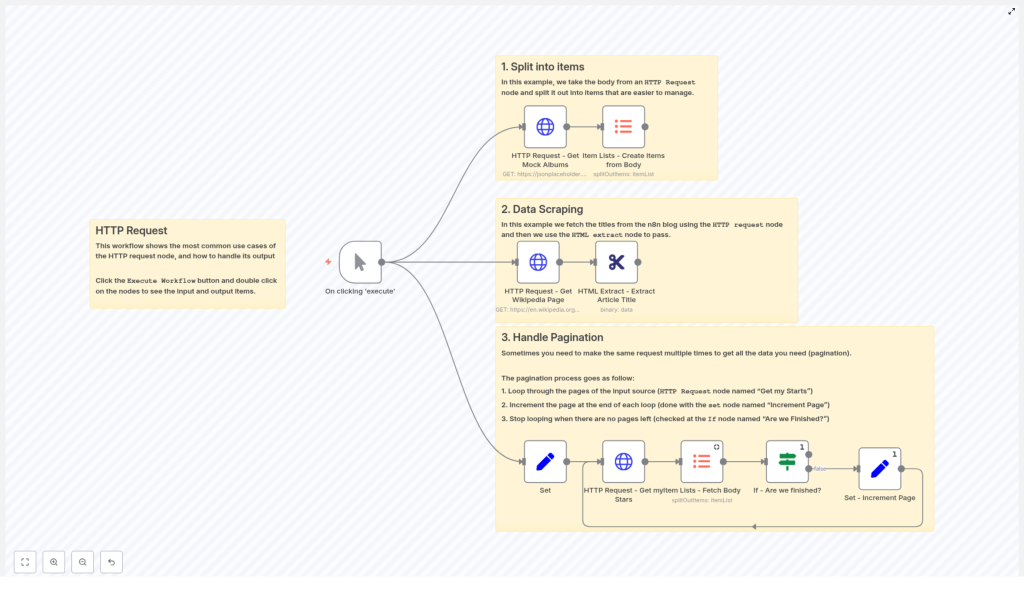
The HTTP Request node in n8n is a core building block for any advanced automation workflow. It enables you to call arbitrary HTTP endpoints, integrate with REST APIs that do not yet have native n8n nodes, fetch HTML for scraping, and handle binary payloads such as files or images. This guide walks through a reference workflow template that demonstrates three key implementation patterns: splitting API responses into individual items, scraping HTML content with HTML Extract, and implementing pagination loops.
1. Workflow Overview
The example workflow template is designed as a compact reference for common HTTP Request node usage patterns in n8n. It covers:
- Array response handling – Fetch JSON from an API, then convert the array in the response body into separate n8n items for downstream processing.
- HTML scraping – Request a web page in binary format, then extract structured data from the HTML using the HTML Extract node.
- Paginated API access – Iterate over multiple pages of results from an API (for example, GitHub starred repositories) by looping until no further results are returned.
All examples are built around the same core node: the HTTP Request node. The workflow demonstrates how to parameterize URLs, control query parameters, manage authentication, and work with full HTTP responses.
2. Architecture and Data Flow
At a high level, the workflow is composed of three logical sections that can be reused or adapted independently:
2.1 Array response to item list
- An HTTP Request node queries an API endpoint that returns JSON, for example a list of albums from a mock API.
- An Item Lists – Create Items from Body node converts the JSON array found in the response body into multiple n8n items.
- Each resulting item is now processed individually by any downstream nodes.
2.2 HTML scraping pipeline
- An HTTP Request node downloads a web page, such as a random Wikipedia article.
- The response format is configured as
file/binaryso the HTML is stored as a binary property. - An HTML Extract node processes that binary HTML and extracts specific elements, for example the article title.
2.3 Pagination loop for APIs
- A Set node initializes pagination and API-specific variables, such as
page,perpage, and agithubUseridentifier. - An HTTP Request node fetches a single page of results, in the example case a list of GitHub starred repositories.
- An Item Lists – Fetch Body node converts the JSON array in the response body into multiple items.
- An If node checks whether the current page returned any items. This node answers the question “Are we finished?”.
- If there are items, a Set – Increment Page node increases the
pagevalue and the workflow loops back to the HTTP Request node. - If the page is empty, the If node stops the loop and the workflow exits the pagination sequence.
This architecture keeps the workflow modular. You can clone and adapt each section depending on the target API or website.
3. Node-by-Node Breakdown
3.1 Initial Set node – pagination and parameters
The first Set node defines variables that are reused across HTTP requests. Typical fields include:
page– Starting page number, usually1.perpage– Number of results per page, for example15or50, depending on the API limits and performance needs.githubUser– A username or other resource identifier, used to build the request URL.
These values are stored in the node output and accessed later via n8n expressions. This approach keeps the workflow configurable and reduces hard-coded values.
3.2 HTTP Request node – core configuration
The HTTP Request node is responsible for interacting with external services. Important configuration parameters are:
- URL: Use expressions to build dynamic URLs. For example, for GitHub starred repositories:
=https://api.github.com/users/{{$node["Set"].json["githubUser"]}}/starred - Query parameters: Map pagination parameters to the values from the Set node:
per_pageset to{{$node["Set"].json["perpage"]}}pageset to{{$node["Set"].json["page"]}}
- Response format:
JSONfor typical REST APIs that return structured data.fileorbinarywhen fetching HTML pages, images, or other binary resources.
- Full response:
- Disabled by default if you only need the parsed body.
- Enabled when you need HTTP headers, status codes, or raw metadata (for example, rate limiting headers or pagination links).
- Authentication (if used):
- Configured via the node’s credentials section, such as OAuth2 or API key headers.
- Alternatively, custom headers can be added manually, for example
Authorization: Bearer <token>.
For HTML scraping, the same HTTP Request node is configured with a URL pointing to a web page, response format set to binary, and no JSON parsing.
3.3 Item Lists nodes – splitting response bodies
The workflow uses two Item Lists patterns:
- Item Lists – Create Items from Body: Takes a JSON array from the HTTP response body and creates a separate n8n item for each element. This is typically used when fetching a list of objects, such as albums from a mock API.
- Item Lists – Fetch Body: Extracts and normalizes items from the JSON body in the pagination example, ensuring that each element is available as a dedicated item for further processing.
As an alternative, you can use the SplitInBatches node to process large arrays in smaller chunks. In this template, the Item Lists node is used to keep the example focused and straightforward.
3.4 If node – termination condition for pagination
The If node evaluates whether the current page of results is empty. Typical logic includes:
- Checking the length of the JSON array returned by the HTTP Request node.
- Verifying that the Item Lists node produced at least one item.
If the condition indicates no items (empty response), the workflow follows the “finished” branch and exits the loop. If items exist, it follows the “continue” branch, which leads to the page increment step.
3.5 Set – Increment Page node
This Set node calculates the next page number for the pagination loop. It:
- Reads the current
pagevalue from the previous Set node output or the current item. - Increments it by
1and writes the new value back intopage.
The workflow then routes back to the HTTP Request node, which uses the updated page value in its query parameters. This continues until the If node detects an empty page.
3.6 HTML Extract node – scraping HTML content
For the scraping example, the HTML Extract node is configured to read the HTML from the binary property of the HTTP Request node output. A common configuration is:
- Input property: The binary property that contains the HTML document.
- CSS selector: For a Wikipedia article title, use
#firstHeading.
The node returns the extracted content as structured data, which can then be stored, analyzed, or passed to other nodes.
4. Detailed Configuration Notes
4.1 Pagination strategies in n8n workflows
The template implements page-based pagination, but the same HTTP Request node can support several patterns:
- Page-based pagination:
- Increment a
pagequery parameter using a Set node. - Common for APIs that expose
pageandper_pageparameters, as in the GitHub example.
- Increment a
- Offset-based pagination:
- Use an
offsetparameter that increases byperpageeach iteration. - Replace the
pagevariable withoffsetin the Set node and HTTP Request query parameters.
- Use an
- Cursor-based pagination:
- Read a
next_cursoror similar token from the response body or headers. - Store the cursor in a Set node and pass it as a query parameter for the next HTTP Request.
- Termination is often based on the absence of a next cursor rather than an empty page.
- Read a
In all cases, the If node logic should match the API’s actual behavior, for example checking for a missing next link instead of relying solely on empty arrays.
4.2 Authentication and credentials
When calling real APIs, secure authentication is essential:
- API keys and bearer tokens:
- Configure credentials in n8n and select them in the HTTP Request node.
- Alternatively, use the
Headerssection to setAuthorization: Bearer <token>.
- OAuth-based APIs:
- Use n8n’s OAuth credentials if supported for the target API.
- The HTTP Request node will attach the tokens automatically once configured.
Avoid hard-coding secrets directly in node parameters. Use n8n credentials or environment variables to keep workflows secure and portable.
4.3 Rate limits and error handling
For production-grade automations, consider the following:
- Rate limits:
- When Full response is enabled, inspect headers such as GitHub’s
X-RateLimit-Remaining. - Use Wait or similar nodes to throttle requests if you approach the limit.
- When Full response is enabled, inspect headers such as GitHub’s
- Error handling:
- Configure the HTTP Request node’s error behavior if available in your n8n version.
- Implement an If node and retry pattern to handle transient failures, for example network timeouts or 5xx responses.
- Decide whether to stop the workflow, skip failing items, or retry with backoff based on your use case.
4.4 Binary vs JSON responses
Select the response format according to the target endpoint:
- JSON:
- Default choice for REST APIs.
- Response body is available directly as parsed JSON in the node output.
- File / binary:
- Use for HTML pages, images, PDFs, or other file content.
- Required for the HTML Extract node to parse the HTML document.
Enable full responses only when you need access to headers or status codes. Keeping it disabled reduces memory usage and simplifies item structures.
5. Example: Extracting a Wikipedia Article Title
The template includes a simple scraping pattern you can adapt:
- Configure an HTTP Request node to fetch a random Wikipedia page. Set the response format to binary so the HTML is stored as a file.
- Add an HTML Extract node that reads the binary HTML output from the HTTP Request node.
- Use the CSS selector
#firstHeadingto extract the article title element.
The result is a structured item containing the page title, which can be logged, stored in a database, or combined with other scraped data for content aggregation workflows.
6. Debugging and Inspection Techniques
To troubleshoot HTTP Request flows and pagination logic:
- Open each node to inspect the input and output items after running the workflow.
- Insert temporary Set nodes to log intermediate values such as
page,perpage, or tokens from responses. - Enable the HTTP Request node’s
fullResponseoption temporarily to inspect headers when diagnosing authentication, rate limits, or pagination links.
Iterate with small perpage values while developing to reduce noise and speed up testing.
7. Security and Compliance Considerations
When using the HTTP Request node in production:
- Do not hard-code API keys or secrets in node parameters. Use n8n credentials or environment variables.
- Respect external API terms of service and usage policies.
- When scraping HTML, limit request frequency and respect
robots.txtand site terms to avoid overloading servers.
8. Practical Best Practices
- Use n8n expressions extensively to keep URLs, query parameters, and headers dynamic.
- Design pagination checks that match the actual API behavior, for example checking for a
nextlink rather than only relying on empty pages. - Keep full responses disabled unless you explicitly need headers or status codes.
- Start with smaller
perpagevalues when building and debugging workflows, then increase them once the logic is stable.
9. Using the Template and Next Steps
The provided template illustrates how to:
- Split JSON arrays into individual items with Item Lists.
- Scrape HTML content with the HTML Extract node.
- Implement looping pagination using Set, HTTP Request, Item Lists, and If nodes.
To get started in your own n8n instance:
- Import the workflow template.
- Run a single HTTP Request without the pagination loop to verify connectivity and response structure.
- Inspect the node outputs and adjust selectors, URLs, and parameters as needed.
- Enable or refine the pagination loop once the basic call works as expected.
- Optionally, duplicate the workflow and replace the API URL to practice integrating different services.
10. Call to Action
If you are ready to extend your automations with custom HTTP integrations, import this n8n template and run it in your environment. Adapt the nodes to your own APIs, experiment with pagination strategies, and build scraping or data aggregation flows tailored to your use case. For more n8n automation patterns and HTTP Request node best practices, subscribe for future tutorials or share your questions and workflows in the comments.
