


n8n If vs Switch: Master Conditional Routing
What you will learn
In this guide you will learn how to:
- Understand the difference between the If node and the Switch node in n8n
- Use conditional logic in n8n to filter and route data without code
- Configure a complete country-based routing workflow step by step
- Apply AND / OR conditions with the If node
- Create multiple branches with the Switch node using a fallback route
- Test, debug, and improve your conditional workflows using best practices
This tutorial is based on a real n8n workflow template that routes customers by country. You can follow along and then adapt it to your own data.
Core idea: Conditional logic in n8n
Conditional logic is the backbone of workflow automation. It lets you decide what should happen next based on the data that flows through your n8n nodes.
In n8n, two nodes are central to this kind of decision making:
- If node – evaluates one or more conditions and splits items into true or false paths
- Switch node – compares a value against multiple possible options and routes items to different outputs
Both are used for conditional logic in n8n, but they shine in different situations. Understanding when to use each is key to clean, maintainable workflow routing and data filtering.
If vs Switch in n8n: When to use which?
The If node
The If node is ideal when you need simple checks, such as:
- A yes/no decision, for example “Is this customer in the US?”
- A small number of conditions combined with AND or OR logic
- Pre-checks before more complex routing, such as skipping invalid records
It has two outputs:
- True – items that match your conditions
- False – items that do not match
The Switch node
The Switch node is better when you need to route data into more than two branches, for example:
- Different countries should be sent to different services
- Different statuses (pending, approved, rejected) require different actions
- You want a clear visual overview of many possible outcomes
Instead of chaining multiple If nodes, a Switch node lets you define multiple rules in one place and keep the workflow readable.
Quick rule of thumb:
- Use If for simple true/false checks or small sets of conditions
- Use Switch for multiple distinct routes from the same decision point
Related keywords: n8n If node, n8n Switch node, workflow routing, data filtering, conditional logic in n8n.
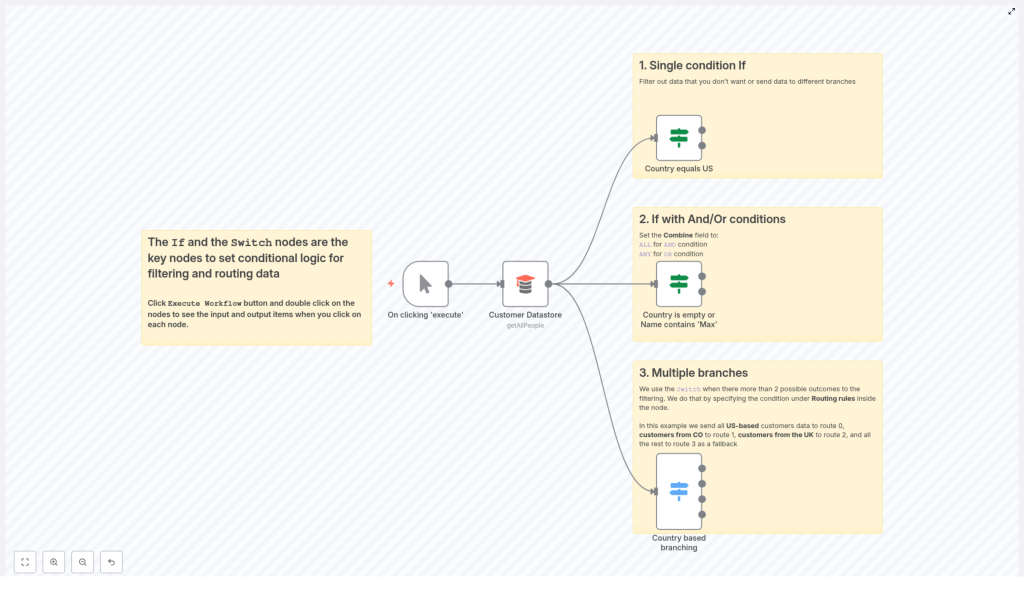
Workflow we will build: Country-based routing
To see all this in action, we will walk through a practical example: a workflow that fetches customer records and routes them based on their country field.
The template uses the following nodes:
- Manual Trigger – starts the workflow on demand
- Customer Datastore (getAllPeople) – returns all customer records
- If: Country equals US – filters customers whose country is
US - If: Country is empty or Name contains “Max” – demonstrates combining conditions with AND / OR logic
- Switch: Country based branching – routes customers to separate branches for
US,CO,UK, or a fallback route
Why this example works well for learning
This pattern is very common in automation:
- You pull records from a data source
- You check specific fields, such as
countryorname - You route each record to the right process or destination
It shows how to:
- Handle missing data (empty country)
- Use partial matches (name contains “Max”)
- Create multiple routes from one decision point with a fallback
Step 1: Trigger and load your customer data
Manual Trigger
Start with a Manual Trigger node. This lets you run the workflow on demand while you are building and testing it.
Customer Datastore (getAllPeople)
Next, add the Customer Datastore (getAllPeople) node:
- Connect it to the Manual Trigger
- Configure it so that it returns all customer records
Each item typically includes fields like name and country. These fields are what you will reference in your If and Switch nodes.
Step 2: Use the If node for a single condition
First, you will use the n8n If node to filter customers from a specific country, for example all customers in the United States.
Goal
Route all customers where country = "US" to the true output, and everyone else to the false output.
Configuration steps
- Add an If node and connect it to the Customer Datastore node.
- Inside the If node, create a new condition.
- Set the Type to
String. - For Value 1, use an expression that points to the country field:
{{$json["country"]}} - Set Operation to
equals(or the equivalent in your UI). - Set Value 2 to:
US - Save the node and keep the two outputs:
- True output – all items where
countryis exactlyUS - False output – all remaining items
- True output – all items where
Tip: Use consistent country codes, such as ISO alpha-2 (US, UK, CO), to avoid mismatches between your data and your conditions.
Step 3: Combine conditions with AND / OR in the If node
The If node in n8n supports multiple conditions. You can control how they are evaluated with the Combine field.
Combine options
ALL– acts like a logical AND. Every condition must be true for the item to follow the true path.ANY– acts like a logical OR. At least one condition must be true for the item to follow the true path.
Example: Country is empty OR Name contains “Max”
In the template, there is an If node that demonstrates this combined logic. It checks two things:
- Whether the
countryfield is empty - Whether the
namefield contains the stringMax
To configure this:
- Add two string conditions in the If node:
- Condition 1:
- Value 1:
{{$json["country"]}} - Operation:
isEmpty
- Value 1:
- Condition 2:
- Value 1:
{{$json["name"]}} - Operation:
contains - Value 2:
Max
- Value 1:
Now set Combine to ANY. The result:
- Items where
countryis empty will go to the true output - Items where
namecontains “Max” will also go to the true output - All other items will go to the false output
This is a powerful pattern for building flexible filters with the If node.
Step 4: Use the Switch node for multiple branches
When you have more than two possible outcomes, multiple If nodes can quickly become hard to follow. This is where the n8n Switch node is more suitable.
Goal
Route customers based on their country value into separate branches for:
USCOUK- Any other country or missing value (fallback)
Configuration steps
- Add a Switch node and connect it to the node that provides your items (for example the Customer Datastore or a previous If node).
- Inside the Switch node, set:
- Value 1 to:
{{$json["country"]}} - Data Type to
string
- Value 1 to:
- Add rules for the countries you care about. For example:
- Rule 1:
- Value:
US - Output:
0
- Value:
- Rule 2:
- Value:
CO - Output:
1
- Value:
- Rule 3:
- Value:
UK - Output:
2
- Value:
- Rule 1:
- Set a Fallback Output, for example:
- Fallback Output:
3
This will be used for any item where
countrydoes not match US, CO, or UK, or is missing. - Fallback Output:
At runtime, the Switch node evaluates the value of {{$json["country"]}} for each item:
- If it matches
US, the item goes to output 0 - If it matches
CO, the item goes to output 1 - If it matches
UK, the item goes to output 2 - If it matches none of the above, the item goes to the fallback output 3
This gives you a clear branching structure for your workflow routing.
Working with expressions and data normalization
Both If and Switch nodes rely on expressions to read data from incoming items. In n8n, the most common pattern is to reference fields from the JSON payload of each item.
Basic expressions
To reference fields in expressions:
- Country:
{{$json["country"]}} - Name:
{{$json["name"]}}
Normalizing data before comparison
Real-world data is often inconsistent. To avoid subtle mismatches, normalize values before you compare them. You can do this in a Set node or a Function node.
Examples:
- Trim whitespace and convert to uppercase:
{{$json["country"]?.trim().toUpperCase()}} - Map full country names to codes, for example:
- “United States” → “US”
- “United Kingdom” → “UK”
This mapping can be implemented in a Function node or via a lookup table.
Normalizing early in your workflow helps your If and Switch conditions behave predictably.
Testing and debugging your conditional workflow
As you build conditional logic, testing is essential. n8n offers several features that make it easier to see how items move through your workflow.
- Execute Workflow:
- Click Execute Workflow from the editor.
- After execution, double click any node to inspect its Input and Output items.
- Logger or HTTP Request nodes:
- Insert a Logger node or an HTTP Request node in a branch to inspect what data that branch receives.
- Triggers:
- Use a Manual Trigger while developing to control when the workflow runs.
- When integrating with external systems, you can switch to a Webhook trigger and still inspect items in the same way.
- Complex conditions in JavaScript:
- For very complex logic, use a Function node.
- In the Function node, you can evaluate multiple JavaScript conditions and return a simple route key, such as:
item.route = "US"; - Then use a Switch node to route based on
item.route.
Best practices for If and Switch nodes
- Prefer Switch for many outcomes:
- Use the Switch node when you have several distinct routes.
- This is usually more readable than chaining multiple If nodes.
- Normalize data early:
- Handle case differences, extra spaces, and synonyms as soon as possible.
- This reduces unexpected behavior in your conditions.
- Keep conditions simple and documented:
- Avoid very complex logic inside a single If or Switch node.
- Use node descriptions to explain what each condition is for.
- Use fallback routes:
- Always define a fallback output in Switch nodes when possible.
- This prevents items from being lost when they do not match any rule.
- Avoid deep nesting:
- Limit deeply nested
- Limit deeply nested
