


Overview
This article explains how to implement a robust n8n workflow that creates, updates, and retrieves users in Iterable using a reusable automation pattern. It walks through the core use case, key nodes, configuration details, and recommended practices for building secure and reliable integrations between n8n and the Iterable API.
The workflow is designed for automation professionals who want to standardize Iterable user management, validate profile state, and power downstream personalization or decision logic.
Why use n8n to manage Iterable users?
Iterable is a sophisticated marketing automation platform that depends on high quality, up-to-date user profiles. n8n, as an open-source workflow automation tool, enables you to orchestrate those user operations across multiple systems without custom code.
By combining n8n with Iterable you can:
- Automatically create or update (upsert) users when events occur in other systems such as forms, CRMs, or product analytics.
- Retrieve user records on demand to drive personalization, segmentation, or conditional routing in workflows.
- Minimize manual intervention and reduce inconsistencies between Iterable and other data sources.
Workflow pattern at a glance
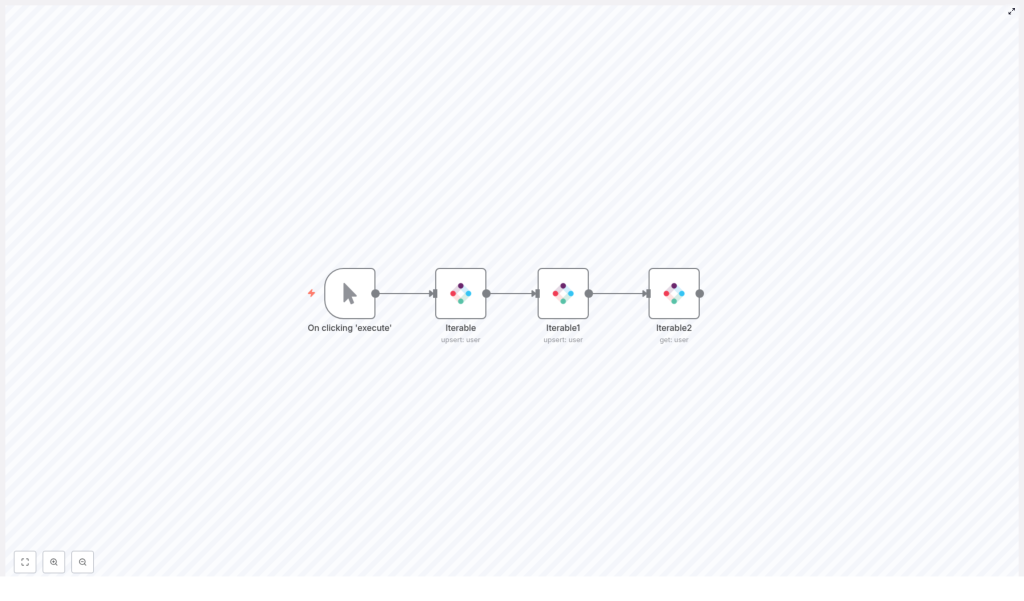
The template implements a simple but powerful sequence that can be adapted to many production use cases:
- Start the workflow via a trigger (manual for testing, or automated in production).
- Upsert a user into Iterable using an email identifier.
- Optionally enrich the user with additional data fields through a second upsert.
- Retrieve the user record by email to confirm the final state and use the returned data downstream.
This upsert-then-get pattern provides both write and verification steps, which is particularly useful when building reliable integrations and debugging data flows.
Key n8n nodes and their role
The template uses a small set of nodes that illustrate the core integration concepts between n8n and Iterable.
1. Manual Trigger
Node: Manual Trigger
The workflow starts with a Manual Trigger, which is ideal for initial development and testing. You execute the workflow on demand from the n8n editor. In a production environment, this node is typically replaced with a more suitable trigger such as:
- A Webhook receiving form submissions or application events.
- A Cron or Schedule node for periodic syncs.
- A trigger from another system or workflow inside n8n.
2. Iterable Upsert (basic profile)
Node: Iterable (Upsert)
This node performs the core user upsert operation. Iterable uses an identifier to determine whether to create a new user or update an existing one. For this template, the identifier is the email address.
Key configuration parameters:
- Identifier: Set to
email. This instructs Iterable to match or create users based on their email address. - Value / Email: The email address of the user to upsert. During testing you can provide a static email; in production you typically reference data from a prior node such as a webhook payload or CRM event.
3. Iterable Upsert with additional fields
Node: Iterable1 (Upsert with Data Fields)
The second Iterable node demonstrates how to enrich a user profile with additional attributes. This is useful if your workflow progressively builds a profile from multiple sources or stages.
Important configuration area:
- Additional Fields /
dataFieldsUi: Use this section to map custom profile fields such asName,plan, orsignup_date. Each entry is a key/value pair that will be persisted on the Iterable user record.
Although this second upsert is optional, it illustrates a pattern where you can chain multiple updates as new data becomes available.
4. Iterable Get User
Node: Iterable2 (Get User)
The final node retrieves the user from Iterable using the same email identifier. This serves two primary purposes:
- Validation that the upsert operations succeeded and the user profile reflects the expected data.
- Providing a complete user payload to downstream nodes for segmentation, routing, or personalization.
Key parameter:
- Operation: Set to
get. Supply the email value used in the upsert node, typically via an expression that references the earlier node configuration.
Configuring the Iterable nodes
To ensure consistent behavior, configure the Iterable nodes carefully in n8n.
Credentials and connection
- Create an Iterable API key with appropriate permissions in your Iterable workspace.
- In n8n, define an Iterable credential and store the API key securely. Use this credential for all Iterable nodes in the workflow.
Core parameters for upsert operations
For each upsert node:
- Identifier:
email. - Value / Email: The user email. For example, pull from a previous node using an expression instead of hard-coding it.
- Additional Fields /
dataFieldsUi: Add any custom attributes you want to persist on the profile, such as:NamePlansignup_date
Core parameters for the get operation
For the final Iterable get node:
- Operation:
get. - Email: Reference the same email used in the upsert node. You can reuse the parameter via an expression.
Step-by-step: building the workflow in n8n
- Add the trigger
- Insert a Manual Trigger node to start. This is ideal for development and debugging.
- Plan to replace this with a production trigger later, such as a Webhook or scheduled trigger.
- Add the first Iterable Upsert node
- Select your Iterable credential in the node configuration.
- Set
identifiertoemail. - Set
valueto the target email address. You can either:- Enter a fixed test email for development, or
- Use an expression that pulls the email from an earlier node such as
{{$json["email"]}}from a webhook.
- Optionally, leave
dataFieldsUiempty in this first node if you plan to enrich later.
- Optionally chain another Iterable Upsert node
- Add a second Iterable node (e.g. Iterable1) connected after the first upsert.
- Use the same email identifier configuration.
- In Additional Fields, open
dataFieldsUiand define key/value pairs such as:Name: user display namePlan: subscription tier
- This pattern lets you progressively enrich the profile as more data becomes available.
- Configure the Iterable Get User node
- Add an Iterable node (e.g. Iterable2) and set Operation to
get. - For the email value, reuse the parameter from the first Iterable node via an expression. For example:
{{$node["Iterable"].parameter["value"]}} - This ensures the get operation targets the same user that was just upserted.
- Add an Iterable node (e.g. Iterable2) and set Operation to
- Execute and validate
- Click Execute Workflow from the Manual Trigger.
- Inspect the output of the final Iterable get node (Iterable2) to confirm that:
- The user exists in Iterable.
- All expected fields and values are present, including any custom attributes.
Expression example: passing email between nodes
To avoid duplicating configuration and to keep workflows maintainable, reference values from one node in another using n8n expressions. For example, to pass the email from the first Iterable upsert node into the get node:
{{$node["Iterable"].parameter["value"]}}This expression reads the value parameter from the Iterable node and provides it as the email for the subsequent get operation.
Testing and debugging strategies
Reliable Iterable integrations depend on careful testing and observability. Consider the following practices:
- Use controlled test data: Work with a test email address that you own to avoid unintended changes to production users.
- Inspect execution details: In each node execution view, review the request and response payloads to confirm that:
- The correct fields are being sent to Iterable.
- The API responses indicate success or provide actionable error messages.
- Validate credentials and configuration: If upserts fail, verify:
- Iterable API credentials in n8n.
- Workspace and project settings in Iterable.
- Any required fields or constraints in your Iterable configuration.
- Generate test payloads: Use a Set node to construct synthetic user data, or connect a Webhook to test the full path from external systems into Iterable.
Error handling and reliability patterns
Production-grade workflows must handle transient issues, invalid data, and external system failures gracefully. In n8n, you can improve resilience with the following patterns:
- Error workflows: Configure a global or workflow-specific error workflow to:
- Capture failed executions and log relevant payloads.
- Send notifications to a Slack channel, email, or incident management tool.
- Retry logic: For intermittent network or API issues, implement retry mechanisms using:
- A Wait node combined with a loop to reattempt failed calls.
- n8n’s built-in retry options where appropriate.
- Input validation: Validate email formats and required fields before calling Iterable to avoid unnecessary API errors. This can be done using:
- Conditional checks in n8n.
- Custom validation logic in Function or Code nodes if needed.
Security considerations for Iterable integrations
Handling user and credential data securely is critical when integrating with Iterable.
- Use n8n credentials storage: Store Iterable API keys as n8n credentials instead of embedding them directly in node parameters or expressions.
- Apply least privilege: Where Iterable supports it, use API keys scoped only to the required operations to reduce risk if credentials are compromised.
- Sanitize inbound data: When accepting external input (for example via webhooks), sanitize and validate fields before mapping them into Iterable profiles. This reduces the risk of injecting unexpected or malformed data.
Common use cases for this template
The create-update-get pattern is broadly applicable across customer lifecycle and marketing operations. Typical scenarios include:
- New signup synchronization: Capture signups from web forms or product registration flows, upsert them into Iterable, then retrieve the profile to trigger a welcome journey or onboarding sequence.
- Behavior-based attribute updates: Update user attributes in Iterable when purchases, upgrades, or key events occur, then fetch the profile to evaluate eligibility for campaigns or promotions.
- Profile enrichment: Enrich Iterable profiles using CRM or data warehouse attributes. After enrichment, run a get operation to validate that all fields are correctly written and ready for downstream segmentation.
Best practices for Iterable user workflows in n8n
To maintain scalable and maintainable automations, follow these guidelines:
- Minimize payload size: Send only the fields you need in each upsert to reduce API usage and lower the risk of conflicting updates.
- Standardize identifiers: Choose a consistent identifier strategy such as email or userId across all systems to avoid duplicate profiles and ambiguous mappings.
- Document field mappings: Maintain documentation for your data model, including:
- Custom Iterable fields and naming conventions.
- Source systems for each attribute.
- Transformation logic applied in n8n.
Conclusion
Automating create, update, and retrieval operations for Iterable users with n8n is both straightforward and highly effective. The upsert-then-get pattern described here provides a reliable way to write data into Iterable, confirm the resulting profile state, and pass that information to subsequent steps for personalization or decision-making.
With proper credential management, error handling, and validation in place, this template can be safely adapted for production workloads and extended to support more complex user lifecycle scenarios.
Next steps
To implement this integration in your environment:
- Import the n8n template linked below.
- Configure your Iterable credentials and replace the test email with a real data source such as a webhook or CRM event.
- Execute the workflow, validate the Iterable get response, and iterate on the data fields as needed.
If you require support with credential setup, advanced error handling, or integrating additional nodes such as webhooks, Slack, or database connectors, consult the n8n and Iterable documentation or reach out to your internal automation team.
Need a ready-to-use n8n template or guidance on tailoring this workflow to your specific stack and data model? Reply to this post or visit our documentation to get started.
