


Build an Automated YouTube Trending Detector with n8n + LangChain
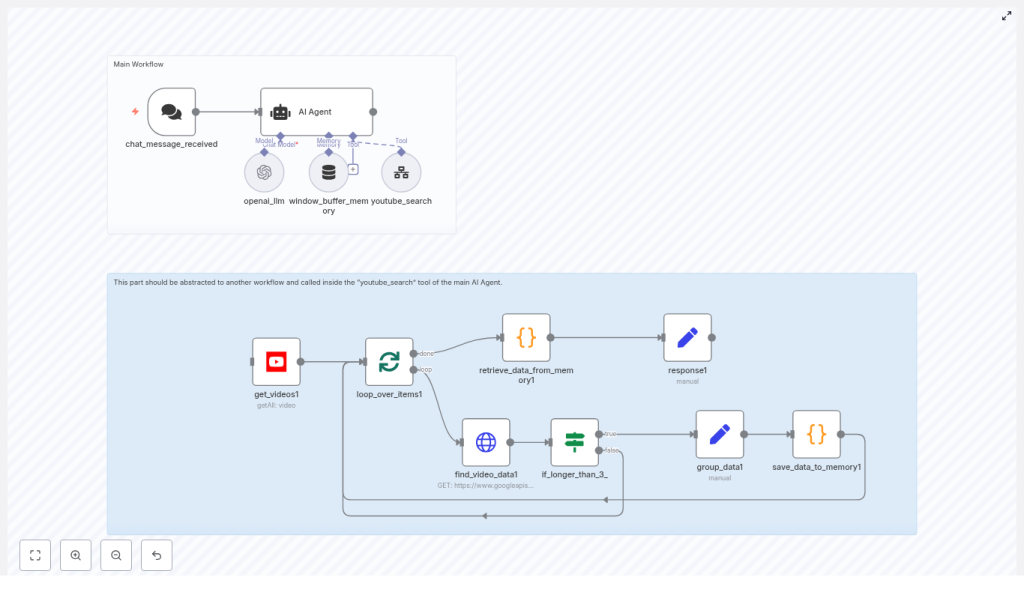
This guide documents a complete n8n workflow that integrates LangChain/OpenAI with the YouTube Data API to automatically identify trending YouTube videos from the last 48 hours, normalize their metadata, and generate actionable content ideas. The focus is on a technical, node-level breakdown so you can adapt and extend the workflow for your own automation stack.
1. Workflow Overview
The automation is designed for creators and technical teams who need fast, repeatable detection of YouTube trends in a specific niche. Instead of manually scanning search results, the workflow uses:
- n8n as the orchestration and data-processing layer
- LangChain-style AI Agent backed by OpenAI to plan searches, call tools, and synthesize insights
- YouTube Data API (via n8n’s YouTube node and HTTP Request node) to fetch recent videos and statistics
- n8n workflow static data as a lightweight in-memory store for aggregating sanitized video metadata
The workflow is triggered by a chat-style request or an API call that specifies a niche (for example, fitness, digital marketing, tech reviews). The LangChain agent validates and refines this niche, generates up to three search queries, invokes a reusable youtube_search sub-workflow as a tool, then analyzes the consolidated results to produce trend insights and content recommendations.
2. High-Level Architecture & Data Flow
2.1 End-to-end process
- Trigger: A chat message or API request starts the n8n workflow and provides a niche or asks for help choosing one.
- Agent planning: The LangChain-style AI Agent confirms the niche, generates up to three distinct search terms, and calls a
youtube_searchtool for each query. - Sub-workflow execution: The
youtube_searchsub-workflow:- Searches YouTube for videos published within the last 48 hours
- Fetches detailed video metadata and statistics
- Sanitizes text fields and appends each video’s data to n8n workflow static data using a fixed delimiter
- Aggregation & analysis: Once all tool calls complete, the agent receives a single consolidated payload, identifies patterns in titles, tags, and performance metrics, and returns structured recommendations plus direct YouTube links.
2.2 Key components
- Trigger node: Starts the workflow when a chat message is received or an API endpoint is hit.
- AI Agent node: Implements a LangChain-style agent with a system prompt that defines tools and analysis rules.
youtube_searchsub-workflow: Encapsulates YouTube search, detailed video lookup, sanitization, and memory persistence.- Static data store: Uses
workflow.staticDatawithin n8n to accumulate video records as a single string for downstream LLM analysis.
3. Node-by-Node Breakdown
3.1 Trigger: chat_message_received
Purpose: Start the workflow when a user asks for trending topics in a niche.
Typical configuration:
- Type: Chat trigger or Webhook / custom trigger (depending on your n8n setup)
- Input: Text message that either:
- Explicitly specifies a niche (for example, “Show me what’s trending in tech reviews”), or
- Asks for help choosing a niche without specifying one
Behavior:
- Extracts the raw user message as the initial context for the AI Agent.
- If the niche is not clearly specified, the downstream agent is instructed to prompt the user with example niches such as:
- Fitness
- Digital marketing
- Tech reviews
- Food
- DIY
Edge case: If your front end cannot support follow-up questions, you can pre-validate the niche in this node and fallback to a default niche or return an error if none is provided.
3.2 AI Agent Node (LangChain-style Agent)
Purpose: Coordinate the entire workflow using a language model. The agent validates the niche, generates search queries, calls the YouTube search tool, and synthesizes final insights.
Core responsibilities:
- Confirm or infer the user’s niche based on the incoming message.
- Generate up to 3 distinct YouTube search queries targeting that niche.
- Call the
youtube_searchtool for each query. - Receive the aggregated, sanitized video data from static memory and produce a concise, high-signal analysis.
System prompt guidelines (conceptual, not literal):
- Require the agent to explicitly confirm the niche with the user if it is ambiguous.
- Instruct the agent to explore multiple angles, for example:
news + <niche>how-to + <niche>challenge + <niche>
- Specify that the agent must:
- Call the
youtube_searchtool up to three times, once per query. - Focus on overall patterns in titles, tags, and performance rather than single viral outliers.
- Return structured recommendations and representative links.
- Call the
Tool integration:
- The
youtube_searchsub-workflow is exposed to the agent as a callable tool (for example, via n8n’s “Execute Workflow” node configured as a tool). - Each tool call receives a query string and any additional parameters (such as region or max results) as input.
- The sub-workflow writes results into static data; the agent later reads a consolidated JSON-like string from that static store for analysis.
3.3 Sub-workflow: youtube_search
Purpose: Encapsulate YouTube search and video detail retrieval logic in a reusable, testable workflow that can be called as a tool by the AI Agent.
Responsibilities:
- Execute a YouTube search scoped to:
regionCode = USpublishedAfter = now - 48 hours- Ordering by relevance
- Limiting to a small number of results per query (for example, top 3)
- Fetch detailed metadata for each video:
snippetcontentDetailsstatistics
- Sanitize and normalize text fields to support pattern detection.
- Append each sanitized video record to the workflow’s static data store, separated by a fixed delimiter:
### NEXT VIDEO FOUND: ###
3.3.1 YouTube Search Node
Node type: n8n YouTube node
Typical configuration:
- Operation:
Search - Resource:
Video - Region code:
US - Published after: current time minus 48 hours
- Order:
relevance - Max results: a small integer, for example 3, to limit API usage and keep analysis focused
Credentials:
- Use n8n’s YouTube credentials configured with a Google API key or OAuth client that has access to the YouTube Data API v3.
3.3.2 Detailed Video Lookup (HTTP Request Node)
Node type: HTTP Request
Endpoint:
https://www.googleapis.com/youtube/v3/videosKey parameters:
part=snippet,contentDetails,statisticsid=<comma-separated video IDs from search results>key=<Google API key, if not using OAuth>
Behavior:
- Batch video IDs to reduce the number of HTTP calls when possible.
- Return a payload that includes:
snippet.title,snippet.description,snippet.tagscontentDetails.durationstatistics.viewCount,statistics.likeCount,statistics.commentCount
3.3.3 Duration-based Branching
Logic:
- Inspect
contentDetails.duration(ISO 8601 format, for examplePT3M30S). - If the duration exceeds roughly 3 minutes 30 seconds, branch the flow to optionally fetch or enrich with additional metadata.
This branching is optional, but in the example workflow longer videos trigger extra processing. You can extend this branch to apply different scoring, exclude long-form content, or collect more contextual fields.
3.3.4 Sanitization & Static Data Storage
Goal: Normalize text fields so the language model can more easily detect patterns across titles, descriptions, and tags.
Typical operations:
- Remove emojis from titles and descriptions.
- Strip URLs from descriptions.
- Normalize whitespace to single spaces and trim leading/trailing spaces.
- Concatenate tags into a single string field.
Conceptual sanitization logic:
// remove emojis
text = text.replace(/\p{Emoji}/gu, '');
// remove urls
text = text.replace(/https?:\/\/\S+/g, '');
// normalize whitespace
text = text.replace(/\s+/g, ' ').trim();
Static data aggregation:
- For each video, create a serialized representation containing:
- Sanitized title
- Sanitized description
- Concatenated tags
- Statistics (views, likes, comments)
- Channel and video IDs
- Append this string to
workflow.staticData, separated by:### NEXT VIDEO FOUND: ###
- This ensures the agent receives a single consolidated string containing all videos across all queries.
Error handling considerations:
- If the YouTube API returns an error or empty results, you can:
- Skip appending anything to static data for that query, and
- Optionally return a status object to the agent so it can adjust its analysis.
- For missing fields (for example, no tags), default to empty strings to avoid JSON parsing issues later.
4. Prompt Design & Query Strategy
4.1 Agent Prompt Design
Prompt engineering is critical for reliable automation. The system prompt provided to the AI Agent should:
- Enforce niche confirmation:
- If the user’s message does not clearly specify a niche, the agent must ask for clarification and suggest examples.
- Limit search calls:
- Instruct the agent to generate up to 3 distinct search queries per request.
- Each query should cover a different angle or format within the niche.
- Define tool usage:
- The agent must call the
youtube_searchtool once per query. - After all tool calls, the agent should read and analyze the aggregated data.
- The agent must call the
- Emphasize pattern detection:
- Prioritize recurring hooks, topics, and tags over isolated one-off videos.
- Encourage identification of common title structures and high-performing formats.
4.2 Example Search-Term Strategy
For a niche like tech reviews, the agent might generate queries such as:
latest smartphone reviewbudget vs flagship phone comparisonunboxing [brand] 2025
You can adapt this pattern to any niche by combining:
- “latest” or “new” + product or topic
- “how to” or “tutorial” + core skill in the niche
- “challenge”, “vs”, or “comparison” + common entities in the niche
5. Result Analysis & Recommendation Generation
5.1 Analysis Focus Areas
Once the agent has access to the consolidated video metadata, it should focus on:
- Title patterns:
- Common keywords and hooks such as “vs”, “review”, “first look”.
- Repeated phrasing patterns (for example, “X you need to know before…”, “I tried X so you don’t have to”).
- Tag clusters:
- Frequently co-occurring tags that indicate subtopics or content clusters.
- Tags that consistently appear in higher-view videos.
- Engagement metrics:
viewCount,likeCount,commentCount.- When possible, translate counts into rates, such as views per hour since upload, to better approximate “trending” status.
- Content gaps & opportunities:
- Identify topics that are emerging but not yet saturated.
- Suggest complementary formats like short explainers, debunk videos, or reactions to trending uploads.
5.2 Link Formatting
The agent’s final output should include clickable YouTube links in a consistent format:
- Video URL:
https://www.youtube.com/watch?v={video_id} - Channel URL:
https://www.youtube.com/channel/{channel_id}
This makes it easy for creators or downstream tools to jump directly to representative videos and channels.
5.3 Recommended Output Structure
A robust final response from the agent typically includes:
- Trend summary:
-
