


n8n LinkedIn Scraper with Bright Data & Google Gemini
Imagine grabbing a LinkedIn profile, cleaning it up, and turning it into a structured JSON resume in just one automated flow. No copying, no pasting, no manual parsing. That is exactly what this n8n workflow template does for you.
Using Bright Data to reliably fetch LinkedIn pages and Google Gemini to understand and structure the content, this workflow turns public LinkedIn profiles into clean JSON resumes plus a separate skills list. It is perfect if you are working on recruiting automation, resume parsing, or building searchable candidate profiles.
What this n8n LinkedIn scraper actually does
At a high level, this template:
- Takes a LinkedIn profile URL as input
- Uses Bright Data to scrape the profile content (in markdown or HTML)
- Feeds that content to Google Gemini to turn messy markup into readable text
- Extracts a structured JSON Resume from that text, including experience, education, and more
- Pulls out a dedicated skills list for search and matching
- Saves the results and sends notifications via webhook and Slack
So instead of manually reviewing profiles, you get machine-readable data that can plug straight into your ATS, analytics, or search tools.
When you would want to use this workflow
This template is especially handy if you:
- Run a recruiting or staffing operation and need consistent resume data
- Build internal tools for talent search or candidate matching
- Want to analyze skills across a large pool of LinkedIn profiles
- Need a repeatable way to turn public LinkedIn data into JSON resumes
Because Bright Data handles the page retrieval and Gemini handles the semantic parsing, the workflow is resilient to layout differences and minor changes in LinkedIn profiles.
How the workflow is structured
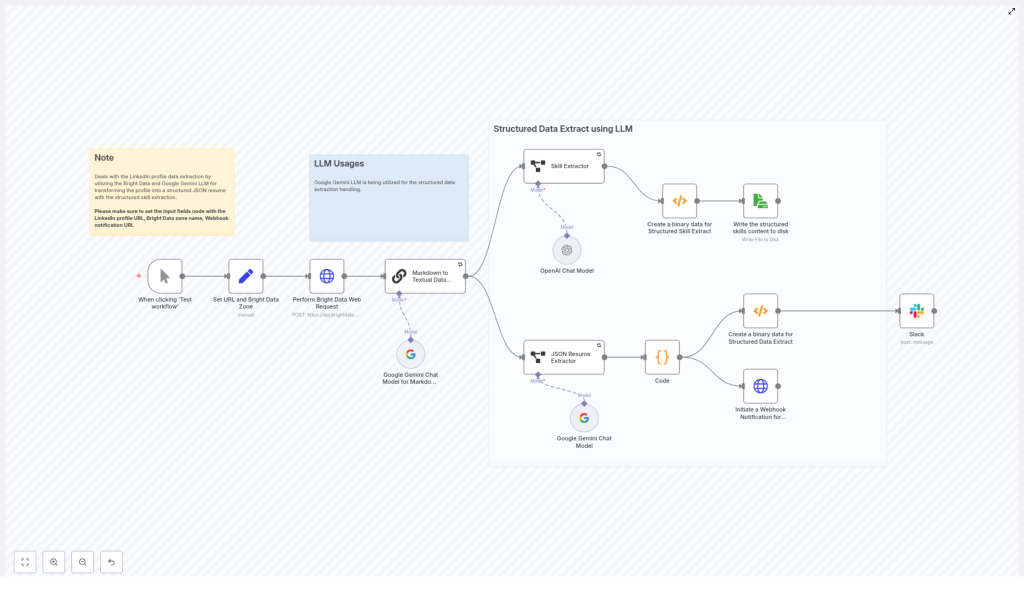
The n8n workflow runs through a series of stages that each handle one piece of the pipeline:
- Input & config – you provide the LinkedIn URL, Bright Data zone, and notification webhook
- Scraping – Bright Data retrieves the profile as markdown or raw content
- Text cleanup – Google Gemini converts that content into clean, plain text
- Resume extraction – a JSON Resume extractor structures the candidate data
- Skill extraction – a dedicated extractor builds a focused skills list
- Storage & alerts – results are written to disk and sent out via webhook/Slack
Let us walk through each stage in n8n so you know exactly what is happening and where you can tweak things.
Step-by-step walkthrough of the n8n nodes
1. Manual Trigger & Set node – feeding the workflow
You start with a Manual Trigger node so you can easily test the workflow. Right after that, a Set node stores the key inputs you will reuse throughout the flow:
- url – the LinkedIn profile URL you want to scrape (the template ships with an example URL you can replace)
- zone – your Bright Data zone name, for example
static - webhook_notification_url – the endpoint that should receive the final structured data
This makes it easy to swap in different profiles or zones without digging into multiple nodes.
2. Bright Data HTTP Request – scraping the LinkedIn profile
Next comes the HTTP Request node that talks to the Bright Data API. This is where the actual scraping happens.
Key settings to pay attention to:
- Set the request method to POST
- Include the zone and url in the request body, using the values from the Set node
- Choose the response format, for example:
rawwithdata_format=markdownworks well to get a cleaned version of the page
- Configure authentication using headers or bearer token credentials, stored securely in n8n Credentials
Once this node runs, you have the LinkedIn profile content in a structured format that is much easier for an LLM to understand.
3. Markdown to Textual Data with Google Gemini
The scraped content still contains markup and layout noise, so the next step is to feed it into a Google Gemini LLM node.
Here, you give Gemini a prompt that tells it exactly what you want:
- Return plain textual content only
- Strip out links, scripts, CSS, and any extra commentary
- Keep important structure like headings, work history, and education sections intact
The goal is to transform messy markdown or HTML into a clean narrative that still reflects the profile sections. This makes the next extraction step much more accurate.
4. JSON Resume Extractor – turning text into structured data
Now that Gemini has produced readable text, a structured extraction node takes over and converts that text into a standardized JSON Resume format.
This node uses a JSON schema that typically includes:
- basics – name, contact details, summary
- work – companies, positions, dates, responsibilities, highlights
- education – schools, degrees, dates
- awards, publications, certificates
- skills, languages, interests, projects
By enforcing a consistent schema, you make it easy to index, store, and compare resumes across your whole candidate pool.
5. Skill Extractor – building a clean skills list
Skills are often the most important part for search and matching, so the template includes a dedicated Skill Extractor node.
This node reads the profile text and outputs a focused array of skills, usually with optional descriptions. The result looks something like this:
[  { "skill": "JavaScript", "desc": "Frontend development, Node.js" },  { "skill": "Data Analysis", "desc": "ETL, cleaning, visualization" }
]
You can use this list directly for tagging, filters, or search queries in your ATS or internal tools.
6. Binary & Storage nodes – saving your results
Once you have both the JSON Resume and the skills array, the workflow moves on to storage.
Here is what typically happens:
- Convert the JSON payloads to binary where needed for file operations
- Write the file to disk or to a storage bucket
In the template, the skills JSON is written as an example file at d:\Resume_Skills.json. You can easily adjust the path or swap in cloud storage like S3 or GCS, depending on your environment.
In addition, the structured data is also sent out to a webhook so that other systems can react to it right away.
7. Notifications via Webhook & Slack
Finally, the workflow lets you know when everything is done.
Two main notifications are included:
- An HTTP Request node that sends the structured JSON to your webhook_notification_url
- A Slack node that posts a summary message to a channel of your choice
This makes it easy to trigger downstream processing, update your ATS, or simply alert your team that a new profile has been parsed.
Setting up your environment & credentials
Before you hit run in n8n, make sure you have the following pieces in place:
- A Bright Data account with a configured zone Store your API key securely in n8n Credentials.
- Google PaLM / Gemini API access These credentials power the LLM nodes that do the text transformation and extraction.
- OpenAI credentials (optional) Only needed if you want to swap in or combine OpenAI models with Gemini.
- A webhook endpoint for notifications You can use a service like webhook.site for testing.
- Correct storage permissions for writing files locally or to cloud buckets
Once these are configured in n8n, you can import the template, plug in your credentials, and start testing with a sample LinkedIn URL.
Staying legal & ethical
Before you put this into production, it is important to think about compliance and responsible use. Make sure you:
- Respect LinkedIn’s terms of service and any relevant scraping regulations where you operate
- Follow data protection laws such as GDPR and CCPA when you process personal data
Use this workflow only for publicly available data, obtain consent where required, and apply rate limits plus respectful crawling practices to avoid overloading services.
Troubleshooting & performance tips
Things not looking quite right on the first run? Here are some practical tweaks:
- If Gemini returns odd formatting or leftover HTML, adjust your prompts to explicitly strip links, metadata, and artifacts.
- Experiment with Bright Data zone options, such as static vs JavaScript-rendered pages, depending on how complex the profile layout is.
- Keep an eye on costs. Both Bright Data requests and LLM tokens can add up, so:
- Batch requests where possible
- Use sampling or limits when you are testing at scale
- Add retry logic and exponential backoff to HTTP nodes to handle temporary network or API timeouts gracefully.
Ideas for extending the pipeline
Once you have the basic LinkedIn scraping and resume extraction working, you can build a lot on top of it. For example, you could:
- Index JSON resumes into Elasticsearch or a vector database for semantic search and candidate matching
- Enrich profiles with:
- Company data
- Skills taxonomy normalization
- Certification verification
- Aggregate skills from multiple profiles to create talent pools and skills heatmaps
- Add deduplication and scoring logic to rank candidates by relevance for a particular role
This template is a solid foundation you can adapt to whatever recruiting or analytics stack you are building.
Sample JSON Resume output
To give you a feel for the final result, here is a simplified example of the JSON Resume format the workflow produces:
{  "basics": { "name": "Jane Doe", "label": "Software Engineer", "summary": "Full-stack developer" },  "work": [{ "name": "Acme Corp", "position": "Senior Engineer", "startDate": "2019-01-01" }],  "skills": [{ "name": "JavaScript", "level": "Advanced", "keywords": ["Node.js","React"] }]
}
Your actual schema can be extended, but this gives you a clear, machine-readable view of the candidate profile that is easy to index and query.
Wrapping up
This n8n LinkedIn scraper template shows how you can combine Bright Data for reliable profile retrieval with Google Gemini for powerful semantic parsing. The result is a scalable way to turn LinkedIn pages into high-quality JSON resumes and skills lists that plug straight into your automation and analytics workflows.
Next steps:
- Import the template into your n8n instance
- Configure your Bright Data, Gemini, and notification credentials
- Run the flow on a test LinkedIn profile
- Refine prompts or schema mappings so the output matches your exact data needs
Try the template in your own stack
Ready to stop copying and pasting LinkedIn profiles by hand? Spin up this template in your n8n instance and see how much time you save.
If you want to adapt the pipeline for your specific recruiting stack or analytics setup, feel free to customize the nodes, extend the schema, or plug in your own storage and search tools. And if you need deeper help or more advanced recipes, you can always reach out to the team or subscribe for updates.
