


n8n MCP Server: Let Agents Run Your Workflows
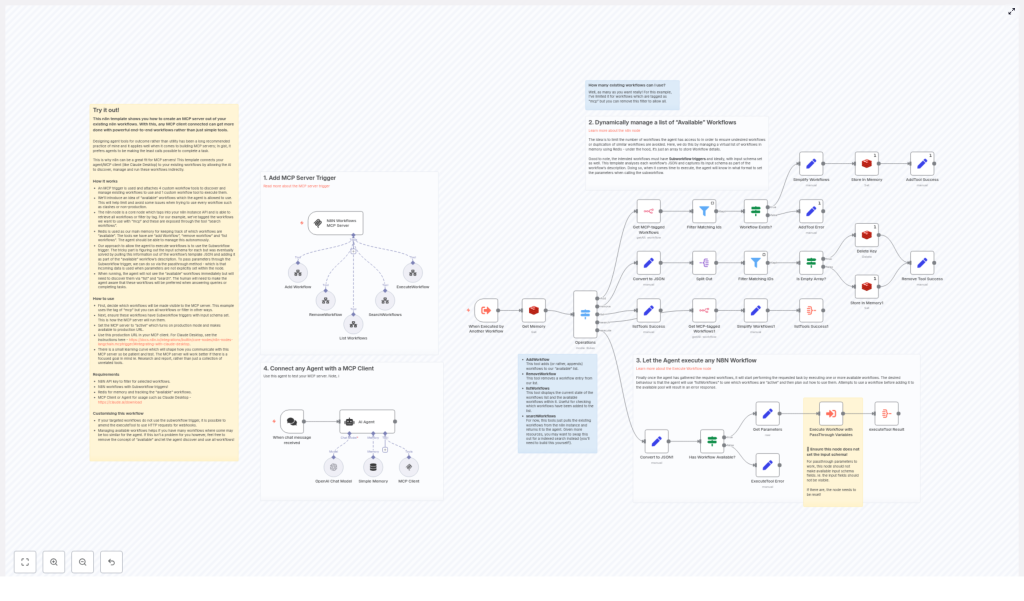
Looking to let an AI agent execute reliable, end-to-end automations in n8n instead of writing ad-hoc scripts? This guide documents an n8n workflow template that exposes your existing workflows as a managed MCP (Model-Connected Platform) server. It is designed for technical users who want precise control over which workflows an agent can see, how parameters are passed, and how executions are orchestrated.
The template turns n8n into an MCP-compatible backend that an agent client (such as Claude Desktop) can connect to over SSE/webhooks. It uses Redis for lightweight memory, Subworkflow triggers for clean execution semantics, and a small, controlled toolset that the agent can call programmatically.
1. Conceptual Overview
1.1 What the template provides
This n8n template implements an MCP server pattern directly inside your n8n instance. It exposes a set of MCP tools that an AI agent can call to:
- Discover candidate workflows in n8n, typically filtered by a tag such as
mcp. - Maintain a curated list of workflows that are currently “available” to the agent.
- Execute only those workflows that have been explicitly added to that available pool.
Instead of the agent inventing HTTP calls or arbitrary scripts, it uses your pre-built, tested n8n workflows as higher-level tools. This improves:
- Reliability – workflows encapsulate tested business logic instead of free-form code.
- Auditability – executions are visible in n8n logs and history.
- Power – complex, multi-step flows (databases, transformations, emails, reports) are accessible via a single tool call.
1.2 Exposed MCP tools
The MCP server workflow exposes five tools to the agent:
searchWorkflows– query all candidate workflows, typically filtered by a tag such asmcp.listWorkflows– list workflows currently registered in the agent’s “available” pool.addWorkflow– add one or more workflows to the available pool.removeWorkflow– remove specified workflows from the available pool.executeWorkflow– execute a workflow from the available pool using passthrough input parameters.
These tools give the agent explicit control over which workflows it can use, while you retain the ability to constrain discovery and execution.
2. Architecture and Data Flow
2.1 Core components
Internally, the template relies on three main building blocks:
- MCP Trigger – an n8n MCP trigger node that exposes the workflow as an MCP server endpoint over SSE/webhooks.
- n8n Node – the built-in n8n node is used to query workflow metadata and retrieve workflow JSON, including tags and definitions.
- Redis – a Redis instance stores the current list of workflows that are “available” to the agent. This acts as a simple memory and access-control layer.
Workflows that the agent can execute are expected to use a Subworkflow trigger. The template invokes them via the Execute Workflow node and relies on passthrough input behavior to forward parameters from the agent to the child workflow.
2.2 High-level flow
- The MCP client (for example Claude Desktop) connects to the n8n MCP trigger endpoint using a production URL.
- The MCP trigger exposes the five tools described above to the agent.
- When the agent calls
searchWorkflows, the n8n node queries workflows (by tag or other criteria) and returns metadata. - The agent uses
addWorkflow/removeWorkflowto manipulate the Redis-backed list of available workflows. - On
executeWorkflow, the template checks that the target workflow is in the available pool, then calls it via Execute Workflow with passthrough inputs and returns the result back to the agent.
The workflow’s system prompt is tuned so that the agent prefers calling these tools instead of generating new scripts or raw HTTP calls.
3. Node-by-Node Functional Breakdown
3.1 MCP Server Trigger Node
Role: Entry point for all MCP interactions.
The MCP trigger node:
- Exposes this n8n workflow as an MCP server endpoint over SSE or webhooks.
- Publishes the server’s tool definitions (
searchWorkflows,listWorkflows,addWorkflow,removeWorkflow,executeWorkflow). - Receives tool invocation requests from the MCP client and routes them through the rest of the n8n workflow.
Configuration notes:
- Use a production-grade URL for the trigger endpoint, since the MCP client will connect to this URL directly.
- Ensure your MCP client configuration (for example in Claude Desktop) references this endpoint and protocol correctly.
3.2 Workflow Discovery via n8n Node (searchWorkflows)
Role: Enumerate candidate workflows that can be exposed to the agent.
When the agent calls searchWorkflows, the template:
- Uses the n8n node to list workflows from your n8n instance.
- Filters workflows based on metadata, typically a specific tag such as
mcp. - Fetches workflow JSON for each candidate to extract:
- Workflow ID and name.
- Description, derived from sticky notes or fields inside the workflow JSON.
- Input schema, inferred from the Subworkflow trigger configuration.
The resulting metadata is returned to the agent, which can then decide which workflows to add to its available pool.
3.3 Redis-backed “Available Workflows” Pool
Role: Maintain a controlled list of workflows that the agent is allowed to execute.
The template uses Redis as a simple memory store to track which workflows are currently available to the agent. This design:
- Prevents the agent from executing every workflow in your instance by default.
- Allows you to keep experimental or duplicate flows hidden unless explicitly added.
- Makes it easy to reset or adjust the pool without modifying individual workflows.
3.3.1 addWorkflow tool
When the agent calls addWorkflow:
- The template validates the requested workflow IDs against the discovery results.
- For each valid workflow, it:
- Reads workflow JSON via the n8n node.
- Extracts id, name, and description.
- Derives an input schema from the Subworkflow trigger’s defined input fields.
- Stores this metadata in Redis as part of the “available workflows” set or list.
The stored schema helps the agent understand which parameters are required when executing the workflow.
3.3.2 listWorkflows tool
When the agent calls listWorkflows, the template reads from Redis and returns the current contents of the available pool, including:
- Workflow identifiers and names.
- Descriptions to help the agent select an appropriate workflow.
- Extracted input parameter names derived from the Subworkflow trigger.
3.3.3 removeWorkflow tool
removeWorkflow deletes specified workflows from the Redis-backed available pool. After removal, those workflows can no longer be executed via executeWorkflow until they are re-added.
3.4 Execution Path (executeWorkflow)
Role: Securely execute a selected workflow with passthrough parameters.
When the agent calls executeWorkflow with a workflow ID and parameters, the template:
- Validates availability:
- Checks Redis to confirm the target workflow is present in the available pool.
- If not present, returns an error response instructing the agent to add the workflow first.
- Invokes the workflow:
- Uses the Execute Workflow node in n8n.
- Configures the node to rely on passthrough variables instead of a fixed input schema.
- Forwards the agent-provided parameters directly into the Subworkflow trigger of the target workflow.
- Returns results:
- Collects the output from the executed workflow.
- Sends the result back through the MCP trigger to the calling agent.
Critical configuration detail: The Execute Workflow node must not define an explicit input schema. If you add fields to the node’s input, n8n will stop using passthrough behavior and instead expect only those defined fields. This breaks the agent’s ability to send arbitrary parameter sets based on the Subworkflow trigger’s schema.
4. Configuration Requirements
4.1 Prerequisites
- n8n instance with API access
The built-in n8n node uses the n8n API to list workflows and retrieve workflow JSON. Ensure:- API access is enabled.
- Credentials for the n8n node are configured with permissions to read workflows.
- Workflows with Subworkflow triggers
Any workflow that should be executable by the MCP server must:- Use a Subworkflow trigger as its entry point.
- Define input fields in the Subworkflow trigger so the template can infer the input schema.
- Redis instance
A Redis server is required to store the list of available workflows.- Configure Redis credentials in n8n.
- Ensure network connectivity from n8n to Redis.
- MCP-capable agent client
For example:- Claude Desktop configured to connect to the n8n MCP server endpoint.
- Any other MCP client that supports custom MCP servers and SSE/webhooks.
4.2 System message and agent behavior
The template includes a system message tuned to:
- Encourage the agent to call the provided MCP tools instead of inventing new scripts.
- Guide the agent to:
- Use
searchWorkflowsto discover capabilities. - Use
addWorkflowandlistWorkflowsto manage access. - Use
executeWorkflowto perform tasks.
- Use
5. Advanced Customization Options
5.1 Workflow discovery and tagging strategy
By default, the template filters candidate workflows using a tag such as mcp. You can customize this behavior to match your environment:
- Change the tag – use a different tag to separate production-ready flows from experiments.
- Remove the filter – expose all workflows for discovery, then rely on the available pool as the primary control mechanism.
- Extend discovery logic – for example, implement:
- Additional filters based on workflow name patterns.
- Priority tags, categories, or indexed search logic.
5.2 Supporting non-Subworkflow targets
The template is optimized for workflows that use Subworkflow triggers, because they provide clean parameter handling and clear schemas. If some of your workflows are triggered differently, you can adapt the execution path:
- Replace the Execute Workflow node with:
- An HTTP Request node calling a workflow’s webhook endpoint.
- Other integration nodes that trigger downstream systems on behalf of the agent.
- Maintain the same validation and Redis-backed availability checks before calling external endpoints.
Note that without Subworkflow triggers, input schema extraction becomes less automatic. You may need to document expected inputs in workflow descriptions or notes and parse them manually.
5.3 Input schema and validation
The template attempts to infer the input schema for each workflow by reading its Subworkflow trigger definition. It extracts the names of required inputs and stores them alongside workflow metadata in Redis. This helps the agent:
- Understand which parameters are required versus optional.
- Construct correctly shaped tool calls when using
executeWorkflow.
To improve schema clarity, you can:
- Add short parameter descriptions in the workflow notes or description field.
- Include example payloads or pseudo-JSON in the workflow description to guide the agent.
- Optionally embed JSON Schema-like structures in descriptions, which the agent can interpret as guidance, even if the template does not formally enforce them.
6. Best Practices for Production Use
- Expose only production-ready workflows
Use tags and the available pool to ensure the agent does not accidentally run experimental or partially configured flows. - Document inputs clearly
In each workflow:- Use sticky notes or descriptions to explain inputs and their semantics.
- Provide example values where possible.
- Monitor executions
Regularly review:- n8n execution logs for workflows triggered via the MCP server.
- Audit logs for destructive or sensitive operations.
- Add extra safety for destructive actions
For workflows that modify or delete data, consider:- Adding confirmation steps or guard conditions inside the workflow.
- Requiring specific flags or parameters to be set before execution proceeds.
7. Troubleshooting and Edge Cases
7.1 Agent calls a workflow that is not in the available pool
Symptom: The agent attempts to execute a workflow and receives an error indicating it is unavailable.
Behavior: The template checks Redis before executing. If the workflow is not in the available pool, it returns an error message instructing the agent to add the workflow first.
Resolution:
- Call
listWorkflowsto inspect the current available pool. - If the workflow is missing
