


n8n Tutorial: Automate Tweets with Manual Trigger, Twitter (X) Node & Conditional IF Logic
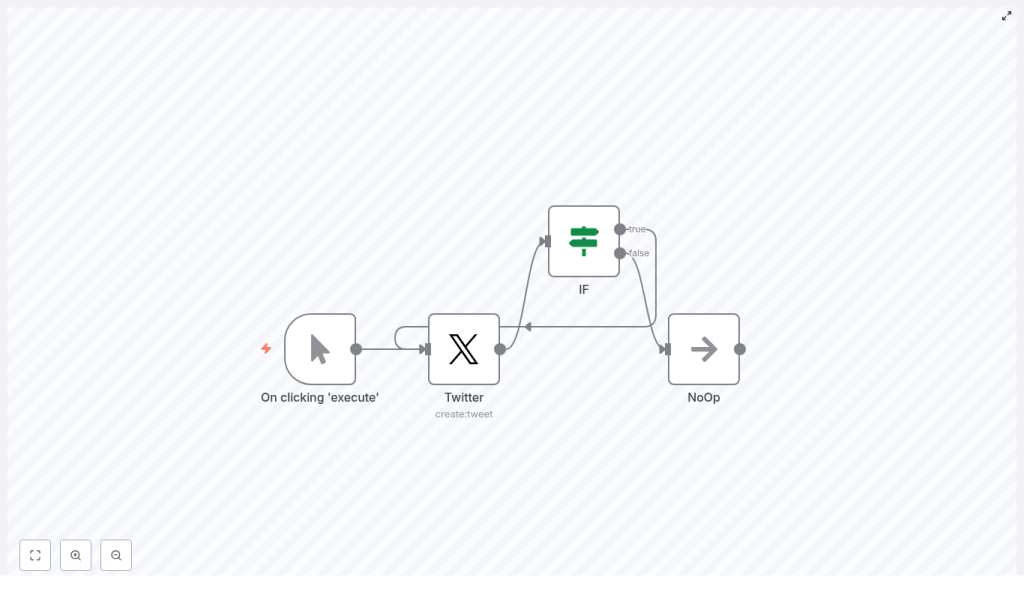
This guide explains how to implement a compact n8n workflow that posts to Twitter (X) on demand and routes execution through an IF node based on a simple condition. The tutorial keeps the workflow minimal while demonstrating key n8n concepts: manual triggers, authenticated API calls, conditional branching, and safe placeholders for future extensions.
1. Workflow overview
The template consists of four core n8n nodes connected in a linear flow with a conditional split:
- Manual Trigger – Executes the workflow on demand when you click Execute Workflow in the editor.
- Twitter (X) Node – Sends a tweet with text content using authenticated Twitter/X credentials.
- IF Node – Evaluates a condition and splits the execution into true and false branches.
- NoOp Node – A no-operation node used as a placeholder target for one of the branches.
At a high level the execution path is:
Manual Trigger → Twitter (X) → IF → (true | false) → NoOp
This pattern is useful when you want a controlled, testable automation that can later be expanded into a more complex flow without changing the basic structure.
2. Architecture and data flow
2.1 Execution path
- Manual Trigger node starts the execution with a single item and no external input data.
- Twitter (X) node receives the item, uses configured credentials, and calls the Twitter/X API to create a tweet with static text.
- IF node evaluates a numeric condition based on the special variable
{{$runIndex}}:- If the condition evaluates to
true, the item continues on the true output. - If the condition evaluates to
false, the item continues on the false output.
- If the condition evaluates to
- NoOp node receives the item from one of the IF outputs and performs no transformation. It simply passes the item along, making it a safe placeholder for future steps.
2.2 Why this pattern is useful
This architecture is intentionally minimal yet covers several common automation patterns in n8n:
- Interactive testing – Use the Manual Trigger to test tweet formatting, credentials, and branching logic without scheduling or external webhooks.
- Conditional workflows – Use the IF node to enable or disable downstream actions based on run index, API responses, or expression-based rules.
- Safe layout for future changes – The NoOp node keeps the visual structure intact and provides a stable connection point for later additions such as Slack notifications, logging, or retry logic.
3. Node-by-node breakdown
3.1 Manual Trigger node
Purpose: Start the workflow manually from the n8n editor.
- Node type:
n8n-nodes-base.manualTrigger - Typical label:
On clicking 'execute'or any descriptive name. - Configuration: No additional parameters are required. The node simply provides a single item when you run the workflow manually.
You use this node primarily during development and for ad-hoc runs. It is ideal when you want to test tweet content or IF logic without configuring a Cron or Webhook trigger.
3.2 Twitter (X) node
Purpose: Post a tweet using the Twitter/X API.
- Node type:
n8n-nodes-base.twitter - Input: Item(s) from the Manual Trigger node.
- Action:
Create Tweet(or the equivalent action name in your n8n version / connector).
Key configuration parameters:
- Action: Select
Create Tweet. - Text: Provide the tweet body, for example:
Hello from n8n! - Authentication / Credentials:
- Open the Credentials section of the node.
- Select or create a Twitter/X OAuth credential in the n8n credential manager.
- Ensure you have valid API keys, access tokens, and any required elevated access level according to current Twitter/X API policies.
Integration specifics & notes:
- Twitter/X API naming and endpoints may change over time. If the node name or action labels differ slightly, select the option that corresponds to posting a new tweet with text.
- If authentication fails, the node will return an error in the execution log. Typical causes include invalid tokens, revoked access, or insufficient permissions.
- The node output typically contains metadata about the posted tweet (such as IDs and timestamps), which you can later reference in expressions if you expand the workflow.
3.3 IF node
Purpose: Conditionally route execution into separate branches based on a boolean evaluation.
- Node type:
n8n-nodes-base.if - Input: Output of the Twitter node.
- Outputs: Two separate outputs:
- true – items that match the condition.
- false – items that do not match the condition.
Condition used in this template:
The template compares the workflow run index to the numeric value 4:
{{$runIndex}} == 4
This means:
{{$runIndex}}is a special n8n variable that starts at0for the first item.- The condition evaluates to true only when
{{$runIndex}}equals4, which corresponds to the fifth item or run.
Common IF node checks you can use:
- Value comparisons: equals, not equals, greater than, less than, contains, etc.
- API response checks: Inspect values from the previous node using expressions such as:
{{$json["fieldName"]}} - Loop or index-based logic: Use
{{$runIndex}}or other contextual variables to control when certain actions occur.
This node is central to adding conditional logic to your automation. In this template it is kept intentionally simple so you can easily adapt the expression to your own conditions.
3.4 NoOp node
Purpose: Provide a stable endpoint or placeholder for one branch of the IF node without changing the data.
- Node type:
n8n-nodes-base.noOp - Input: Output from either the true or false branch of the IF node.
- Behavior: The node does not modify or enrich the data. It simply passes the item through.
This is helpful when you are still designing your workflow. You can:
- Keep the branching structure visible and connected.
- Later replace or extend the NoOp node with real logic, such as:
- Sending a Slack notification.
- Writing logs to a database or Google Sheets.
- Adding retry or error handling steps.
4. Template JSON reference
The following JSON is a compact representation of the workflow structure. It reflects the same node types and connections described above.
{  "nodes": [  {  "name": "On clicking 'execute'",  "type": "n8n-nodes-base.manualTrigger"  },  {  "name": "IF",  "type": "n8n-nodes-base.if"  },  {  "name": "NoOp",  "type": "n8n-nodes-base.noOp"  },  {  "name": "Twitter",  "type": "n8n-nodes-base.twitter",  "parameters": {  "text": "Hello from n8n!"  }  }  ],  "connections": {  /* connections: Manual -> Twitter -> IF -> (true|false) -> NoOp */  }
}
In a full export from your own instance you will also see credentials references, node positions, and other metadata. The snippet above focuses on the conceptual structure.
5. Configuration & setup notes
5.1 Credentials and authentication
- Configure Twitter/X OAuth credentials in the n8n Credentials section.
- Do not hard-code API keys or tokens directly inside text fields. Use the credential manager to keep secrets secure.
- If tokens expire or permissions change, you may need to re-authorize the Twitter credential in n8n.
5.2 Expressions and indices
{{$runIndex}}is zero-based:0is the first item.4is the fifth item.
- When processing multiple items per execution, the run index is evaluated per item, which affects when your IF condition becomes true.
- Use the expression editor in n8n to validate syntax for expressions like:
{{$json["field"]}}before saving the node configuration.
6. Testing, debugging & common pitfalls
6.1 Testing the workflow
- Click Execute Workflow to run from the Manual Trigger node.
- Inspect each node’s output in the execution panel:
- Confirm that the Twitter node successfully posts the tweet.
- Verify that the IF node routes items into the expected branch.
- Check that the NoOp node receives the item as expected.
- For predictable testing of IF conditions, you can:
- Use a Set node (if you add one) to define static fields.
- Temporarily simplify the condition to something you can easily trigger.
6.2 Debugging Twitter node failures
- Review the error message in the node execution details. Common problems:
- Invalid or expired tokens.
- Revoked access or changed permissions.
- API rate limits reached.
- If you hit rate limits, space out your tests and consider adding retry logic or scheduling less frequent runs.
- Re-check that the configured action is
Create Tweetand that the text field is not empty.
6.3 Common pitfalls
- Authentication errors: When credentials are updated or revoked on Twitter/X, you must re-connect or re-authorize them in n8n.
- Incorrect expressions: Mis-typed JSON paths like
{{$json["field"]}}can cause runtime errors. Always validate in the expression editor. - Misunderstanding indices: Remember that
{{$runIndex}}is per item and starts at 0. If you expect the condition to be true earlier, adjust the comparison accordingly.
7. Advanced customization & next steps
7.1 Replace Manual Trigger with Cron
To move from ad-hoc testing to scheduled automation, replace the Manual Trigger with a Cron node:
- Delete or disable the Manual Trigger.
- Add a Cron node and configure the desired schedule (for example, hourly or daily).
- Connect the Cron node to the Twitter node.
This transforms the workflow into a recurring job that posts tweets at predefined times.
7.2 Extend IF logic
The IF node can do more than compare the run index. You can:
- Inspect tweet content or metadata and route based on:
- Presence of keywords.
- Flags or status values from previous nodes.
- Send items that match a condition to:
- Slack for notifications.
- Google Sheets for basic analytics.
- Additional validation nodes before posting.
In all these cases, the pattern remains the same: Twitter → IF → different branches, with NoOp easily replaced by functional nodes.
7.3 Error handling and retry strategies
To make the workflow more robust, you can introduce dedicated error handling:
- Add a Catch Error branch to handle failures from the Twitter node.
- Use a Function node for custom retry logic, such as:
- Retrying on rate limit errors after a delay.
- Logging error details to an external system.
- Sending alerts to an administrator or support channel.
These enhancements build on the same structure without changing the core logic of the template.
8. Security & policy considerations
- Always store API keys and tokens in n8n credentials, not in plain text fields or code.
- Review Twitter/X platform rules and content policies before automating posts, especially at scale.
- Monitor rate limits to avoid automated workflows hitting caps and failing unexpectedly.
9. Putting it all together
This template illustrates a foundational n8n automation pattern:
Manual Trigger → Twitter (X) → IF → NoOp
With this small workflow you get:
- Interactive, manual execution for safe development and testing.
- An authenticated action node that integrates with an external API.
- Conditional branching using the IF node and expressions like
{{$runIndex}}. - A NoOp placeholder that keeps the structure extensible and maintainable.
From here you can scale to scheduled tweets, multi-channel notifications, analytics, and more advanced error handling without discarding the core design.
Try it in your instance: Import the template, connect your Twitter/X credentials, and click Execute Workflow. Experiment with different IF conditions and replace the NoOp node with real actions such as Slack messages, database logging, or retry logic.
