


How a Stressed SEO Marketer Turned n8n, GPT‑4.1, and Serper Into a Website Analyzer Superpower
By 9:30 a.m., Lina already had a headache.
Her manager had just dropped a list of 120 URLs into her inbox with a cheerful note: “Need titles, meta descriptions, summaries, and keyword patterns for all of these by tomorrow. Should help with our SEO roadmap.”
Lina was an experienced SEO marketer, not a magician. She knew what this meant in practice: endless tab switching, copy pasting text into documents, scanning for patterns, and trying to guess which keywords actually mattered. She had done this routine manually before. It was slow, repetitive, and error prone.
This time, she decided it had to be different.
The breaking point: when manual analysis stops scaling
Lina opened the first few pages from the list. Each one had messy layouts, pop ups, navigation menus, footers, and cookie banners. The information she actually needed was buried in the main content.
- She needed page titles and meta descriptions for quick SEO checks.
- She needed concise summaries to share with her content team.
- She needed keyword patterns, not just guesses, but structured n‑gram analysis of unigrams, bigrams, and trigrams.
Doing this manually for 10 pages was annoying. For 120 pages it was a nightmare.
She had used n8n before for simple automations like sending Slack alerts and syncing form submissions, so a thought crossed her mind: “What if I can turn this into an automated website analyzer?”
The discovery: an n8n Website Analyzer template
Searching for “n8n website analyzer” led her to a reusable workflow template built around GPT‑4.1‑mini and Serper. It promised exactly what she needed:
- Automated page scraping.
- LLM powered summarization.
- N‑gram analysis with structured outputs.
The more she read, the more it felt like this template was designed for people exactly like her: content teams, SEO specialists, and developers who needed fast, structured insights from web pages at scale.
The workflow combined three main ingredients:
- n8n for orchestration and low code automation.
- Serper as the search and scraping layer that fetched clean content.
- GPT‑4.1‑mini to parse, summarize, and analyze the text.
Instead of manually reading every page, Lina could have an AI agent do the heavy lifting, then plug the results straight into her reporting stack.
Inside the “Website Analyzer” brain
Before she trusted it with her 120 URLs, Lina wanted to understand how this n8n workflow actually worked. The template followed an AI agent pattern, with a few key nodes acting like parts of a small team.
The core nodes Lina met along the way
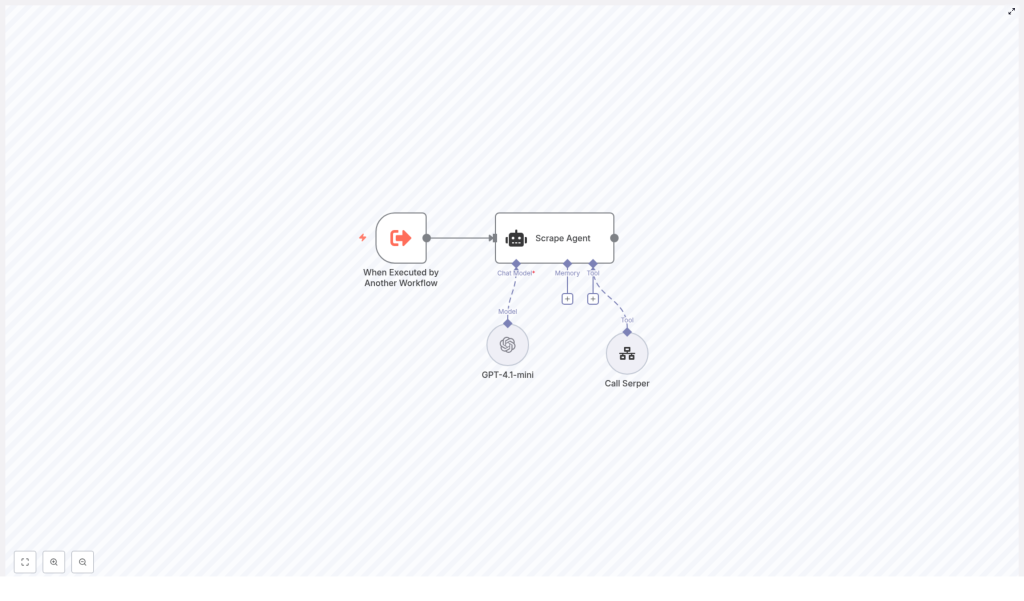
- When Executed by Another Workflow – A trigger node that let this analyzer run on demand. Lina could call it from other workflows, from a schedule, or from a simple webhook.
- Scrape Agent – A LangChain style agent node that coordinated the language model and the tools. This was the “brain” that decided what to do with each URL.
- GPT‑4.1‑mini – The LLM responsible for parsing the scraped text, creating summaries, and performing n‑gram analysis.
- Call Serper – A separate workflow used as a tool that actually fetched the web page, cleaned the HTML, and returned usable content.
In other words, the workflow did not just “call GPT on a URL.” It followed a clear step by step process that made sense even to a non developer like Lina.
The rising action: turning a template into her personal analyzer
Lina imported the template into her n8n instance and watched the nodes appear in the editor. It looked more complex than the simple automations she was used to, but the structure was logical.
Step 1 – Bringing the template into n8n
She started by importing the workflow JSON file. Once loaded, she checked:
- That all nodes were connected correctly.
- That the “When Executed by Another Workflow” trigger was at the top.
- That the Scrape Agent node pointed to the “Call Serper” tool workflow.
With the skeleton in place, it was time to give the analyzer access to real data.
Step 2 – Wiring up GPT‑4.1‑mini and Serper credentials
Without valid API keys, the workflow was just a nice diagram. Lina opened the credentials panel and configured two key integrations:
- OpenAI credentials for the GPT‑4.1‑mini node, where she pasted her API key so the agent could perform the summarization and analysis.
- Serper credentials for the “Call Serper” workflow, ensuring that the URL fetch node would return either clean text or HTML that the tool could sanitize.
Once saved, the red warning icons disappeared. The agent was ready to think and browse.
Step 3 – Understanding the agent’s step by step behavior
Lina opened the Scrape Agent configuration and followed the logic. For each URL, the workflow would:
- Receive a request from another workflow or trigger with the URL to analyze.
- Call the Serper tool to fetch the page HTML and extract the main textual content, avoiding navigation bars, ads, and boilerplate.
- Send the cleaned content to GPT‑4.1‑mini with a structured prompt that requested:
- Page title.
- Meta description, or a generated summary if none existed.
- A concise 2 to 3 sentence summary of the page.
- N‑gram analysis including unigrams, bigrams, and trigrams.
- Return a structured response that other workflows could consume as JSON, send to a webhook, export as CSV, or write directly into a database.
This was exactly the workflow she had been doing manually, only now it could run across dozens or hundreds of pages without her supervision.
The turning point: crafting the perfect prompt
When Lina clicked into the system prompt for the Scrape Agent, she realized how much power lived in a few paragraphs of instruction. The template already included a solid default prompt, but she wanted to understand the rules before trusting the n‑gram output.
The core prompt guidelines focused on keeping the analysis clean and consistent:
- Analyze only the main textual content, ignore navigation, sidebars, footers, and ads.
- Normalize the text before extracting n‑grams:
- Convert to lowercase.
- Remove punctuation.
- Strip stop words.
- Return the top 10 items for unigrams, bigrams, and trigrams when available.
- Exclude n‑grams that contain only stop words.
She kept those rules but added a few tweaks of her own, such as slightly adjusting the way summaries were phrased to match the tone her team preferred.
The prompt became the contract between her expectations and the model’s behavior. With that in place, she felt confident enough to run a real test.
First run: from a single URL to a reliable JSON payload
To avoid surprises, Lina started with one URL from her list. She triggered the workflow manually inside n8n, watched the execution log, and waited for the result.
The output arrived as a clean JSON object, similar to this structure:
{  "url": "https://example.com/page",  "title": "Example Page Title",  "meta_description": "Short meta description or generated summary",  "summary": "2-3 sentence summary",  "n_grams": {  "unigram": ["word1", "word2", "word3"],  "bigram": ["word1 word2", "word2 word3"],  "trigram": ["word1 word2 word3"]  }
}
Everything she needed was there: title, meta description, summary, and structured keyword patterns. No more scanning paragraphs and guessing which phrases mattered.
Scaling up: testing, iterating, and debugging like a pro
With the first success, Lina queued a handful of URLs. She used n8n’s execution view to monitor each run and confirm the outputs were consistent.
Iterating on the workflow
- She checked that Serper always returned enough text. For pages with very little content, she learned to verify whether the site relied heavily on client side rendering. In those cases, a headless browser or pre render service could help capture the final HTML.
- She tightened the LLM prompt to reduce hallucinations, explicitly asking GPT‑4.1‑mini to avoid inventing facts and to state clearly when information was missing.
- She adjusted the number of n‑gram results when she wanted a shorter list for quick overviews.
Each small tweak improved the reliability of the analyzer. Soon, she felt ready to let it loose on the full list of 120 URLs.
Beyond the basics: extending the Website Analyzer
Once the core analyzer was stable, Lina started to see new possibilities. The template was not just a one off solution, it was a foundation she could extend as her needs evolved.
Language detection and smarter n‑grams
Some of the URLs her team tracked were in different languages. She added a language detection step before the n‑gram extraction so that the workflow could:
- Identify the page language automatically.
- Route the content to language specific stop word lists.
- Produce cleaner, more meaningful n‑gram results in each language.
Content scoring and SEO strength
Next, she used GPT‑4.1‑mini not only to summarize, but also to score content based on:
- Readability.
- SEO strength.
- Relevance to a given keyword set.
These scores helped her prioritize which pages needed urgent optimization and which were already performing well.
Storage, dashboards, and long term insights
Instead of exporting CSV files manually, Lina connected the workflow to her database. Each run now:
- Stored analyzer outputs in a structured table.
- Fed data into a dashboard built on top of Elasticsearch and a BI tool.
- Allowed her to search across titles, summaries, and n‑grams over time.
What started as a one day emergency task turned into a sustainable system for ongoing content intelligence.
Staying responsible: ethics, legality, and best practices
As she scaled the analyzer, Lina knew she had to be careful. Scraping public content did not mean she could ignore ethics or legal considerations.
She put a few safeguards in place:
- Checking
robots.txtand site terms before adding a domain to her automated runs. - Implementing rate limits and exponential backoff in n8n to avoid overloading target servers.
- Filtering and redacting any sensitive personal data before storing or sharing outputs.
These steps kept the workflow aligned with both technical best practices and company policies.
Performance and cost: keeping the analyzer lean
As the number of URLs grew, Lina became more conscious of API costs and performance. She made a few optimizations:
- Fetching only the necessary text and stripping scripts, styles, and images at the scraping stage.
- Caching results for URLs that were analyzed repeatedly, so she did not pay for the same page twice.
- Using GPT‑4.1‑mini for routine analysis, reserving larger models only for deep dives on high value pages.
With these adjustments, the workflow stayed fast and affordable even as her team expanded its coverage.
What changed for Lina and her team
By the end of the week, Lina had more than just a completed task list. She had built an internal Website Analyzer agent that her team could reuse for:
- Automated SEO page audits and keyword extraction.
- Content research and competitor analysis with quick summaries and topic clusters.
- Data enrichment for indexing and cataloging large sets of URLs.
Instead of spending hours on manual copy paste work, she could now focus on strategy, content ideas, and actual optimization. The tension that began her week had turned into a sense of control.
Your turn: building your own n8n Website Analyzer
If you recognize yourself in Lina’s story, you can follow a similar path in your own n8n instance.
- Import the Website Analyzer template into n8n and verify the node connections.
- Configure your OpenAI credentials for the GPT‑4.1‑mini node and set up Serper (or another scraping tool) for clean content extraction.
- Customize the Scrape Agent system prompt so it matches your analysis needs, including n‑gram rules and summary style.
- Test with a few URLs, inspect the JSON outputs, then iterate on the prompt and node settings.
- Once stable, scale up, add storage or dashboards, and extend with language detection, scoring, or rate limiting as needed.
The template gives you a ready made AI agent that combines orchestration, web crawling, and LLM analysis into one reusable workflow. You do not have to start from scratch or build your own tooling layer.
Start now: import the template, plug in your OpenAI and Serper credentials, and run your first test URL. From there, you can shape the analyzer around your own SEO, content, or data enrichment workflows.
