


Automate Applicant Intake: New Job Application Parser with n8n, OpenAI, and Pinecone
Every new job application is a potential game changer for your team. Yet when resumes are buried in inboxes or scattered across tools, it is hard to give every candidate the attention they deserve. Manual screening eats into your day, slows hiring decisions, and pulls you away from the strategic work that really moves the business forward.
This is where thoughtful automation becomes a catalyst for growth. In this guide, you will walk through a complete journey: from the pain of manual intake, to a new mindset about automation, to a concrete n8n workflow template that turns resume chaos into structured, searchable insight. By the end, you will not just understand how this “New Job Application Parser” works, you will see how it can be a stepping stone toward a more focused, scalable workflow for your entire hiring process.
From Manual Chaos to Intentional Automation
Most recruiting teams start in the same place. Applications arrive through forms, email, or job boards, and someone has to:
- Open each resume and copy key fields into a tracking sheet
- Scan for skills, experience, and role fit
- Notify hiring managers when a promising candidate appears
- Keep some form of audit log for compliance and reporting
This approach is familiar, but it does not scale. It is time-consuming, error-prone, and mentally draining. The more applications you receive, the more you are forced to choose between speed and quality.
Automating job application parsing with n8n lets you step out of that loop. Instead of acting as a human data pipeline, you become the architect of a system that:
- Extracts structured fields like name, email, skills, and experience automatically
- Makes resumes searchable with semantic embeddings instead of brittle keyword filters
- Triggers follow-up actions, such as Slack alerts and Google Sheets logs, in real time
- Preserves context and audit trails for analytics and compliance
When you shift this work to an automated workflow, you reclaim hours every week and gain a clear, consistent view of your talent pipeline. That is the mindset shift: you are not just saving time, you are building a repeatable hiring engine.
Reimagining Your Hiring Workflow With n8n
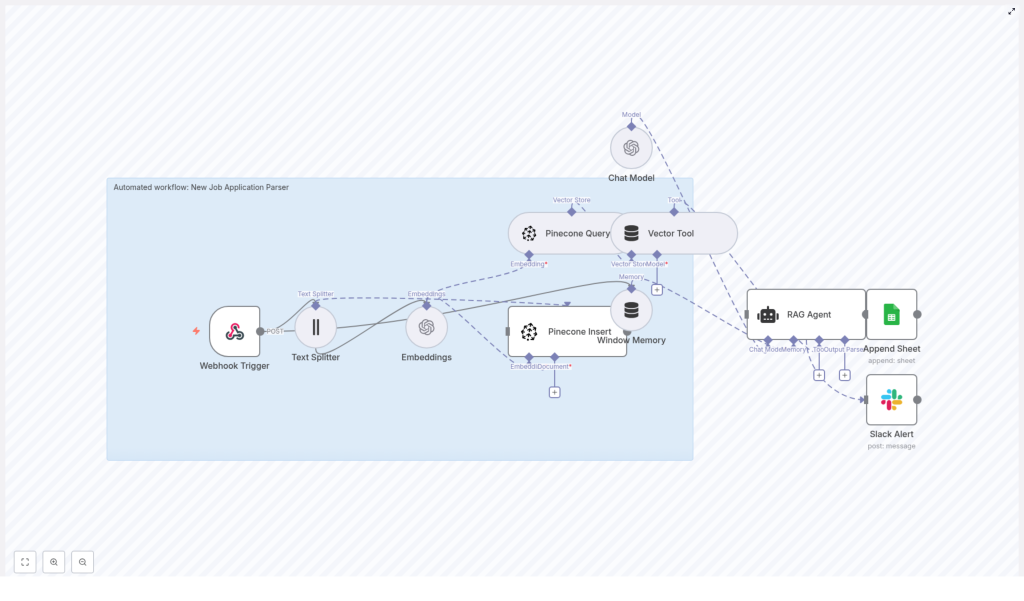
n8n is the backbone of this transformation. It lets you orchestrate each step of your job application pipeline with visual, configurable nodes. In this “New Job Application Parser” template, n8n connects:
- A Webhook Trigger that receives new job applications
- A Text Splitter that prepares resume content for embeddings
- OpenAI Embeddings that convert text into semantic vectors
- Pinecone for scalable vector storage and retrieval
- A RAG Agent (Retrieval Augmented Generation) that uses stored context to summarize and classify candidates
- Google Sheets for logging and tracking
- Slack for alerts and notifications
Each component plays a specific role, but together they create something more powerful: a living knowledge base of your applicants that you can query, analyze, and improve over time.
The Journey of a Job Application Through the Workflow
1. A Candidate Applies, Your Webhook Listens
The moment a candidate submits their resume through your career site or a third-party form, the journey begins. n8n’s Webhook Trigger node receives a POST request that contains either the raw text of the application or a resume file that you convert to text before sending into the workflow.
This webhook is your automated intake door. Instead of landing in an inbox, every application enters a structured pipeline that you control and can monitor.
2. Normalize and Split the Text for Better Understanding
Resumes and cover letters can be long and varied in format. To prepare them for semantic search, the Text Splitter node breaks the content into smaller chunks, such as a chunk size of 400 characters with an overlap of 40.
This chunking strategy helps in two ways:
- It keeps embeddings accurate by preserving local context
- It prevents long documents from exceeding model token limits
By normalizing and splitting text thoughtfully, you set the stage for high-quality embeddings and reliable retrieval later on.
3. Generate Semantic Embeddings With OpenAI
Each chunk of text is sent to an OpenAI embeddings model, such as text-embedding-3-small. The model returns dense vector representations that capture the meaning of the content, not just the exact words used.
These vectors are what make semantic search possible. Instead of asking “Does this resume contain the word Python” you can ask “Who has strong Python and AWS experience” and retrieve candidates whose profiles genuinely match that skill set, even if they phrase it differently.
4. Store Vectors in Pinecone With Rich Metadata
Once embeddings are generated, the workflow uses the Pinecone Insert node to store them in a Pinecone index, such as one named new_job_application_parser.
Each vector is saved along with metadata like:
- Applicant ID
- Name and email
- Job applied for
- Submission date
- Link to the original resume file
This metadata turns raw vectors into actionable records. Later, you can filter by job_id, restrict searches to a specific role, or quickly jump back to the original document when you find a promising candidate.
5. Use a RAG Agent for Context-Aware Insights
The real power of this setup appears when you start asking questions of your candidate data. When you or a hiring manager queries the system, for example:
“Show me top candidates with Python and AWS experience”
The workflow uses a Pinecone Query node to retrieve the most relevant chunks from your index. A Vector Tool passes those chunks to a RAG Agent, which combines them with a Chat Model.
The result is a concise, human-ready summary or classification that is grounded in the actual resume content. This retrieval-augmented generation process reduces hallucinations and keeps answers tied to your stored data.
6. Log Everything and Keep Your Team in the Loop
Every processed application is then appended to a Google Sheet. Typical columns might include:
- Timestamp
- Applicant name
- Job ID or role
- Status
- RAG agent summary
This sheet becomes your lightweight applicant tracking and reporting layer. At the same time, a Slack Alert node keeps your team informed. You can configure it to send messages to a channel such as #alerts whenever critical events occur, especially errors that need quick attention from engineering or operations.
Instead of quietly failing in the background, your automation becomes transparent and trustworthy.
Designing a Reliable n8n Job Application Parser
Building a workflow that feels effortless on the surface requires a few deliberate design choices. Here are key areas to focus on as you implement or adapt this n8n template.
Data Normalization
- Convert PDFs and DOCX resumes to clean plain text using reliable libraries
- Avoid noisy OCR when possible, since it can introduce errors into embeddings
- Strip boilerplate sections, such as legal disclaimers, to reduce noise in your vector store
Clean input leads to better semantic search and more meaningful summaries.
Chunking Strategy
- Use overlapping chunks, for example 10 to 20 percent overlap, to preserve context around boundaries
- Keep chunk sizes aligned with your embedding model’s token limits
- Maintain consistent settings across the workflow for predictable results
A thoughtful chunking strategy improves both the accuracy of retrieval and the quality of RAG outputs.
Metadata Design
- Include identifiers such as
applicant_id,email,job_id,submission_date,source_url - Use metadata filters during Pinecone queries, for example restrict results to
job_id=123 - Think ahead about what attributes will matter for analytics and routing
Good metadata design makes your vector store not just powerful, but truly usable in day-to-day recruiting decisions.
Rate Limits and Batching
- Batch embedding calls where possible to reduce latency and API costs
- Monitor OpenAI and Pinecone rate limits as your application volume grows
- Use n8n’s configurable chunk processing and throttling to stay within quotas
Planning for scale early helps your automation grow with your hiring needs instead of becoming a bottleneck.
Privacy and Compliance
- Store only the personal data you truly need in metadata
- Implement deletion workflows to honor GDPR and CCPA requests
- Encrypt sensitive fields where appropriate and control who can access your n8n instance, Google Sheets, and Pinecone data
- Set retention policies for raw text so you are not keeping data longer than required
Responsible automation builds trust with candidates and aligns your growth with regulatory expectations.
Common Issues and How to Overcome Them
As you experiment and refine this workflow, you may run into a few predictable challenges. Treat them as part of the learning curve rather than blockers.
- Embedding failures: Check that the input text length is within model limits and that your OpenAI API key has access to the embedding model you are using.
- Pinecone insert errors: Verify the index name, namespace, and API credentials. Confirm that the vector dimension matches the embedding model’s output size.
- Webhook not firing: Make sure your form or integration is posting to the correct public n8n webhook URL, and that the workflow is active.
- RAG agent hallucinations: Increase the amount of retrieved context, refine your system prompts, and ensure the agent is instructed to base answers only on evidence from the vector store.
Each issue you solve makes your automation more robust and gives you confidence to automate even more of your process.
Scaling Your Automated Hiring Pipeline
Once your first version is running, you can start thinking about scale and performance. This is where your n8n workflow shifts from “helpful tool” to “core infrastructure” for recruiting.
- Horizontal scaling: Run n8n in a cluster with queue-backed execution to handle large volumes of applications.
- Index sharding: Split your Pinecone index by job, region, or business unit to keep search latency low as data grows.
- Model mix: Use more cost-effective embedding models for initial indexing and reserve higher-quality models for on-demand summarization or executive-ready reports.
These tweaks help you serve more candidates, more teams, and more roles without sacrificing responsiveness.
Security You Can Trust as You Automate
As your workflow becomes central to hiring, security matters even more.
- Store API keys inside n8n credentials and rotate them regularly
- Limit access to your Google Sheets document and Slack channels that receive alerts
- Add authentication or secret tokens to your webhook endpoint to prevent spam or unauthorized submissions
Secure foundations let you scale automation with confidence.
Real-World Ways to Use This n8n Job Application Template
Once your New Job Application Parser is live, you can extend it in multiple directions. For example, you can:
- Automatically classify candidate seniority and route promising profiles to the right recruiter
- Search across your historical applicants for niche skills using semantic search in Pinecone
- Generate quick summaries of candidate strengths and build one-click shortlists for hiring managers
Each of these use cases frees your team from repetitive work and lets you spend more time on conversations, not copy-paste.
Your Next Step: Turn This Template Into Your Own Growth Engine
Building a “New Job Application Parser” with n8n, OpenAI embeddings, and Pinecone is more than a technical exercise. It is a shift in how you work. Instead of reacting to a flood of resumes, you create a structured, searchable, and intelligent system that grows with your hiring needs.
With Google Sheets logging and Slack alerts, your team stays informed and aligned. With a RAG agent and semantic search, you gain a deeper understanding of your talent pool. Most importantly, you reclaim time and focus for the strategic parts of recruiting that only humans can do.
You do not have to build everything from scratch. Start small, then iterate:
- Deploy n8n and create your webhook trigger.
- Wire up the Text Splitter, Embeddings, and Pinecone Insert nodes.
- Add the Pinecone Query, Vector Tool, Chat Model, and RAG Agent for context-aware answers.
- Connect Google Sheets and Slack to close the loop with logging and alerts.
From there, keep experimenting. Adjust chunk sizes, refine prompts, expand metadata, or plug in additional tools. Every improvement you make today compounds into a smoother, smarter hiring process tomorrow.
Call to Action
If you are ready to accelerate your applicant intake and build a more automated recruiting workflow, take the next step now. Download the n8n workflow template or book a free demo to see this parser in action and learn how to adapt it to your own hiring stack. Click below to get the template and your next steps.
