


New Job Application Parser with n8n, Pinecone & RAG
Automating candidate intake with n8n lets recruiting and talent teams process job applications in a consistent, high-quality way. This reference-style guide documents an n8n workflow template that:
- Accepts incoming job applications via webhook
- Splits and embeds application text using OpenAI embeddings
- Indexes vectors in Pinecone for semantic search
- Uses a Retrieval-Augmented Generation (RAG) agent to synthesize insights
- Logs outputs to Google Sheets
- Sends Slack alerts on operational errors
The goal is a production-ready, observable pipeline that turns unstructured resumes and cover letters into structured, queryable data.
1. Use Case Overview
1.1 Why build a Job Application Parser?
Recruiters and hiring managers receive applications in multiple formats – email bodies, PDF resumes, attached cover letters, and LinkedIn exports. Manual triage introduces several issues:
- Slow response times to strong candidates
- Inconsistent evaluation criteria across reviewers
- Limited ability to search historical applications
An automated Job Application Parser built in n8n addresses these problems by:
- Extracting and structuring candidate information with minimal manual effort
- Maintaining a searchable vector index of resumes and cover letters
- Using LLMs and RAG to generate summaries, skill matches, and suggested statuses
- Integrating with existing tools like Google Sheets, Slack, and your ATS
2. Workflow Architecture
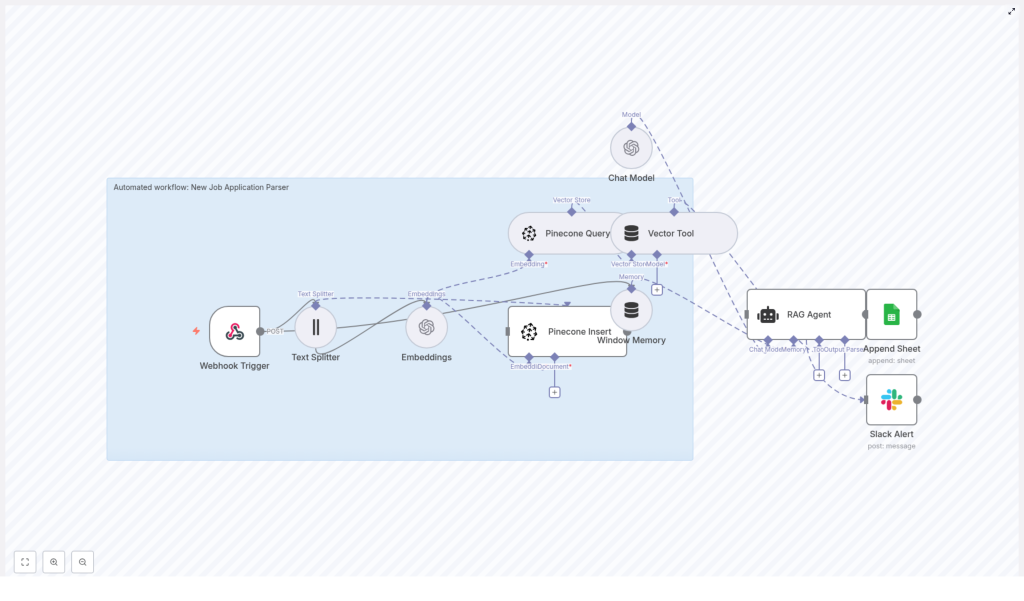
The n8n template is organized as a linear, event-driven pipeline. At a high level, the architecture consists of:
- Ingress: Webhook Trigger that receives job application payloads
- Pre-processing: Text Splitter that segments documents into chunks
- Vectorization: Embeddings node using OpenAI
text-embedding-3-small - Vector Storage: Pinecone Insert into index
new_job_application_parser - Retrieval: Pinecone Query + Vector Tool for context retrieval
- Context Management: Window Memory for short-lived conversational state
- Reasoning: Chat Model + RAG Agent to generate structured insights
- Persistence: Append Sheet node to log results in Google Sheets
- Observability: Slack Alert on workflow errors
All nodes are orchestrated within a single n8n workflow, with credentials configured per integration (OpenAI, Pinecone, Google Sheets, Slack).
3. Data Flow Description
The following sequence describes the end-to-end data flow from inbound application to logged result:
- Webhook Trigger receives a POST request when a new application arrives from an email parser, form submission, or ATS webhook.
- The raw application content (e.g., resume text, cover letter text, metadata) is passed to the Text Splitter.
- The Text Splitter divides the content into overlapping chunks with:
chunkSize = 400chunkOverlap = 40
This configuration is optimized for typical resume and cover letter lengths.
- Each chunk is sent to the Embeddings node, which calls OpenAI with model
text-embedding-3-smallto generate vector representations. - The workflow aggregates the embeddings and uses Pinecone Insert to upsert them into a Pinecone index named
new_job_application_parser, optionally including application metadata. - For the current application, the workflow issues a Pinecone Query to retrieve relevant vectors. A Vector Tool node wraps this retrieval so the RAG agent can call it as a tool.
- Window Memory maintains a short history of exchanges, giving the RAG agent limited conversational context without persisting long-term PII.
- The Chat Model + RAG Agent node receives:
- The current application text
- Retrieved context from Pinecone
- Window Memory state
- A system prompt that defines the expected JSON output
The agent returns a structured summary, skills, suggested status, and other fields.
- The workflow writes this structured response to a Google Sheet via Append Sheet, targeting a sheet named
Logfor downstream analytics or ATS synchronization. - If any node fails, a Slack Alert node posts an error notification to a predefined Slack channel, for example
#alerts, providing operational visibility.
4. Node-by-Node Breakdown
4.1 Webhook Trigger
- Purpose: Entry point for new job applications.
- Typical sources:
- Email parsing services that forward structured JSON
- Custom application forms that POST submissions
- ATS webhooks that send candidate data on status changes
- Configuration:
- HTTP method:
POST - Path: configurable endpoint path (e.g.
/job-application) - Payload format: JSON body containing the application text and any metadata
- HTTP method:
Edge cases: Ensure the webhook handles missing or malformed fields gracefully. In n8n, use optional checks or additional nodes (e.g. IF / Switch) if you expect multiple payload schemas.
4.2 Text Splitter
- Purpose: Segment long application documents into overlapping text chunks for more effective embedding and retrieval.
- Key parameters:
chunkSize = 400characterschunkOverlap = 40characters
- Rationale:
- 400-character chunks provide enough context for resumes and cover letters without exceeding embedding payload limits.
- 40-character overlap preserves continuity across chunk boundaries, which improves retrieval quality.
Configuration note: Feed the Text Splitter a single concatenated string of relevant fields (e.g. resume text + cover letter text) or split them separately if you want distinct indexing strategies.
4.3 Embeddings (OpenAI)
- Purpose: Convert each text chunk into a numerical vector.
- Model:
text-embedding-3-small(OpenAI) - Inputs:
- Array of text chunks from the Text Splitter node
- Outputs:
- Array of embedding vectors, typically one per chunk
Credentials: Configure OpenAI API credentials in n8n. Make sure to set appropriate organization and project limits if applicable.
Error handling: Handle potential rate limits or API errors by configuring retry logic at the workflow or node level, or by routing failures to the Slack Alert node.
4.4 Pinecone Insert
- Purpose: Persist embedding vectors in a Pinecone index for future semantic retrieval.
- Index configuration:
- Index name:
new_job_application_parser - Index should be created in Pinecone beforehand with a suitable dimension that matches the embedding model.
- Index name:
- Inputs:
- Embedding vectors
- Optional metadata (e.g. candidate ID, role ID, source, timestamp)
Best practice: Store only non-sensitive metadata in Pinecone if you are subject to strict data protection requirements. Sensitive PII can be tokenized or hashed before insertion.
4.5 Pinecone Query + Vector Tool
- Purpose:
- Query Pinecone for the most relevant chunks related to the current application or role.
- Expose retrieval as a tool that the RAG agent can call in-context.
- Inputs:
- Query vector derived from the current application text
- Index name:
new_job_application_parser - Optional filters (e.g. by role ID or date) if configured
- Outputs:
- Top-k matching vector entries with associated text and metadata
Note: The Vector Tool node makes retrieval available to the agent as a callable tool, enabling the agent to pull additional context on demand.
4.6 Window Memory
- Purpose: Maintain a short-lived memory window of recent messages for the RAG agent.
- Behavior:
- Stores a limited number of previous turns, keeping the context focused and cost-bounded.
- Does not function as a long-term datastore for PII.
Recommendation: Keep the window size conservative to avoid leaking sensitive information across unrelated requests and to limit token usage.
4.7 Chat Model + RAG Agent
- Purpose: Use an LLM to synthesize retrieved context and application data into a structured evaluation.
- Inputs:
- System prompt defining the assistant role and output schema
- Current application content
- Retrieved context from Pinecone via the Vector Tool
- Window Memory state
- Key configuration:
- System message example:
You are an assistant for New Job Application Parser. - Explicitly define the JSON keys the agent must return.
- System message example:
Expected JSON output (conceptual structure):
summaryskillsexperience_yearssuggested_status(e.g."Review","Reject","Interview")confidence(0-1)red_flags
Error handling: Validate that the agent returns valid JSON. If parsing fails, you can route the error path to Slack and optionally log the raw response for debugging.
4.8 Google Sheets – Append Sheet
- Purpose: Persist the RAG agent output in a structured log for analytics and downstream automation.
- Target:
- Spreadsheet: your chosen document
- Sheet name:
Log
- Authentication:
- Service account or OAuth credentials configured in n8n
- Behavior:
- Each application processed results in a new appended row.
- Columns can map to JSON fields returned by the RAG agent.
Verification: Ensure the service account or OAuth user has edit access to the target spreadsheet and that the sheet name matches exactly.
4.9 Slack Alert
- Purpose: Provide real-time visibility into workflow failures.
- Configuration:
- Slack channel: e.g.
#alerts - Message template: include error message, node name, and optionally input payload identifiers
- Slack channel: e.g.
Usage: Connect error paths from critical nodes or use n8n’s built-in error workflow feature to route all failures to this alert node.
5. Key Configuration & Tuning Parameters
- Text Splitter:
chunkSize = 400chunkOverlap = 40- Optimized for typical resumes and cover letters.
- Embeddings model:
- OpenAI
text-embedding-3-small
- OpenAI
- Pinecone index:
- Name:
new_job_application_parser - Ensure the index dimension matches the embedding model.
- Name:
- Google Sheets:
- Append to sheet named
Log - Use service account or OAuth credentials with appropriate permissions.
- Append to sheet named
- Slack:
- Channel:
#alerts(or equivalent monitoring channel)
- Channel:
- RAG Agent:
- System prompt: e.g.
You are an assistant for New Job Application Parser - Define a strict JSON output format for deterministic downstream parsing.
- System prompt: e.g.
6. Best Practices & Operational Guidance
6.1 PII Handling: Redact or Encrypt
Resumes and applications often contain sensitive personal data such as:
- Email addresses and phone numbers
- National IDs or other government identifiers
- Physical addresses
Recommended practices:
- Redact or tokenize PII before sending text to the Embeddings node or Pinecone.
- Store raw PII in a separate, encrypted data store if you need to retain it.
- Use hashing for identifiers when you only need referential integrity, not the raw value.
Only index non-sensitive fields in the vector database unless you have explicit consent and robust data controls.
6.2 Tuning Chunk Size & Overlap
Chunk parameters directly affect retrieval relevance and cost:
- For dense, short resumes:
- Chunk size in the 300-500 character range with 20-40 overlap is typically effective.
- For long cover letters:
- Larger chunks may be acceptable since the narrative is more continuous.
Iteratively test retrieval quality with real candidate data and adjust chunkSize and chunkOverlap to balance context richness against token and storage costs.
