


Onfleet to Discord Integration: Automate Task Start Notifications with n8n
Overview
For operations and logistics teams, timely communication is critical. When a delivery task begins, stakeholders need to know immediately, without relying on manual updates or fragmented channels. This is where workflow automation with n8n becomes highly effective.
This article describes how to integrate Onfleet with Discord using an n8n workflow template. The workflow listens for taskStarted events in Onfleet and automatically sends structured notifications to a designated Discord channel. The result is a reliable, real-time notification pipeline that supports better coordination, faster response times, and centralized communication.
Use Case: Real-Time Task Start Notifications
The primary objective of this workflow is to notify your team in Discord as soon as an Onfleet delivery task moves into the “started” state. Typical scenarios include:
- Dispatch teams monitoring live delivery operations
- Customer support teams that need context when customers inquire about order status
- Operations managers tracking driver performance and route execution
By automating these updates with n8n, you remove manual steps, reduce the risk of missed messages, and keep everyone aligned on task progress in real time.
Workflow Architecture in n8n
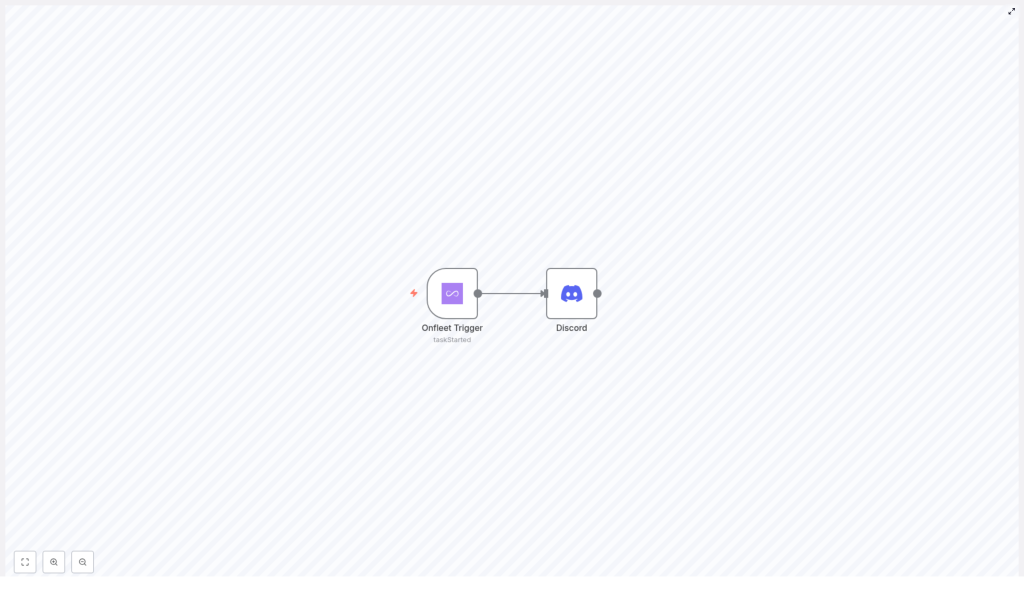
The integration is intentionally minimalistic and robust. It relies on two core n8n nodes connected in a simple event-driven pattern:
Onfleet Trigger Node
- Type: Trigger node
- Purpose: Subscribes to Onfleet webhooks and listens for specific task events
- Configured Event:
taskStarted
When Onfleet emits a taskStarted event, this node receives the payload and passes the event data into the workflow.
Discord Node
- Type: Action node
- Purpose: Posts a formatted message to a specified Discord channel
- Trigger: Executes whenever the Onfleet Trigger node outputs a new event
The Discord node consumes the data from Onfleet, applies your defined message template, and publishes the notification to your channel of choice.
Implementation Guide: Building the Workflow
The following steps describe how to configure this automation in n8n from start to finish. The process assumes you already have n8n running and have access to both Onfleet and Discord credentials.
1. Create a New Workflow in n8n
Begin by opening your n8n instance and creating a new, empty workflow:
- From the n8n dashboard, select the option to create a new workflow.
- Assign a clear, descriptive name such as Onfleet Task Started to Discord to simplify future maintenance.
2. Configure the Onfleet Trigger Node
Next, add the event source that will listen for task updates from Onfleet.
- Drag the Onfleet Trigger node onto the canvas.
- Open the node settings and set Trigger On to
taskStarted. - Under credentials, configure and select your Onfleet API credentials so that n8n can authenticate against your Onfleet account.
Once configured, this node will subscribe to the taskStarted event. Every time a delivery task moves into the started state, Onfleet will send the relevant event payload into n8n through this trigger.
3. Add and Set Up the Discord Node
After the trigger is in place, configure the action that will send the notification to Discord.
- Drag a Discord node onto the workflow canvas.
- Connect the output of the Onfleet Trigger node to the input of the Discord node to define the data flow.
- In the Discord node configuration:
- Provide your Discord bot token and select or enter the target channel ID where notifications should be posted.
- Define the message content or template that will be sent when a task starts. You can reference fields from the Onfleet payload to include details such as task ID, assigned driver, or start time, depending on your Onfleet configuration and data model.
Using a structured message template is considered a best practice, as it ensures consistency and makes it easier for teams to quickly parse relevant information inside Discord.
4. Validate Connections and Activate the Workflow
Before enabling the automation, verify that the nodes are correctly wired and authenticated.
- Confirm that the Onfleet Trigger node output is connected to the Discord node input.
- Ensure that both Onfleet and Discord credentials are valid and tested inside n8n.
Once the configuration is complete:
- Save the workflow.
- Switch the workflow status to Active so that it starts listening for live
taskStartedevents.
From this point onward, any new Onfleet task that transitions to the started state will automatically generate a corresponding notification in your specified Discord channel.
Automation Best Practices for This Integration
To maximize reliability and maintainability of this n8n workflow, consider the following best practices:
- Use clear naming conventions for both nodes and the workflow itself to simplify troubleshooting and onboarding of new team members.
- Template your messages so that they include only essential operational details and are easily scannable in high-traffic channels.
- Test with a staging channel in Discord before routing events into a production or team-wide channel.
- Monitor initial runs to ensure that the trigger fires as expected and that no authentication or permission issues exist with Onfleet or Discord.
Key Benefits of Using n8n for Onfleet to Discord Notifications
Implementing this workflow template offers several operational advantages:
- Real-time operational visibility – Teams receive immediate Discord notifications whenever a task starts in Onfleet, enabling faster decision making and incident response.
- Centralized communication – Delivery task updates are consolidated in the same Discord channels where your teams already collaborate, reducing context switching and fragmented tools.
- No-code automation – n8n provides a visual, low-friction interface, allowing operations and automation professionals to configure and adjust workflows without custom code.
- Scalability and extensibility – The simple two-node pattern can be extended with additional nodes, such as logging, conditional routing, or notifications to other systems, as your automation strategy matures.
Conclusion
Integrating Onfleet with Discord through n8n is a straightforward yet powerful way to improve operational communication. By listening for taskStarted events and sending structured Discord notifications automatically, your teams gain real-time visibility into delivery activities with minimal manual effort.
For organizations focused on efficiency and reliable communication, this workflow template is a practical starting point that can be extended into a broader automation ecosystem.
Ready to automate your task start notifications with n8n, Onfleet, and Discord? Deploy this workflow and streamline your operational communications today.
