

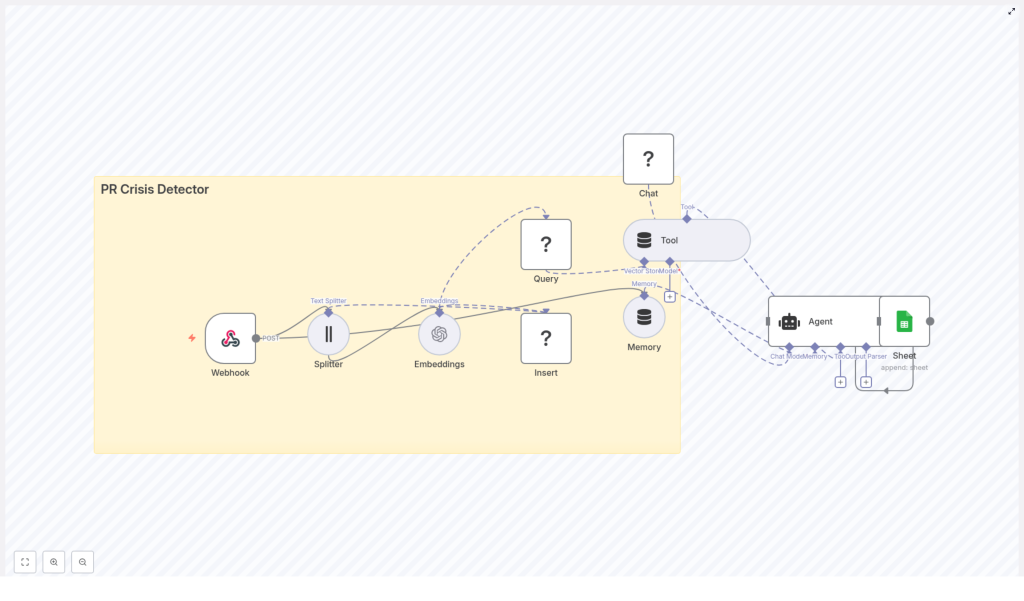
PR Crisis Detector Workflow with n8n & LangChain
From Overwhelm to Control: Turning PR Noise into Actionable Insight
Every brand lives in a constant stream of mentions, comments, and reactions. Somewhere in that flow, a single frustrated post can turn into a full-blown PR crisis. The challenge is not just spotting the danger, it is doing it fast enough to respond with clarity and confidence.
Instead of manually scanning feeds and dashboards, you can design a system that quietly works in the background, flags potential crises in real time, and gives you recommended actions right when you need them. That is exactly what this n8n workflow template helps you do.
In this guide, you will walk through a complete PR Crisis Detector built with n8n, LangChain, Redis, and HuggingFace/OpenAI models, with results logged to Google Sheets for simple auditing. More than a technical tutorial, think of this as a stepping stone toward a more automated and focused way of working, where your time goes into strategic decisions, not constant monitoring.
Why Automating PR Detection Is a Game Changer
Manually tracking every mention is not realistic. Automation turns that impossible task into a reliable, repeatable process that:
- Catches early warning signs before they explode into a crisis
- Gives you back time to focus on strategy instead of endless scrolling
- Creates a consistent response framework so your team knows what to do, fast
- Builds a historical record of incidents and responses for learning and improvement
The workflow you are about to explore combines several powerful building blocks into one cohesive system:
- n8n for event-driven automation and orchestration
- LangChain for embeddings, memory, and an intelligent agent
- Redis as a high-performance vector store
- HuggingFace/OpenAI models for language understanding and reasoning
- Google Sheets as a simple, accessible reporting layer
Once you have this in place, you can keep evolving it, layer by layer, turning a single workflow into the backbone of a more resilient PR and communications operation.
The Vision: A Real-Time PR Crisis Detector You Can Trust
Before we dive into the nodes, imagine the experience from your team’s perspective:
- Your monitoring tools or scrapers send content into n8n via a webhook.
- The workflow breaks down the text, embeds it, and stores it in Redis for fast semantic search.
- Each new event is compared against past signals so you can spot patterns and spikes.
- A LangChain agent, powered by a chat model and backed by memory, evaluates severity and suggests next steps.
- Every detection and recommendation is logged to Google Sheets, ready for review, collaboration, and continuous improvement.
This is not just about catching crises. It is about building a feedback loop that helps your team get smarter, faster, and more aligned with every incident.
High-Level Architecture of the n8n Workflow
At the core of this template is a clear, event-driven architecture. Here are the main components and how they connect:
- Webhook (n8n) – receives POST events from social platforms, monitoring tools, or email-to-webhook integrations
- Splitter – breaks incoming text into manageable chunks using
chunkSizeandchunkOverlap - Embeddings (OpenAI or alternative) – converts text chunks into vectors for semantic search
- Insert (Redis Vector Store) – stores these vectors in a dedicated index, for example
pr_crisis_detector - Query (Redis) + Tool – retrieves similar documents to provide context for the agent
- Memory (buffer) – keeps recent context so the agent remembers what has been happening
- Chat (HuggingFace or other) – the language model that reasons about severity and next actions
- Agent (LangChain) – orchestrates tools, memory, and model to produce a recommendation
- Sheet (Google Sheets) – appends a new row with detection details and recommended actions
Visual Flow
Conceptually, you can picture the workflow from left to right:
Webhook → Splitter → Embeddings → Insert → Query → Tool → Agent → Sheet
The Memory and Chat nodes plug into the Agent, giving it both historical context and language understanding so it can analyze what is happening, not just react to single posts in isolation.
Step 1: Receiving Events with the n8n Webhook
Every automated journey starts with a trigger. In this workflow, that trigger is an n8n Webhook node configured to accept POST requests.
Typical sources include:
- Social listening or monitoring platforms
- Streaming listeners that watch specific hashtags or mentions
- Scheduled scrapers or crawlers that send summaries
A typical incoming payload might look like this:
{  "source": "twitter",  "timestamp": "2025-10-15T12:34:56Z",  "text": "Company X just released a buggy update - total disaster",  "metadata": { "user": "user123", "location": "US" }
}
Once this is in n8n, you have a consistent entry point to transform raw, noisy content into structured insight.
Step 2: Splitting Text into Meaningful Chunks
Long or complex posts can be difficult for language models to process efficiently. The Splitter node solves this by breaking the text into chunks that are easier to embed and reason about.
Recommended starting configuration:
chunkSize = 400chunkOverlap = 40
These values help you stay under typical token limits while preserving enough overlapping context for the embeddings to remain meaningful. You can always adjust these parameters as you experiment with your own data and average message length.
Step 3: Creating Embeddings and Storing Them in Redis
Next, you transform text into a format that machines can search and compare at scale. This is where embeddings and Redis come in.
Embeddings Node
Use OpenAI embeddings or another capable model to convert each chunk into a vector representation. These vectors capture semantic meaning, so similar posts end up close together in vector space, even if they use different wording.
Redis Vector Store
Insert the embeddings into a Redis Vector Store under a dedicated index, for example:
indexName = pr_crisis_detector
Attach helpful metadata to each vector, such as:
timestampsourceURLor identifier- Possible
severityor sentiment flags, if you compute them earlier
This combination of embeddings and metadata gives you a powerful foundation for fast similarity search and richer analysis later on.
Step 4: Querying Similar Signals and Spotting Patterns
Once your Redis index starts filling up, each new event can be compared against historical data to detect patterns and potential spikes.
The workflow does this by:
- Generating an embedding for the incoming event
- Querying the Redis Vector Store for similar vectors
- Evaluating similarity scores and the density of similar content
You can use this to drive escalation logic. For example, if the number of highly similar negative posts suddenly increases within a short time window, that is a strong signal that something is brewing.
Step 5: Adding Intelligence with Agent, Memory, and Chat
Up to this point, the system is excellent at gathering and organizing signals. The next step is turning those signals into actionable guidance. This is where LangChain’s Agent, Memory, and Chat components come together.
What the Agent Does
The LangChain agent in this workflow can:
- Use a Tool to read the top-k similar documents from Redis
- Access Memory that stores recent conversation or incident history
- Leverage a Chat model (HuggingFace or another provider) to classify severity and propose next steps
Designing the Prompt and Rubric
The quality of the agent’s output depends heavily on your prompt. Provide a clear rubric that covers:
- What counts as a minor complaint vs. a serious incident vs. a full crisis
- Recommended human responses for each severity level
- Escalation contacts and communication channels
- Expected response times and priorities
As you iterate, you can refine this rubric based on real incidents and feedback from your team. Over time, your agent becomes a living playbook that grows with your brand.
Step 6: Logging Decisions in Google Sheets for Clarity and Alignment
Automation works best when it is transparent. To keep everyone aligned, this workflow logs each detection and recommendation to a Google Sheet.
Configure the Sheet node to append rows with columns such as:
timestampsourceexcerptor summary of the contentsimilarity_scoreseveritylevel determined by the agentrecommended_actionhandled_bynotesfor follow-up
Many teams already live in spreadsheets, so this simple audit trail makes it easy to review, collaborate, and refine your approach without extra tools.
Designing Thresholds, Scoring, and Escalation Logic
To turn raw signals into meaningful alerts, you will want clear, measurable rules. Here is an example strategy you can adapt:
- Similarity density: If more than 5 similar posts appear within 10 minutes, mark as a potential
spike. - Sentiment + keywords: If sentiment is strongly negative and the content includes words like
lawsuit,fraud,sue, orrecall, escalate to crisis review. - Influencer factor: Posts from accounts with more than 100k followers increase the severity score multiplier.
You can implement these rules:
- Inside the agent as a rule-based layer in the prompt
- Or as pre-processing logic that enriches embedding metadata before it reaches the agent
Start simple, then tune thresholds as you collect real data. Over time, your escalation logic will reflect your brand’s risk tolerance and communication style.
Best Practices to Keep Your Detector Reliable
1. Data Quality Matters
The classic principle applies: garbage in, garbage out. Before you embed and store content, make sure you:
- Normalize incoming text and remove HTML noise
- Strip unnecessary links while preserving useful ones
- Keep valuable metadata such as author, follower count, and source URL
This improves embedding quality and gives your agent richer context for decision making.
2. Privacy and Compliance
Be intentional about what you store. To stay on the safe side:
- Avoid storing personally identifiable information (PII) in the vector store when possible
- Encrypt sensitive fields or store only hashed identifiers if you must keep them
- Respect platform terms of service when ingesting user-generated content
3. Model Selection and Cost Awareness
Different models come with different trade-offs:
- OpenAI embeddings are powerful but have usage costs
- HuggingFace chat models vary in latency and pricing
- Open-source embedding models can reduce cost if you are willing to manage infrastructure
Where possible, batch embeddings to reduce overhead and monitor usage so you can scale sustainably.
4. Monitoring and Observability
To keep your PR Crisis Detector healthy and trustworthy, track metrics such as:
- Webhook event rate and error rate
- Embedding latency and associated costs
- Redis query times and index size growth
- False positive and false negative rates, based on human review
These insights help you tune performance and improve the balance between sensitivity and noise.
Scaling Your Workflow as Your Brand Grows
As your volume of mentions and incidents grows, the same template can evolve with you. Consider:
- Sharding or namespacing Redis indexes by region or brand to keep queries fast
- Rate limiting inbound webhooks and using queues for downstream processing during spikes
- Caching tokenized results and embeddings for repeated identical content to save on compute
This way, your automated foundation stays stable even as your visibility and reach expand.
Sample n8n Configuration Notes
To help you move quickly from idea to implementation, here are key configuration details from the template:
- Splitter:
chunkSize = 400,chunkOverlap = 40 - Embeddings node: model set to
OpenAI(or your chosen alternative) - Redis Insert/Query:
indexName = pr_crisis_detector - Agent prompt: include severity rubric, action templates, and escalation contact list
- Google Sheets append:
documentId = SHEET_ID,sheetName = Log
These defaults give you a solid starting point that you can adapt to your own environment and tooling.
Ideas for Next-Level Enhancements
Once the core detector is running, you can keep building on it to create an even richer automation ecosystem. For example:
- Multi-language embeddings to monitor global mentions across regions
- Image and video analysis to capture signals from multimedia posts
- Automated response drafts that your team can review and approve, reducing response time without auto-posting
- Integrations with Slack, PagerDuty, or incident management tools for faster human intervention and collaboration
Each enhancement builds on the same foundation, reinforcing your ability to stay calm, informed, and proactive in the face of public scrutiny.
Your Next Step: Turn This Template into Your Own PR Ally
With n8n and LangChain as your building blocks, you can create a lightweight yet powerful PR Crisis Detector that:
- Ingests events in real time through webhooks
- Transforms noisy text into searchable embeddings stored in Redis
- Uses an agent with memory and a chat model to analyze context and recommend actions
- Logs every decision to Google Sheets for transparency and continuous improvement

