


Replace Face in Video with Image Avatar Using Fal.ai
From Manual Editing To Effortless Automation
Manually editing videos to swap faces or animate avatars can feel overwhelming. Traditional tools are complex, time consuming, and often require specialist skills. If you are a creator, marketer, or developer, you probably do not want to spend hours inside video editors when you could be building, launching, and growing.
This is where automation becomes a powerful ally. By combining n8n, Fal.ai, and AWS S3, you can turn a tedious, repetitive task into a smooth, automated workflow that runs in the background while you focus on higher value work.
In this guide, you will walk through a complete n8n workflow template that automatically replaces a face in a video with a custom image avatar using Fal.ai. You will see how a simple form submission can trigger an entire automated process, from file upload to final animated video, with no manual editing required.
Imagine The Possibilities
Before we dive into the steps, take a moment to imagine what this kind of automation could unlock for you:
- Personalized video messages that feature your brand avatar instead of your face
- Marketing campaigns with unique character-based ads generated in minutes
- Social media content that stands out, created without touching a timeline or keyframe
- Developer friendly automation that plugs into your apps, forms, or internal tools
This workflow is not just a one-off trick. It can be a starting point for a more automated, focused way of working. Once you see how easily you can replace a face in a video with Fal.ai and n8n, you will likely start spotting other processes you can streamline too.
Who This Workflow Empowers
This n8n template is designed for anyone who wants to combine creativity with automation:
- Content creators who want to produce unique, animated videos without learning complex video tools
- Marketers who need scalable, personalized content for ads, campaigns, and social media
- Developers who love building systems and want to integrate AI-powered video into their apps or internal workflows
If you are ready to move from manual editing to automated creation, this workflow gives you a practical, repeatable system to start with.
How The Automated Journey Works
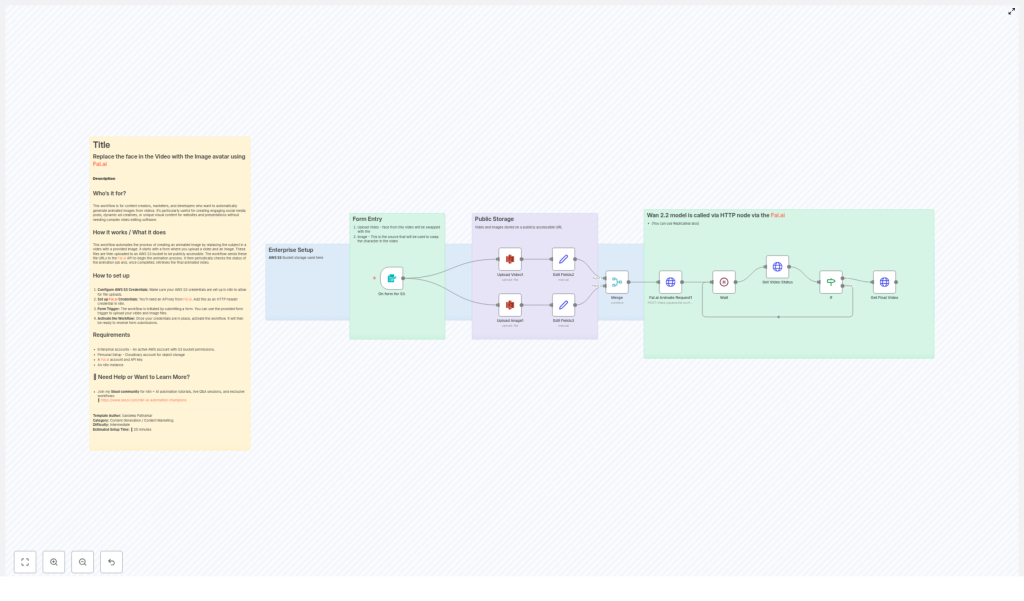
At a high level, here is the transformation that happens behind the scenes every time the workflow runs:
- A user opens a simple form and uploads a video and a face image.
- n8n stores both files in an AWS S3 bucket and generates public URLs.
- Those URLs are sent to the Fal.ai animation API, which performs the face swap on the video.
- n8n periodically checks the job status until Fal.ai reports that the animation is COMPLETED.
- The final animated video is retrieved and ready to use, share, or feed into the next step of your automation.
Once this is set up, the entire process runs automatically. Your only job is to supply the source video and the image. Everything else is handled by the workflow.
Mindset Shift: Build Once, Reuse Forever
Instead of treating each video as a one-off project, start thinking in terms of systems. With n8n, every workflow you build can be reused, improved, and scaled. This template is a great example:
- You configure the workflow once.
- Anyone on your team can use the form to generate new videos.
- You can plug the output into other automations, such as automatic posting, notifications, or storage.
As you follow the steps below, view them as an investment in a long term automation asset. You are not just creating one cool video. You are building an engine that can power many future projects.
Step-by-Step: Setting Up The n8n + Fal.ai Workflow
The following setup keeps all the technical power of the original process, but organizes it into a clear path you can follow. Each step brings you closer to a fully automated face replacement system.
1. Get Your Requirements In Place
Before configuring the workflow, make sure you have the essentials ready:
- An active AWS account with an accessible S3 bucket
- A Fal.ai account and a valid Fal.ai API key
- A running n8n instance with credentials configured for AWS and Fal.ai
Once these are set, you are ready to connect everything through n8n.
2. Prepare AWS S3 Storage For Media Files
Your workflow needs a reliable place to store the uploaded video and image so Fal.ai can access them. AWS S3 is perfect for this.
In n8n:
- Set up AWS credentials with permission to upload files to your chosen S3 bucket.
- Confirm the bucket is configured so that uploaded files can be exposed as publicly accessible URLs (Fal.ai needs to reach them).
This step turns S3 into the central media hub for your automation.
3. Configure Fal.ai API Access In n8n
Next, connect n8n to Fal.ai so it can send animation requests.
- Obtain your Fal.ai API key from your Fal.ai account.
- In n8n, configure this key using HTTP header authentication for all Fal.ai API requests.
With this in place, n8n can securely tell Fal.ai which video and image to use for each face replacement job.
4. Create The Upload Form With formTrigger
Now it is time to design the entry point to your workflow: a simple, user friendly form.
- Add the
formTriggernode in n8n. - Configure it to allow users to upload:
- One video file
- One image file that will act as the avatar or replacement face
This node becomes the front door to your automation. Whenever someone submits the form, the entire workflow starts running automatically.
5. Upload The Video And Image To S3
Once the form is submitted, you want n8n to take over the manual work of handling files.
- Use the appropriate S3 node(s) in n8n to upload both files from the form to your S3 bucket.
- After upload, capture the public URLs for both the video and the image.
These URLs are what Fal.ai will use to access and process your media.
6. Send The Face Replacement Request To Fal.ai
With your media hosted on S3, you are ready to trigger the actual animation.
- Use an HTTP Request node (or similar) in n8n to send a POST request to the Fal.ai animation API.
- Include the video URL and the image URL in the request body, following Fal.ai’s required format.
This is the moment your static image and source video start their transformation into a new, animated result.
7. Monitor The Animation Status Until Completion
Fal.ai processes the animation job asynchronously, so your workflow needs to wait and check when it is ready.
- Use a Wait node in n8n configured in a loop.
- Periodically check the job status with additional Fal.ai API calls.
- Continue looping until the status is reported as COMPLETED.
This pattern lets your workflow stay responsive without blocking, and it ensures you only move forward once the final video is ready.
8. Retrieve And Use The Final Animated Video
When Fal.ai reports that the job is completed, your workflow can collect the finished asset.
- Fetch the final animated video from the URL provided by Fal.ai.
- From here, you can:
- Store it back into S3
- Send it via email or chat
- Trigger another workflow, such as posting to social media or updating a CRM
At this point, the entire face replacement process has been handled by automation. All the user did was submit a form.
Why This Workflow Is A Powerful Starting Point
Automating face replacement in video with Fal.ai and n8n brings several concrete benefits that directly impact your time, energy, and creative output:
- No complex video editing software required, everything is handled through automation
- Seamless face replacement using a reliable, repeatable workflow instead of manual steps
- Engaging, personalized content generated quickly for campaigns, presentations, or social media
- Full customization so you can align the workflow with your brand, marketing, or product needs
Most importantly, this workflow is modular. You can extend it, combine it with other n8n templates, or adapt it to fit new use cases as your automation skills grow.
Build On This Template And Keep Experimenting
Think of this n8n + Fal.ai template as a foundation. Once it is working, you can start experimenting:
- Trigger the form from different tools or platforms
- Automatically notify your team when a new animated video is ready
- Chain this workflow with others for publishing, archiving, or analytics
Each small improvement compounds. Over time, you will build a library of automations that save you hours every week and let you focus on strategy, creativity, and growth.
Take The Next Step
If you are ready to bring AI powered face replacement into your automated toolkit, this n8n Fal.ai workflow is a practical, inspiring place to start. You can have your first fully automated, personalized animated video running with just a few clicks and some simple configuration.
For more tutorials, inspiration, and support as you expand your automation skills, join our dedicated community on Skool:
n8n & AI Automation Champions Community
