


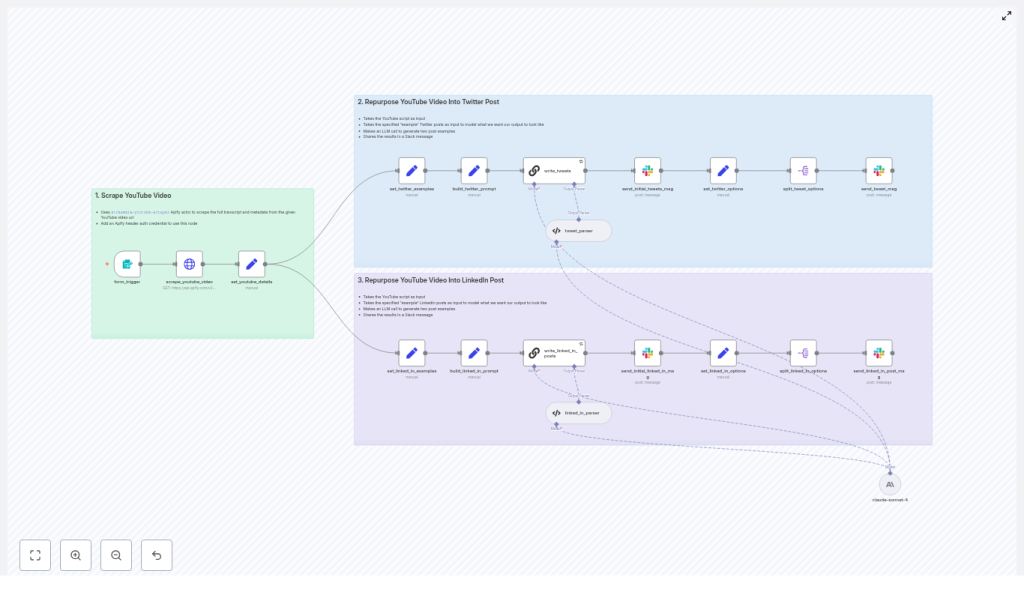
Long-form YouTube content is an exceptional source of high-value insights, yet converting a single video into platform-optimized posts for Twitter (X) and LinkedIn is typically a manual and repetitive task. This guide presents a refined overview of the “The Recap AI” n8n workflow template, which automates that entire process. The template uses Apify to scrape YouTube metadata and transcripts, then leverages an LLM to generate structured, on-brand social content. You will learn how the workflow is architected, which n8n nodes are involved, how to configure them, and how to adapt the automation to your own content operations.
Why automate YouTube content repurposing?
For most teams, video production is the most resource-intensive part of their content strategy. Repurposing a single YouTube video into multiple social assets significantly increases reach without increasing production time. With an automated n8n workflow, you can reliably transform one long-form video into:
- Twitter (X) threads and standalone tweets
- LinkedIn posts tailored to professional audiences
- Additional short-form content or snippets with minimal extra effort
Automation ensures consistency in tone, structure, and formatting, while reducing manual copywriting and coordination overhead. It also allows non-technical stakeholders to trigger and review content without touching the underlying workflow.
Overview of the “Recap AI” n8n template
At a high level, the template implements the following flow:
- Receives a YouTube URL via a simple form trigger.
- Invokes an Apify actor to scrape the video’s metadata and subtitles.
- Extracts and normalizes the transcript and key attributes such as title and URL.
- Builds LLM prompts that combine the transcript with curated example posts.
- Calls an LLM (for example, Anthropic Claude) to generate multiple Twitter and LinkedIn options.
- Parses the model output into structured JSON fields.
- Delivers the generated content to Slack for review, with the option to extend into full auto-publishing.
The result is a modular, extensible workflow that can be integrated into existing editorial pipelines or content operations platforms.
Architecture and key n8n components
1. Entry point: Form Trigger
The workflow starts with a Form Trigger node. This node exposes a simple web form where users paste a YouTube video URL and submit it to n8n. The design is intentionally lightweight so that marketers, content editors, or other non-technical team members can initiate the process without logging into n8n directly.
2. Data acquisition: Apify YouTube scraper
Once the URL is received, an HTTP Request node calls Apify’s streamers~youtube-scraper actor. This actor is responsible for:
- Fetching the video’s subtitles (SRT or equivalent captions).
- Retrieving key metadata such as title, URL, and other descriptive fields.
The template maps the SRT subtitles into a transcript variable that becomes the primary content source for the LLM. Standardizing this input at the workflow level ensures that every downstream node receives consistent, structured data, regardless of the specific video.
3. Prompt engineering: Set nodes for examples and templates
A set of Set nodes is used to define and manage the prompt strategy for the LLM. In particular:
set_twitter_examplesstores a collection of high-performing Twitter/X examples that represent the desired voice, format, and structure for threads or single tweets.set_linked_in_examplesholds LinkedIn-specific examples, including preferred post length, narrative style, and call-to-action patterns.- Additional Set nodes combine the dynamic transcript data with these examples to build the final prompt payload that is sent to the LLM.
This approach allows teams to tune brand voice and messaging by updating example content in a single place, instead of rewriting prompts across multiple nodes.
4. Content generation: LLM node (Claude / Anthropic in template)
The core generation step is handled by an LLM node configured in a LangChain-style pattern. In the reference template, the model is set to claude-sonnet-4 from Anthropic, but the structure can be adapted to other providers such as OpenAI.
The prompt instructs the model to:
- Analyze the transcript to identify the primary pain point, the core solution, and a quantifiable outcome.
- Map these elements into proven social content frameworks suitable for Twitter threads and LinkedIn posts.
- Produce three distinct tweet options and three LinkedIn post options, all aligned with the example patterns supplied earlier.
By clearly specifying the number of variants and the expected structure, the workflow increases the reliability and usefulness of the generated content.
5. Structuring the output: Parsing nodes
Once the LLM returns its response, Output Parser nodes convert the free-form text into machine-friendly JSON. These parsers extract:
tweet_options– an array of candidate tweets or thread components.post_options– an array of LinkedIn post drafts.
Clean parsing at this stage is essential for downstream automation, such as automated scheduling, logging to a content calendar, or routing to different review channels.
6. Distribution and review: Slack integration
Finally, Slack nodes push the generated content into a designated Slack channel. The template is configured so that each tweet option and each LinkedIn option can be posted as separate messages, often using split nodes to iterate over the arrays. This makes it easy for editors to:
- Review and compare multiple options.
- Provide feedback directly in Slack.
- Copy and paste approved content into scheduling tools.
For teams that want to go further, these Slack nodes can be replaced or augmented with email notifications, Google Sheets exports, or direct posting integrations.
Prerequisites and environment setup
Required accounts and services
- n8n instance (cloud or self-hosted) with access to create workflows and credentials.
- Apify account with an API token, used as an authenticated header for the HTTP Request node.
- LLM provider account such as Anthropic Claude or OpenAI, with credentials configured for the LLM/LangChain node.
- Optional: Slack app and OAuth credentials if you plan to push outputs to a Slack channel.
Configuration steps in n8n
- Import the template
Load the “Recap AI” template into your n8n instance. Connect the Form Trigger node to a simple web form, either embedded on your website or made available via an internal dashboard. - Configure Apify credentials
In n8n, create an HTTP credential using your Apify API token. Attach this credential to the HTTP Request node that calls thestreamers~youtube-scraperactor, and confirm that thestartUrlsfield is correctly populated with the submitted YouTube URL. - Set up the LLM provider
Add your LLM API key or select the configured Anthropic/OpenAI credentials in the LLM node. Verify the model name (for example, claude-sonnet-4) and adjust the prompt format if your provider has specific requirements. - Customize example posts
Update theset_twitter_examplesandset_linked_in_examplesnodes with examples that reflect your brand voice, preferred structure, and typical calls to action. The quality and diversity of these examples significantly influence the final outputs. - Integrate Slack or alternative destinations
If using Slack, configure OAuth credentials and specify the target channel IDs in the Slack nodes. If you prefer another review mechanism, adapt the final nodes to send outputs via email, store them in Google Sheets, or log them to Airtable. - Run a test and iterate
Trigger the workflow with a public YouTube URL. Inspect the transcript, the LLM response, and the final Slack messages. Iterate on prompt wording, add or refine examples, and adjust the output parser rules until the JSON structure and content quality meet your standards.
Best practices for reliable, high-quality social content
- Invest in strong examples
The Set nodes that hold example posts are critical. Provide several high-performing threads and LinkedIn posts that demonstrate the exact formatting you want, including hooks, body structure, and CTAs. - Clean up transcripts when needed
Auto-generated subtitles may contain filler words and transcription noise. Consider adding a lightweight preprocessing step to strip out repeated filler terms if they consistently degrade LLM output. - Specify structure in the prompt
Use explicit instructions such as: “Produce 3 tweet options. Each option must include a short hook, a 4-line body, and a clear CTA asking users to reply with WORKFLOW.” Structural guidance significantly reduces inconsistent formatting. - Tune temperature and system messages
Lower temperature values will yield more consistent, predictable posts. Higher values may generate more creative hooks but can also introduce variability. Adjust system instructions to reinforce tone, voice, and compliance requirements. - Maintain a human approval step
Even with strong prompts, automated publishing without review can amplify mistakes. Keep at least one human-in-the-loop checkpoint for brand, legal, and factual validation before posts go live.
Practical use cases for content and growth teams
Teams using this template typically focus on scaling distribution of existing YouTube content. Common scenarios include:
- Converting a single in-depth tutorial into a full week of social posts.
- Generating Twitter/X threads that drive followers and DMs using comment-gated CTAs.
- Producing LinkedIn posts that highlight thought leadership and direct readers back to the original YouTube video or a community.
Typical output patterns might look like:
- Twitter: A concise hook, followed by a 5 to 6 step breakdown of the workflow, and a CTA such as “Follow, RT, and comment ‘WORKFLOW’ to get the template via DM.”
- LinkedIn: A problem-to-solution narrative that quantifies the benefit (for example, “saves 5 hours per week”), includes a brief walkthrough, and ends with a CTA like “Comment WORKFLOW to get access.”
Troubleshooting and optimization
Missing transcript or subtitles
If no transcript is returned:
- Verify that the
startUrlsparameter in the Apify request is correctly set to the YouTube URL. - Confirm that the video is not private, unlisted with restrictions, or age-restricted.
- Check Apify settings to ensure auto-generated captions are enabled when available.
Unstructured or messy LLM output
If the JSON output is inconsistent or difficult to parse:
- Strengthen the system prompt with explicit schema requirements.
- Provide clearer examples in the Set nodes that show the exact JSON structure expected.
- Refine the output parser node to validate and normalize the model’s text into a stable schema.
Slack messages not appearing
If Slack notifications fail:
- Confirm that the Slack app has the correct OAuth scopes for posting messages.
- Double-check the channel ID and any thread-related configuration. If
thread_tsis invalid, messages may not post as expected. - Test the Slack node independently using simple sample text to isolate credential or permission issues.
Extending and customizing the workflow
The template is intentionally modular so it can evolve with your automation strategy. Common extensions include:
- Auto-publishing to Twitter/X using the Twitter API or a connected social scheduling tool.
- Short-form video generation for TikTok or Instagram Reels by adding a clip-splitting node and connecting to a rendering service.
- Content calendar integration by writing generated posts to Google Sheets or Airtable for planning and analytics.
- Approval workflows using Notion, Airtable, or email-based approval steps that must be completed before auto-posting is triggered.
Conclusion: Operationalizing YouTube-to-social at scale
Automating YouTube-to-social repurposing is one of the highest-leverage improvements content teams can make. The Recap AI n8n template provides a ready-made foundation that connects YouTube, Apify, LLMs, and Slack into a cohesive, reviewable workflow. With minimal configuration, you can turn every long-form video into a consistent stream of platform-optimized posts, without expanding your editorial team.
Next steps
Connect your Apify and LLM credentials, customize the example posts to match your brand, and start testing the template with your existing YouTube content. Iterate on prompts and parsing rules until the workflow reliably produces publish-ready drafts.
If you would like the exact prompt configurations referenced in this guide, you can comment “WORKFLOW” under the blog post or use the download option to access the n8n JSON and a full video walkthrough.
Want to see it in action with your own content? Paste a public YouTube URL and you can generate sample Twitter and LinkedIn outputs as a mockup.
