

Reverse Engineer Short-Form Videos with n8n & AI
Short-form videos on Instagram Reels and TikTok are full of subtle creative decisions: framing, pacing, camera motion, lighting, and visual style. This guide shows you how to use an n8n workflow template to automatically download a Reel or TikTok, convert it to a base64 payload, send it to Google Gemini for detailed forensic analysis, and receive a structured “Generative Manifest” in Slack that you can reuse for AI video generation.
What you will learn
By the end of this tutorial-style walkthrough, you will be able to:
- Explain why automating video reverse engineering is useful for content and AI workflows
- Understand each part of the n8n workflow and how the nodes connect
- Configure the Instagram and TikTok scraping branches using Apify
- Send an MP4 video to Google Gemini as base64 and retrieve a “Generative Manifest”
- Deliver the AI-generated manifest to Slack as a reusable prompt file
- Design and improve the analysis prompt for more accurate, production-ready outputs
Why automate reverse engineering of short-form videos?
Manually breaking down a short-form video is slow and inconsistent. You have to watch frame by frame, guess lens choices, estimate timing, and describe motion in words. This is difficult to repeat across many videos or share with a team.
By automating the process with n8n and AI, you can:
- Save time by letting a workflow handle downloading, converting, and analyzing videos
- Produce consistent, structured descriptions every time
- Generate highly detailed prompts that can be fed directly into generative video models
- Create a repeatable pipeline for reverse engineering and recreating short-form content
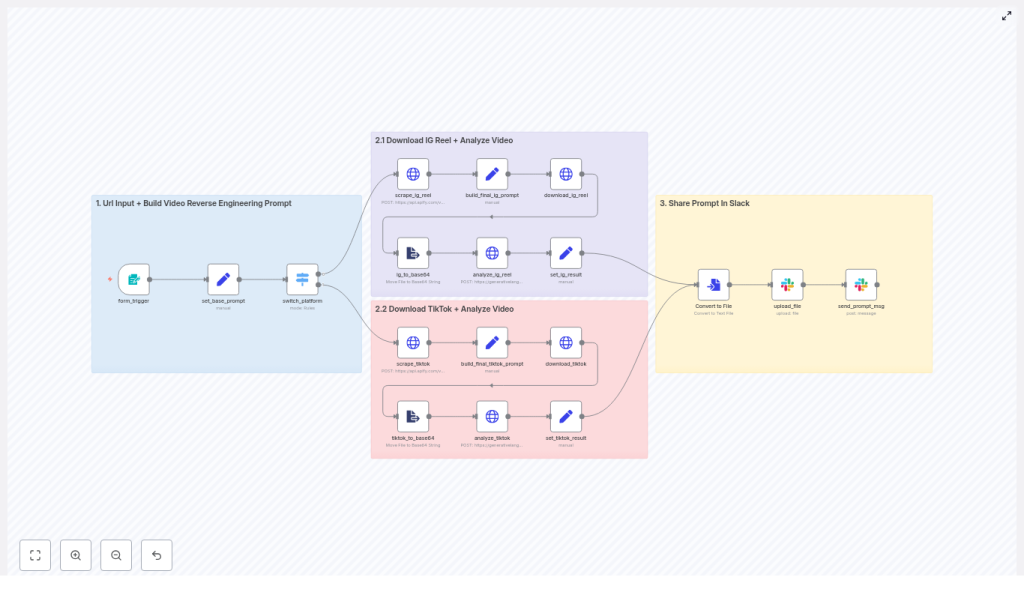
High-level overview of the workflow
Here is what the n8n workflow template does from start to finish:
- Collects a user-submitted Instagram Reel or TikTok URL from a form
- Detects which platform the URL belongs to and routes it to the correct scraper
- Uses Apify acts to extract the video asset and metadata
- Downloads the MP4 file and converts it to a Base64-encoded string
- Sends the encoded video plus a structured reverse engineering prompt to Google Gemini
- Receives a detailed “Generative Manifest” from Gemini
- Converts the manifest text into a file and posts it to Slack for review and reuse
Tools and services used in the template
- n8n – visual automation platform that orchestrates triggers, conditions, and HTTP requests
- Apify acts – scrapers for Instagram Reels and TikTok that return video URLs and metadata
- Google Gemini – generative language model used to analyze the video and output the Generative Manifest
- Slack – messaging platform used to deliver the resulting prompt file to your team
Prerequisites before you start
To run this workflow template successfully, you will need:
- An n8n instance, either self-hosted or n8n cloud
- An Apify API key with access to Instagram and TikTok scraping acts
- A Google Cloud API key with access to Gemini, or equivalent generative model credentials
- Slack OAuth app credentials with permission to post messages and upload files
How the n8n workflow is structured
The workflow is organized into three main stages:
- Input and platform routing
- Platform-specific processing (Instagram branch and TikTok branch)
- Delivery of the Generative Manifest to Slack
Let us walk through each stage step by step.
Stage 1 – Input and routing
Nodes involved: form_trigger → set_base_prompt → switch_platform
1. Form input
The form_trigger node is where the workflow begins. It exposes a simple form with one required field:
- A single URL input where the user pastes either an Instagram Reel link or a TikTok link
Once the user submits the form, the URL is passed into the rest of the workflow.
2. Base analysis prompt
The set_base_prompt node prepares the core instructions that will be sent to Google Gemini later. It:
- Defines a detailed “Digital Twin Architect” persona that acts as a forensic analyst
- Instructs the model to be precise, non-interpretive, and deterministic
- Sets the structure for the Generative Manifest, such as sections for shots, camera, lighting, and physics
This base prompt is later combined with platform-specific metadata to give Gemini more context.
3. Platform detection and routing
The switch_platform node inspects the submitted URL and decides which branch of the workflow to run. It typically uses simple checks like:
- If the URL contains
instagram.comthen route to the Instagram Reel branch - If the URL contains
tiktok.comthen route to the TikTok branch
From here, only the relevant branch is executed for that URL.
Stage 2 – Platform-specific branches
The workflow has two parallel branches, one for Instagram Reels and one for TikTok. Both follow the same logical pattern:
- Scrape metadata and video URL
- Build a final prompt that includes metadata
- Download the MP4 video
- Convert the video to base64
- Send the video and prompt to Gemini
- Extract and store the AI result
2.1 Instagram Reel branch
Nodes involved: scrape_ig_reel → build_final_ig_prompt → download_ig_reel → ig_to_base64 → analyze_ig_reel → set_ig_result
Step 1 – Scrape the Instagram Reel
The scrape_ig_reel node calls an Apify act dedicated to Instagram. This node:
- Uses the Reel URL to fetch post-level data
- Retrieves the direct
videoUrlfor the MP4 file - Collects metadata such as caption, hashtags, and possibly a title
Step 2 – Build the final prompt for Instagram
The build_final_ig_prompt node merges two sources of information:
- The generic base prompt from
set_base_prompt - Instagram-specific metadata returned by the scraper (caption, tags, etc.)
The result is a tailored prompt that gives Gemini both the forensic instructions and context about the content, which helps it interpret timing and on-screen text more accurately.
Step 3 – Download the Reel video
The download_ig_reel node uses the scraped videoUrl to download the Reel as an MP4 file. The binary data is stored in n8n so it can be transformed in the next step.
Step 4 – Convert MP4 to base64
The ig_to_base64 node converts the MP4 binary into a Base64-encoded string and stores it in a JSON property. This step is important because:
- Google Gemini expects inline media data in base64 format
- The workflow needs to pass the video payload directly inside the API request
Step 5 – Analyze the Reel with Google Gemini
The analyze_ig_reel node sends a request to the Gemini API that includes:
- The full text prompt created in
build_final_ig_prompt - The base64-encoded video data with the correct MIME type, such as
video/mp4
Gemini responds with a detailed Generative Manifest that describes the video shot by shot, including camera behavior, timing, and other requested details.
Step 6 – Store the Instagram analysis result
The set_ig_result node parses Gemini’s response and extracts the main textual result. Typically this is the model’s first candidate output. It then stores this text in a property named result, which will be used later when sending content to Slack.
2.2 TikTok branch
Nodes involved: scrape_tiktok → build_final_tiktok_prompt → download_tiktok → tiktok_to_base64 → analyze_tiktok → set_tiktok_result
The TikTok branch mirrors the Instagram branch, but uses TikTok-specific scrapers and field names.
Step 1 – Scrape the TikTok video
The scrape_tiktok node calls an Apify act designed for TikTok. It:
- Uses the TikTok URL to fetch video metadata
- Returns a direct video URL for the MP4 file
- Provides TikTok-specific fields like description, tags, or sound information (depending on the act configuration)
Step 2 – Build the final TikTok prompt
The build_final_tiktok_prompt node combines:
- The shared base prompt from
set_base_prompt - TikTok metadata from the scraper’s response
This gives Gemini a similar level of context as in the Instagram branch, but tailored to TikTok’s structure and content style.
Step 3 – Download the TikTok video
The download_tiktok node retrieves the MP4 file from the scraped video URL and stores the binary data in n8n.
Step 4 – Convert MP4 to base64
The tiktok_to_base64 node encodes the binary video data into a base64 string inside a JSON field, preparing it for the Gemini API request.
Step 5 – Analyze the TikTok video with Gemini
The analyze_tiktok node sends the TikTok-specific prompt and base64 video payload to Google Gemini, again specifying video/mp4 as the MIME type. Gemini returns a TikTok-focused Generative Manifest.
Step 6 – Store the TikTok analysis result
The set_tiktok_result node extracts the main text candidate from the Gemini response and stores it in a result property, aligning with the Instagram branch so that the downstream Slack delivery can handle either platform uniformly.
Stage 3 – Delivering the Generative Manifest to Slack
Nodes involved: Convert to File → upload_file → send_prompt_msg
1. Convert text result to a file
Once either branch has produced a result property, the Convert to File node turns this text into a downloadable file. For example, it might create a file named prompt.md or manifest.txt. This makes it easier for collaborators to store, edit, or import the prompt into other tools.
2. Upload the file to Slack
The upload_file node uses the Slack file upload API to send the generated prompt file to a chosen Slack channel. This requires that your Slack app has the correct OAuth scopes, such as files:write, and permission to post in that channel.
3. Post a message with a link to the manifest
The send_prompt_msg node posts a short Slack message that:
- Mentions that a new Generative Manifest is available
- Includes a link or reference to the uploaded file
This way, teammates can quickly open the file, review the analysis, and copy the prompt into their generative video tools.
Designing an effective Generative Manifest prompt
The quality of the Generative Manifest that Gemini returns is heavily influenced by how you design the base prompt in set_base_prompt. In this template, the persona “Digital Twin Architect” is used to enforce a forensic, deterministic style and avoid vague or interpretive descriptions.
Key sections you should include in your prompt design:
- Global aesthetic and camera emulation
Describe the overall look and feel of the video, such as:- Camera sensor or film stock being emulated
- White balance and color temperature
- Grain level, contrast, and saturation
- Per-shot breakdowns
Ask for a shot-by-shot analysis that includes:- Exact time offsets and durations
- Framing and composition details
- Camera movement curves and speed
- Focus pulls and depth of field changes
- On-screen micro-actions tied to precise timestamps
- Lighting blueprint and environment
Request a detailed lighting plan that covers:- Light temperature and color
- Key light size, distance, and angle
- Practical light sources in the scene
- Atmospherics like dust or particles and how they catch light
- Physics and simulation constraints
For generative video tools that support physics, include:- Cloth behavior and how it reacts to motion or wind
- Fluid dynamics, splashes, or smoke movement
- Particle density and distribution
- How these elements interact with light and objects
Tips to improve analysis accuracy
To get more reliable and detailed Generative Manifests, consider these best practices:
- Use high quality source videos
Provide the highest bitrate version you can. Overly compressed MP4s make it harder for Gemini to detect subtle motion, grain, and fine texture. - Include rich metadata in the prompt
Feed extra context like the uploader handle, caption text, visible titles, and on-screen overlays into the prompt. This helps the model align visual events with meaning and timing. - Adjust model settings for precision
If your Gemini configuration allows it, lower the temperature and limit candidate diversity to favor precise, rule-based outputs instead of creative variations. - Split long videos into segments
For longer content, cut the video into shot segments before analysis. Running the workflow on shorter segments often yields more granular, accurate manifests.
Security, privacy, and legal considerations
Before you automate video analysis, keep these points in mind:
- Ensure you have legal rights to download and analyze

