


SendGrid Bounce Alert Workflow With n8n & Weaviate: A Story From Panic To Control
On a Tuesday morning that started like any other, Maya, a lifecycle marketer at a fast-growing SaaS startup, opened her inbox and froze. Overnight, unsubscribe rates had ticked up, open rates had dropped, and a warning banner from her ESP hinted at a problem she had always feared but never really prepared for: deliverability issues.
Her campaigns were still sending, but more and more messages were bouncing. Some addresses were invalid, some domains were complaining, and others were silently dropping messages. The worst part was that she had no clear way to see what was happening in real time, let alone understand why.
She knew one thing for sure: if she did not get a handle on SendGrid bounces quickly, her sender reputation and domain health could spiral out of control.
The Problem: Invisible Bounces, Invisible Risk
For months, Maya had treated bounces as an occasional annoyance. They lived in CSV exports, sporadic dashboards, and vague “bounce rate” charts. But now the consequences were real:
- Invalid addresses and full inboxes were cluttering her lists.
- Spam complaints and blocked messages were quietly damaging her IP reputation.
- Domain issues were going unnoticed until too late.
Her team had no automated way to monitor SendGrid bounce events. Everything was manual. Someone would pull a report, skim it, maybe add a note in a spreadsheet, then move on to the next fire. There was no consistent logging, no context-aware analysis, and no reliable alerts.
She needed something different: a near real-time SendGrid bounce alert pipeline that did more than just collect data. It had to understand it.
The Discovery: An n8n Workflow Template Built For Bounces
While searching for “SendGrid bounce automation” and “n8n deliverability monitoring,” Maya stumbled on a template that sounded almost too good to be true: a SendGrid bounce alert workflow using n8n, Weaviate, embeddings, and a RAG agent.
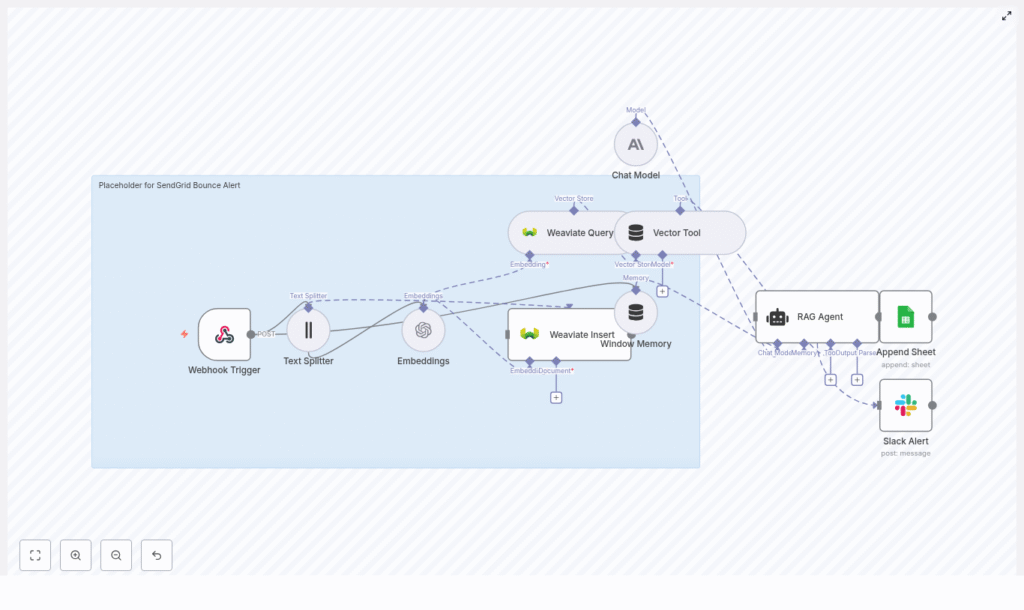
The promise was simple but powerful. Instead of just logging bounces, this workflow would:
- Ingest SendGrid Event Webhook data directly into n8n.
- Break verbose diagnostic messages into chunks for embeddings.
- Use OpenAI embeddings to create vector representations of bounce context.
- Store everything in Weaviate for semantic search and retrieval.
- Let a RAG (Retrieval-Augmented Generation) agent reason over that data.
- Append structured results into Google Sheets.
- Send Slack alerts if anything went wrong.
Instead of just knowing that a bounce happened, Maya could know why, see similar historical events, and get a recommended next action. It sounded like the workflow she wished she had built months ago.
So she decided to try it.
Setting The Stage: What Maya Needed Before She Started
Before she could turn this into a working SendGrid bounce alert system, Maya gathered the prerequisites:
- An n8n instance, which her team already used for some internal automations.
- A SendGrid account with the Event Webhook feature enabled.
- An OpenAI API key for embeddings (or any equivalent embedding provider).
- A running Weaviate instance to store vector data.
- Access to Anthropic or another chat LLM to power the RAG agent.
- A Google Sheets account for logging results.
- A Slack workspace with a channel ready for alerts.
With the basics in place, she opened n8n and imported the template. That is when the real journey started.
Rising Action: Building The Bounce Intelligence Pipeline
1. Catching The First Signal: Webhook Trigger
Maya began at the entry point of the workflow: the Webhook Trigger node.
She configured SendGrid’s Event Webhook to send bounce events to a specific n8n URL, something like:
/sendgrid-bounce-alert
This webhook would receive events like:
{  "email": "user@example.com",  "event": "bounce",  "timestamp": 1690000000,  "reason": "550 5.1.1 <user@example.com>: Recipient address rejected: User unknown",  "sg_message_id": "sendgrid_internal_id"
}
To avoid turning her endpoint into a public door for junk traffic, she followed best practices and secured it with IP allowlisting and a shared secret. Only authenticated SendGrid payloads would make it into the pipeline.
2. Making The Text Digestible: Text Splitter
She quickly realized that SendGrid’s diagnostic messages could be long and messy. To make them suitable for embeddings, the workflow used a Text Splitter node.
This node would break the combined diagnostic text into manageable chunks:
chunkSize: 400chunkOverlap: 40
The idea was straightforward. Instead of embedding one giant blob of text, each chunk would capture a focused piece of context. That would produce more meaningful vectors later on.
3. Turning Text Into Vectors: Embeddings
Next came the Embeddings node. Maya configured it to use OpenAI’s text-embedding-3-small model, which struck a good balance between cost and semantic quality for her volume.
Each chunk from the Text Splitter was converted into a vector representation. She kept batch sizes conservative to stay within rate limits and avoid surprises on her OpenAI bill.
These vectors were not just numbers. They were the foundation of semantic search over her bounce history.
4. Giving Memory To The System: Weaviate Insert
With embeddings ready, the workflow moved to Weaviate Insert. Here, the vectors were stored in a Weaviate collection named:
sendgrid_bounce_alert
Alongside each vector, the workflow saved structured metadata, including:
messageIdtimestampeventType(bounce, delivered, dropped)recipientdiagnosticMessage- the original payload
By designing a consistent schema, Maya ensured she could run both semantic and filtered queries later. She could ask Weaviate for “bounces similar to this one” or “all bounces for this recipient in the last 24 hours.”
5. Retrieving Context On Demand: Weaviate Query As Vector Tool
Storing vectors was only half the story. The real power came when the workflow needed to look back at history.
The template included a Weaviate Query node, wrapped as a Vector Tool. This turned Weaviate into a tool the RAG agent could call whenever it needed context. For example, when a new bounce arrived, the agent could fetch:
- Previous similar bounces.
- Historical diagnostics for the same domain.
- Patterns related to a specific ISP or error code.
Instead of making decisions in a vacuum, the agent could reason with real, historical data.
6. Keeping Short-Term Context: Window Memory
To tie everything together, the workflow used a Window Memory node. This provided a short history of recent interactions and agent outputs.
For Maya, this meant the RAG agent could remember what it had just seen or recommended. If multiple related events came in close together, the agent could correlate them and craft a better summary or next step.
7. The Brain Of The Operation: RAG Agent
At the center of the workflow was the RAG Agent, powered by a chat LLM such as Anthropic.
She configured its system prompt along the lines of:
You are an assistant for SendGrid Bounce Alert.
The agent had access to:
- The Vector Tool for Weaviate queries.
- Window Memory for recent context.
Given a new bounce event, the agent would:
- Pull in relevant context from Weaviate.
- Analyze the error and historical patterns.
- Produce a human-readable status.
- Recommend an action, such as:
- Suppress the address.
- Retry sending later.
- Check DNS or domain configuration.
- Generate a concise summary suitable for logging.
Maya was careful with prompt design and safety. She limited the agent to recommendations, not destructive actions. No automatic suppression or deletion would happen without explicit business rules layered on top.
8. Writing The Story Down: Append To Google Sheet
Once the RAG agent produced its output, the workflow passed everything to an Append Sheet node for Google Sheets.
Each row in the “Log” sheet contained:
- Timestamp of the bounce.
- Recipient and event type.
- Diagnostic message.
- Agent status and recommended action.
- Any extra notes or context.
For the first time, Maya had a durable, searchable log of bounce events that was more than just raw errors. It was enriched with analysis.
9. When Things Go Wrong: Slack Alert On Error
Of course, no system is perfect. API outages, malformed payloads, or misconfigurations could still happen.
To avoid silent failures, the workflow used a Slack Alert node connected via On Error paths. If the RAG agent or any critical node failed, a message would land in her #alerts channel with details.
Instead of discovering issues days later, her team would know within minutes.
The Turning Point: Testing The Pipeline Under Fire
With everything wired up, Maya needed to prove that the workflow worked in practice.
Simulating Real Bounces
She used curl and Postman to send sample SendGrid webhook payloads to the n8n webhook URL. Each payload mimicked a realistic bounce, using structures like:
{  "email": "user@example.com",  "event": "bounce",  "timestamp": 1690000000,  "reason": "550 5.1.1 <user@example.com>: Recipient address rejected: User unknown",  "sg_message_id": "sendgrid_internal_id"
}
The workflow extracted the fields it needed, combined the human-readable reason with surrounding context, and passed that text to the Text Splitter. From there, the embeddings and Weaviate steps kicked in automatically.
Verifying Each Layer
- She checked Weaviate to confirm that embeddings were created and indexed correctly in the
sendgrid_bounce_alertcollection. - She triggered a manual RAG agent prompt like:
"Summarize the bounce and recommend next action." - She opened the Google Sheet and saw new rows appearing, each with a clear summary and recommendation.
- She forced an error by temporarily breaking an API key, then watched as a Slack alert appeared in
#alerts.
For the first time, she could see the entire lifecycle of a bounce event, from webhook to vector search to intelligent summary, all in one automated pipeline.
Design Choices That Saved Future Headaches
Securing Webhooks From Day One
Maya knew that an exposed webhook could be a liability. So she implemented:
- HMAC verification or shared secrets to validate payloads.
- IP filtering to only accept requests from SendGrid.
She treated the webhook as a production endpoint, not a quick hack.
Embedding Strategy That Balanced Cost And Quality
To keep costs predictable, she chose text-embedding-3-small and stuck to the chunking strategy:
- Chunk sizes that stayed within token limits.
- Overlaps that preserved context between chunks.
She also batched embedding requests where possible to minimize API calls.
Weaviate Schema That Enabled Hybrid Search
By storing both vectors and metadata, she could run hybrid queries. For example:
- “All bounces for this recipient in the last 7 days.”
- “Similar errors to this diagnostic message, but only for a specific ISP.”
Fields like messageId, recipient, eventType, timestamp, and diagnosticMessage made analytics and debugging much easier.
Safe Agent Behavior And Auditability
For the RAG agent, she:
- Crafted a clear system prompt with a narrow scope.
- Limited it to non-destructive recommendations by default.
- Logged agent decisions in Google Sheets for future audits.
If the business later decided to auto-suppress certain addresses, they could layer business rules and confidence thresholds on top of the agent’s outputs, not hand it full control from day one.
Monitoring And Retries
To keep things stable over time, she added:
- Retry logic for transient network or timeout errors.
- Slack alerts for persistent issues.
- The option to log errors in a separate sheet or monitoring dashboard.
This meant the workflow would be resilient even as APIs or traffic patterns changed.
Beyond The First Win: Extensions And Future Ideas
Once the workflow was running smoothly, Maya started thinking about how far she could take it. The template opened the door to several extensions:
- Auto-suppress addresses based on agent confidence scores and explicit business rules.
- Daily bounce summaries emailed to the deliverability or marketing ops team.
- Enriching bounce data with ISP-level status from third-party APIs.
- Dashboards in Grafana or Looker by exporting the Google Sheet or piping logs into a dedicated datastore.
She also looked at performance and cost optimization:
- Batching embedding requests to reduce API calls.
- Choosing lower-cost embedding models for high-volume scenarios.
- Using TTL policies in Weaviate for ephemeral or low-value historical data.
- Tracking usage and adding throttling if needed.
The workflow had started as a crisis response. It was quickly becoming a core part of her deliverability strategy.
The Resolution: From Panic To Predictable Deliverability
Weeks later, Maya’s inbox looked different. Instead of vague warnings and surprise deliverability drops, she had:
- A production-ready SendGrid bounce alert system built on n8n.
- Near real-time visibility into bounce events.
- A semantic index in Weaviate that let her search and compare diagnostic messages.
- A RAG agent that summarized issues and suggested clear next steps.
- A Google Sheet log that made audits and reporting straightforward.
- Slack alerts that surfaced problems before they became crises.
The core message was simple: by combining n8n automation, vector search with Weaviate, LLM-powered
