


Streamline Sprint Reviews: A Story Of AI-Powered Summaries & Archives
The Sprint Review That Broke The Camel’s Back
By the end of another long Friday, Maya, a product manager at a fast-growing startup, stared at a 90-minute sprint review recording sitting in her inbox. The team had switched to recording all ceremonies and auto-generating transcripts so no one would miss details. In theory, it was great. In practice, it meant Maya now had a wall of text to comb through before she could share a clear update with stakeholders.
The leadership team wanted concise summaries. Engineers wanted a checklist of action items. Designers needed an easy way to revisit decisions from previous sprints. Maya had transcripts, but not time. She tried skimming, copying snippets into a document, and highlighting key moments. Every sprint review recap took hours.
As the backlog of “to be summarized” meetings grew, she knew this was not sustainable. She needed a way to turn raw sprint review transcripts into structured, searchable summaries without spending her evenings rewriting what had already been said in the meeting.
The Search For A Better Sprint Review Workflow
Maya’s team already used automation tools, and she had heard colleagues mention n8n as a flexible way to connect different apps and services. One evening, while searching for “automated sprint review summaries n8n,” she stumbled across an n8n workflow template for AI-powered sprint review summaries and archives.
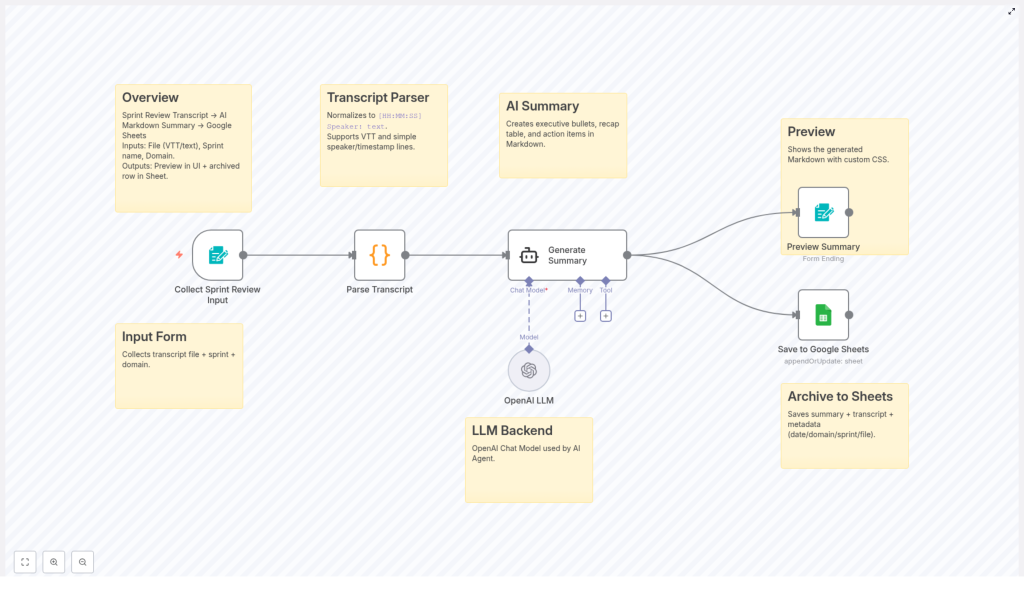
The promise sounded almost too good to be true: upload a sprint review transcript, let AI summarize it into a clean Markdown report, and automatically archive everything in Google Sheets for long-term tracking. No more manual formatting, no more hunting through random files to remember who said what three sprints ago.
Curious, Maya clicked through to view the template and started imagining how it might fit into her team’s Agile ceremonies.
What The Template Actually Does
Before adopting anything, Maya wanted to be sure she understood how the workflow worked. As she walked through the template, she realized it addressed every pain point she had been facing.
1. A Simple Way To Capture Input
First, the workflow introduces a user-friendly form. Instead of juggling multiple tools, Maya could use this form as the entry point for each sprint review:
- Upload the sprint review transcript file (VTT or plain text)
- Enter the sprint name
- Specify the domain or team (for example, “Mobile,” “Platform,” or “Growth”)
This meant every transcript would arrive with the right metadata attached, ready for tailored summarization and proper archiving. No more guessing which team a transcript belonged to weeks later.
2. Turning Messy Transcripts Into Clean Text
Maya knew how messy auto-generated transcripts could be. Different tools used different timestamp formats, speaker labels, and sometimes no labels at all. The template handled this with a transcript parsing stage.
The workflow normalizes incoming text into a predictable structure like:
[HH:MM:SS] Speaker: text
It supports both WebVTT and simpler timestamp or speaker line formats, which made it compatible with the variety of tools her team used. By the end of this step, the transcript was no longer a chaotic block of text. It was a standardized conversation, ready for AI to process.
3. Letting AI Do The Heavy Lifting
The heart of the template is AI-powered summarization using an OpenAI language model. Instead of Maya manually skimming and rewriting, the model transformed the normalized transcript into a structured Markdown summary.
The output included several key sections that mapped perfectly to what her stakeholders had been asking for:
- Concise opening summary that captured the essence of the sprint review in a few sentences
- Executive summary bullets with 3 to 5 clear highlights so leadership could scan in seconds
- Presentation recap table listing timestamps, presenters, and topics for quick reference
- Action items checklist with clearly defined tasks and owners whenever the transcript identified them
Instead of Maya trying to remember every detail, the AI turned the meeting into a digestible, structured story that anyone on the team could understand at a glance.
4. Seeing The Summary Before It Goes Live
Maya did not want a black-box system. She needed to review what the AI produced, especially the first few times. The template included a preview generation step that showed the Markdown summary in a custom-styled UI.
The preview used a monospace font and white-space: pre-wrap styling so line breaks, tables, and checklists were preserved. This made the content easy to scan and gave Maya confidence that the structure would remain intact when shared or archived.
If something looked off, she could adjust prompts or formatting in the workflow. Over time, she expected to trust the output enough to skip manual edits entirely.
5. Automatic Archival In Google Sheets
The final piece solved one of her biggest frustrations: scattered meeting notes. The workflow automatically appended or updated a row in a Google Sheets sprint archive with:
- The AI-generated summary
- The original transcript
- Date of the sprint review
- Domain or team
- Sprint name
- File name
Over time, this would become a searchable history of sprint reviews. Need to know when a decision was made? Filter by topic, sprint, or team. Need to audit commitments from past reviews? Browse the action item checklists. Everything lived in one familiar place instead of scattered across docs, emails, and chat threads.
The Turning Point: First Live Test In A Real Sprint
The next sprint review was the real test. Maya set up the n8n workflow template, connected her OpenAI credentials, and pointed the archival step to a new Google Sheets document named “Sprint Review Archive.”
After the meeting, she exported the transcript, opened the input form, and filled in three simple fields: sprint name, domain, and transcript file. She hit submit and watched the workflow run.
Within minutes, she had a neatly formatted Markdown summary ready to preview. The opening summary captured the core narrative of the sprint. The executive bullets highlighted exactly what leadership cared about: shipped features, blocked items, and risks. The presentation recap table listed each presenter and topic with timestamps, so anyone could jump straight to the relevant part of the recording. The action item checklist was already structured, with owners pulled from the transcript wherever possible.
She opened the Google Sheets archive and saw a new row waiting for her, complete with the summary, transcript, and all associated metadata. No copy-paste. No manual formatting. Just a clean record of the sprint review.
How The Workflow Changed Her Team’s Sprint Reviews
Within a few sprints, the impact was obvious.
- Time savings were dramatic. Maya no longer lost hours reading and rewriting transcripts. The AI summarization step slashed her manual effort down to a quick review and occasional tweak.
- Consistency improved. Every sprint review now had the same structure, format, and level of detail. New team members could easily read summaries from past sprints and understand the pattern.
- Accessibility increased. With everything stored in Google Sheets, the team had a searchable, shareable sprint history. Stakeholders could self-serve, filtering by sprint, team, or date.
- Communication became clearer. Leaders received executive-level bullets. Engineers got action item checklists. Designers could quickly revisit decisions. The sprint review stopped being a one-time meeting and became a durable artifact.
Most importantly, Maya reclaimed her Friday evenings. Instead of wrestling with transcripts, she could focus on planning, strategy, and supporting her team.
Adopting The Same Workflow For Your Agile Team
If Maya’s story feels familiar, you are not alone. Many Agile teams record sprint reviews but struggle to turn that raw material into something usable. The n8n AI-powered sprint review summary and archival template gives you a repeatable way to solve that problem.
To follow a similar path, you can:
- Gather your sprint review transcript files (VTT or text) and decide on the metadata you want to track, such as sprint name and domain or team.
- Use the template’s input form to capture transcripts plus metadata in a consistent way.
- Let the workflow parse and normalize transcripts into a standard format with timestamps and speaker labels.
- Leverage the OpenAI-powered summarization step to generate structured Markdown summaries, including opening summary, executive bullets, recap table, and action item checklist.
- Review the preview UI to confirm the summary looks right and refine prompts if needed.
- Archive everything automatically into Google Sheets to build a long-term, searchable sprint review history.
From Overwhelm To Clarity
What started as a frustrating backlog of unread transcripts turned into one of Maya’s most valuable Agile assets. With an automated workflow for sprint review summaries and archives, her team gained time, consistency, and transparency.
Your team can follow the same journey. Instead of treating sprint reviews as a one-time conversation that quickly fades, you can preserve them as clear, actionable summaries that support better planning and alignment.
Explore integrating AI with your Agile ceremonies and experience streamlined sprint reviews that work for everyone on your team, from engineers to executives.
Try The n8n Template Yourself
If you are ready to automate your sprint review summaries and build a reliable archive, you can start from the same workflow template that transformed Maya’s process.
